AstrBot provides built-in support for multiple Large Language Model (LLM) providers and offers a unified interface, making it convenient for plugin developers to access various LLM services.
You can use the LLM / Agent interfaces provided by AstrBot to implement your own intelligent agents.
Starting from version v4.5.7, we've made significant improvements to the way LLM providers are invoked. We recommend using the new approach, which is more concise and supports additional features. The legacy invocation method remains documented in the previous Chinese-only guide.
Tip
Added in v4.5.7
umo = event.unified_msg_origin
provider_id = await self.context.get_current_chat_provider_id(umo=umo)Tip
Added in v4.5.7
llm_resp = await self.context.llm_generate(
    chat_provider_id=provider_id, # Chat model ID
    prompt="Hello, world!",
)
# print(llm_resp.completion_text) # Get the returned textTools enable large language models to invoke external capabilities.
from pydantic import Field
from pydantic.dataclasses import dataclass

from astrbot.core.agent.run_context import ContextWrapper
from astrbot.core.agent.tool import FunctionTool, ToolExecResult
from astrbot.core.astr_agent_context import AstrAgentContext


@dataclass
class BilibiliTool(FunctionTool[AstrAgentContext]):
    name: str = "bilibili_videos"  # Tool name
    description: str = "A tool to fetch Bilibili videos."  # Tool description
    parameters: dict = Field(
        default_factory=lambda: {
            "type": "object",
            "properties": {
                "keywords": {
                    "type": "string",
                    "description": "Keywords to search for Bilibili videos.",
                },
            },
            "required": ["keywords"],
        }
    )

    async def call(
        self, context: ContextWrapper[AstrAgentContext], **kwargs
    ) -> ToolExecResult:
return "1. Video Title: How to Use AstrBot\nVideo Link: xxxxxx"Once a Tool is defined, if you want it to be automatically invoked during user conversations, register it in your plugin's __init__ method:
class MyPlugin(Star):
    def __init__(self, context: Context):
        super().__init__(context)
        # >= v4.5.1:
        self.context.add_llm_tools(BilibiliTool(), SecondTool(), ...)

        # < v4.5.1:
        tool_mgr = self.context.provider_manager.llm_tools
        tool_mgr.func_list.append(BilibiliTool())
Warning
context.register_llm_tool() is deprecated. Do not use it in new plugins.
If you must use it for legacy compatibility, func_args must be a list of dicts in this format:
func_args = [{"type": "string", "name": "arg_name", "description": "..."}, ...]Passing a list of strings or any other format will raise AttributeError: 'str' object has no attribute 'pop'.
Alternatively, you can use the @filter.llm_tool decorator to define and register a tool in one step. Make sure to follow the exact format below, including the docstring — AstrBot parses the docstring to generate the parameter schema:
@filter.llm_tool(name="get_weather")  # If name is omitted, the function name is used
async def get_weather(self, event: AstrMessageEvent, location: str) -> MessageEventResult:
    '''Get weather information.

    Args:
        location(string): The location to query
    '''
    resp = self.get_weather_from_api(location)
    yield event.plain_result("Weather: " + resp)
In location(string): The location to query, location is the parameter name, string is the type, and the remainder is the description.
Supported types: string, number, object, boolean, array. Since v4.5.7, array subtypes are supported, e.g. array[string].
Warning
The Args: block is required and must be formatted correctly.
The @filter.llm_tool decorator generates the parameter schema by parsing the function's docstring — it does not read Python type annotations. If the docstring is missing an Args: block, or the format does not follow param_name(type): description, the generated schema will be empty. Any arguments passed by the LLM will be silently dropped, causing the function to fail with a missing-argument error.
Additionally, passing parameters=... directly to the decorator is not supported and will be silently ignored. If you need manual control over the schema, use the @dataclass + add_llm_tools() approach above.
Tip
Added in v4.X.X
Just as @filter.command() can be restricted to admins with @filter.permission_type(filter.PermissionType.ADMIN), @filter.llm_tool() supports the same idea through a permission_type parameter, letting you declare a default permission for the tool:
from astrbot.api.event import filter, AstrMessageEvent

@filter.llm_tool(name="restart_server", permission_type=filter.PermissionType.ADMIN)
async def restart_server(self, event: AstrMessageEvent):
    '''Restart the server.'''
    # handler logic
permission_type accepts filter.PermissionType.ADMIN or filter.PermissionType.MEMBER. If omitted, the previous behavior is unchanged (the tool is available to everyone).
If you define a tool via @dataclass + FunctionTool (see Defining Tools above), you can declare a default permission the same way by adding a declared_permission_type field to the dataclass:
from pydantic import Field
from pydantic.dataclasses import dataclass

from astrbot.core.agent.run_context import ContextWrapper
from astrbot.core.agent.tool import FunctionTool, ToolExecResult
from astrbot.core.astr_agent_context import AstrAgentContext


@dataclass
class RestartServerTool(FunctionTool[AstrAgentContext]):
    name: str = "restart_server"
    description: str = "Restart the server."
    parameters: dict = Field(default_factory=lambda: {"type": "object", "properties": {}})
    declared_permission_type: str | None = "admin"  # "admin" / "member" / None

    async def call(self, context: ContextWrapper[AstrAgentContext], **kwargs) -> ToolExecResult:
        # handler logic
        return "ok"
Warning
permission_type/declared_permission_typeonly sets the tool's default permission. If the bot owner has explicitly configured a permission for this tool in the WebUI panel (Extensions -> Components -> Tool Management), that configuration overrides the default declared in the plugin's code.- The point of this mechanism is that plugin authors can ship a sane default safeguard for dangerous tools (e.g. restarting a service, running shell commands) without relying on the bot owner to ever open the WebUI panel.
Tip
Added in v4.5.7
An Agent can be defined as a combination of system_prompt + tools + llm, enabling more sophisticated intelligent behavior.
After defining the Tool above, you can invoke an Agent as follows:
llm_resp = await self.context.tool_loop_agent(
    event=event,
    chat_provider_id=prov_id,
    prompt="Search for videos related to AstrBot on Bilibili.",
    tools=ToolSet([BilibiliTool()]),
    max_steps=30, # Maximum agent execution steps
    tool_call_timeout=120, # Tool invocation timeout
)
# print(llm_resp.completion_text) # Get the returned text
tool_loop_agent() method automatically handles the loop of tool invocations and LLM requests until the model stops calling tools or the maximum number of steps is reached.
Tip
Added in v4.5.7
Multi-Agent systems decompose complex applications into multiple specialized agents that collaborate to solve problems. Unlike relying on a single agent to handle every step, multi-agent architectures allow smaller, more focused agents to be composed into coordinated workflows. We implement multi-agent systems using the agent-as-tool pattern.
In the example below, we define a Main Agent responsible for delegating tasks to different Sub-Agents based on user queries. Each Sub-Agent focuses on specific tasks, such as retrieving weather information.
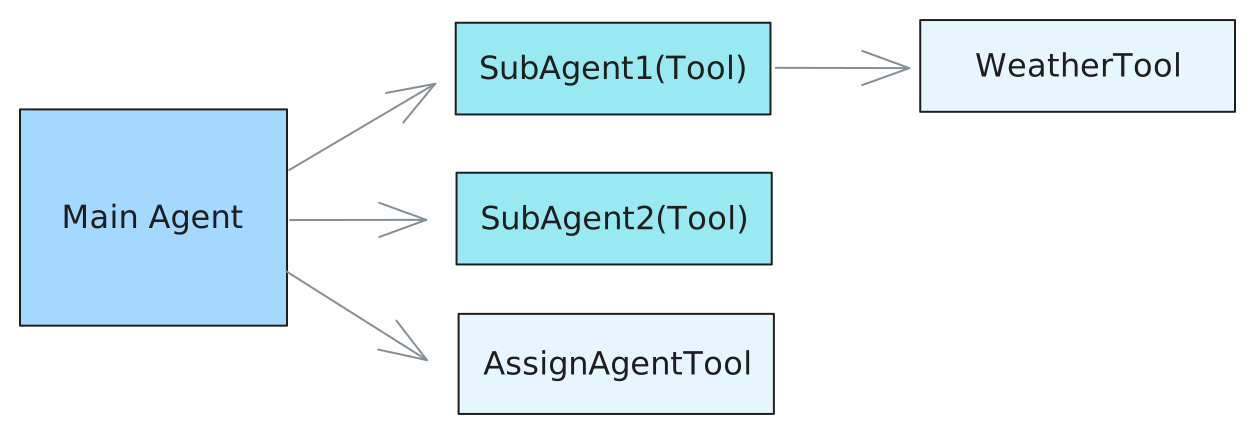
Define Tools:
from astrbot.api import logger
from astrbot.core.agent.run_context import ContextWrapper
from astrbot.core.agent.tool import FunctionTool, ToolExecResult, ToolSet
from astrbot.core.astr_agent_context import AstrAgentContext
from pydantic import Field
from pydantic.dataclasses import dataclass


@dataclass
class AssignAgentTool(FunctionTool[AstrAgentContext]):
    """Main agent uses this tool to decide which sub-agent to delegate a task to."""

    name: str = "assign_agent"
    description: str = "Assign an agent to a task based on the given query"
    parameters: dict = Field(
        default_factory=lambda: {
            "type": "object",
            "properties": {
                "query": {
                    "type": "string",
                    "description": "The query to call the sub-agent with.",
                },
            },
            "required": ["query"],
        }
    )

    async def call(
        self, context: ContextWrapper[AstrAgentContext], **kwargs
    ) -> ToolExecResult:
        # Here you would implement the actual agent assignment logic.
        # For demonstration purposes, we'll return a dummy response.
        return "Based on the query, you should assign agent 1."


@dataclass
class WeatherTool(FunctionTool[AstrAgentContext]):
    """In this example, sub agent 1 uses this tool to get weather information."""

    name: str = "weather"
    description: str = "Get weather information for a location"
    parameters: dict = Field(
        default_factory=lambda: {
            "type": "object",
            "properties": {
                "city": {
                    "type": "string",
                    "description": "The city to get weather information for.",
                },
            },
            "required": ["city"],
        }
    )

    async def call(
        self, context: ContextWrapper[AstrAgentContext], **kwargs
    ) -> ToolExecResult:
        city = kwargs["city"]
        # Here you would implement the actual weather fetching logic.
        # For demonstration purposes, we'll return a dummy response.
        return f"The current weather in {city} is sunny with a temperature of 25°C."


@dataclass
class SubAgent1(FunctionTool[AstrAgentContext]):
    """Define a sub-agent as a function tool."""

    name: str = "subagent1_name"
    description: str = "subagent1_description"
    parameters: dict = Field(
        default_factory=lambda: {
            "type": "object",
            "properties": {
                "query": {
                    "type": "string",
                    "description": "The query to call the sub-agent with.",
                },
            },
            "required": ["query"],
        }
    )

    async def call(
        self, context: ContextWrapper[AstrAgentContext], **kwargs
    ) -> ToolExecResult:
        ctx = context.context.context
        event = context.context.event
        logger.info(f"the llm context messages: {context.messages}")
        llm_resp = await ctx.tool_loop_agent(
            event=event,
            chat_provider_id=await ctx.get_current_chat_provider_id(
                event.unified_msg_origin
            ),
            prompt=kwargs["query"],
            tools=ToolSet([WeatherTool()]),
            max_steps=30,
        )
        return llm_resp.completion_text


@dataclass
class SubAgent2(FunctionTool[AstrAgentContext]):
    """Define a sub-agent as a function tool."""

    name: str = "subagent2_name"
    description: str = "subagent2_description"
    parameters: dict = Field(
        default_factory=lambda: {
            "type": "object",
            "properties": {
                "query": {
                    "type": "string",
                    "description": "The query to call the sub-agent with.",
                },
            },
            "required": ["query"],
        }
    )

    async def call(
        self, context: ContextWrapper[AstrAgentContext], **kwargs
    ) -> ToolExecResult:
        return "I am useless :(, you shouldn't call me :("
Then, similarly, invoke the Agent using the tool_loop_agent() method:
@filter.command("test")
async def test(self, event: AstrMessageEvent):
    umo = event.unified_msg_origin
    prov_id = await self.context.get_current_chat_provider_id(umo)
    llm_resp = await self.context.tool_loop_agent(
        event=event,
        chat_provider_id=prov_id,
        prompt="Test calling sub-agent for Beijing's weather information.",
        system_prompt=(
            "You are the main agent. Your task is to delegate tasks to sub-agents based on user queries."
            "Before delegating, use the 'assign_agent' tool to determine which sub-agent is best suited for the task."
        ),
        tools=ToolSet([SubAgent1(), SubAgent2(), AssignAgentTool()]),
        max_steps=30,
    )
yield event.plain_result(llm_resp.completion_text)from astrbot.core.conversation_mgr import Conversation
uid = event.unified_msg_origin
conv_mgr = self.context.conversation_manager
curr_cid = await conv_mgr.get_curr_conversation_id(uid)
conversation = await conv_mgr.get_conversation(uid, curr_cid) # Conversation::: details Conversation Type Definition
@dataclass
class Conversation:
    """The conversation entity representing a chat session."""

    platform_id: str
    """The platform ID in AstrBot"""
    user_id: str
    """The user ID associated with the conversation."""
    cid: str
    """The conversation ID, in UUID format."""
    history: str = ""
    """The conversation history as a string."""
    title: str | None = ""
    """The title of the conversation. For now, it's only used in WebChat."""
    persona_id: str | None = ""
    """The persona ID associated with the conversation."""
    created_at: int = 0
    """The timestamp when the conversation was created."""
    updated_at: int = 0
    """The timestamp when the conversation was last updated."""
:::
from astrbot.core.agent.message import (
    AssistantMessageSegment,
    UserMessageSegment,
    TextPart,
)

conv_mgr = self.context.conversation_manager
provider_id = await self.context.get_current_chat_provider_id(event.unified_msg_origin)
curr_cid = await conv_mgr.get_curr_conversation_id(event.unified_msg_origin)
user_msg = UserMessageSegment(content=[TextPart(text="hi")])
llm_resp = await self.context.llm_generate(
    chat_provider_id=provider_id,  # Chat model ID
    contexts=[user_msg],  # When prompt is not specified, contexts is used as input; if both prompt and contexts are provided, prompt is appended to the end of the LLM input
)
await conv_mgr.add_message_pair(
    cid=curr_cid,
    user_message=user_msg,
    assistant_message=AssistantMessageSegment(
        content=[TextPart(text=llm_resp.completion_text)]
    ),
)- Usage
Create a new conversation in the current session and automatically switch to it. - Arguments
unified_msg_origin: str– In the formatplatform_name:message_type:session_idplatform_id: str | None– Platform identifier, defaults to parsing fromunified_msg_origincontent: list[dict] | None– Initial message historytitle: str | None– Conversation titlepersona_id: str | None– Associated persona ID
- Returns
str– Newly generated UUID conversation ID
- Usage
Switch the session to a specified conversation. - Arguments
unified_msg_origin: strconversation_id: str
- Returns
None
- Usage
Delete a conversation from the session; ifconversation_idisNone, deletes the current conversation. - Arguments
unified_msg_origin: strconversation_id: str | None
- Returns
None
- Usage
Get the conversation ID currently in use by the session. - Arguments
unified_msg_origin: str
- Returns
str | None– Current conversation ID, returnsNoneif it doesn't exist
- Usage
Get the complete object for a specified conversation; automatically creates it if it doesn't exist andcreate_if_not_exists=True. - Arguments
unified_msg_origin: strconversation_id: strcreate_if_not_exists: bool = False
- Returns
Conversation | None
- Usage
Retrieve the complete list of conversations for a user or platform. - Arguments
unified_msg_origin: str | None– WhenNone, does not filter by userplatform_id: str | None
- Returns
List[Conversation]
- Usage
Update the title, history, or persona_id of a conversation. - Arguments
unified_msg_origin: strconversation_id: str | None– Uses the current conversation whenNonehistory: list[dict] | Nonetitle: str | Nonepersona_id: str | None
- Returns
None
PersonaManager is responsible for unified loading, caching, and providing CRUD interfaces for all Personas, while maintaining compatibility with the legacy persona format (v3) from before AstrBot 4.x.
During initialization, it automatically reads all personas from the database and generates v3-compatible data for seamless use with legacy code.
persona_mgr = self.context.persona_manager- Usage Get persona data by persona ID.
- Arguments
persona_id: str– Persona ID
- Returns
Persona– Persona data, returns None if it doesn't exist - Raises
ValueError– Raised when it doesn't exist
- Usage
Retrieve all personas from the database at once. - Returns
list[Persona]– Persona list, may be empty
- Usage
Create a new persona and immediately write it to the database; automatically refreshes the local cache upon success. - Arguments
persona_id: str– New persona ID (unique)system_prompt: str– System promptbegin_dialogs: list[str]– Optional, opening dialogs (even number of entries, alternating user/assistant)tools: list[str]– Optional, list of allowed tools;None=all tools,[]=disable all
- Returns
Persona– Newly created persona object - Raises
ValueError– Ifpersona_idalready exists
- Usage
Update any fields of an existing persona and synchronize to database and cache. - Arguments
persona_id: str– Persona ID to updatesystem_prompt: str– Optional, new system promptbegin_dialogs: list[str]– Optional, new opening dialogstools: list[str]– Optional, new tool list; semantics same ascreate_persona
- Returns
Persona– Updated persona object - Raises
ValueError– Ifpersona_iddoesn't exist
- Usage
Delete the specified persona and clean up both database and cache. - Arguments
persona_id: str– Persona ID to delete
- Raises
ValueError– Ifpersona_iddoesn't exist
- Usage
Get the default persona (v3 format) to use based on the current session configuration.
Falls back toDEFAULT_PERSONALITYif configuration doesn't specify one or the specified persona doesn't exist. - Arguments
umo: str | MessageSession | None– Session identifier, used to read user-level configuration
- Returns
Personality– Default persona object in v3 format
::: details Persona / Personality Type Definition
class Persona(SQLModel, table=True):
    """Persona is a set of instructions for LLMs to follow.

    It can be used to customize the behavior of LLMs.
    """

    __tablename__ = "personas"

    id: int = Field(primary_key=True, sa_column_kwargs={"autoincrement": True})
    persona_id: str = Field(max_length=255, nullable=False)
    system_prompt: str = Field(sa_type=Text, nullable=False)
    begin_dialogs: Optional[list] = Field(default=None, sa_type=JSON)
    """a list of strings, each representing a dialog to start with"""
    tools: Optional[list] = Field(default=None, sa_type=JSON)
    """None means use ALL tools for default, empty list means no tools, otherwise a list of tool names."""
    created_at: datetime = Field(default_factory=lambda: datetime.now(timezone.utc))
    updated_at: datetime = Field(
        default_factory=lambda: datetime.now(timezone.utc),
        sa_column_kwargs={"onupdate": datetime.now(timezone.utc)},
    )

    __table_args__ = (
        UniqueConstraint(
            "persona_id",
            name="uix_persona_id",
        ),
    )


class Personality(TypedDict):
    """LLM Persona class.

    Starting from v4.0.0 and later, it's recommended to use the Persona class above. Additionally, the mood_imitation_dialogs field has been deprecated.
    """

    prompt: str
    name: str
    begin_dialogs: list[str]
    mood_imitation_dialogs: list[str]
    """Mood imitation dialog preset. Deprecated since v4.0.0 and later."""
    tools: list[str] | None
    """Tool list. None means use all tools, empty list means don't use any tools"""
:::