How to set TextBox ErrorTemplate? #8282

Replies: 7 comments 18 replies

-
|
OK found DataValidationErrors source template here It has a nice example of it built-in showing up in the previewer! So all I need is to add this to <Style Selector="DataValidationErrors">
<Setter Property="Template" Value="{DynamicResource TooltipDataValidationContentTemplate}" />
<Setter Property="ErrorTemplate" Value="{DynamicResource TooltipDataValidationErrorTemplate}" />
</Style>Now... can I add DataValidationErrors to a ListBox to warn when the list is empty? |
Beta Was this translation helpful? Give feedback.

-
Probably. You need to add this control to the template. And set error to it when you need. You can use ComboBox as a reference, somewhat similar control. |
Beta Was this translation helpful? Give feedback.
-
|
My first thought is adding DataValidationErrors to the template indeed. But it's not showing the error that the list is empty. For a situation where validation errors can't be displayed well in a control, like multi-control validations, is there another method of displaying validation errors? <Style Selector="ListBox">
<Setter Property="Template">
<ControlTemplate>
<DataValidationErrors>
<Border Name="border"
ClipToBounds="{TemplateBinding ClipToBounds}"
Background="{TemplateBinding Background}"
BorderBrush="{TemplateBinding BorderBrush}"
BorderThickness="{TemplateBinding BorderThickness}"
CornerRadius="{TemplateBinding CornerRadius}">
<ScrollViewer Name="PART_ScrollViewer"
HorizontalScrollBarVisibility="{TemplateBinding (ScrollViewer.HorizontalScrollBarVisibility)}"
VerticalScrollBarVisibility="{TemplateBinding (ScrollViewer.VerticalScrollBarVisibility)}"
AllowAutoHide="{TemplateBinding (ScrollViewer.AllowAutoHide)}">
<ItemsPresenter Name="PART_ItemsPresenter"
Items="{TemplateBinding Items}"
ItemsPanel="{TemplateBinding ItemsPanel}"
ItemTemplate="{TemplateBinding ItemTemplate}"
Margin="{TemplateBinding Padding}"
VirtualizationMode="{TemplateBinding VirtualizationMode}" />
</ScrollViewer>
</Border>
</DataValidationErrors>
</ControlTemplate>
</Setter>
</Style> |
Beta Was this translation helpful? Give feedback.

-
|
oh I would need to create a derived class to make work? I'd rather avoid going that route for something so trivial... |
Beta Was this translation helpful? Give feedback.
-
|
|
Beta Was this translation helpful? Give feedback.
-
|
From what I remember, |
Beta Was this translation helpful? Give feedback.
-
|
Also, you can use bindings from XAML. See from the TextBox template: <TextBox Text="Sample">
<DataValidationErrors.Error>
<sys:Exception />
</DataValidationErrors.Error>
</TextBox>you can do similarly for your control with DataValidationErrors inside of the template: <ListBox DataValidationErrors.Error="{Binding ValidationResult}" />or even this should work without modifying any templates: <DataValidationErrors Error="{Binding ValidationResult}">
<ListBox />
</DataValidationErrors> |
Beta Was this translation helpful? Give feedback.
-
|
Basically, if you check source code of this control, it's very simple:
And control itself or developer are responsible to set this attached error property. |
Beta Was this translation helpful? Give feedback.

-
|
Linking documentation issue https://github.com/AvaloniaUI/Documentation/issues/278 |
Beta Was this translation helpful? Give feedback.
-
|
|
Beta Was this translation helpful? Give feedback.
-
Basic validation already works for basic input elements. ListBox and ListBoxItem are not input elements, and validation is domain logic specific for them.
From what I understand, you don't need to create your own DataValidationErrors control, but you can. It's simple. |
Beta Was this translation helpful? Give feedback.
-
|
I will prepare some simple sample now |
Beta Was this translation helpful? Give feedback.
-
|
ListBox with DataValidationErrors controls inside of the template. Validation rules are defined with an attached property. |
Beta Was this translation helpful? Give feedback.
-
|
Thanks for the sample, but setting validation rule in the UI is a big no-no. Validation rule goes in the ViewModel. If we create an extension method, it needs to listen to Something like... or perhaps to make a specific text block display the error Either way, accessing the |
Beta Was this translation helpful? Give feedback.
-
|
By setting this in App.xaml <Style Selector="DataValidationErrors">
<Setter Property="Template" Value="{DynamicResource TooltipDataValidationContentTemplate}" />
<Setter Property="ErrorTemplate" Value="{DynamicResource TooltipDataValidationErrorTemplate}" />
</Style>The textbox gets partially hidden when an error is displayed. <StackPanel Orientation="Horizontal">
<TextBlock Text="Rate Multiplier " VerticalAlignment="Center" />
<Grid Width="80">
<TextBox Text="{Binding Settings.Rate}" Classes="compact" />
</Grid>
</StackPanel>Version: 0.10.15 |
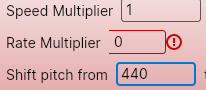
Beta Was this translation helpful? Give feedback.
-
|
You can check it with devtools what's wrong. Probably some min width or something like this is set on some control of the visual tree. |
Beta Was this translation helpful? Give feedback.
-
|
Indeed, MinWidth=64 set by TextBoxThemeMinWidth. If I remove that, it works. |
Beta Was this translation helpful? Give feedback.

-
|
How to open devtools in VS? |
Beta Was this translation helpful? Give feedback.

-
|
run your App in debug mode. Then press [F12] https://docs.avaloniaui.net/docs/getting-started/developer-tools |
Beta Was this translation helpful? Give feedback.
-
|
Thanks. |
Beta Was this translation helpful? Give feedback.

-
|
For those who land here like me trying to get a TextBox to display the errors in a tooltip in order to stop it from affecting your layout, you can simply set the DataValidationErrors Theme property to TooltipDataValidationErrors within App.axaml or a custom axaml file with all of your styles etc... This may not be appropriate for all situations but it works for us with the controls we use with Avalonia 11-Pre6 |
Beta Was this translation helpful? Give feedback.

-
|
love it, took some time to found this, would be great if this are in docs or so |
Beta Was this translation helpful? Give feedback.

-
|
btw, how to change the default Icons of Error Indicator?? |
Beta Was this translation helpful? Give feedback.
-
|
best to lookup the original style used in the source code or use DevTools |
Beta Was this translation helpful? Give feedback.


Uh oh!
There was an error while loading. Please reload this page.
-
How do I set the TextBox ErrorTemplate to display validation errors?
I want something that won't screw up the layout, a red exclamation mark at the right with the error as tooltip. Any sample of it done?
Beta Was this translation helpful? Give feedback.
All reactions