-
Notifications
You must be signed in to change notification settings - Fork 1
Expand file tree
/
Copy pathprogram-netlogo-language-basics.qmd
More file actions
518 lines (366 loc) · 19.3 KB
/
Copy pathprogram-netlogo-language-basics.qmd
File metadata and controls
518 lines (366 loc) · 19.3 KB
1
2
3
4
5
6
7
8
9
10
11
12
13
14
15
16
17
18
19
20
21
22
23
24
25
26
27
28
29
30
31
32
33
34
35
36
37
38
39
40
41
42
43
44
45
46
47
48
49
50
51
52
53
54
55
56
57
58
59
60
61
62
63
64
65
66
67
68
69
70
71
72
73
74
75
76
77
78
79
80
81
82
83
84
85
86
87
88
89
90
91
92
93
94
95
96
97
98
99
100
101
102
103
104
105
106
107
108
109
110
111
112
113
114
115
116
117
118
119
120
121
122
123
124
125
126
127
128
129
130
131
132
133
134
135
136
137
138
139
140
141
142
143
144
145
146
147
148
149
150
151
152
153
154
155
156
157
158
159
160
161
162
163
164
165
166
167
168
169
170
171
172
173
174
175
176
177
178
179
180
181
182
183
184
185
186
187
188
189
190
191
192
193
194
195
196
197
198
199
200
201
202
203
204
205
206
207
208
209
210
211
212
213
214
215
216
217
218
219
220
221
222
223
224
225
226
227
228
229
230
231
232
233
234
235
236
237
238
239
240
241
242
243
244
245
246
247
248
249
250
251
252
253
254
255
256
257
258
259
260
261
262
263
264
265
266
267
268
269
270
271
272
273
274
275
276
277
278
279
280
281
282
283
284
285
286
287
288
289
290
291
292
293
294
295
296
297
298
299
300
301
302
303
304
305
306
307
308
309
310
311
312
313
314
315
316
317
318
319
320
321
322
323
324
325
326
327
328
329
330
331
332
333
334
335
336
337
338
339
340
341
342
343
344
345
346
347
348
349
350
351
352
353
354
355
356
357
358
359
360
361
362
363
364
365
366
367
368
369
370
371
372
373
374
375
376
377
378
379
380
381
382
383
384
385
386
387
388
389
390
391
392
393
394
395
396
397
398
399
400
401
402
403
404
405
406
407
408
409
410
411
412
413
414
415
416
417
418
419
420
421
422
423
424
425
426
427
428
429
430
431
432
433
434
435
436
437
438
439
440
441
442
443
444
445
446
447
448
449
450
451
452
453
454
455
456
457
458
459
460
461
462
463
464
465
466
467
468
469
470
471
472
473
474
475
476
477
478
479
480
481
482
483
484
485
486
487
488
489
490
491
492
493
494
495
496
497
498
499
500
501
502
503
504
505
506
507
508
509
510
511
512
513
514
515
516
517
518
# NetLogo language basics {#netlogo-language-basics}
In this session, we will learn more about NetLogo's programming language. We will start with the very basics to ease you into it, in case you are not familiar with any type of programming.
::: {.callout-caution}
**NOTE**
In the explanation below I'm using `<UPPERCASE_TEXT>` to express the positions in the code to be filled by the name of entities, variables, and other elements, depending on the context. For instance, `<COLOR> <FRUIT>` would represent many possible phrases, such as "red apple", "brown kiwi", etc. Beware that these fragments are only place holders and are not NetLogo code.
For now, we will interact freely with the program, without a particular file or model. The code snippets shown here can sometimes be executed directly, but will often not run without a proper context in code.
:::
## Console interaction
As a preamble, important to anyone without previous experiences with programming languages, the very first thing one can do in NetLogo is give oneself a bit of encouragement. In the **NetLogo interface**, go to the bottom area named **'Command Center'** and type the following in the empty field on the right of **'observer>'** and press Enter:
```NetLogo
You can do it!
```
The console prints:
```
ERROR: Nothing named YOU has been defined.
```
Oops! NetLogo still doesn't know "you". Or is it that it cannot *understand* you? Well let us get you two properly introduced...
Before continuing, we should note: NetLogo does have its own vocabulary, containing what we will call **"primitives"**, to which we can add many more "words", as long as we define them first using what NetLogo *can* understand. Without going into details now, just keep in mind that, in NetLogo language, special kinds of "words" are **reporters**, which are practical equivalents to **values**, and **commands**, which wrap the necessary steps to **do** something.
## Entities
The (real) first thing one should learn about NetLogo, and most agent-based modelling systems, is that it handles *mainly* two types of entities/agents: `patches`, cells of a square grid, and `turtles`, which are proper "agents" (i.e., mobile, autonomous entities). Both entities have primitives (built-in, default properties), some of which can be modified by processes in your model. For example, you can't modify the position of a patch, but you can change its filling colour.
<p style="text-align: center;">
<a title="NetLogo world and entities (Figure 2 in Izquierdo et al. 2019)" href="https://wisc.pb.unizin.org/agent-based-evolutionary-game-dynamics/"><img width="400" style="background-color: white" alt="NetLogo entities" src="https://wisc.pb.unizin.org/app/uploads/sites/28/2018/09/the-netlogo-world.png"></a>
<br>
<i style="color: grey;">NetLogo world and entities (Figure 2 in Izquierdo et al. 2019)</i>
</p>
As seen in the figure above, NetLogo also includes a third type of entity, `links`, which has the particularity of describing a connection between two `turtles` and thus not having specific spatial coordinates of their own. We will deal with links later on, but for now we focus on the other entities, which are more commonly used in models.
::: {.callout-note}
::: {.grid}
::: {.g-col-6}
The term "turtle" comes from the base language from which NetLogo was developed from, called "Logo" (in turn, an adaptation of another language, [Lisp](https://en.wikipedia.org/wiki/Lisp_(programming_language)), where instructions can be given to one agent or robot ("turtle") to move and draw a line graph. It was conceived to teach programming concepts -- in fact, I had the opportunity of participating in one Logo session back in my school!
:::
::: {.g-col-6}
<a title="NightElfik, CC0, via Wikimedia Commons" href="https://commons.wikimedia.org/wiki/File:KochTurtleAnim.gif"><img width="256" alt="KochTurtleAnim" src="https://upload.wikimedia.org/wikipedia/commons/0/09/KochTurtleAnim.gif?20110330124613"></a>
:::
:::
:::
All `patches` and `turtles` can be identified individually through primitives. Turtles have a unique numerical identifier (`who`) that is assigned automatically upon the creation of the turtle. Patches, in turn, have an unique combination of x and y integer coordinates in 2D space (`pxcor` and `pycor`), as they occupy each a single position in a grid (see **Grid**). To reference a specific turtle, patch or link:
```NetLogo
turtle <WHO_NUMBER>
patch <PXCOR> <PYCOR>
link <WHO_NUMBER> <WHO_NUMBER>
```
NetLogo allows you to define types of `turtles` as if it where a primitive, declaring its name as a `breed`:
```NetLogo
breed [<BREED_1_NAME_PLURAL> <BREED_1_NAME_SINGULAR>]
breed [<BREED_2_NAME_PLURAL> <BREED_2_NAME_SINGULAR>]
```
For example:
```NetLogo
breed [apples apple]
breed [pears pear]
```
We can then use the plural or singular form of the `breed` name directly, instead of referring to the generic `turtles`.
```NetLogo
<BREED_1_NAME_SINGULAR> <WHO_NUMBER>
```
Or:
```NetLogo
pear 2
```
This is useful, of course, when there are more the one `breed` to be defined, so that they are easily distinguished and intelligible in the code.
We can also refer to agents collectively as:
```NetLogo
<BREED_1_NAME_PLURAL>
```
```NetLogo
pears
```
or randomly as:
```NetLogo
one-of apples
one-of patches
```
The `one-of` primitive offers a easy way to randomly select one agent (`turtles` and `patches`) from all (or a subset of all) agents of a given type.
Last, we should keep in mind that `turtles` can be created and destroyed on-the-fly during simulations, while `patches` are created in the background upon initialisation, according to the model settings (*e.g.* grid dimensions), but never destroyed during simulation runs.
See NetLogo's documentation on agents for further details (https://ccl.northwestern.edu/netlogo/docs/programming.html#agents).
## Variables
The most fundamental elements of NetLogo, as in any programming language, is variables. To assign a value to a variable we use the general syntax or code structure:
```NetLogo
set <VARIABLE_NAME> <VALUE>
```
For example:
```NetLogo
set x 123
```
Meaning "set the variable x to be the number 123".
While variable names are fragments of contiguous text following a naming convention (*e.g.* `my-variable`, `myVariable`, `my_variable`, etc.), values can be of the following data types:
- Number (*e.g.*, `1`, `4.5`, `1E-6`)
- Boolean (*i.e.*, `true`, `false`)
- String (effectively text, but enclosed by quote marks: *e.g.*, `"1"`, `"my value"`)
- `turtles`, `patches` (*i.e.*, NetLogo's computation entities; see **Entities**)
- AgentSet (a set of either `turtles` or `patches`; see **Entities**)
- List (a list enclosed in squared brakets with values of any kind separated by spaces: *e.g.*, `[ "1" 1 false my-agents-bunch ["my value" true 4.5] ]`)
Before we assign a value to a variable, we must declare its scope and name, though not its data type, which is only defined when assigning an specific value. Variable declaration is typically done at the first section of a model script and its exact position will depend on if it is stored globally or inside entities. These types of declarations follow their own structures:
```NetLogo
globals [ <GLOBAL_VARIABLE_NAME> ]
turtles-own [ <TURTLE_VARIABLE_NAME> ]
<BREED_1_NAME_PLURAL>-own
[
<BREED_1_VARIABLE_1_NAME>
<BREED_1_VARIABLE_2_NAME>
]
patches-own [ <PATCHES_VARIABLE_NAME> ]
```
For example:
```NetLogo
globals [ x y ]
turtles-own [ weight ]
apples-own [ redness ]
```
As an exception to this general rule, variables can also be declared "locally" using the following syntaxes:
```NetLogo
let <VARIABLE_NAME> <VALUE>
```
For example:
```NetLogo
let freshness 100
```
As in other programming languages, having a variable declared locally means it is inside a temporary computation environment, such as a procedure (see below). Once the environment is closed, the variable is automatically discarded in the background.
## Expressing equations
As we will see examples further on, the values of variables can be transformed in different ways, using different syntaxes, depending on their type. Possibly the most straightforward case is to perform basic arithmetic operations over numerical variables, expressing equations. These can be written using the special characters normally used in most programming languages (`+`, `-`, `*`, `/`, `(`, etc.):
```NetLogo
set myVariable (2 + 2) * 10 / ((2 + 2) * 10)
```
Notice that arithmetic symbols and numbers must be separated by spaces and that the order of operations can be structured using parentheses.
NetLogo allow line breaks, which can help you read expressions that are too long because they hold several operations. However, too many operation at a time can become hard to read and verify, even with line breaks. The best and safer practice to overcome this is to use parentheses abundantly to ensure the right sequence of operations is performed:
Valid
```NetLogo
set myVariable (
(
(2 + 2) *
10
) / (
(2 + 2) *
10
)
)
```
Additionally, as proper equations, such expressions in NetLogo will also accept variables names representing their current value. Equations can then serve to create far reaching dependencies between different parts of the model code:
```NetLogo
set myVariable 2
set myOtherVariable 10
<...>
let myTemporaryVariable 2 * myVariable * myOtherVariable
set myVariable myTemporaryVariable / myTemporaryVariable
```
It will normally be better to keep operations in separate lines. However, be aware that NetLogo accepts sequential commands in the same line, as long as their syntax is correct:
```NetLogo
set myVariable 2 set myOtherVariable 10 let myTemporaryVariable 2 * myVariable * myOtherVariable set myVariable myTemporaryVariable / myTemporaryVariable
```
Knowing this, is particularly useful whenever you want to test the outcome of a longer command sequence in NetLogo's console ("Command Center").
## Logical operators
As most programming languages, NetLogo can evaluate equalities and inequalities and return a Boolean value (`true` or `false`). The related logical operators are:
- `=`: "equals".
- `!=`: "not equal to".
- `>`: "greater than".
- `>=`: "greater than or equal to".
- `<`: "less than".
- `<=`: "less than or equal to".
For example, try:
```NetLogo
1 >= 0
```
```NetLogo
100 >= 100 + 1
```
Equality and inequality operators can also be used with other data types, though beware of the different implications. Some operations will return an error.
For example, you can compare Boolean values with `=` or `!=`:
```NetLogo
true = false
```
but not with quantitative comparisons:
```NetLogo
true >= false
```
The same applies to **lists** and **agent sets**, but not to **strings** or **entities** (turtles, patches, links):
Valid: check if the two lists are exactly the same.
```NetLogo
[1 2 3] = [ 1 ]
```
Invalid: a quantitative comparison between lists is not interpreted from this.
```NetLogo
[1 2 3] > [ 1 ]
```
Valid: check if strings are exactly the same.
```NetLogo
"apple" = "banana"
```
Valid: compares the length of the strings.
```NetLogo
"apple" >= "banana"
```
Valid: checks if entities are the same (useful when entities are referenced indirectly by variables)
```NetLogo
patch 0 0 != patch 1 1
```
Valid, but not recommended: compares the internal ID of entities, which express the creation order, which is often arbitrary.
```NetLogo
turtle 0 < turtle 1
patch 0 0 > patch 1 1
```
Note that in other programming languages the equal sign might be reserved to setting the value of a variable. For example, `"a" = "b"` will return `false` in NetLogo, while in R it will assign a value "b" to an variable named "a". By the way, to achieve the same in R, we should write `"a" == "b"`.
## Procedures
In NetLogo, any action we want to perform, that is not manually typed in the console, must be enclosed within a procedure that is declared in the model script (the text in **'Code'** tab in the user interface). Similarly to 'functions' or 'methods' in other programming languages, a procedure is the code scripted inside the following structure:
```NetLogo
to <PROCEDURE_NAME>
<PROCEDURE_CODE>
end
```
Any procedure can be executed by typing `<PROCEDURE_NAME>` + Enter in the NetLogo's console at the bottom of the 'Interface' tab. The "Hello World" program, a typical minimum exercise when learning a programming language, correspond to the following procedure `hello-world`:
```NetLogo
to hello-world
print "Hello World!"
end
```
which generates the following "prints" in the console:
```
observer> hello-world
Hello World!
```
Procedures are particularly useful to group and enclose a sequence of commands that are semantically connected for the programmer. For example, the following procedure declares a temporary (local) variable, assigns to it a number as value, and prints it in the console:
```NetLogo
to set-it-and-show-me
let thisVariableOfMine 42
print thisVariableOfMine
end
```
Procedures can then be used elsewhere by writing its name (more complications to come). A procedure can be included as a step in another procedure:
```NetLogo
to <PROCEDURE NAME>
<PROCEDURE_1>
<PROCEDURE_2>
<PROCEDURE_3>
...
end
```
NetLogo's interface editor allows us to create buttons that can execute one or multiple procedures (or even a snippet of *ad hoc* code). The interface system is quite straightforward. First, at the top of the interface tab, click "Add" and select a type of element in the drop-down list. Click anywhere in the window below to place it. Select it with click-dragging or using the "Select" option in the right-click pop-up menu. You can edit the element by selecting "Edit", also in the right-click pop-up menu. For any doubts on how to edit the interface tab, please refer to NetLogo's documentation (https://ccl.northwestern.edu/netlogo/docs/interfacetab.html).
## Logic bifurcations: `if` and `ifelse`
>The code exemplifies how to create conditional rules according to predefined general conditions using if/else statements, which in NetLogo can be written as `if` or `ifelse`:
```NetLogo
if (<CONDITION_1_IS_TRUE>)
[
<DO_ACTION_A>
]
ifelse (<CONDITION_2_IS_TRUE>)
[
<DO_ACTION_B>
]
[
<DO_ACTION_C>
]
```
## Iterators (*loops*)
Using `while`, we can use a structure similar to bifurcations, to reiterate over the same code a number of times as long as a logical condition is true:
```NetLogo
while [<CONDITION_1_IS_TRUE>]
[
<DO_ACTION>
]
```
Notice the use of square brackets to surround the condition (`[<CONDITION_1_IS_TRUE>]`).
A variant of this is the primitive `loop`, where there is no condition, meaning that the action within will be repeated forever until the code inside stop the flow explicitly (`stop` or `report`), or the user interrupts NetLogo.
```NetLogo
loop
[
<DO_SOMETHING>
]
```
::: {.callout-caution}
**ALERT**
Avoid using `while` or `loop` until you are confident with you code. A loop hidden inside you code, that might go forever in a few cases, can become a headache when performing simulation experiments in batches.
:::
A more useful iterator is `repeat`, which will reiterate code a certain number of times:
```NetLogo
repeat <NUMBER_OF_TIMES>
[
<DO_SOMETHING>
]
```
You may quickly test it in the console with:
```NetLogo
let counter 0 repeat 10 [ set counter counter + 1 ] print counter
```
A especial type of iterator abundantly used in NetLogo is `ask`. You can `ask` all or any subset of entities to perform specific commands by following the structure:
```NetLogo
ask <ENTITIES>
[
<DO_SOMETHING>
]
```
Try this out in the command center:
```NetLogo
ask patches [ set pcolor blue ]
```
## Entities with variables, logic operations, and procedures
Commands inside the `ask` structure can be both direct variable operations and procedures. For instance:
```NetLogo
ask <BREED_1_NAME_PLURAL>
[
set <BREED_1_VARIABLE_2> <VALUE>
<PROCEDURE_1>
<PROCEDURE_2>
<PROCEDURE_3>
]
```
However, all variables referenced inside these structures must be properly related to their scope, following NetLogo's syntax. For example, an agent is only able to access the variable in another agent if it we use the following kind of structure:
```NetLogo
ask <BREED_1_NAME_PLURAL>
[
print [<BREED_1_VARIABLE_2>] of <BREED_2_NAME_SINGULAR> <WHO_NUMBER>
]
```
It is possible to select a subset of any set of entities through logic clauses to be checked separately for each individual entity. For example, to get all agents with a certain numeric property greater than a given threshold:
```NetLogo
<TYPE_NAME_PLURAL> with [ <VARIABLE_NAME_1> > <THRESHOLD> ]
```
When operating from the inside an `ask` command, we can also make sure to filter-out the agent currently performing the call, by using the primitive `other`:
```NetLogo
ask <BREED_1_NAME_PLURAL>
[
ask other <BREED_1_NAME_PLURAL>
[
print <WHO_NUMBER>
]
]
```
All this can be combined to form quite complex rules of behaviour, yet keeping itself generally readable:
```NetLogo
to celebrate-birthday
ask people
[
if (today = my-birthday)
[
ask other people with [presents > 0]
[
give-present
]
]
]
end
```
## Grid (world)
One should spend some time understanding the grid structure and associated syntax. It is recommendable to consult the "settings" pop-up window in the "interface tab":
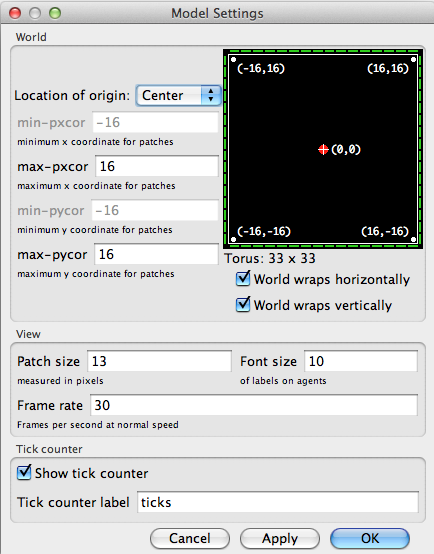
*The settings pop-up window in NetLogo*
The default configuration is a 33x33 grid with the position (0,0) at the centre. Both dimensions and centre can be easily edited for each particular model. Moreover, we can specify agents behaviour at the borders by ticking the "wrap" options. Wrapping the world limits means that, for instance, under the default setting mentioned above, the position (-16,0) is adjacent to (16,0). In the console, we can "ask" the patch at (-16,0) to print its distance to the patch at (16,0), using the primitive function `distance` (https://ccl.northwestern.edu/netlogo/docs/dictionary.html#distance):
```
observer> ask patch -16 0 [ print distance patch 16 0 ]
1
```
Wrapping one dimension represents a cylindrical surface while wrapping two depicts a strange toroidal object (Doughnut!). Although this aspect is relatively hidden among the options, it can have great importance if spatial relations play any part in a model. So if you want your grid to represent a geographical map, make sure to unpick the wrapping features.
## Commenting code
Annotations or comments (i.e., text that should be ignored when executing the code) can be added to the code by using the structure:
```NetLogo
<CODE>
; <FREE_TEXT>
<CODE>
```
or
```NetLogo
<CODE> ; <FREE_TEXT>
```
## Dictionary
One of the most useful resources of NetLogo's documentation is the *dictionary* that can be accessed in the "Help" menu. This is true at any moment throughout your learning curve; even when you know all *primitives* and built-in functions by heart. Moreover, all documentation is present with any copy of NetLogo, so it is fully available offline.
The dictionary is particularly useful whenever you are learning by example, as in our case. For instance, regarding the earlier mention of `distance`, you could have searched it in the dictionary directly. Whenever you find yourself reading NetLogo code with violet or blue words that you do not understand, take the habit of searching them in NetLogo's *dictionary*.
For **more information** consult [NetLogo Programming Guide](https://ccl.northwestern.edu/netlogo/docs/programming.html).