Pneumonia is an inflammatory condition of the lung affecting primarily the small air sacs known as alveoli.Symptoms typically include some combination of productive or dry cough, chest pain, fever and difficulty breathing. The severity of the condition is variable. Pneumonia is usually caused by infection with viruses or bacteria and less commonly by other microorganisms, certain medications or conditions such as autoimmune diseases.Risk factors include cystic fibrosis, chronic obstructive pulmonary disease (COPD), asthma, diabetes, heart failure, a history of smoking, a poor ability to cough such as following a stroke and a weak immune system. Diagnosis is often based on symptoms and physical examination. Chest X-ray, blood tests, and culture of the sputum may help confirm the diagnosis.The disease may be classified by where it was acquired, such as community- or hospital-acquired or healthcare-associated pneumonia. Our task is to create a API whichs predict whether the given images are penumonia or not.
The solution proposed for the above problem is that we have used Computer vision to solve the above problem to classify the data. We have used the Pytorch framework to solve the above problem also we have have created our custom CNN network with the help of pytorch. Then we have created a API which takes in the images and predicts wheter a person is having Pneumonia or not. Then we have dockerized the application and deployed the model on AWS cloud.
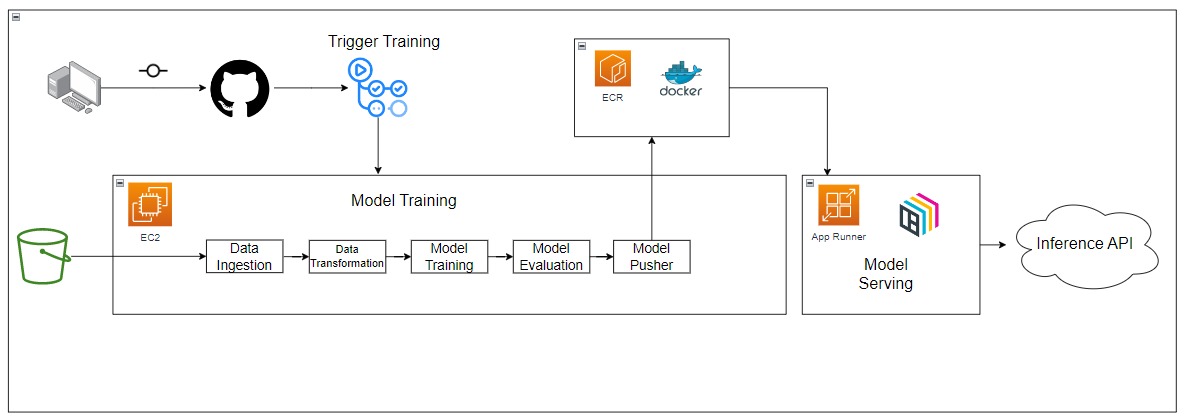
The dataset was shared by Apollo diagnostic center for research purpose. So we hvae created a POC with the given data.
- Python
- FastAPI
- Pytorch
- Docker
- AWS
- Azure
- AWS S3
- AWS App Runner
- Github Actions
Step 1. Download the zip file
Download the zip file and extract it to a folder.
Step 2. Create a conda environment.
conda create -p env python=3.8 -y
conda activate ./env
Step 3. Install the requirements
pip install -r requirements.txt
Step 4. Export the environment variable
export AWS_ACCESS_KEY_ID=<AWS_ACCESS_KEY_ID>

export AWS_SECRET_ACCESS_KEY=<AWS_SECRET_ACCESS_KEY>

export AWS_DEFAULT_REGION=<AWS_DEFAULT_REGION>
Step 5. Run the application server
python app.py
Step 6. Train application
http://localhost:8001/trainStep 7. Prediction application
http://localhost:8001/predict-
Check if the Dockerfile is available in the project directory
-
Build the Docker image
docker build -t xray_classification .
- Run the Docker image
docker run -d -p 8001:8001 -e AWS_ACCESS_KEY_ID=<AWS_ACCESS_KEY_ID> -e AWS_SECRET_ACCESS_KEY=<AWS_SECRET_ACCESS_KEY> xray_classifier
- Custom CNN architecture
Components : Contains all components of Deep Learning(CV) Project
- data_ingestion
- data_transformation
- model_training
- model_evaluation
- model_pusher
Custom Logger and Exceptions are used in the Project for better debugging purposes.
- The project we have created can also be in real-life by doctors to check whether the person is having Pneumonia or not. It will help doctors to take better decisions.