| stoplight-id | 1l1fm2g0sfm69 |
|---|
AppDB allows the storage of arbitrary JSON documents similar to a normal NoSQL database. This enables the ability to store a state within your DomoApp. Optionally, you can also sync the data in AppDB back to a Domo DataSet. Three layers (analogous to traditional storage mechanisms) provide this data storage:
- Datastores: Analogous to a database. A CustomApp has a single datastore that is created automatically, named with the CustomApp’s ID and managed transparently to the CustomApp.
- Collections: Analogous to a collection in a NoSQL database or a table in a relational database. A datastore can have multiple collections defined.
- Documents: Analogous to documents in a NoSQL database or a table row in a relational database. A collection can have multiple documents.
Within the app manifest, you can define the Collections that you want your app to be able to use by simply listing them in a Collections property as in the following:
{
  "name": "Example comments app",
  "version": "1.0",
  "size": {
    "width": 2,
    "height": 2
  },
  "mapping": [],
  "collections": [
    {
      "name": "CommentsTable",
      "schema": {
        "columns": [
          { "name": "user", "type": "STRING" },
          { "name": "comment", "type": "STRING" }
        ]
      },
      "syncEnabled": true
    },
    {
      "name": "Users"
    }
  ],
  "id": "760ae493-6c29-4e61-8fe3-9c887265ea86"
}
As you can see, if you do not need to sync a Collection back to Domo, the only property you need to define is the Collection name. If you want it to sync back to Domo, you must also provide the schema you want for the Domo DataSet.
The schema object takes a list of columns. Each column has a name and a type. The following types are accepted.
STRINGLONGDECIMALDOUBLEDATEDATETIME
Documents that contain DATE or DATETIME data must be formatted as YYYY-MM-DD or YYYY-MM-DDTHH:MM:SSZ in order to be successfully synced to a Domo DataSet.
If your app has not yet created a DataSet and you provide the wrong data type in the schema section of your manifest, your collection will not be able to create a DataSet to export to. If, after adding documents to your collection and waiting the 15-minute period for a normally scheduled export, you do not see your AppDB DataSet in your data center, double check to ensure that your schema is set up correctly. A common mistake is to include a data type like NUMBER or INTEGER.
It's also important to be aware that Collections won't sync to Domo if the owner of the Collection doesn't have the correct permissions on the DataSet it's syncing to.
This is important to know in the case of someone who gets removed from their Domo instance. For example, if Bob owns a Collection that is synced to DataSet, and is then removed from the Domo instance, "deleted user" will remain as owner of the Collection unless updated; however, Bob will have no permissions on the DataSet, so it will stop syncing.
The new owner of the Collection not only has to be the owner, but has to be given Admin Permissions on the Collection as well.
Examples of how to make calls to the Collections defined in your manifest are below. For now, you will not be able to make these calls in local dev without including a proxy. Instead, you must publish your app and ensure that it is making calls in an installed app.
If you make any updates to the manifest and re-publish your app design, you will need to edit the installed app and re-save it for the manifest changes to take effect on the installed app (similar to what you would have to do when making changes to the mapping section of your manifest).
Create a single document in a collection.
The documentContent variable in this POST request is equal to the sample request body.
domo.post(`/domo/datastores/v1/collections/Users/documents/`, documentContent)
    .then(data => console.log(data));
| Property Name | Type | Required | Description |
|---|---|---|---|
| collectionName | String | Required | The name given to the collection in the manifest |
POST /domo/datastores/v1/collections/{collectionName}/documents/ HTTP/1.1
Content-Type: application/json
Accept: application/json
The request body accepts a document object. All document content should be wrapped in the content object. The properties of the document within the content object should match the schema of the collection if the schema is provided.
{
  "content": {
    "username": "Bill S. Preston, Esquire"
  }
}Returns the created document.
HTTP/1.1 200 OK
Content-Type: application/json;charset=UTF-8

{
    "id": "b3ea3d2d-86c5-44e6-a2f4-985136bbbce1",
    "customer": "excellent-adventure",
    "owner": 1089963280,
    "datastoreId": "d4a4b9c4-e123-41ce-8f93-dcafbeea4642",
    "collectionId": "02c3a404-e18c-4f15-ac7f-a96cdb59ad10",
    "createdOn": "2019-03-04T16:59:25.184+0000",
    "updatedOn": "2019-03-04T16:59:25.184+0000",
    "updatedBy": 1089963280,
    "content": {
        "username": "Bill S. Preston, Esquire"
    },
    "syncRequired": true
}domo.post(`/domo/datastores/v1/collections/Users/documents`, {
content: {
username: 'Bill S. Preston, Esquire',
},
});Lists all documents from a given Collection.
domo
  .get(`/domo/datastores/v1/collections/Users/documents/`)
.then((data) => console.log(data));| Property Name | Type | Required | Description |
|---|---|---|---|
| collectionName | String | Required | The name given to the collection in the manifest |
GET /domo/datastores/v1/collections/{collectionName}/documents/ HTTP/1.1
Content-Type: application/json
Accept: application/json
Returns an array of documents.
HTTP/1.1 200 OK
Content-Type: application/json;charset=UTF-8

[
    {
        "id": "b3ea3d2d-86c5-44e6-a2f4-985136bbbce1",
        "customer": "excellent-adventure",
        "owner": 1089963280,
        "datastoreId": "d4a4b9c4-e123-41ce-8f93-dcafbeea4642",
        "collectionId": "02c3a404-e18c-4f15-ac7f-a96cdb59ad10",
        "createdOn": "2019-03-04T16:59:25.184+0000",
        "updatedOn": "2019-03-04T16:59:25.184+0000",
        "updatedBy": 1089963280,
        "content": {
            "username": "Bill S. Preston, Esquire"
        },
        "syncRequired": true
    },
    {
        "id": "1e61d99d-9885-419a-a33e-3be3941ee720",
        "customer": "excellent-adventure",
        "owner": 1089963280,
        "datastoreId": "d4a4b9c4-e123-41ce-8f93-dcafbeea4642",
        "collectionId": "02c3a404-e18c-4f15-ac7f-a96cdb59ad10",
        "createdOn": "2019-03-03T17:49:25.72+0000",
        "updatedOn": "2019-03-03T17:49:25.72+0000",
        "updatedBy": 1089963280,
        "content": {
            "username": "Ted Theodore Logan"
        },
        "syncRequired": true
    },
]Retrieves a single document from a Collection when given its document ID.
domo
  .get(
    `/domo/datastores/v1/collections/Users/documents/b3ea3d2d-86c5-44e6-a2f4-985136bbbce1`,
  )
.then((data) => console.log(data));| Property Name | Type | Required | Description |
|---|---|---|---|
| collectionName | String | Required | The name given to the collection in the manifest |
| documentId | UUID | Required | The id of the document returned when it was created |
GET /domo/datastores/v1/collections/{collectionName}/documents/{documentId} HTTP/1.1
Content-Type: application/json
Accept: application/json
Returns the indicated document.
HTTP/1.1 200 OK
Content-Type: application/json;charset=UTF-8

{
    "id": "b3ea3d2d-86c5-44e6-a2f4-985136bbbce1",
    "customer": "excellent-adventure",
    "owner": 1089963280,
    "datastoreId": "d4a4b9c4-e123-41ce-8f93-dcafbeea4642",
    "collectionId": "02c3a404-e18c-4f15-ac7f-a96cdb59ad10",
    "createdOn": "2019-03-04T16:59:25.184+0000",
    "updatedOn": "2019-03-04T16:59:25.184+0000",
    "updatedBy": 1089963280,
    "content": {
        "username": "Bill S. Preston, Esquire"
    },
    "syncRequired": true
}Updates an existing document in a Collection when given its document ID.
The documentContent variable in this PUT request is equal to the sample request body.
domo.put(`/domo/datastores/v1/collections/Users/documents/b3ea3d2d-86c5-44e6-a2f4-985136bbbce1`, documentContent)
    .then(data => console.log(data));
| Property Name | Type | Required | Description |
|---|---|---|---|
| collectionName | String | Required | The name given to the collection in the manifest |
| documentId | UUID | Required | The id of the document returned when it was created |
PUT /domo/datastores/v1/collections/{collectionName}/documents/{documentId} HTTP/1.1
Content-Type: application/json
Accept: application/json
Request Body
{
    "content": {
        "username": "Bill S. Preston, Esquire",
        "Band": "Wyld Stallyns"
    }
}Returns the modified document.
HTTP/1.1 200 OK
Content-Type: application/json;charset=UTF-8

{
    "id": "b3ea3d2d-86c5-44e6-a2f4-985136bbbce1",
    "customer": "excellent-adventure",
    "owner": 1089963280,
    "datastoreId": "d4a4b9c4-e123-41ce-8f93-dcafbeea4642",
    "collectionId": "02c3a404-e18c-4f15-ac7f-a96cdb59ad10",
    "createdOn": "2019-03-04T16:59:25.184+0000",
    "updatedOn": "2019-03-05T15:42:16.115+0000",
    "updatedBy": 1089963280,
    "content": {
        "username": "Bill S. Preston, Esquire",
        "Band": "Wyld Stallyns"
    },
    "syncRequired": true
}domo
.put(
`/domo/datastores/v1/collections/Users/documents/b3ea3d2d-86c5-44e6-a2f4-985136bbbce1`,
)
.then(console.log);Permanently deletes a document from your application's Collection.
This is destructive and cannot be reversed. Deleting documents in an AppDB Collection may have performance implications with regard to syncing to its corresponding DataSet in Domo if the
syncEnabledproperty is set totruefor the Collection. Code Example domo.delete(/domo/datastores/v1/collections/Users/documents/1e61d99d-9885-419a-a33e-3be3941ee720);
| Property Name | Type | Required | Description |
|---|---|---|---|
| collectionName | String | Required | The name given to the collection in the manifest |
| documentId | UUID | Required | The id of the document returned when it was created |
DELETE /domo/datastores/v1/collections/{collectionName}/documents/{documentId} HTTP/1.1
Content-Type: application/json
Accept: application/json
Returns the parameter of a success or an error.
HTTP/1.1 200 OK
Any MongoDB query that can be used in a Mongo find() function can be used to query for documents in an AppDB Datastore. Official MongoDB query documentation is below:
https://docs.mongodb.com/manual/reference/operator/query/
Example of querying for a document that includes a comment that has the word 'happy' (via a regex operator) or does not include the username 'Eeyore' (via the not equals operator) can be found below. The return value of this call will be an array of documents that matches the query.
POST /domo/datastores/v1/collections/{collectionName}/documents/query HTTP/1.1
Content-Type: application/json
Accept: application/json
| Property Name | Type | Required | Description |
|---|---|---|---|
| collectionName | String | Required | The name given to the collection in the manifest |
{ $or:
       [
           { content.comments: {$regex: 'happy'} },
           { content.username: {$ne: 'Eeyore' } }
       ]
}Returns an array of documents matching the query.
HTTP/1.1 200 OK

[
    {
        "id": "b3ea3d2d-86c5-44e6-a2f4-985136bbbce1",
        "customer": "excellent-adventure",
        "owner": 1089963280,
        "datastoreId": "d4a4b9c4-e123-41ce-8f93-dcafbeea4642",
        "collectionId": "02c3a404-e18c-4f15-ac7f-a96cdb59ad10",
        "createdOn": "2019-03-04T16:59:25.184+0000",
        "updatedOn": "2019-03-05T15:42:16.115+0000",
        "updatedBy": 1089963280,
        "content": {
            "username": "Mickey Mouse",
            "comments": "Happy Birthday!"
        },
        "syncRequired": true
     },
     {
        "id": "b3ea3d2d-86c5-44e6-a2f4-985136bbbce1",
        "customer": "excellent-adventure",
        "owner": 1089963280,
        "datastoreId": "d4a4b9c4-e123-41ce-8f93-dcafbeea4642",
        "collectionId": "02c3a404-e18c-4f15-ac7f-a96cdb59ad10",
        "createdOn": "2019-03-04T16:59:25.184+0000",
        "updatedOn": "2019-03-05T15:42:16.115+0000",
        "updatedBy": 1089963280,
        "content": {
            "username": "Tigger",
            "comments": "Bouncing makes me so happy!"
        },
        "syncRequired": true
     },
]Dates can be queried in AppDB using the MongoDB Extended JSON v2 spec shown below. This essentially casts the string provided to the "less than or equal to" operator into a date object. MongoDB documentation on the $date operator can be found here. The date string provided will need to be in the demonstrated ISO date format.
{
    "createdOn" : {
        "$lte" : {
            "$date" : "2020-05-12T00:00:00.000Z"
        }
    }
}After the query limits the documents which will be returned by the API call, you can optionally add query string parameters to the URL to aggregate the query results. Each parameter (excluding groupby) has the optional ability to take an alias. While it is not required to alias each property that is being aggregated, it is useful in the event that you need to pass the same property to different aggregations to avoid name collisions.
POST /domo/datastores/v1/collections/{collectionName}/documents/query?groupby={property1, property2}&count={alias}&{avg|max|min|sum}={property1 alias1, property2 alias2}&orderby={alias1 ascending|descending, alias2 ascending|descending} HTTP/1.1
Content-Type: application/json
Accept: application/json
| Property Name | Type | Required | Description |
|---|---|---|---|
| collectionName | String | Required | The name given to the collection in the manifest |
| query | Object | Required | The JSON object that represents a Mongo query |
| groupby | String | Optional | The comma-separated list of properties you wish to group by |
| count | String | Optional | The name you wish to alias a count aggregation property |
| avg | String | Optional | The comma-separated list of properties in which you wish to perform an average aggregation followed by the name you wish to alias the result |
| min | String | Optional | The comma-separated list of properties in which you wish to perform a minimum aggregation followed by the name you wish to alias the result |
| max | String | Optional | The comma-separated list of properties in which you wish to perform a maximum aggregation followed by the name you wish to alias the result |
| sum | String | Optional | The comma-separated list of properties in which you wish to perform a sum aggregation followed by the name you wish to alias the result |
| unwind | String | Optional | The comma-separated list of properties that you wish to unwind (the unwind operator flattens nested arrays - see MongoDB documentation for additional information) |
| orderby | String | Optional | Alias of the aggregation you wish to order by (ascending or descending) |
| limit | Integer | Optional | The number of documents in which to limit the number of return objects, default is 10,000 |
| offset | Integer | Optional | The number of documents in which to skip before returning documents, default is 0 |
const url =
  '/domo/datastores/v1/collections/campaigns/documents/query?groupby=content.campaignName, content.month&count=documentCount&avg=content.clicks avgClicks, content.impressions avgImps&sum=content.clicks sumClicks, content.impressions sumImps&max=content.clicks maxClicks, content.impressions maxImps&min=content.clicks minClicks, content.impressions minImps&orderby=sumClicks descending';

domo.post(url, {}).then((data) => console.log(data));[
{
"maxImps": 1250,
"sumClicks": 210,
"sumImps": 2260,
"documentCount": 2,
"minImps": 1010,
"avgImps": 1130,
"campaignName": "Red Campaign",
"minClicks": 90,
"avgClicks": 105,
"maxClicks": 120,
"month": "February"
},
{
"maxImps": 1150,
"sumClicks": 190,
"sumImps": 2050,
"documentCount": 2,
"minImps": 900,
"avgImps": 1025,
"campaignName": "Red Campaign",
"minClicks": 85,
"avgClicks": 95,
"maxClicks": 105,
"month": "January"
},
{
"maxImps": 1000,
"sumClicks": 100,
"sumImps": 1000,
"documentCount": 1,
"minImps": 1000,
"avgImps": 1000,
"campaignName": "Blue Campaign",
"minClicks": 100,
"avgClicks": 100,
"maxClicks": 100,
"month": "January"
},
{
"maxImps": 500,
"sumClicks": 50,
"sumImps": 500,
"documentCount": 1,
"minImps": 500,
"avgImps": 500,
"campaignName": "Blue Campaign",
"minClicks": 50,
"avgClicks": 50,
"maxClicks": 50,
"month": "February"
}
]Using standard mongo queries and update operations, you can do partial updates on your documents. The query must reference a document, or reference a property in a document.
Supported Operators:
- currentDate
- inc
- min
- max
- mul
- rename
- set
- unset
- addToSet
- pop
- pullAll
Supported Modifiers:
- each
- position
- slice
- sort
Please refer to the official mongoDB documentation on Update Operators to better understand these operators and how to create them. Note that since we require that the query reference an existing document or property, the operator $setOnInsert is not supported.
domo.put(`/domo/datastores/v1/collections/Users/documents/update`, body)
    .then(data => console.log(data));
| Property Name | Type | Required | Description |
|---|---|---|---|
| collectionName | String | Required | The name given to the collection in the manifest |
  PUT /domo/datastores/v1/collections/{collectionName}/documents/update
  Content-Type: application/json
  Accept: application/json
Specification
The request body is a single object that must be structured as follows.
{
  "query": "{mongo query JSON}",
  "operation": "{mongo operation JSON}"
}
Example
{
  "query": { "content.username": "Bill S. Preston, Esquire" },
  "operation": {
    "$set": {
      "content.comment": "Excellent!"
    }
  }
}Returns the number of updated objects or properties.
HTTP/1.1 200 OK
Content-Type: application/json;charset=UTF-8
1
AppDB also allows for the creation, upsertion, and deletion of bulk lists of documents as shown in the examples below.
Create multiple documents in a given collection in a single HTTP request.
The documents variable in this post request is equal to the sample request body.
domo.post(`/domo/datastores/v1/collections/Users/documents/bulk`, documents)
    .then(data => console.log(data));
| Property Name | Type | Required | Description |
|---|---|---|---|
| collectionName | String | Required | The name given to the collection in the manifest |
POST /domo/datastores/v1/collections/{collectionName}/documents/bulk HTTP/1.1
Content-Type: application/json
Accept: application/json
The request body accepts an array of document objects.
[
  {
    "content": {
      "username": "Bill S. Preston, Esquire"
    }
  },
  {
    "content": {
      "username": "Ted Theodore Logan"
    }
  }
]Returns the number of documents created successfully.
HTTP/1.1 200 OK
Content-Type: application/json;charset=UTF-8

{
   "Created": 2
}To upsert documents, you will need to provide the content object for each document and the ID for existing objects that need to be updated. Objects that have an ID will be updated; those with no ID (or where the ID is not found in the Collection) will be created.
The documents variable in this POST request is equal to the sample request body.
domo.put(`/domo/datastores/v1/collections/Users/documents/bulk`, documents)
    .then(data => console.log(data));
| Property Name | Type | Required | Description |
|---|---|---|---|
| collectionName | String | Required | The name given to the collection in the manifest |
PUT /domo/datastores/v1/collections/{collectionName}/documents/bulk HTTP/1.1
Content-Type: application/json
Accept: application/json
The request body accepts an array of document objects.
[
  {
    "id": "b3ea3d2d-86c5-44e6-a2f4-985136bbbce1",
    "content": {
      "username": "Bill S. Preston, Esquire",
      "Band": "Wyld Stallyns"
    }
  },
  {
    "id": "1e61d99d-9885-419a-a33e-3be3941ee720",
    "content": {
      "username": "Ted Theodore Logan",
      "Band": "Wyld Stallyns"
    }
  },
  {
    "content": {
      "username": "Rufus"
    }
  }
]Returns the number of documents created and/or updated.
HTTP/1.1 200 OK
Content-Type: application/json;charset=UTF-8

{
    "Updated": 2,
    "Created": 1
}Provides a list of document IDs to be permanently deleted as a comma-separated query parameter.
This is destructive and cannot be reversed. Deleting documents in an AppDB collection may have performance implications with regard to syncing to its corresponding DataSet in Domo if the
syncEnabledproperty is set totruefor the Collection.
domo
  .delete(
    `/domo/datastores/v1/collections/Users/documents/bulk?ids=2bdd6370-85af-4e06-aadb-380839e4de8c,c78ba737-5f84-49c9-8ac9-58615a0f8aa8,1e61d99d-9885-419a-a33e-3be3941ee720`,
  )
.then((data) => console.log(data));| Property Name | Type | Required | Description |
|---|---|---|---|
| collectionName | String | Required | The name given to the collection in the manifest |
| idList | Array | Required | Comma-separated list of document Ids |
DELETE /domo/datastores/v1/collections/{collectionName}/documents/bulk?ids={idList} HTTP/1.1
Content-Type: application/json
Accept: application/json

HTTP/1.1 200 OK
Content-Type: application/json;charset=UTF-8

{
    "Deleted": 3
}While most of the time you are going to want to define a Collection in your manifest and have the platform automatically create the Collection for you, there is also the option to programmatically manipulate Dollections from your app code.
To create a Collection programmatically, send a POST request to the below endpoint and provide as the body of the request the same JSON value that you would have provided in your manifest for a Collection. Once created, the Collection can be retrieved by the name you provided as usual.
The collection variable in this code sample is equal to the collection object in the sample request body.
domo
  .post(`/domo/datastores/v1/collections`, collection)
.then((data) => console.log(data));POST /domo/datastores/v1/collections HTTP/1.1
Content-Type: application/json
Accept: application/json
{
  "name": "Users",
  "schema": {
    "columns": [
      { "name": "username", "type": "STRING" },
      { "name": "band", "type": "STRING" }
    ]
  },
  "syncEnabled": true
}Returns the created Collection.
HTTP/1.1 200 OK
Content-Type: application/json;charset=UTF-8

{
    "id": "6de8034e-0aa3-4fd9-ac1d-9a1ffeccb759",
    "customer": "excellent-adventure",
    "owner": 1089963280,
    "datastoreId": "d4a4b9c4-e123-41ce-8f93-dcafbeea4642",
    "name": "Users",
    "schemaJson": "{\"columns\":[{\"type\":\"STRING\",\"name\":\"username\",\"visible\":true},{\"type\":\"STRING\",\"name\":\"band\",\"visible\":true}]}",
    "syncRequired": true,
    "fullReplaceRequired": true,
    "lastSync": "1970-01-02T00:00:00.000+0000",
    "updatedBy": 1089963280,
    "schema": {
        "columns": [
            {
                "type": "STRING",
                "name": "username",
                "visible": true
            },
            {
                "type": "STRING",
                "name": "band",
                "visible": true
            }
        ]
    },
    "createdOn": "2019-03-04T18:47:12.327+0000",
    "updatedOn": "2019-03-04T18:47:12.327+0000",
    "exportable": true,
    "syncEnabled": true
}Retrieves a list of the existing Collections for your application.
domo.get(`/domo/datastores/v1/collections/`).then((data) => console.log(data));GET /domo/datastores/v1/collections HTTP/1.1
Content-Type: application/json
Accept: application/json
Returns an array of Collection objects.
HTTP/1.1 200 OK
Content-Type: application/json;charset=UTF-8

[
  {
    "id": "6de8034e-0aa3-4fd9-ac1d-9a1ffeccb759",
    "customer": "excellent-adventure",
    "owner": 1089963280,
    "datastoreId": "d4a4b9c4-e123-41ce-8f93-dcafbeea4642",
    "name": "Users",
    "schemaJson": "{\"columns\":[{\"type\":\"STRING\",\"name\":\"username\",\"visible\":true},{\"type\":\"STRING\",\"name\":\"band\",\"visible\":true}]}",
    "syncRequired": true,
    "fullReplaceRequired": true,
    "lastSync": "1970-01-02T00:00:00.000+0000",
    "updatedBy": 1089963280,
    "schema": {
        "columns": [
            {
                "type": "STRING",
                "name": "username",
                "visible": true
            },
            {
                "type": "STRING",
                "name": "band",
                "visible": true
            }
        ]
    },
    "createdOn": "2019-03-04T18:47:12.327+0000",
    "updatedOn": "2019-03-04T18:47:12.327+0000",
    "exportable": true,
    "syncEnabled": true
  },
  {
        "id": "6b3b7ab7-9e72-483e-bc79-f05011cee5ef",
        "customer": "excellent-adventure",
        "owner": 1089963280,
        "datastoreId": "d4a4b9c4-e123-41ce-8f93-dcafbeea4642",
        "name": "Comments",
        "datasourceId": "62b4a99f-a98f-4f01-92f2-b02c35693c97",
        "schemaJson": "{\"columns\":[{\"type\":\"STRING\",\"name\":\"user\",\"visible\":true},{\"type\":\"STRING\",\"name\":\"comment\",\"visible\":true}]}",
        "syncRequired": false,
        "fullReplaceRequired": true,
        "lastSync": "2019-01-29T19:15:10.239+0000",
        "updatedBy": 1089963280,
        "schema": {
            "columns": [
                {
                    "type": "STRING",
                    "name": "user",
                    "visible": true
                },
                {
                    "type": "STRING",
                    "name": "comment",
                    "visible": true
                }
            ]
        },
        "createdOn": "2019-01-15T20:17:48.533+0000",
        "updatedOn": "2019-01-29T19:15:10.255+0000",
        "exportable": true,
        "syncEnabled": true
    }
]This PUT request allows you to modify any of your Collections programmatically.
If you manually override the properties of a Collection that exists in your manifest, then any time an app Card is saved, the Card will revert back to the manifest definition of that Collection. It is best practice to only update Collections that you have created manually. Otherwise, to update a Collection, simply update the manifest.
domo
  .put(`/domo/datastores/v1/collections/{collectionName}`, collection)
.then((data) => console.log(data));| Property Name | Type | Required | Description |
|---|---|---|---|
| collectionName | String | Required | The name of the collection provided when the collection was created |
PUT /domo/datastores/v1/collections/{collectionName} HTTP/1.1
Content-Type: application/json
Accept: application/json
{
  "id": "6de8034e-0aa3-4fd9-ac1d-9a1ffeccb759",
  "schema": {
    "columns": [
      {
        "type": "STRING",
        "name": "username",
        "visible": true
      },
      {
        "type": "STRING",
        "name": "band",
        "visible": true
      },
      {
        "type": "STRING",
        "name": "favorite color",
        "visible": true
      }
    ]
  },
  "syncEnabled": true
}Returns the updated Collection object.
{
  "id": "6de8034e-0aa3-4fd9-ac1d-9a1ffeccb759",
  "customer": "excellent-adventure",
  "owner": 1089963280,
  "datastoreId": "d4a4b9c4-e123-41ce-8f93-dcafbeea4642",
  "name": "Users",
  "schemaJson": "{\"columns\":[{\"type\":\"STRING\",\"name\":\"username\",\"visible\":true},{\"type\":\"STRING\",\"name\":\"band\",\"visible\":true},{\"type\":\"STRING\",\"name\":\"favorite color\",\"visible\":true}]}",
  "syncRequired": true,
  "fullReplaceRequired": false,
  "lastSync": "1970-01-02T00:00:00.000+0000",
  "updatedBy": 1089963280,
  "schema": {
    "columns": [
      {
        "type": "STRING",
        "name": "username",
        "visible": true
      },
      {
        "type": "STRING",
        "name": "band",
        "visible": true
      },
      {
        "type": "STRING",
        "name": "favorite color",
        "visible": true
      }
    ]
  },
  "createdOn": "2019-03-04T18:47:12.332+0000",
  "updatedOn": "2019-03-04T18:59:06.168+0000",
  "exportable": true,
  "syncEnabled": true
}Programmatically deletes a Collection.
This is destructive and cannot be reversed.
domo.delete(`/domo/datastores/v1/collections/{collectionName}`);| Property Name | Type | Required | Description |
|---|---|---|---|
| collectionName | String | Required | The name of the collection provided when the collection was created |
DELETE /domo/datastores/v1/collections/{collectionName} HTTP/1.1
Content-Type: application/json
Accept: application/json
Returns the parameter of a success or an error.
HTTP/1.1 200 OK
Collections that are marked as syncEnabled will be exported to the Domo instance every 15 minutes. If for some reason, you need the Collections for your app to be exported at a certain moment in time, you can manually call the export endpoint, and it will begin the export process. If there is already an export in progress, you will receive a 423 LOCKED HTTP response. Otherwise, you will receive a 200 OK HTTP response suggesting that the export request was successfully received.
The export endpoint is a POST request that takes no body.
domo.post(`/domo/datastores/v1/export`);POST /domo/datastores/v1/export HTTP/1.1
Content-Type: application/json
Accept: application/json
Returns the parameter of success or error.
HTTP/1.1 200 OK
By default, hitting this endpoint will only export Collections that were created by the app instance you are routing the request against. If you'd like to export all Collections wired to the app instance, regardless of which instance created them, you can set includeRelatedCollections=true in the query string.
const exportCollection = async () => {
  const response = await fetch(
    '/domo/datastores/v1/export?includeRelatedCollections=true',
    {
      body: '{}',
      method: 'POST',
    },
  );
  console.log(response);
  return response;
};While developing your application, you might find yourself creating specific queries to limit users to see or use only certain data that is stored in your AppDB Collections. These queries might be aimed at accomplishing some of the following use-case examples:
- A user should only see data that has been assigned to a certain region or team.
- A user should only be able to update AppDB documents that they themselves created.
- Only a manager who belongs to a certain Domo group can delete documents from your Collection.
While your front-end application code can accomplish these examples in an attempt to secure your app, it is also possible for a user to bypass your client-side code and write their own code that interfaces with the AppDB endpoints directly. In order to secure your documents on the server side, document-level filtering rules can be applied to the Collection within the manifest of your application. An example of a Collection with a document-level filter applied is shown below.
"collections": [
    {
      "name": "secureCollection",
      "filters": [
        {
          "name": "defaultFilter",
          "applyOn": [
            "READ",
            "UPDATE",
            "DELETE"
          ],
          "applyTo": [
            {
              "type": "GROUP_ID",
              "values": [
                12,
                15
              ]
            }
          ],
          "applyToAll": false,
          "limitToOwner": false,
          "query": {
            "content.region": "West"
          }
        }
      ]
    }
  ]
In this example, any user who belongs to the group with ID 12 or 15 in Domo will only be able to see, modify, or delete documents that have the value of “West” in the document’s content.region property. As you can see, the filters property of this Collection's configuration object takes a list of filter rules. Adding multiple filter rules in the filters property will chain together the rules as an OR statement as in any standard data query language. There are several properties of a filter rule that are required to secure your documents. The following image groups them together by function.
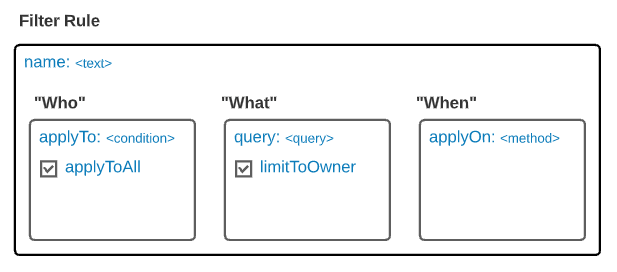
name– The name of the filter rule that you intend to create. This will be used mainly as a description of what you intend the rule to accomplish.
-
applyTo– The property that describes who to apply this filter rule to. This property takes a list of one or more condition objects.-
condition – The condition that must be met in order for the filter rule to apply to the current user. The condition contains two properties.
- type – The property that determines what kind of condition to compare against the current user:
USER_IDGROUP_ID
values– The property that takes a list of possible values that the current user will be compared to. For example, if thetypeof the condition isUSER_IDand thevalueslist contains the current user’s ID, then the condition will evaluate to true, and this filter rule will apply to the current user. If the list does not contain the user’s ID, the condition will evaluate to false, and the filter rule will not apply and will be skipped.- Wildcards: In addition to listing static values, this field also supports two wildcards:
%userId%and%groupIds%. An example of using one is,"query": {"content.user": "%userId%"}, which would replace the%userId%with the ID of the current user.
- Wildcards: In addition to listing static values, this field also supports two wildcards:
- type – The property that determines what kind of condition to compare against the current user:
-
-
applyToAll– A boolean value that overrides the applyTo property. If this property is set to true, then the current filter rule will apply to all users of the app.
query– The AppDB query that should be combined with any query the user is trying to make to further filter their request for documents. For example, let’s say the user belongs to the “West Sales” group, as defined in our example Collection, and they write the following query to search for documents:
{ "content.country": "US" }In this case, because the user is part of a group defined in the applyTo section of the filter rule definition, the condition would be evaluated to true and our additional document-level security filter would be applied. The resulting query to AppDB on the server side would be transformed to look similar to the following:
{ "content.country": "US", "content.region": "West" }So although the user requested all documents from the “US” country, only those documents which are both in the “US” and the “West” region will be returned to the user.
limitToOwner– This property takes a boolean that determines whether to add another query to any request that limits documents to only those created by the current user. So, if this flag were set totrue, then the resulting query on the backend would be transformed still further to add the user’s ID to the request. In the case of our previous example, even though the user requested documents from the “US”, they would be returned all documents from the “US” that are in the “West” region and created by the existing user.
{ "content.country": "US", "content.region": "West", "owner": "123456" }-
applyOn– Takes a list of HTTP methods that the current filter rule should apply to. The list of methods is as follows:READUPDATEDELETE
Any AppDB endpoint that performs one of these operations will apply extra filtering prior to executing the request that the user specified. From our previous example: If a user were given the document ID of a document that was not in the “West” region and the DELETE method existed in a filter rule that applied to those documents, then when they attempt to call the delete endpoint and use that document ID, they would not be allowed to delete it. In this case, if they called the single document's delete endpoint, it would return a '404 not found' error. If they called the bulk endpoint, it would return '0 documents deleted'.
Some applications might find it necessary to add security permissions at the Collection level. This could range from adding or removing the ability for a user to modify the definition of a programmatically created Collection to removing the ability of any user of the app to delete any documents from the Collection. By default, all users of the app who own the Collection have all permissions to the Collection and its documents until the permissions are updated to be more specific.
Assuming you already have permission to modify the Collection, you can change the permissions of a Collection by hitting the following endpoint:
domo.put(
  '/domo/datastores/v1/collections/Users/permission/RYUU_APP/733ff55b-387c-472e-b3c7-9911c7057f5f?permissions=read,create_content,update_content,read_content',
);PUT /domo/datastores/v1/collections/{collectionName}/permission/{entity}/{entityId}?permissions={permissionList} HTTP/1.1
Content-Type: application/json
HTTP/1.1 200 OK
The following are the possible entities that can be used in the entity path parameter in the above endpoint:
USERGROUPRYUU_APP
The value you choose for the entity path parameter will determine which entity ID you will need to provide for the entityId path parameter. For users and groups, you will use either the user ID or the group ID. If you want to modify permissions for anyone who has access to the app as a whole, you can use the RYUU_APP path parameter and provide the app instance ID as the entityId. The app instance ID is the first UUID provided in the URL of the iframe that houses the app. You should be able to pull down the URL in your JavaScript using window.location and parsing the first UUID programmatically.
The following are the possible permissions that can be added using the permissions query parameter:
admin- All permissions to the Collection and its documentswrite- Permission to update properties of the Collectionread- Permission to read the properties of the Collectionshare- Permission to add or remove any permissions this entity already hasdelete- Permission to delete the Collection or its documentscreate_content- Permission to create documents in the Collectionupdate_content- Permission to update documents in the Collectionread_content- Permission to read documents in the Collectiondelete_content- Permission to delete documents in the Collection
You can remove all permissions for an entity using the endpoint below. If all entities’ permissions are removed, then only users with the Manage AppDB grant will still have access.
domo.delete(
  '/domo/datastores/v1/collections/Users/permission/RYUU_APP/733ff55b-387c-472e-b3c7-9911c7057f5f',
);DELETE /domo/datastores/v1/collections/{collectionName}/permission/{entity}/{entityId} HTTP/1.1
Content-Type: application/json
HTTP/1.1 200 OK