- LLM을 의사결정 엔진으로 사용하여 작업을 수행하는 시스템임
- 모델은 입력된 데이터를 분석하여 맥락에 맞는 의사결정을 수행함
- 시스템은 사용자의 요청을 이해하고 적절한 해결책을 제시함
- 복잡한 작업을 자동화하여 업무 효율성을 높일 수 있음
-
모델은 외부 시스템 (DB, API 등)과 직접 소통할 수 없어 LangChain은 이를 위한 Tool Calling 기능을 제공함
-
Tool Calling은 모델이 사전에 정의된 도구나 함수를 호출해 외부 시스템과 상호작용하도록 돕는 매커니즘임
-
구조화된 출력과 스키마 기반 응답을 통해 시스템 요구사항을 충족하고 효율적인 통신을 가능하게 함
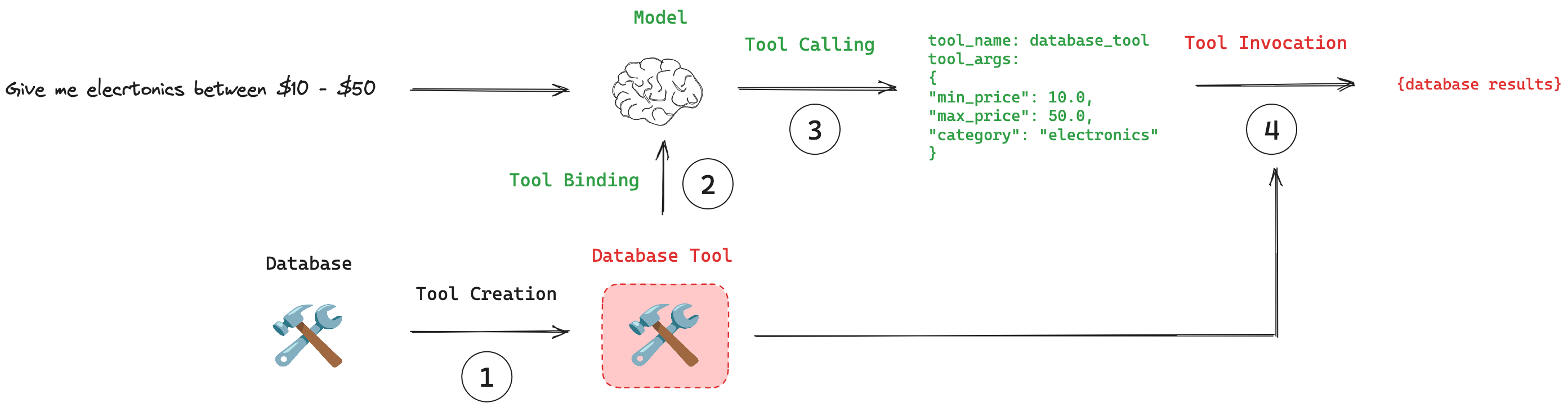
사용 흐름
| 단계 | 설명 |
|---|---|
| 1. Tool Creation | @tool 데코레이터를 사용하여 모델이 사용할 수 있는 도구로 정의함📌 도구로 정의하는 함수에는 설명이 입력되어야 함 |
| 2. Tool Binding | 정의한 도구를 모델에 연결하여 입력 스키마를 인식시킴 |
| 3. Tool Calling | 모델이 적절한 도구를 선택하고, 호출에 필요한 입력값을 생성함 |
| 4. Tool Execution | 모델이 선택한 도구를 실행하고 결과를 받아 응답 생성에 활용함 |
유의 사항
- Tool Calling 기능은 모델의 구조화 출력 능력에 의존하므로 모델 선택이 중요함
- 도구의 설명과 입력이 직관적일수록 모델이 잘 활용함
- 과다한 도구는 모델의 성능 저하를 유발하므로 5개 이하로 사용하는 것이 이상적임
예시 코드
from langchain_core.tools import tool
from langchain_openai import ChatOpenAI

# Tool creation
@tool
def multiply(a: int, b: int) -> int:
    """Multiply a and b."""
    return a * b

tools = [multiply]

# Tool binding
model = ChatOpenAI(model="gpt-4.1-mini", temperature=0)
model_with_tools = model.bind_tools(tools)

# Tool calling
response = model_with_tools.invoke("3과 4를 곱해줘")
print(response.tool_calls[0])
# > Output: {'name': 'multiply', 'args': {'a': 3, 'b': 4}, 'id': '...', 'type': 'tool_call'}

# Tool execution
result = multiply.invoke(response.tool_calls[0])
print(result.content)
# > Output: 12- LangChain의 기본 에이전트 실행 시스템임
- 에이전트의 계획-실행-관찰 사이클을 자동으로 관리함
- 에이전트의 행동을 모니터링하고 결과를 반환함
사용 흐름
- Tool Creation :
@tool데코레이터를 사용하여 모델이 사용할 수 있는 도구를 정의함 - 추론 체인 구성 : 에이전트의 기본 행동과 응답 방식을 정의하는 프롬프트 템플릿과 핵심 추론 엔진 모델을 정의함
- 에이전트 생성 : 모델과 도구를 통합하여 복잡한 작업을 수행하는 에이전트를 생성함 (도구 실행 결과를 분석하여 최종 응답을 생성하는 워크플로우를 구현함)
- 에이전트 실행기 생성 : 에이전트의 작업 흐름을 관리하고 결과를 처리하는
AgentExecutor컴포넌트를 활용함- 사용자 입력부터 최종 출력까지의 전체 프로세스를 조율하고 제어함
- 에러 처리, 로깅, 결과 포매팅 등 시스템 운영에 필요한 기능을 제공함
예시 코드
from langchain_core.prompts import ChatPromptTemplate, MessagesPlaceholder
from langchain_openai import ChatOpenAI
from langchain.agents import create_tool_calling_agent
from langchain.agents import AgentExecutor

# 프롬프트 템플릿 정의
prompt = ChatPromptTemplate.from_messages([
    ("system", "당신은 사용자의 요청을 처리하는 AI Assistant입니다."),
    ("user", "{input}"),
    MessagesPlaceholder(variable_name="agent_scratchpad")
])

# 모델 정의
llm = ChatOpenAI(model="gpt-4.1-mini",temperature=0)

# 도구 목록 생성
tools = [get_weather, calculate]

# 에이전트 생성 (도구 호출)
agent = create_tool_calling_agent(llm, tools, prompt)

# 에이전트 실행기 생성
agent_executor = AgentExecutor(
    agent=agent,      # 도구 호출 에이전트
    tools=tools,      # 도구 목록
    verbose=True,     # 상세 로그 출력
    return_intermediate_steps=True  # 중간 단계 반환 (기본값 False)
)

# 에이전트 실행
response = agent_executor.invoke(
    {"input": "서울의 날씨는 어떤가요?"},
)

# 중간 단계 출력
for msg in response['intermediate_steps']:
    pprint(msg[0])
    pprint(msg[1])
- QA 페인을 구성하여 질의응답 시스템을 체계화할 수 있음
- 도구 사용을 통해 사용자가 원하는 정보를 컨텍스트로 활용 가능함
(https://modelcontextprotocol.io/introduction) (https://github.com/modelcontextprotocol/python-sdk) (https://github.com/langchain-ai/mcpdoc/tree/main) (https://github.com/thedaviddias/llms-txt-hub)