This Twitch chat bot connects twitch chat to StarCraft II game enabling viewers to interact witht the streamer directly. It works only on arcade maps that support this – my MM maps. Here is a longer post on my site.
The bot has been refactored and mostly incorporated into my StarCraft II Co-op Overlay. It's generally improved and doesn't require creating new account for a bot. Only image recognition functionality hasn't been ported as it requires cv2 package and is difficult to set up for different screen resolutions.
- Basic bot stuff - responses, etc.
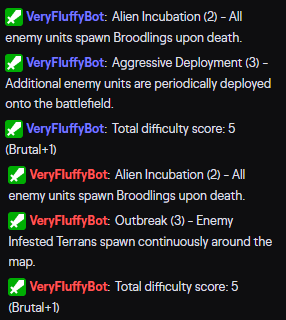
- Indentifies mutators that are being played through image recognition and posts them in the chat or as overlay on screen
- Calculates mutation difficulty score and equivalent Brutal+ difficulty and posts it into the chat
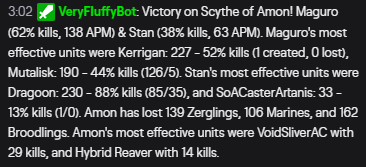
- Analyses replays and posts game summary in the chat
- Game integration into my [MM] maps. You can affect the game with several supported commands (!join, !message, !spawn, !mutator, !resources).
Viewers joining into the game:

Mutator identification through image recognition:
Post game summary:
- Create a twitch account for the bot
- Get twich API oauth key for the bot (https://twitchapps.com/tmi/)
- Download the config file and .exe (or python script and run/compile it yourself).
- Change channel name, bot name, oauth key, bank locations (and optionally responses) in the config file.
- Run the bot while playing
Commands for the streamer:
- !gm → enables partial game integration (!join, !message). But it's on by default already.
- !gm full → enables full game integration (!mutator, !spawn, !resources)
- !gm stop → disables all game integration
Editing responses:
- You add or remove them as you wish (except "RESPONSE", removing that one might throw an error)
- For example if you add
SNOW = It's snowing!, if someone writes "!snow", the bot will say "It's snowing!"