This is the single source of truth for adding a theme to Gogh: the
step-by-step workflow, the .yml template, the field reference, and the
rules a theme PR needs to follow.
Requires task and uv
installed locally. Run task help any time for this same workflow printed
to your terminal, or bare task to list every command.
Changing
gogh.shorapply-colors.shdirectly instead of adding a theme? This guide doesn't cover that — runtask testbefore opening a PR (bash -n, ShellCheck, and the Bats suite intests/; same checks CI runs).
task initEnables a local git hook that blocks commits touching data/, installs/,
gogh.sh, or tools/run.txt — those are generated by CI, never by hand.
Add themes/<Your Theme Name>.yml (filename must match the theme's name:
field). Copy an existing file in themes/ as a starting point, or use this
template — replace the hex values with your own:
---
name: 'Gogh'
author: ''             # 'Author Name (http://website.com)'
variant: ''            # dark or light (lowercase)

color_01: '#292D3E'    # Black (Host)
color_02: '#F07178'    # Red (Syntax string)
color_03: '#62DE84'    # Green (Command)
color_04: '#FFCB6B'    # Yellow (Command second)
color_05: '#75A1FF'    # Blue (Path)
color_06: '#F580FF'    # Magenta (Syntax var)
color_07: '#60BAEC'    # Cyan (Prompt)
color_08: '#ABB2BF'    # White

color_09: '#959DCB'    # Bright Black
color_10: '#F07178'    # Bright Red (Command error)
color_11: '#C3E88D'    # Bright Green (Exec)
color_12: '#FF5572'    # Bright Yellow
color_13: '#82AAFF'    # Bright Blue (Folder)
color_14: '#FFCB6B'    # Bright Magenta
color_15: '#676E95'    # Bright Cyan
color_16: '#FFFEFE'    # Bright White

background: '#292D3E'  # Background
foreground: '#BFC7D5'  # Foreground (Text)

cursor: '#BFC7D5'      # Cursor
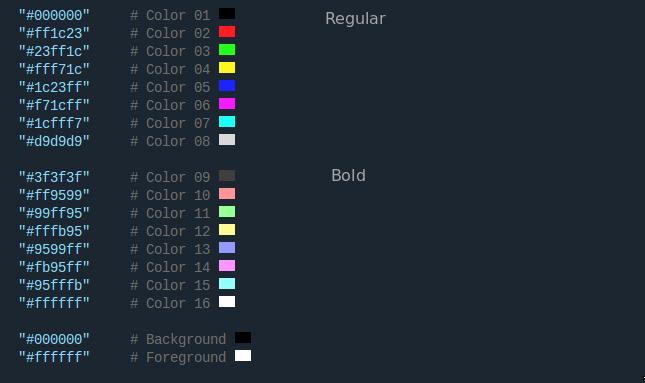
The 18 colors are laid out in 3 sections — regular text (color_01-08),
bold text (color_09-16), and text/background (foreground/background/
cursor) — across the 8 basic colors (black, red, green, yellow, blue,
purple, cyan, white). This image shows how they map to what you see in a
terminal:
The name itself can be whatever its original author/repo called it (e.g.
ported from mbadolato/iTerm2-Color-Schemes) — Gogh doesn't force a casing
style on it. Rules (checked automatically by task validate, see step 4):
- Filename matches
name:exactly (e.g.Solarized Dark.yml↔name: 'Solarized Dark') — required. - No underscores (
_) in the name — use a space or hyphen instead — required. variant:is exactlydarkorlight, lowercase (or empty) — required.- Foreground/background contrast of at least 2.5:1 — recommended, won't block your PR if you skip it.
- All 16 ANSI colors, plus
background,foreground,cursor. - Every hex value uppercase (
#FF0000, not#ff0000) — required.
task generateRegenerates data/, installs/, gogh.sh, and tools/run.txt locally so
you can see what CI would produce — without pushing and pulling. Once you're
done looking:
task cleanDiscards that regenerated output, so your working tree only has the new
themes/*.yml file. Don't commit data//installs//gogh.sh/tools/run.txt
yourself — task init's hook will refuse it, and CI generates the real thing
once your PR is merged.
task validateRuns the same checks CI runs on your PR: colors uppercase, filename matches
name:, no underscores in name:, variant: is dark/light/empty
(these block), a foreground/background contrast recommendation (doesn't
block), and that only themes/ was touched. Add your real title to also
check that:
task validate TITLE="theme: Add Your Theme Name"- Title: starts with
theme:, e.g.theme: Add Solarized Midnight. - Scope: only add or edit files under
themes/— no changes anywhere else in the repo (data/,tools/,installs/,gogh.sh, etc. are all generated automatically by CI once your PR is merged, so you don't need to touch them). - Filename, no underscores, variant: as in step 2 (only checked for a newly added theme, not one you're just editing).
- Contrast: as in step 2, but recommended only — it's reported, not required.
- Colors: every hex value uppercase, as in step 2.
CI regenerates data/, installs/, gogh.sh, etc. automatically once a
maintainer merges it.