Arazzo Visualizer helps you understand, edit, and run Arazzo Specification workflows directly inside VS Code.
It turns Arazzo files into interactive diagrams, keeps the diagram in sync with your code, and includes a built-in runner engine so you can try workflows against real APIs without leaving the editor.
- Install the extension from the VS Code Marketplace.
- Open an Arazzo file, such as
.arazzo.yaml,.arazzo.yml, or.arazzo.json. - Click the Arazzo Overview icon in the editor toolbar, or open the Command Palette (
Ctrl+Shift+P/Cmd+Shift+P) and run ArazzoDesigner: Open Arazzo Visualizer.
The visualizer opens beside your file and updates as you edit.
Read complex API flows as a clear diagram instead of scanning long YAML or JSON files.
- See the full flow: View workflows, steps, decisions, and connections in one place.
- Focus on one workflow: Open a specific workflow when you want a closer look.
- Inspect details: Select a step to understand the request, response, inputs, outputs, and success checks.
- Stay in sync: Update the file and the diagram refreshes automatically.
The extension adds helpful actions above workflow definitions.
- Visualize: Open the selected workflow in the visualizer.
- Try with AI: Run the selected workflow through Github Copilot.
Arazzo Visualizer works with GitHub Copilot so you can create, change, and run workflows using plain English.
Starting from scratch? Open Copilot Chat and ask for the workflow you need:
"Create a sample Arazzo file named toolshop.arazzo.yaml with 3 steps using the Toolshop OpenAPI specification below to list all products and create a cart: https://api.practicesoftwaretesting.com/docs"
Editing an existing file? Ask Copilot for a change:
"Add a retry step if the tool list fetch fails."
"Add success criteria to the 'create cart' step to check that the status code is 200."
After you save, the visualizer updates to match the latest file.
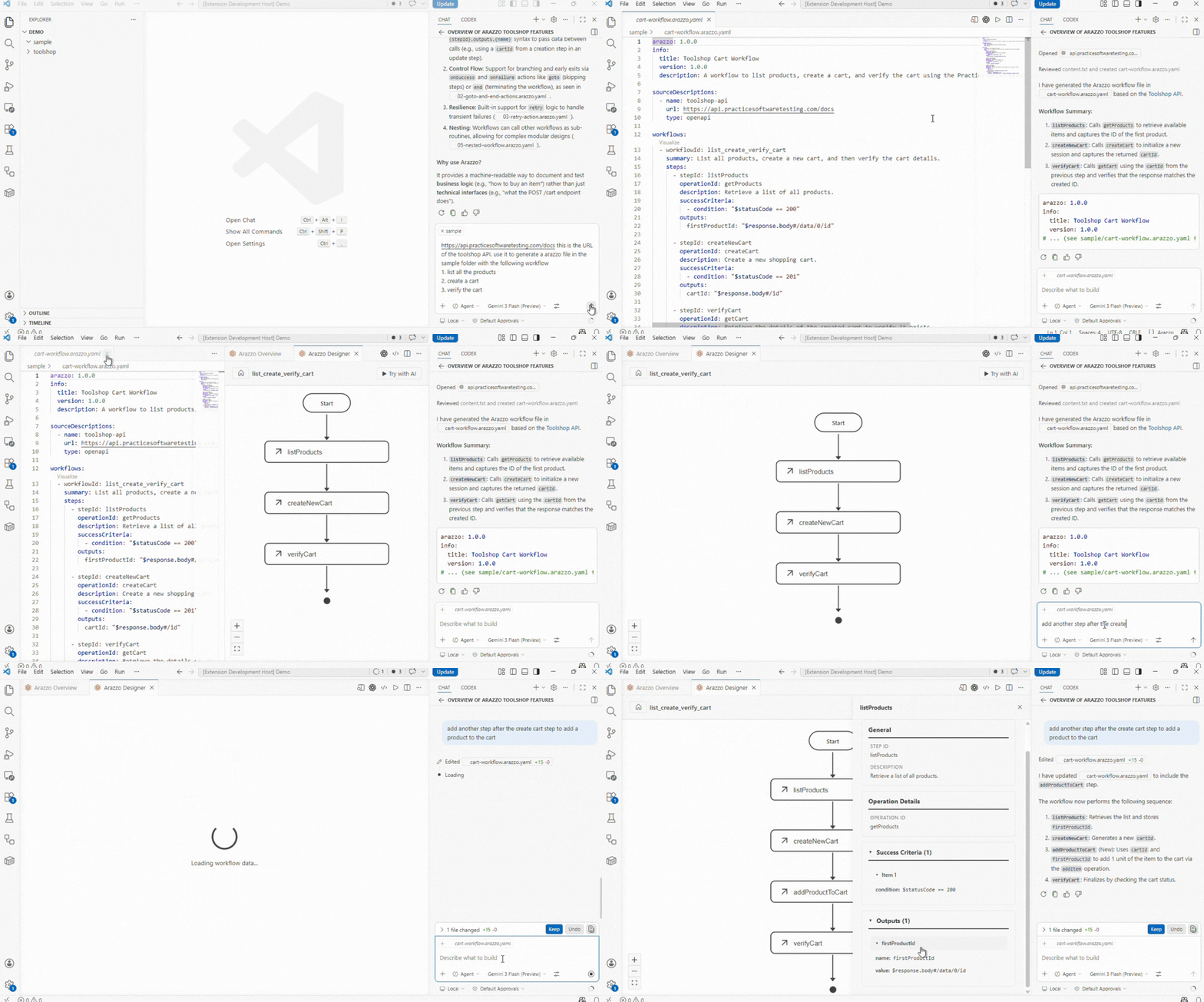
The visualizer shows how a workflow is designed. The built-in Runner Engine helps you prove that the workflow actually works.
Use it to execute an Arazzo workflow from VS Code and see how each API call behaves in a real run. This makes the extension useful not only for reading workflows, but also for testing, validating, and improving them as you build.
- Run real API sequences: Execute workflow steps in the order defined by your Arazzo file.
- Validate each step: Check responses, status codes, success criteria, and output values as the workflow runs.
- Pass data between steps: Use values returned by one API call in later steps, just like the workflow describes.
- Start from anywhere: Run a workflow from the visualizer, or via CodeLens actions above each workflow.
- Use Copilot as the entry point: Ask Copilot to run a workflow in plain English, such as
List all available products in the tool shop and create a cart. - Review what happened: Use the execution logs and trace details to understand failures, slow steps, and unexpected results.
- No separate setup: The runner is packaged with the extension, so you do not need to install another tool to try a workflow.
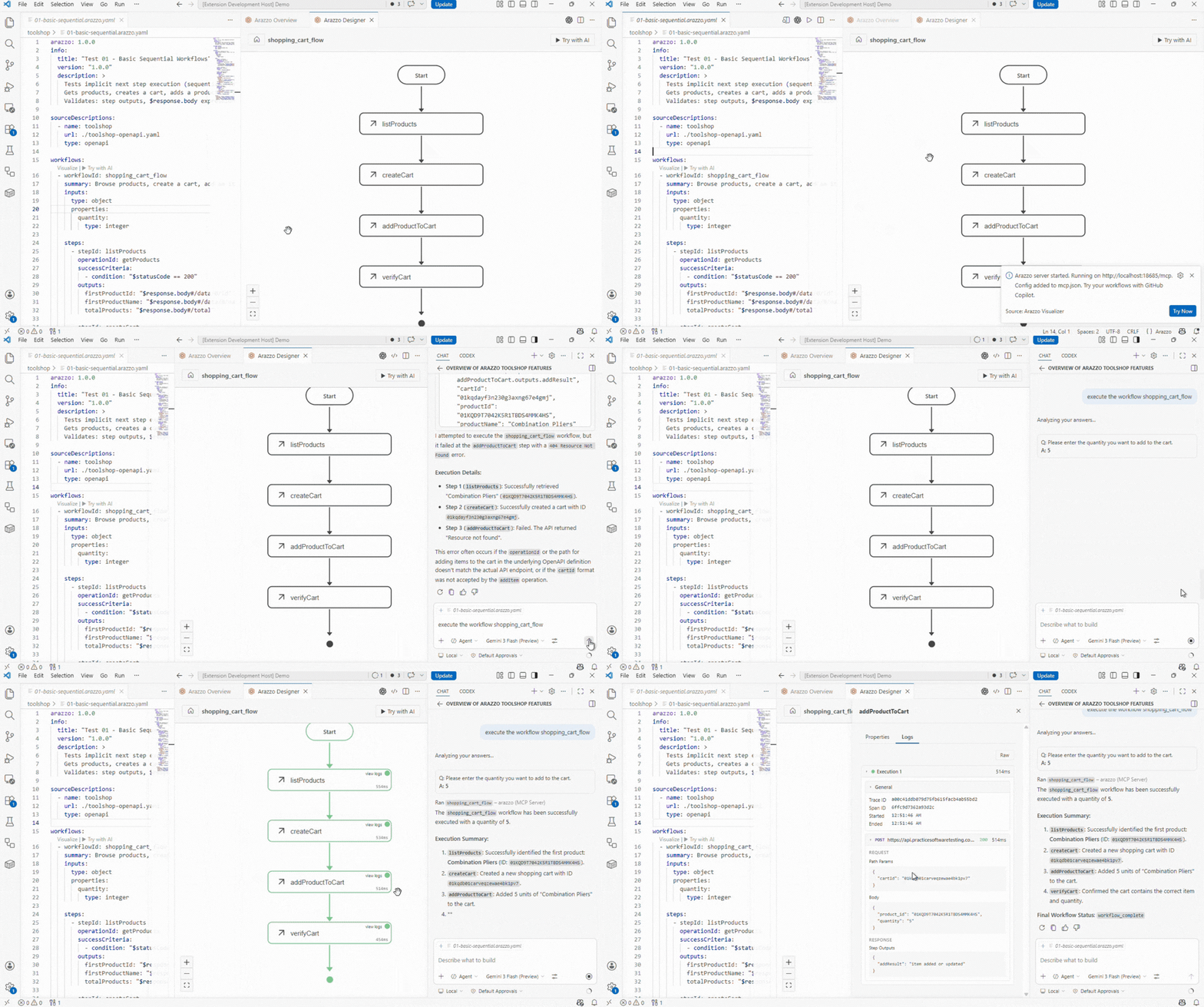
When a workflow runs, the extension shows what happened step by step.
- Live progress: Watch the workflow as it runs.
- Clear results: See which steps passed, which failed, and why.
- Trace details: Review timing and request flow information when you need to troubleshoot a slow or failing workflow.
The extension also improves the normal editing experience for Arazzo files.
- Syntax highlighting for Arazzo keywords and runtime expressions like
$statusCodeand$response.body - Suggestions for valid fields and values while you type
- Validation for missing fields, invalid references, and structure issues
- File recognition for
.arazzo.yaml,.arazzo.yml,.arazzo.json, and matching-arazzofile names
The Arazzo Specification is an OpenAPI Initiative standard for describing API workflows. It is useful when you need to show or test how several API calls work together.
Common use cases include:
- Documenting multi-step API flows
- Testing end-to-end API journeys
- Describing real user or system workflows
- Supporting SDK, code generation, and compliance automation