No ORM files in Blender Cloud texture library? #3154


-
|
I'm starting to texture and light the model I'm using to try out importing things to Hubs, and I have a question.. I'm was looking through Blender Cloud's texture library for some quick textures to make sure I can make everything work correctly and they don't seem to have ORM files, which are what are discussed in the videos? Or maybe they are ORM files but are not labeled as such? I'm seeing just Color files, sometimes just Color and Specular, occasionally there's a Normal or Bump in there. I found one with an Ambient Occlusion file. But none that say anything about ORM. Am I looking in the wrong place for ORM files? Or am I missing something? |
Beta Was this translation helpful? Give feedback.
Replies: 1 comment

-
|
If the texture library contains separate Occlusion, Roughness, and Metallic textures, you can combine them into one ORM texture in a number of ways. Pasting them into the R, G, & B channels, respectively, using an image editor is one such way. |
Beta Was this translation helpful? Give feedback.


If the texture library contains separate Occlusion, Roughness, and Metallic textures, you can combine them into one ORM texture in a number of ways. Pasting them into the R, G, & B channels, respectively, using an image editor is one such way.
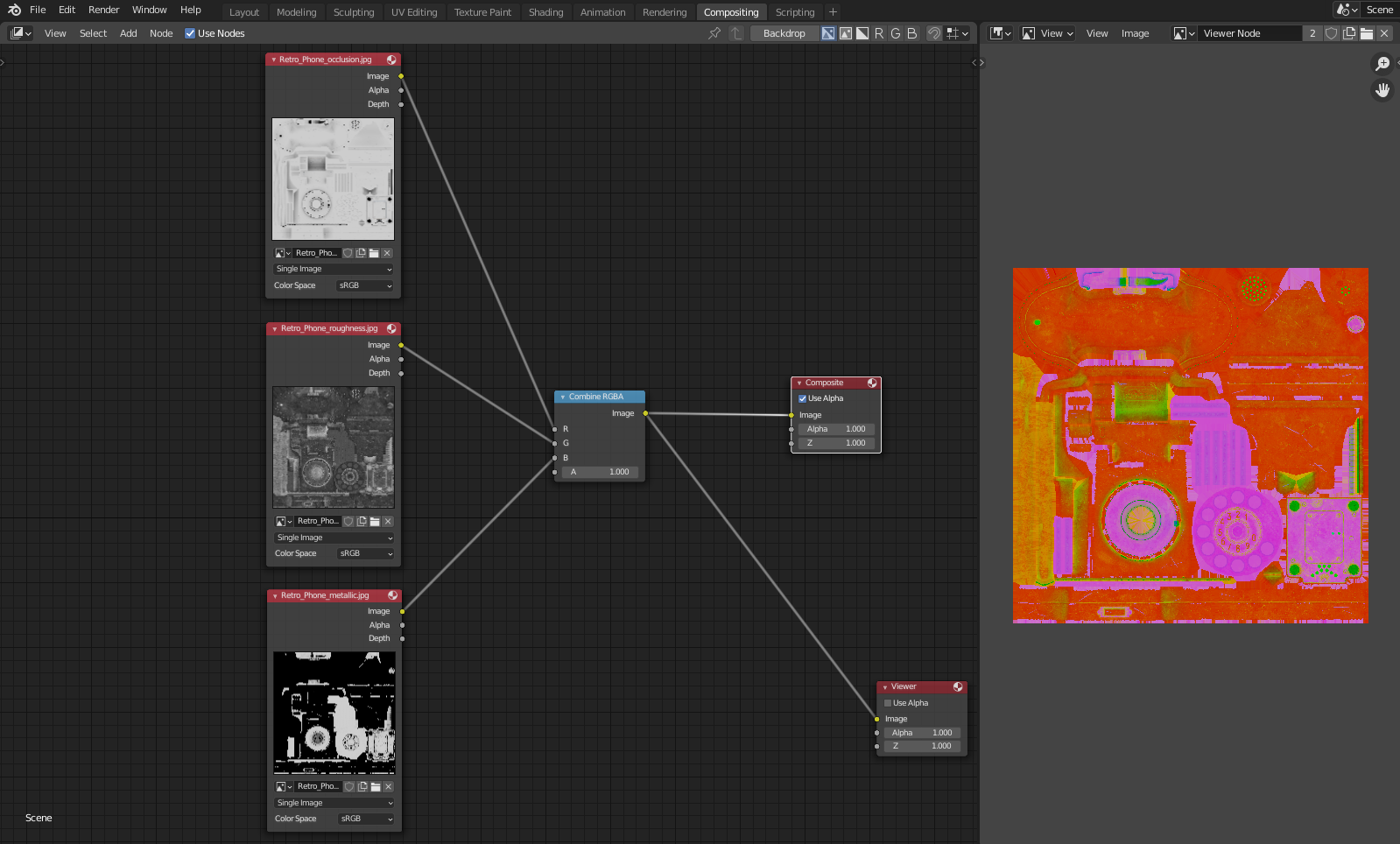
I like to use Blender's compositor to do this.
You can set up your separate image files and use a 'Combine RGB' node to output them to a new render: