
(上の画像をクリックして、このレッスンの動画をご覧ください)
これまでのカリキュラムで、プロンプトや「プロンプトエンジニアリング」と呼ばれる専門分野などの基本的な概念について学びました。ChatGPT、Office 365、Microsoft Power Platformなどのツールを使用して、プロンプトを活用して何かを達成することができます。
アプリにそのような体験を追加するには、プロンプトや補完の概念を理解し、使用するライブラリを選択する必要があります。この章では、まさにその内容を学びます。
この章では以下を学びます:
- openaiライブラリとその基本概念について学ぶ
- openaiを使用してテキスト生成アプリを構築する
- プロンプト、温度、トークンなどの概念を使用してテキスト生成アプリを構築する方法を理解する
このレッスンの終わりには以下ができるようになります:
- テキスト生成アプリとは何かを説明する
- openaiを使用してテキスト生成アプリを構築する
- トークンの使用量を調整したり、温度を変更して出力を多様化する方法を設定する
通常、アプリを構築する際には以下のようなインターフェースがあります:
- コマンドベース。コンソールアプリは典型的な例で、コマンドを入力するとタスクを実行します。例えば、
gitはコマンドベースのアプリです。 - ユーザーインターフェース(UI)。一部のアプリにはグラフィカルユーザーインターフェース(GUI)があり、ボタンをクリックしたり、テキストを入力したり、オプションを選択したりします。
コマンドベースのアプリと比較すると以下のような制限があります:
- 制限がある。入力できるコマンドはアプリがサポートしているものだけです。
- 言語特化。一部のアプリは多言語をサポートしていますが、デフォルトでは特定の言語向けに構築されています。追加の言語サポートを追加することは可能です。
では、テキスト生成アプリはどう違うのでしょうか?
テキスト生成アプリでは、より柔軟性があり、特定のコマンドや入力言語に限定されません。代わりに自然言語を使用してアプリと対話することができます。また、従来のアプリがデータベースにある情報に限定されるのに対し、テキスト生成アプリは膨大な情報を学習したデータソースと直接やり取りすることができます。
以下のようなものを構築することができます:
- チャットボット。会社や製品に関する質問に答えるチャットボットは良い選択肢です。
- ヘルパー。LLMはテキストの要約、洞察の取得、履歴書の作成などに優れています。
- コードアシスタント。使用する言語モデルによっては、コード作成を支援するコードアシスタントを構築できます。例えば、GitHub CopilotやChatGPTを使用してコード作成を支援することができます。
LLMと統合する方法を見つける必要があります。通常、以下の2つのアプローチがあります:
- APIを使用する。プロンプトを含むウェブリクエストを構築し、生成されたテキストを取得します。
- ライブラリを使用する。ライブラリはAPI呼び出しをカプセル化し、使いやすくします。
LLMを操作するための有名なライブラリには以下があります:
- openai。このライブラリはモデルに接続し、プロンプトを送信するのを簡単にします。
さらに高レベルで動作するライブラリもあります:
- Langchain。LangchainはPythonをサポートしており、広く知られています。
- Semantic Kernel。Semantic KernelはMicrosoftが提供するライブラリで、C#、Python、Javaをサポートしています。
最初のアプリを構築する方法、必要なライブラリ、必要な作業量などを見てみましょう。
OpenAIやAzure OpenAIとやり取りするためのライブラリは多数存在します。C#、Python、JavaScript、Javaなどのプログラミング言語を使用することも可能です。ここではPythonのopenaiライブラリを選択し、pipを使用してインストールします。
pip install openai以下の手順を実行してください:
-
Azureでアカウントを作成する https://azure.microsoft.com/free/
-
Azure OpenAIへのアクセスを取得する。以下のリンクでアクセスを申請してください https://learn.microsoft.com/azure/ai-services/openai/overview#how-do-i-get-access-to-azure-openai
[!NOTE] 執筆時点では、Azure OpenAIへのアクセスを申請する必要があります。
-
Pythonをインストールする https://www.python.org/
-
Azure OpenAI Serviceリソースを作成する。リソース作成方法については以下のガイドを参照してください create a resource
この時点で、openaiライブラリに使用するAPIキーを指定する必要があります。APIキーを見つけるには、Azure OpenAIリソースの「Keys and Endpoint」セクションに移動し、「Key 1」の値をコピーしてください。
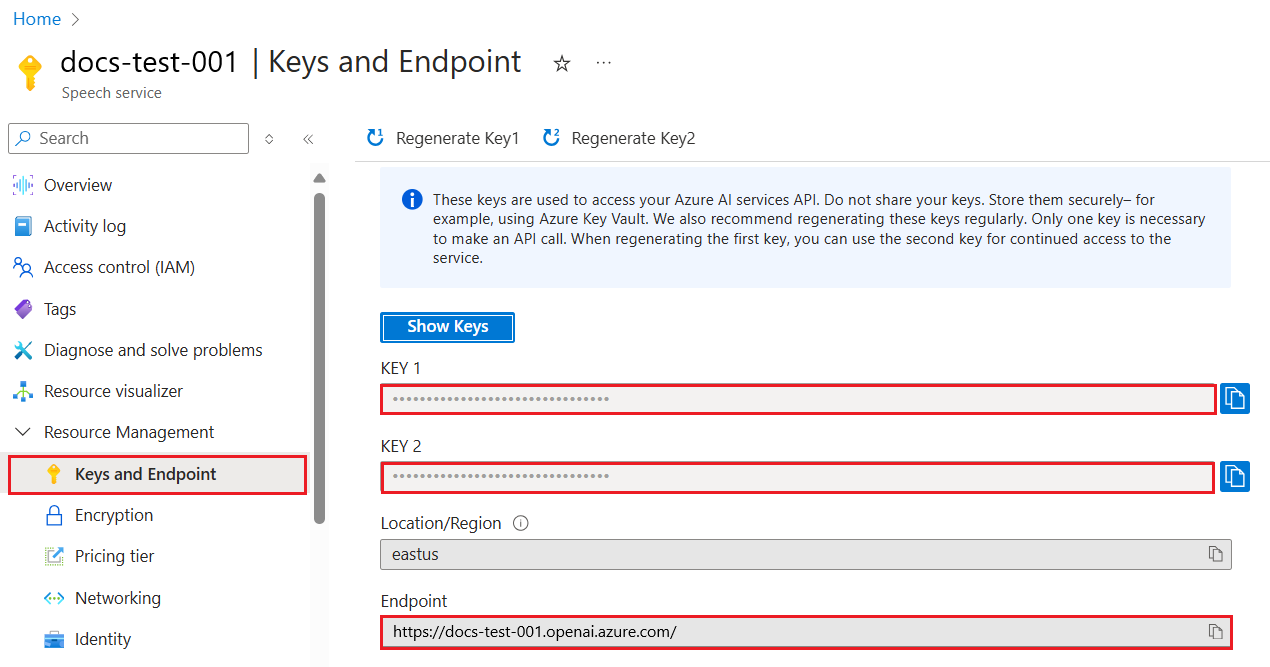
この情報をコピーしたら、ライブラリに指示を与えましょう。
Note
APIキーをコードから分離する価値があります。環境変数を使用してこれを行うことができます。
- 環境変数
OPENAI_API_KEYをAPIキーに設定します。export OPENAI_API_KEY='sk-...'
Azure OpenAIを使用している場合、以下のように設定を行います:
openai.api_type = 'azure'
openai.api_key = os.environ["OPENAI_API_KEY"]
openai.api_version = '2023-05-15'
openai.api_base = os.getenv("API_BASE")
上記では以下を設定しています:
api_typeをazureに設定。これにより、ライブラリがOpenAIではなくAzure OpenAIを使用することを指示します。api_keyはAzureポータルで見つけたAPIキーです。api_versionは使用するAPIのバージョンです。執筆時点では最新バージョンは2023-05-15です。api_baseはAPIのエンドポイントです。AzureポータルでAPIキーの隣に表示されています。
[!NOTE] >
os.getenvは環境変数を読み取る関数です。OPENAI_API_KEYやAPI_BASEなどの環境変数を読み取るために使用できます。これらの環境変数はターミナルで設定するか、dotenvのようなライブラリを使用して設定します。
テキストを生成する方法はCompletionクラスを使用することです。以下はその例です:
prompt = "Complete the following: Once upon a time there was a"

completion = openai.Completion.create(model="davinci-002", prompt=prompt)
print(completion.choices[0].text)
上記のコードでは、補完オブジェクトを作成し、使用するモデルとプロンプトを渡します。その後、生成されたテキストを出力します。
これまでCompletionを使用してテキストを生成してきましたが、チャットボットにより適したChatCompletionというクラスもあります。以下はその使用例です:
import openai

openai.api_key = "sk-..."

completion = openai.ChatCompletion.create(model="gpt-3.5-turbo", messages=[{"role": "user", "content": "Hello world"}])
print(completion.choices[0].message.content)
この機能については次の章で詳しく説明します。
openaiの設定と構成方法を学んだので、最初のテキスト生成アプリを構築する時が来ました。アプリを構築するには以下の手順を実行してください:
-
仮想環境を作成し、openaiをインストールします:
python -m venv venv
source venv/bin/activate
pip install openai
[!NOTE] Windowsを使用している場合は
source venv/bin/activateの代わりにvenv\Scripts\activateを入力してください。[!NOTE] Azure OpenAIキーを以下のリンクで確認してください https://portal.azure.com/。
Open AIを検索し、Open AI resourceを選択してKeys and Endpointを選択し、Key 1の値をコピーしてください。 -
_app.py_ファイルを作成し、以下のコードを記述します:
import openai

openai.api_key = "<replace this value with your open ai key or Azure OpenAI key>"

openai.api_type = 'azure'
openai.api_version = '2023-05-15'
openai.api_base = "<endpoint found in Azure Portal where your API key is>"
deployment_name = "<deployment name>"

# add your completion code
prompt = "Complete the following: Once upon a time there was a"
messages = [{"role": "user", "content": prompt}]

# make completion
completion = openai.chat.completions.create(model=deployment_name, messages=messages)

# print response
print(completion.choices[0].message.content)
[!NOTE] Azure OpenAIを使用している場合は、
api_typeをazureに設定し、api_keyをAzure OpenAIキーに設定する必要があります。以下のような出力が表示されるはずです:
 very unhappy _____.

Once upon a time there was a very unhappy mermaid.
プロンプトを使用してテキストを生成する方法を学びました。さらに、異なる種類のテキストを生成するために変更可能なプログラムも動作しています。
プロンプトは様々なタスクに使用できます。例えば:
- 特定の種類のテキストを生成する。例えば、詩やクイズの質問などを生成できます。
- 情報を検索する。プロンプトを使用して情報を検索できます。例:'Web開発におけるCORSとは何ですか?'
- コードを生成する。プロンプトを使用してコードを生成できます。例えば、メールを検証する正規表現を作成したり、ウェブアプリのようなプログラム全体を生成したりできます。
家にある材料を使って料理をしたいとします。そのためにはレシピが必要です。レシピを見つける方法として検索エンジンを使用することもできますが、LLMを使用することもできます。
以下のようなプロンプトを記述できます:
"以下の材料を使った料理のレシピを5つ教えてください:鶏肉、ジャガイモ、ニンジン。各レシピで使用するすべての材料をリストしてください"
上記のプロンプトを使用すると、次のような応答が得られるかもしれません:
1. Roasted Chicken and Vegetables:
Ingredients:
- 4 chicken thighs
- 2 potatoes, cut into cubes
- 2 carrots, cut into cubes
- 2 tablespoons olive oil
- 2 cloves garlic, minced
- 1 teaspoon dried thyme
- 1 teaspoon dried oregano
- Salt and pepper, to taste

2. Chicken and Potato Stew:
Ingredients:
- 2 tablespoons olive oil
- 1 onion, diced
- 2 cloves garlic, minced
- 2 chicken breasts, cut into cubes
- 2 potatoes, cut into cubes
- 2 carrots, cut into cubes
- 1 teaspoon dried oregano
- 1 teaspoon dried thyme
- 1 cup chicken broth
- Salt and pepper, to taste

3. Chicken and Potato Bake:
Ingredients:
- 2 tablespoons olive oil
- 2 chicken breasts, cut into cubes
- 2 potatoes, cut into cubes
- 2 carrots, cut into cubes
- 1 onion, diced
- 2 cloves garlic, minced
- 1 teaspoon dried oregano
- 1 teaspoon dried thyme
- 1 cup chicken broth
- Salt and pepper, to taste

4. Chicken and Potato Soup:
Ingredients:
- 2 tablespoons olive oil
- 1 onion, diced
- 2 cloves garlic, minced
- 2 chicken breasts, cut into cubes
- 2 potatoes, cut into cubes
- 2 carrots, cut into cubes
- 1 teaspoon dried oregano
- 1 teaspoon dried thyme
- 4 cups chicken broth
- Salt and pepper, to taste

5. Chicken and Potato Hash:
Ingredients:
- 2 tablespoons olive oil
- 2 chicken breasts, cut into cubes
- 2 potatoes, cut into cubes
- 2 carrots, cut into cubes
- 1 onion, diced
- 2 cloves garlic, minced
- 1 teaspoon dried oregano
この結果は素晴らしいですね。これで何を料理するかが分かります。この時点で役立つ改善点としては:
- 嫌いな材料やアレルギーのある材料を除外する
- 家にない材料を考慮した買い物リストを作成する
上記のケースでは、以下の追加プロンプトを使用します:
"ニンニクがアレルギーなのでレシピから除外し、代わりに何か別のものを使ってください。また、家に鶏肉、ジャガイモ、ニンジンがあることを考慮して、レシピの買い物リストを作成してください。"
これで新しい結果が得られます。具体的には:
1. Roasted Chicken and Vegetables:
Ingredients:
- 4 chicken thighs
- 2 potatoes, cut into cubes
- 2 carrots, cut into cubes
- 2 tablespoons olive oil
- 1 teaspoon dried thyme
- 1 teaspoon dried oregano
- Salt and pepper, to taste

2. Chicken and Potato Stew:
Ingredients:
- 2 tablespoons olive oil
- 1 onion, diced
- 2 chicken breasts, cut into cubes
- 2 potatoes, cut into cubes
- 2 carrots, cut into cubes
- 1 teaspoon dried oregano
- 1 teaspoon dried thyme
- 1 cup chicken broth
- Salt and pepper, to taste

3. Chicken and Potato Bake:
Ingredients:
- 2 tablespoons olive oil
- 2 chicken breasts, cut into cubes
- 2 potatoes, cut into cubes
- 2 carrots, cut into cubes
- 1 onion, diced
- 1 teaspoon dried oregano
- 1 teaspoon dried thyme
- 1 cup chicken broth
- Salt and pepper, to taste

4. Chicken and Potato Soup:
Ingredients:
- 2 tablespoons olive oil
- 1 onion, diced
- 2 chicken breasts, cut into cubes
- 2 potatoes, cut into cubes
- 2 carrots, cut into cubes
- 1 teaspoon dried oregano
- 1 teaspoon dried thyme
- 4 cups chicken broth
- Salt and pepper, to taste

5. Chicken and Potato Hash:
Ingredients:
- 2 tablespoons olive oil
- 2 chicken breasts, cut into cubes
- 2 potatoes, cut into cubes
- 2 carrots, cut into cubes
- 1 onion, diced
- 1 teaspoon dried oregano

Shopping List:
- Olive oil
- Onion
- Thyme
- Oregano
- Salt
- Pepper
これでニンニクが含まれていない5つのレシピが得られ、家にある材料を考慮した買い物リストも作成されました。
シナリオを試したので、示されたシナリオに合ったコードを書いてみましょう。以下の手順に従ってください:
-
既存の_app.py_ファイルを出発点として使用します。
-
prompt変数を見つけて、以下のコードに変更します:prompt = "Show me 5 recipes for a dish with the following ingredients: chicken, potatoes, and carrots. Per recipe, list all the ingredients used"
コードを実行すると、以下のような出力が表示されるはずです:
-Chicken Stew with Potatoes and Carrots: 3 tablespoons oil, 1 onion, chopped, 2 cloves garlic, minced, 1 carrot, peeled and chopped, 1 potato, peeled and chopped, 1 bay leaf, 1 thyme sprig, 1/2 teaspoon salt, 1/4 teaspoon black pepper, 1 1/2 cups chicken broth, 1/2 cup dry white wine, 2 tablespoons chopped fresh parsley, 2 tablespoons unsalted butter, 1 1/2 pounds boneless, skinless chicken thighs, cut into 1-inch pieces
-Oven-Roasted Chicken with Potatoes and Carrots: 3 tablespoons extra-virgin olive oil, 1 tablespoon Dijon mustard, 1 tablespoon chopped fresh rosemary, 1 tablespoon chopped fresh thyme, 4 cloves garlic, minced, 1 1/2 pounds small red potatoes, quartered, 1 1/2 pounds carrots, quartered lengthwise, 1/2 teaspoon salt, 1/4 teaspoon black pepper, 1 (4-pound) whole chicken
-Chicken, Potato, and Carrot Casserole: cooking spray, 1 large onion, chopped, 2 cloves garlic, minced, 1 carrot, peeled and shredded, 1 potato, peeled and shredded, 1/2 teaspoon dried thyme leaves, 1/4 teaspoon salt, 1/4 teaspoon black pepper, 2 cups fat-free, low-sodium chicken broth, 1 cup frozen peas, 1/4 cup all-purpose flour, 1 cup 2% reduced-fat milk, 1/4 cup grated Parmesan cheese

-One Pot Chicken and Potato Dinner: 2 tablespoons olive oil, 1 pound boneless, skinless chicken thighs, cut into 1-inch pieces, 1 large onion, chopped, 3 cloves garlic, minced, 1 carrot, peeled and chopped, 1 potato, peeled and chopped, 1 bay leaf, 1 thyme sprig, 1/2 teaspoon salt, 1/4 teaspoon black pepper, 2 cups chicken broth, 1/2 cup dry white wine

-Chicken, Potato, and Carrot Curry: 1 tablespoon vegetable oil, 1 large onion, chopped, 2 cloves garlic, minced, 1 carrot, peeled and chopped, 1 potato, peeled and chopped, 1 teaspoon ground coriander, 1 teaspoon ground cumin, 1/2 teaspoon ground turmeric, 1/2 teaspoon ground ginger, 1/4 teaspoon cayenne pepper, 2 cups chicken broth, 1/2 cup dry white wine, 1 (15-ounce) can chickpeas, drained and rinsed, 1/2 cup raisins, 1/2 cup chopped fresh cilantro
NOTE、LLMは非決定論的なので、プログラムを実行するたびに異なる結果が得られる可能性があります。
素晴らしいですね。次に改善方法を見てみましょう。コードを柔軟にするために、材料やレシピの数を変更できるようにします。
-
以下のようにコードを変更します:
no_recipes = input("No of recipes (for example, 5): ")

ingredients = input("List of ingredients (for example, chicken, potatoes, and carrots): ")

# interpolate the number of recipes into the prompt an ingredients
prompt = f"Show me {no_recipes} recipes for a dish with the following ingredients: {ingredients}. Per recipe, list all the ingredients used"
コードをテスト実行すると、以下のような結果が得られるかもしれません:
No of recipes (for example, 5): 3
List of ingredients (for example, chicken, potatoes, and carrots): milk,strawberries

-Strawberry milk shake: milk, strawberries, sugar, vanilla extract, ice cubes
-Strawberry shortcake: milk, flour, baking powder, sugar, salt, unsalted butter, strawberries, whipped cream
-Strawberry milk: milk, strawberries, sugar, vanilla extract
現在、レシピを生成する機能を持つアプリが動作しており、ユーザーからの入力に基づいて柔軟に動作します。レシピの数や使用する材料を変更することができます。
さらに改善するために以下を追加したいと思います:
-
材料のフィルター。嫌いな材料やアレルギーのある材料を除外できるようにしたいです。この変更を実現するために、既存のプロンプトを編集し、以下のようにフィルター条件を追加します:
filter = input("Filter (for example, vegetarian, vegan, or gluten-free): ")

prompt = f"Show me {no_recipes} recipes for a dish with the following ingredients: {ingredients}. Per recipe, list all the ingredients used, no {filter}"
上記ではプロンプトの最後に
{filter}を追加し、ユーザーからフィルター値を取得しています。プログラムを実行した際の入力例は以下のようになります:
No of recipes (for example, 5): 3
List of ingredients (for example, chicken, potatoes, and carrots): onion,milk
Filter (for example, vegetarian, vegan, or gluten-free): no milk

1. French Onion Soup

Ingredients:

-1 large onion, sliced
-3 cups beef broth
-1 cup milk
-6 slices french bread
-1/4 cup shredded Parmesan cheese
-1 tablespoon butter
-1 teaspoon dried thyme
-1/4 teaspoon salt
-1/4 teaspoon black pepper

Instructions:

1. In a large pot, sauté onions in butter until golden brown.
2. Add beef broth, milk, thyme, salt, and pepper. Bring to a boil.
3. Reduce heat and simmer for 10 minutes.
4. Place french bread slices on soup bowls.
5. Ladle soup over bread.
6. Sprinkle with Parmesan cheese.

2. Onion and Potato Soup

Ingredients:

-1 large onion, chopped
-2 cups potatoes, diced
-3 cups vegetable broth
-1 cup milk
-1/4 teaspoon black pepper

Instructions:

1. In a large pot, sauté onions in butter until golden brown.
2. Add potatoes, vegetable broth, milk, and pepper. Bring to a boil.
3. Reduce heat and simmer for 10 minutes.
4. Serve hot.

3. Creamy Onion Soup

Ingredients:

-1 large onion, chopped
-3 cups vegetable broth
-1 cup milk
-1/4 teaspoon black pepper
-1/4 cup all-purpose flour
-1/2 cup shredded Parmesan cheese

Instructions:

1. In a large pot, sauté onions in butter until golden brown.
2. Add vegetable broth, milk, and pepper. Bring to a boil.
3. Reduce heat and simmer for 10 minutes.
4. In a small bowl, whisk together flour and Parmesan cheese until smooth.
5. Add to soup and simmer for an additional 5 minutes, or until soup has thickened.
ご覧の通り、牛乳を含むレシピが除外されています。ただし、乳糖不耐症の場合はチーズを含むレシピも除外したいかもしれませんので、明確にする必要があります。
-
買い物リストの作成。家にある材料を考慮して買い物リストを作成したいです。
この機能を実現するには、1つのプロンプトで全てを解決するか、2つのプロンプトに分けることができます。後者のアプローチを試してみましょう。ここでは追加のプロンプトを提案しますが、それを機能させるためには、前のプロンプトの結果を後のプロンプトのコンテキストとして追加する必要があります。
最初のプロンプトの結果を出力するコード部分を見つけ、その下に以下のコードを追加してください:
old_prompt_result = completion.choices[0].message.content
prompt = "Produce a shopping list for the generated recipes and please don't include ingredients that I already have."

new_prompt = f"{old_prompt_result} {prompt}"
messages = [{"role": "user", "content": new_prompt}]
completion = openai.Completion.create(engine=deployment_name, messages=messages, max_tokens=1200)

# print response
print("Shopping list:")
print(completion.choices[0].message.content)
以下の点に注意してください:
-
最初のプロンプトの結果を新しいプロンプトに追加して、新しいプロンプトを構築しています:
new_prompt = f"{old_prompt_result} {prompt}"
-
新しいリクエストを作成しますが、最初のプロンプトで要求したトークン数も考慮します。このため、今回は
max_tokensを1200に設定します。completion = openai.Completion.create(engine=deployment_name, prompt=new_prompt, max_tokens=1200)
このコードを試してみると、次のような出力が得られます:
No of recipes (for example, 5): 2
List of ingredients (for example, chicken, potatoes, and carrots): apple,flour
Filter (for example, vegetarian, vegan, or gluten-free): sugar


-Apple and flour pancakes: 1 cup flour, 1/2 tsp baking powder, 1/2 tsp baking soda, 1/4 tsp salt, 1 tbsp sugar, 1 egg, 1 cup buttermilk or sour milk, 1/4 cup melted butter, 1 Granny Smith apple, peeled and grated
-Apple fritters: 1-1/2 cups flour, 1 tsp baking powder, 1/4 tsp salt, 1/4 tsp baking soda, 1/4 tsp nutmeg, 1/4 tsp cinnamon, 1/4 tsp allspice, 1/4 cup sugar, 1/4 cup vegetable shortening, 1/4 cup milk, 1 egg, 2 cups shredded, peeled apples
Shopping list:
-Flour, baking powder, baking soda, salt, sugar, egg, buttermilk, butter, apple, nutmeg, cinnamon, allspice
-
これまでのコードは動作しますが、さらに改善するためにいくつか調整すべき点があります。以下のようなことを行うべきです:
-
秘密情報をコードから分離する。例えばAPIキーなどの秘密情報はコードに含めるべきではなく、安全な場所に保存する必要があります。秘密情報をコードから分離するには、環境変数を使用し、
python-dotenvのようなライブラリを使ってファイルから読み込むことができます。コードでは以下のように実装します:-
.envファイルを作成し、以下の内容を記述します:OPENAI_API_KEY=sk-...
注意: Azureを使用する場合、以下の環境変数を設定する必要があります:
OPENAI_API_TYPE=azure
OPENAI_API_VERSION=2023-05-15
OPENAI_API_BASE=<replace>
コード内では、環境変数を以下のように読み込みます:
from dotenv import load_dotenv

load_dotenv()

openai.api_key = os.environ["OPENAI_API_KEY"]
-
-
トークンの長さについての注意。生成したいテキストに必要なトークン数を考慮するべきです。トークンにはコストがかかるため、可能な限り使用するトークン数を節約するようにしましょう。例えば、プロンプトを工夫してトークン数を減らせるかどうかを検討してください。
使用するトークン数を変更するには、
max_tokensパラメータを使用します。例えば、100トークンを使用したい場合は以下のように設定します:completion = client.chat.completions.create(model=deployment, messages=messages, max_tokens=100)
-
温度の調整。温度はこれまで触れていませんが、プログラムの動作において重要な要素です。温度値が高いほど出力がランダムになり、低いほど予測可能な出力になります。出力にバリエーションが必要かどうかを考慮してください。
温度を変更するには、
temperatureパラメータを使用します。例えば、温度を0.5に設定したい場合は以下のようにします:completion = client.chat.completions.create(model=deployment, messages=messages, temperature=0.5)
注意: 1.0に近いほど出力が多様になります。
この課題では、何を作るかを選択できます。
以下は提案の一例です:
- レシピ生成アプリをさらに改善する。温度値やプロンプトを調整して、どのような結果が得られるか試してみてください。
- "勉強仲間"を作る。このアプリは、Pythonなどのトピックに関する質問に答えることができます。例えば、「Pythonの特定のトピックとは何ですか?」や「特定のトピックに関するコードを見せてください」といったプロンプトを使用できます。
- 歴史ボットを作成し、歴史を生き生きとさせる。ボットに特定の歴史上の人物を演じさせ、その人物の人生や時代について質問してみてください。
以下はスタータープロンプトです。これを使用して、自分の好みに合わせて調整してみてください。
- "You're an expert on the Python language

    Suggest a beginner lesson for Python in the following format:

    Format:
    - concepts:
    - brief explanation of the lesson:
    - exercise in code with solutions"
以下は使用できるプロンプトの例です:
- "You are Abe Lincoln, tell me about yourself in 3 sentences, and respond using grammar and words like Abe would have used"
- "You are Abe Lincoln, respond using grammar and words like Abe would have used:

   Tell me about your greatest accomplishments, in 300 words"
温度の概念は何を制御しますか?
- 出力のランダム性を制御します。
- 応答の大きさを制御します。
- 使用するトークン数を制御します。
課題に取り組む際、温度を変えてみてください。0、0.5、1に設定して試してみましょう。0は最も変化が少なく、1は最も変化が多いです。あなたのアプリに最適な値はどれですか?
このレッスンを完了した後は、Generative AI Learning collection をチェックして、生成AIの知識をさらに深めてください!
次のレッスン7では、チャットアプリケーションの構築について学びます!
免責事項:
この文書はAI翻訳サービスCo-op Translatorを使用して翻訳されています。正確性を追求しておりますが、自動翻訳には誤りや不正確な部分が含まれる可能性があります。元の言語で記載された文書を正式な情報源としてご参照ください。重要な情報については、専門の人間による翻訳を推奨します。この翻訳の使用に起因する誤解や誤認について、当方は一切の責任を負いません。