Understanding the essentials of Computer Networking with Linux
In order for applications to easily talk to other applications on a different machine, they utilize a standardized model to transfer data to one another over a network. A network is a set of devices (nodes) connected to one another via some physical method of transmission (wires, cables, telephone lines, radio waves, satellites, or infrared light beams, etc). For computer networking to be possible, a group of computers are connected with one another and utilize common protocols to communicate and receive information.
The OSI model is the basis on which all networking standards are based. This model describes the networking stack that transfers data to applications connected over a network. The OSI model is partitioned into seven abstraction layers (Physical, Data Link, Network, Transport, Session, Presentation, Application) each responsible for a different level of functionality in the process of representing the data transfer and telecommunication from one computer to another.
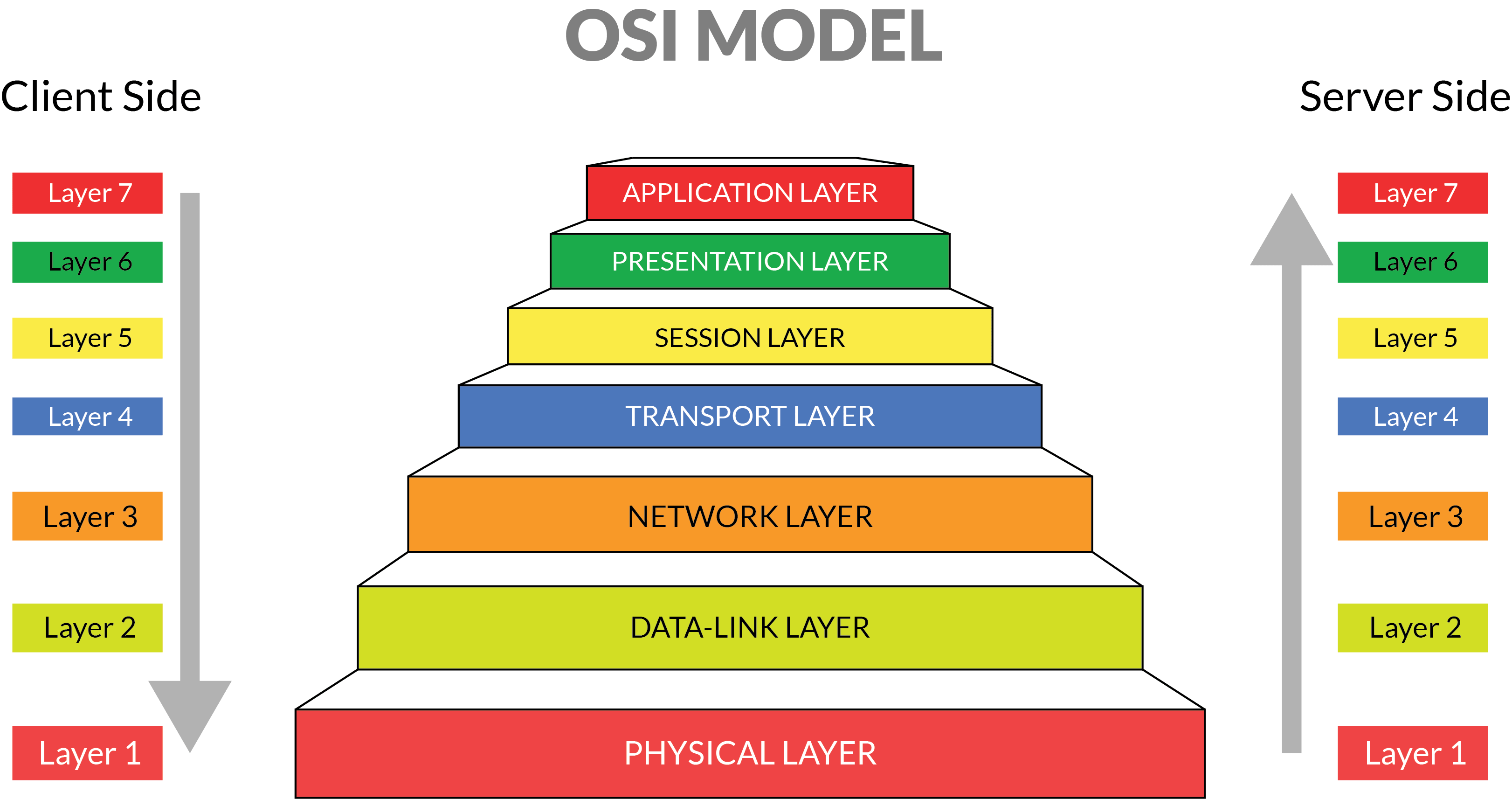
Using the OSI model, network admins have a framework to narrow down specific problems occuring in a system (whether something is a physical or application layer issue for example)

The Application layer is at the top and is the layer closest to the end user being the actual application that they see and interact with that facilitates access to other more internal application processes that utilize further networking services. Think of your Web Browser, Zoom or another application running on your machine which you utilize for one purpose but is doing a fair share of complicated networking under the hood.
The Presentation Layer "presents" data for the network or the application depending on whether it is in the position of sending or receiving. This layer formats data in an agnostic way that is not reliant on the format it will be represented in the Application layer. It accomplishes this by translating the data between application and network formats so that it can be further transferred.
The Session Layer is responsible for creating a means for two devices to connect and communicate with one another. It is responsible for managing the session of communication from start to close and functions to setup, coordinate things like system wait times, and terminate connection between the applications.
The Transport Layer ensures the reliable delivery of messages broadcasted within the session, acknowledging any data loss or duplication related issues that would prevent the data segments created out of the message received from the Application layer to be transmitted unsuccessfully.
The Network Layer handles the transfer and routing of packets from one node to another, fragmenting the data if necessary to transmit over the data link between the nodes.
The Data Link layer handles the direct data transfer between two nodes by forming a link connecting them. It also attempts to correct any errors in the data that arise in the physical layer.
The Physical layer is responsible for transferring and receiving raw data between a device and a physical transmission point (wires, cables, telephone lines, radio waves, satellites, or infrared light beams, etc).
While the OSI model is generally viewed as a more theoretical guide especially when compared to the more streamlined TCP/IP model, it is still used widely in the industry because it's approach to definining the structure of networking requests is relevant and platform agnostic.
The landscape of data center networking has changed recently with the rise of radically different offerings at the application layer. Whereas in the past many applications were delivered in on-premise data centers nowadays many apps are distributed across infrastructure and networks. With the various changes that have nbeen made has been brought about through advances in hardware technology allowing for faster network processing, the use of Linux as an operating system to facilitate networking has directly allowed for the rapid growth of businesses today.
Linux has a number of practical use cases that make it helpful in enterprise contexts.
- Automation and Orchestration
- Server Virtualization
- Private Cloud
- Big Data
- Containers
Most Linux servers are set up to allow for users to connect via Secure Shell (SSH), an encrypted communications protocol that is secure via the use of public & private keys stored on the host and remote server.
In order to connect using the ssh command the following syntax is used: ssh username@192.168.1.107 where after the ssh command you fill in the username of the account you're logging into remotely followed by the hostname or IP address of the linux host you're connecting to.
You can use the uname command to show the basic type of Linux OS you're using:
uname -a
You can also use the **hostnamectl command to show the hostname of the Linux server as well as other system info.
hostnamectl
Remember that Linux stores files in a tree like structure starting with the root / directory. There are some important directories in the file structure including:
/bin, /sbin, /usr/bin, and /usr/sbinwhich stores executables/devwhich stores files representing hardware devices/etcwhich stores configuratio files/homewhich stores home directories per user/varwhich stores variable-length files like log files
The $PATH variable includes all the location searched when you run a command in the CLI. The /bin directory is naturally in your path which allows you to execute many of the common commands.
Linux distros offer package managers that help you search for online packages that you can use. Some of the common package managers are apt, dpkg, rpm, and yum
Programs in Linux run interactively naturally but can also run in the background (often called services) in which case you don't see their output. In order to check running processes the ps command is helpful. ps -ef | less
In order to check running system services you can use the command systemctl status
To be effective in Linux Network Administration you need to understand how to use log files to determine the source of issues and errors. Most system logs are found in /var/log
Important log files include:
- syslog
- auth.log
- messages
Some of the common tools used to view and parse log files are:
- cat
- less
- grep
- head
- tail
You need different levels of access to work with different parts of the Linux OS. To be able to view more privileged files you may need superuser privileges which are made exclusive for the root user. The su command is used to switch users and sudo is used to obtain root user access.
To add, modify and delete users the following commands can be used: adduser, moduser, and deluser
File permissions in Linux work in a syntax that looks like this example:
drwxr-xr-x where the "d" lets you know that you're looking at a a directory and the three sets of permissions that follow let you know whether you can read, write, and execute the application at the user level, the group level, and the level of "others". The two most important types of objects in the Linux file system are directories ("d") and files ("-")