The Govee integration allows you to control and monitor lights and switches using the Govee API.
- The installation is done inside HACS (Home Assistant Community Store). If you don't have HACS, you must install it before adding this integration. Installation instructions here.
- Once HACS is installed, navigate to the 'Integrations' tab in HACS and search for the 'Govee' integration there. Click "Download this repository in HACS". On the next screen, select "Download". Once fully downloaded, restart HomeAssistant.
- In the sidebar, click 'Configuration', then 'Devices & Services'. Click the + icon to add "Govee" to your Home Assistant installation. An API key is required; you need to obtain it in the 'Govee Home' app on your mobile device. This can be done from the Account Page (Far right icon at the bottom) > Settings (top right icon) > About Us > Apply for API Key. The key will be sent to your account email.
A lot of effort is going into that integration. So if you can afford it and want to support us:

Thank you!
We think so. It is used often, and the support thread is active.
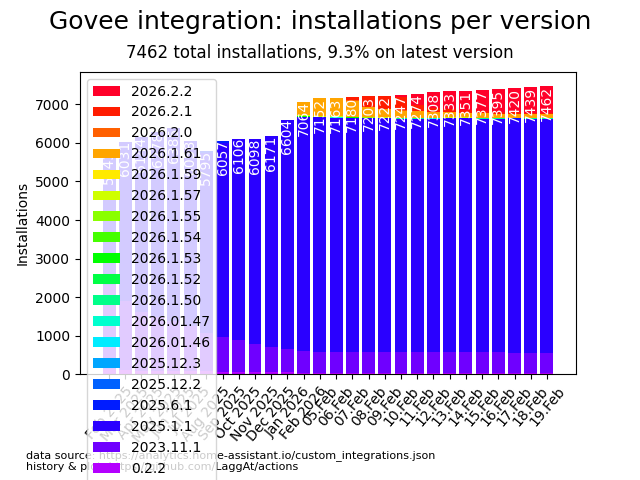
Usage Data is taken from Home Assistant analytics and plotted over time by us. You need to enable analytics if you want to show here.
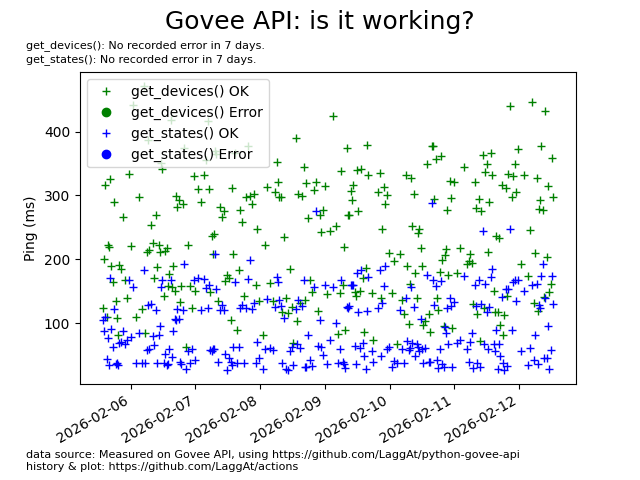
This graph uses the same library to do simple checks. If you see round dots on the right of the graph (= today), probably there is an issue.
Some devices do not support pulling state. In this case, we assume the state of your last input. For others, we assume the state just after controlling the light, but will otherwise request it from the cloud API.
You shouldn't use this feature in normal operation, but if something is broken, e.g., on the Govee API, you could help yourself and others on the forum with a little tweak.
Not all attribute updates can be disabled, but most can. Fiddling here could also lead to other misbehaviours, but could help with some issues.
Let's talk about an example:
We can have state from two sources: 'API' and 'HISTORY'. History, for example, means that when we turn on a light, we already guess the state will be on, so we set a history state of on before we get data from the API. In the default configuration, you could also see this, as it shows two buttons until the final state from the API arrives.

So let's say we have an issue, that the ON/OFF state from the API is wrong, we always get OFF. (This happened, and this is why I developed that feature.) If we disable the power state we get from the API, we could work around this, and that's exactly what we do:
- 'API' or 'History': state from which source do we want to disable? In our example, the API state is wrong, as we can see in the logs, so we choose 'API'
- Look up the attribute you want to disable in the GoveeDevice data class. Don't worry; you don't need to understand any of the code here. Here is that data class (click). In our example, we will find 'power_state'
- Next, in Home Assistant, we open Configuration - Integrations and click on the options on the Govee integration. Here is an example of how this config option could look:

- With the information from 1. and 2., we could write a string disabling power_state from the API. This will do the trick for our case:
API:power_state
IF you want to disable a state from both sources, do that separately. You may have as many disables as you like.
API:online;HISTORY:online
If you fix an issue like that, consider helping other users on the forum thread (click).
ALWAYS REMEMBER: this should always be a temporary workaround, if you use it in daily business, you should probably request a feature or bug fix :)
To remind you, disabling it asap, this will log a warning on every update.
Usually, you don't have to do anything here - just in case something feels wrong, read on:
40:83:FF:FF:FF:FF:FF:FF:
  set_brightness_max: 100
  get_brightness_max: 100
  before_set_brightness_turn_on: false
  config_offline_is_off: false
Different Govee devices use different settings. These will be learned by the used library, or can be configured by you.
- set_brightness_max: is autolearned, defines the range to set the brightness to 0-100 or 0-254.
- get_brightness_max: is autolearned, defines the range of how to interpret brightness state (also 0-100 or 0-254).
- before_set_brightness_turn_on: Configurable by you, default false. When true, if the device is off and you set the brightness > 0, the device is turned on first, then after a second, the brightness is set. Some devices don't turn on with the set brightness command.
- config_offline_is_off: Configurable by you, default false. This is useful if your device is, for example, powered by a TV's USB port, where, when the TV is off, the LED is also off. Usually, we stay in the state we know, but this changes to the OFF state when the device disconnects.
Support thread is here: https://community.home-assistant.io/t/govee-led-strips-integration/228516 There you'll also find links to code repositories and their issue trackers.
For bug reports, include the debug log, which can be enabled in configuration YAML + restart:
logger:
  default: warning
  logs:
    homeassistant.components.govee: debug
    custom_components.govee: debug
    govee_api_laggat: debug
Then, in Settings - Logs, click on the “full logs” button and add them to the bug report after removing personal data.
You can set a poll interval, but don't set it too low, as the API has a limit of 60 requests per minute, and each device needs one request per state pull and control action. If you have more than one lamp, use a higher interval. Govee wants to implement a single request for all devices in 2021.
Once the integration is active, you will see all your registered devices, and may control on/off, brightness, color temperature, and color.