



















If you like this project and find it useful, please consider giving it a star on GitHub and sponsoring it.

The official Matterbridge Home Assistant Application (formerly known as add-on) allows you to run Matterbridge with the Home Assistant Supervisor.
All Matterbridge features work correctly in the official application.
The Matterbridge storage and the Matterbridge plugins storage persist when you update, restart or uninstall and install again the application.
When you start or restart the application, Matterbridge will reload all plugins that were previously registered (it takes time so be patient).
The Application can run on arm64 and amd64 archs (armv7 arch has been deprecated by Home Assistant and is not available on the manifest of modern Node.Js 24 images).
The image (luligu/matterbridge:s6-rc) is built on Debian 13 (trixie-slim) with Node.js 24 and integrates the s6-rc overlay system.
Visit the Documentation page for more information.
Here’s a nice video: https://www.youtube.com/watch?v=06zzl7o_IqQ.
The ideal companion to the add-on is the Matterbridge Home Assistant plugin
Click here

or from your Home Assistant web page, go to Settings, select Apps and click on the Install app button.
In the upper-right corner, click on the three dots menu, select Repositories and paste this link
https://github.com/Luligu/matterbridge-home-assistant-addon
then click on ADD.
You should now see your Matterbridge app in the app store and be able to Install it.
Be patient because it can take a few minutes.
Enable Start on boot, Autoupdate and Show in sidebar.
The Watchdog is not used because Matterbridge always restarts with the s6-rc overlay system.
Click on Start.
The first start (or a restart) on a Home Assistant Green takes around 2-3 minutes.
Starting Matterbridge the first time takes time because it will reload all plugins that were already registered.
To open the Matterbridge frontend click on Open Web UI or click on the sidebar Matterbridge icon.
You may be asked to install the Home Assistant Matter Server: confirm the default installation.
The app works perfectly with the beta of Matter Server (we use the same matter.js library).
This app has a configuration page where you can set the binding address for the matterbridge frontend and select to install the latest dev or the latest stable release of matterbridge.
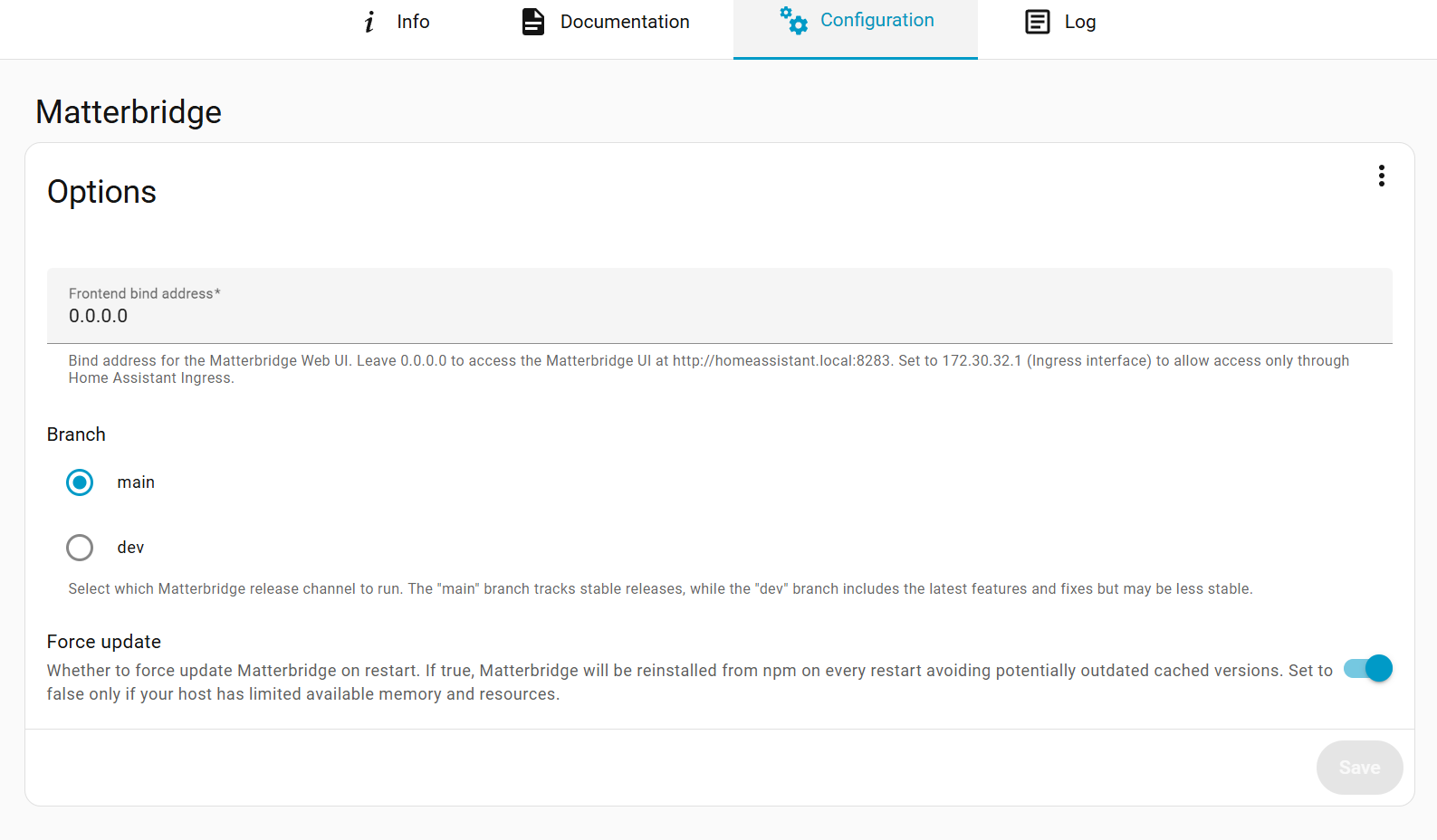
To avoid having any old version of matterbridge and plugins, always update the add-on when you are prompted to.
A restart of the application will update the Matterbridge version.
After updating or restarting the application, in the log you will see messages like this:
[18:16:13.122] [Matterbridge] Error parsing plugin matterbridge-example-accessory-platform. Trying to reinstall it from npm...
[18:16:16.167] [Matterbridge] Plugin matterbridge-example-accessory-platform reinstalled.
[18:16:16.190] [Matterbridge] Error parsing plugin matterbridge-example-dynamic-platform. Trying to reinstall it from npm...
[18:16:18.973] [Matterbridge] Plugin matterbridge-example-dynamic-platform reinstalled.
This is normal in this context and means that Matterbridge detected that the plugins are not present in the newly created container and will install them from npm using the latest stable version or the latest dev version.
If you were using a plugin installed from a tarball, you need to reinstall it manually.
If you were using a dev version of a plugin, it will be reinstalled with the latest dev version.
Since Home Assistant exposes a lot of interfaces to the containers, it is mandatory to set the matter mdns interface in the Matterbridge Settings page.
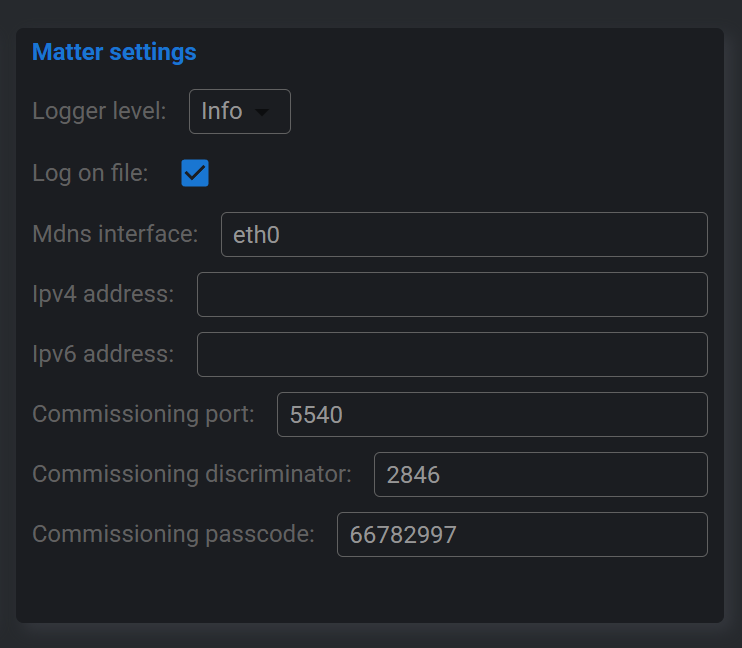
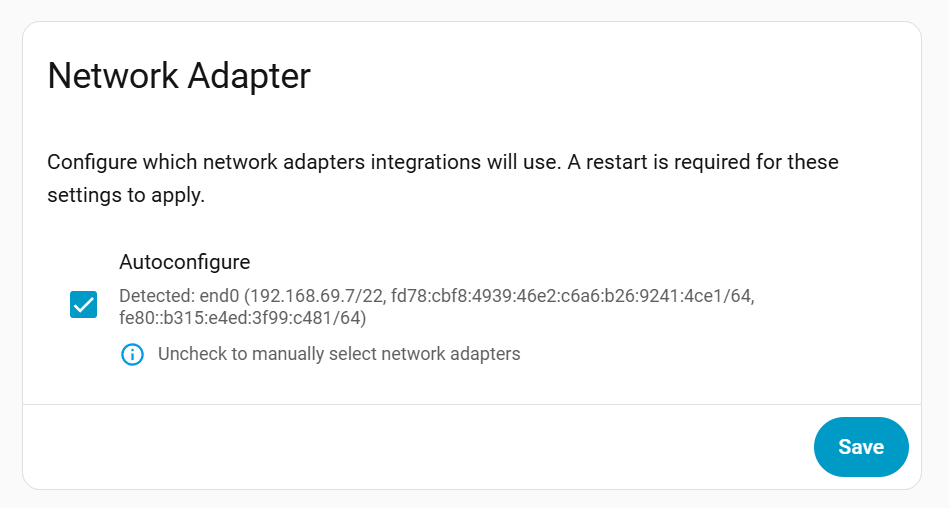
You can get the correct interface name from the Network Adapter panel. From the Home Assistant frontend navigate to Settings -> System -> Network.
In this case the correct name is end0 but your system can have a different interface.
During the installation you may see in the log a warning that looks scary, for example:
npm warn deprecated glob@10.5.0: Old versions of glob are not supported, and contain widely publicized security vulnerabilities, which have been fixed in the current version. Please update. Support for old versions may be purchased (at exorbitant rates) by contacting i@izs.me
This warning does not come from Matterbridge code.
It is emitted by a transitive dependency (the archiver package) that pulls in an older glob version. Matterbridge does not depend on this version of glob directly.
In short: you can safely ignore this message; it is a dependency warning, not a Matterbridge vulnerability.