This project implements a Shortest Pathfinding System using Dijkstra's Algorithm and A*. The backend is built with Django, the frontend with Next.js, and the shortest path computation is performed efficiently using file-based caching. The project integrates OpenStreetMap (OSM) data for geospatial mapping and visualization.
project_root/
│── backend/            # Django Backend
│   ├── shortest_path/  # Django Project
│   │   ├── manage.py       # Django project manager
│   │   ├── shortest_path/  # Main Django app
│   │   ├── maps/           # Django routes app
│   │   │   ├── models.py   # Database models
│   │   │   ├── views.py    # API views
│   ├── utils/              # Utils to populate the data into the database
│── frontend/           # Next.js Frontend
│   ├── components/     # React components
│   ├── pages/          # Next.js pages
│   ├── public/         # Static assets
│   ├── styles/         # Global styles
│   ├── utils/          # Helper functions
│   ├── services/       # API calls and integrations
│── docs/               # Documentation
│── README.md           # Project documentation
pip install venv
python -m venv venvWindows:
venv\Scripts\activateLinux/macOS:
source venv/bin/activatecd backend
pip install -r requirements.txtDownload PostgreSQL from the official site: https://www.postgresql.org/download/
- Open pgAdmin and create a new database named
pathfindingdb. - Set up environment variables in
.env:
DB_NAME=pathfindingdb
DB_USER=your_username
DB_PASSWORD=your_password
DB_HOST=localhost
DB_PORT=5432- Apply migrations:
python manage.py migrateRun the following utility script:
python backend/utils/util_pune.pyThis will populate the database with geospatial data.
Download and install Node.js from https://nodejs.org/.
cd frontend
npm installCreate a .env.local file in the frontend directory:
NEXT_PUBLIC_API_BASE_URL=http://localhost:8000/apinpm run devThe Next.js application will be available at http://localhost:3000/.
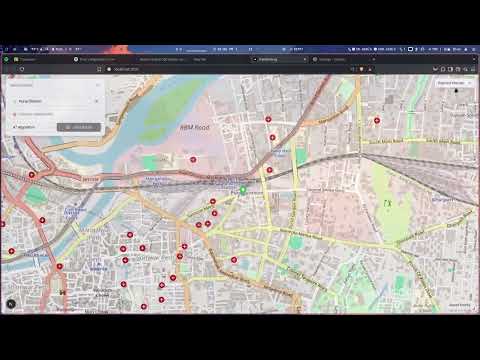
- Interactive Map: Displays OpenStreetMap with path visualization.
- Shortest Path Calculation: Users can select two points, and the shortest path is computed and displayed.
- Live Updates: The frontend dynamically fetches routes from the backend API.
- Custom Markers: Start and end points are marked on the map.
- Mobile-Friendly UI: Responsive design for mobile and desktop users.
We use Django’s file-based caching to cache graph data and prevent repeated database reads, speeding up the algorithm.
- Graph Data Caching:
- An adjacency list representation of the graph is cached in the filesystem.
- If cache is missing or expired, data is loaded from the database and cached again.
# settings.py
CACHES = {
    'default': {
        'BACKEND': 'django.core.cache.backends.filebased.FileBasedCache',
        'LOCATION': os.path.join(BASE_DIR, 'graph_cache'),
    }
}
Make sure the graph_cache/ directory exists and is writable.
from django.core.cache import cache

def load_graph():
    graph = cache.get("graph_data")
    if graph:
        return graph

    # Load graph from DB if not cached
    nodes = Node.objects.all()
    edges = Edge.objects.all()
    graph = {node.id: [] for node in nodes}
    for edge in edges:
        graph[edge.start_node_id].append((edge.end_node_id, edge.weight))
        graph[edge.end_node_id].append((edge.start_node_id, edge.weight))

    cache.set("graph_data", graph)
return graph- Optimizing pathfinding by integrating Dijkstra directly into PostgreSQL using recursive SQL queries.
- Implementing an API to fetch routes dynamically from the frontend.
- Enhancing UI with interactive map features using MapLibre GL JS.
- Backend: Django, Django REST Framework
- Frontend: Next.js, React, MapLibre GL JS
- Database: PostgreSQL + PostGIS
- Pathfinding: Dijkstra’s Algorithm, A*
- Geospatial Data: OpenStreetMap (OSM), GeoJSON
- Caching: Django File-Based Caching
- Prasangeet Dongre (B23CH1033) - Project Lead
- Prakhar Chauhan (B23BB1032)
- Rajas Kadu (B23CH1039)
- Mayuri R. Pujari (B23ES1026)