A desktop application built with C# and .NET Framework 4.0 that identifies speakers using audio recordings. It applies MFCC feature extraction, Dynamic Time Warping (DTW) with and without pruning, and parallel processing to match test voices to a database of enrolled speakers.
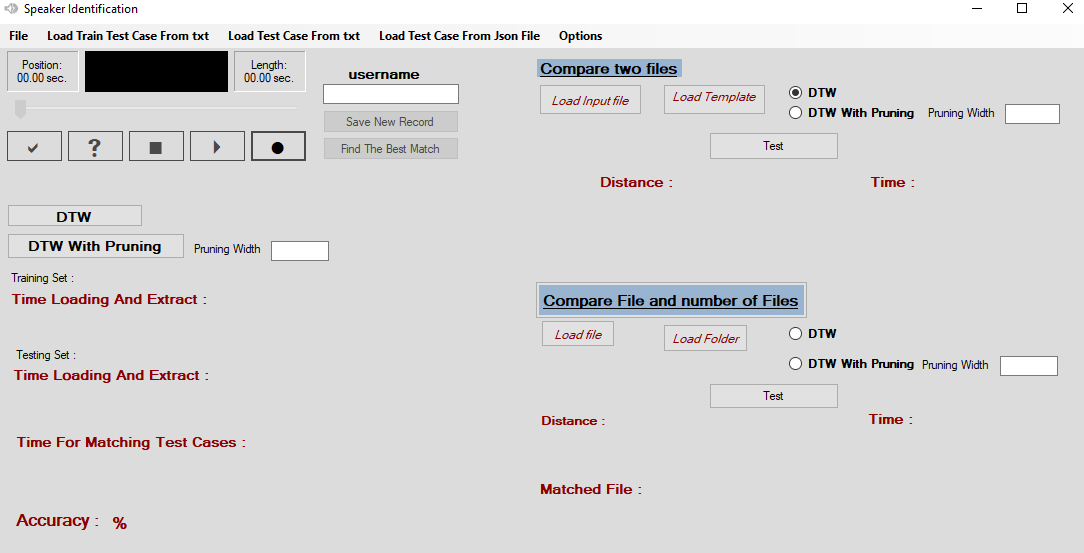
- 🎙️ Record or upload audio samples
- 🎧 Extract MFCC features and remove silence
- 🔁 Match using DTW or DTW with pruning (Sakoe-Chiba band)
- 📦 Save and load audio datasets as JSON
- 📊 Display match distance, processing time, and accuracy
- ⚡ Fast matching using parallel processing
We use Mel-Frequency Cepstral Coefficients (MFCC) to extract speaker-specific features from audio signals. Silence removal is applied before extraction to improve accuracy.
DTW compares two sequences by computing an optimal alignment path between them.
- Builds a full
N x Mcost matrix for two sequences. - Calculates minimum-cost path from top-left to bottom-right.
- Time complexity: O(N × M).
- Restricts alignment to a diagonal band of width
waround the main diagonal. - Reduces number of computations and improves performance.
- Time complexity: O(N × W).
- Example logic:
int l = Math.Max(1, i - (w / 2));
int r = Math.Min(m, i + (w / 2));
Matching the test voice against multiple enrolled users can be slow for large datasets. To speed this up, the application uses:
-
Parallel.ForEach in C# to distribute DTW comparisons across CPU cores.
-
Reduces processing time drastically in multi-speaker scenarios.
- Clone this repo
- Open the solution in Visual Studio
- Make sure .NET Framework 4.0 is installed
- Build and run the project
MainFunctions/
├── AudioOperations.cs        // Extract features, remove silence
├── DataOperations.cs         // Load/save training/testing data
├── SequenceMatching.cs       // DTW logic
MFCC/                         // Feature extraction logic
Recorder/                     // Recording functions
GUI/                          // WinForms UI