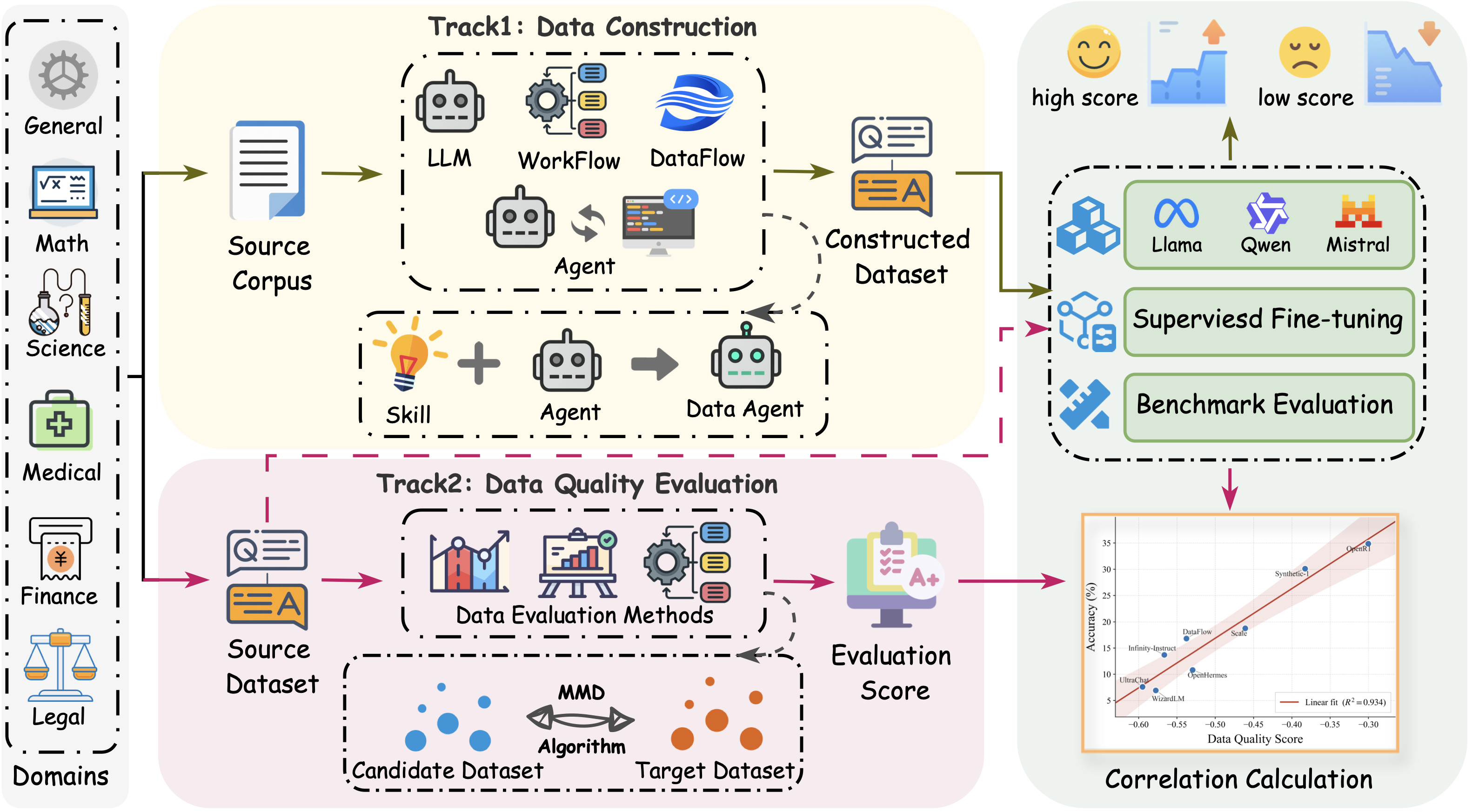


A unified, downstream-grounded benchmark for data preparation in LLM training pipelines.
DataPrep-Bench is the first unified, downstream-grounded benchmark that jointly evaluates how well LLMs, agents, and data workflows can prepare training data end to end. It covers three complementary tracks:
- Data Construction — transforms raw sources into SFT data.
- Data Selection — selects high-utility subsets from candidate pools.
- Data Quality Evaluation — predicts the downstream utility of candidate datasets.
It also ships strong baselines for each track: Data-Construction-Skill for skill-driven agentic construction, a unified Data-Selection framework with ten selector strategies, and the Distributional Alignment Score (DAS), a training-free, MMD-based quality estimator. All tracks are tested under shared domains, base models, training protocols, and downstream benchmarks, so methods are compared by their actual downstream impact.
The Data Construction module md_to_qa converts Markdown books and long-form documents into structured supervision datasets for LLM fine-tuning. It targets book-to-SFT workflows where full content coverage, resumable execution, and quality control are required.
The pipeline compiles source knowledge into three complementary supervision forms:
- Concept QA — Atomic, reusable knowledge such as definitions, categories, rules, mechanisms, purposes, and constraints.
- Process QA — Concise, grounded reasoning patterns including condition checking, rule application, causal explanation, comparison, exception handling, and step ordering.
- Case Application — Knowledge transfer into realistic, source-grounded scenarios where the model must analyze a situation and apply domain knowledge.
- Corpus Preparation — Build a manifest from a directory of Markdown files and split long documents into overlapping chunks.
- Knowledge Cleaning — Clean and normalize chunks to remove boilerplate and improve semantic coherence.
- QA Generation — Generate the three supervision forms above from each chunk via LLM-based operators.
- Scoring & Filtering — Score generated QA pairs and filter out low-quality items.
- Validation & Coverage Audit — Ensure every chunk reaches a final state (
keptorskipped) and report coverage statistics.
The pipeline is resumable and tracks progress via chunk_status.jsonl, making it suitable for long-running batch jobs.
| Path | Description |
|---|---|
md_to_qa/DataFlow/ |
Core pipeline implementations, including chunking, cleaning, generation, scoring, and filtering operators. |
md_to_qa/LLM/ |
Batch and domain processing scripts for large-scale data generation. |
md_to_qa/SKILL/ |
Skill definitions, reference materials, and helper scripts for Markdown-to-QA conversion. |
md_to_qa/Agent/ |
Agent prompts and task specifications for automated dataset construction. |
The underlying data-construction skill is also published as a standalone, reusable skill:
- Skill: data_construction_skill
You can reference or import this skill directly in compatible agent frameworks.
Training is conducted using LlamaFactory. Base models include:
For each constructed dataset, we will use it to train both base models followed by a Dolly-15k training.
Please refer to Experiment.md for detailed configures we employed in our experiments.
The evaluation codes are in Data-Agent-Evaluation. You can use the script to run evaluation for the models trained in the last step. Please refer to README.md for instruction to use the script and Experiment.md for detailed configurations for evaluation.
The Data Selection framework (data-selection) selects high-utility subsets from large candidate SFT pools. It unifies random baselines, length and perplexity filters, embedding similarity, quality scoring, diversity algorithms, and LLM-as-a-judge methods behind a single Selector protocol, making it easy to compare selection strategies under identical training and evaluation conditions.

Average downstream score of each selection method across all domains and selection budgets (k). Higher is better.
| Selector | Strategy |
|---|---|
RandomSelector |
Random baseline |
SourceBalancedRandomSelector |
Source-balanced random sampling |
LengthBasedSelector |
Shortest / longest samples |
PerplexityBasedSelector |
Perplexity-based selection (low / high / mid) |
EmbeddingSimilaritySelector |
NEAR-style similarity to a target set |
DeitaQualitySelector |
Quality × complexity scoring |
QualityScorerSelector |
FineWeb-Edu / PairQual quality scoring |
DiversityKCenterSelector |
TSDS diversity K-Center |
LLMAsSelector |
LLM multi-dimensional scoring |
CompositeSelector |
Chain multiple selectors |
cd data-selection
uv syncfrom data_selection import RandomSelector
from data_selection.runner import run_selection
selector = RandomSelector(k=100, seed=42)
run_selection(
selector,
input_path="data/input.jsonl",
output_path="data/output_random.jsonl",
)run_selection also supports multiple selection budgets in one call. For score-based selectors, scoring runs once at max(k) and results are truncated for smaller k values:
run_selection(
    selector,
    input_path="data/input.jsonl",
    output_path="data/output_k{k}.jsonl",
    k=[1000, 10000, 100000],
)
Please refer to data-selection/README.md for a complete guide to all selectors, input formats, score caching, and development commands.
After selecting a subset, train a model on it with LlamaFactory and evaluate with the Data-Agent-Evaluation harness. Please refer to Experiment.md for selection results across finance, law, medicine, math, general, and science domains.
A Python package for computing distributional distances (e.g., MMD) between datasets, designed for evaluating data preparation quality in LLM training pipelines.
This project uses uv for dependency management. To get started:
git clone https://github.com/haolpku/Data-Preparation-Bench.git
cd Data-Preparation-Bench
uv sync
To set up the development environment:
uv sync --extra dev
uv run pre-commit install
Before committing, format and lint the code:
uv run pre-commit run --all-filesThe example script compute_mmd.py demonstrates how to compute MMD distance between two datasets using the vLLM OpenAI-compatible embedding API.
-
Start a vLLM embedding server (e.g., serving
Qwen/Qwen3-Embedding-8B):vllm serve Qwen/Qwen3-Embedding-8B --runner pooling --trust-remote-code --max-model-len 40960 --served-model-name Qwen/Qwen3-Embedding-8B --dtype bfloat16 --seed 42
-
Configure the datasets in
compute_mmd.py:from distflow.data.dataset import DistflowDataset from distflow.data.data_formatter import AlpacaFormatter, ShareGptFormatter dataset_1 = DistflowDataset( dataset_name="oda-math", data_path="OpenDataArena/ODA-Math-460k", load_type="datasets", formatter=AlpacaFormatter( user_key="question", assistant_key="response", ), data_size=5000, split="train", shuffle_seed=42, ) dataset_2 = DistflowDataset( dataset_name="infinity-instruct", data_path="BAAI/Infinity-Instruct", load_type="datasets", formatter=ShareGptFormatter( conversations_key="conversations", ), data_size=5000, split="train", shuffle_seed=42, )
Typically, you only need to update
data_pathwith your HuggingFace dataset identifier and define a formatter that converts raw items to the required chat format. Two built-in formatters are available:AlpacaFormatter: For datasets with separateuser_key/assistant_keyfields.ShareGptFormatter: For datasets with aconversationsfield containing multi-turn messages.
-
Run the computation:
uv run examples/compute_mmd.py
To save results to a JSON file:
uv run examples/compute_mmd.py --output results/
Please refer to Experiment.md for detailed configurations we employed in our experiments.
Training is conducted using LlamaFactory. Base models include:
Please refer to Experiment.md for detailed configures we employed in our experiments.
The evaluation codes are in Data-Agent-Evaluation. You can use the script to run evaluation for the models trained in the last step. Please refer to README.md for instruction to use the script and Experiment.md for detailed configurations for evaluation.
The example script run_benchmark.py shows how to evaluate a custom data-quality metric by measuring its correlation with downstream task accuracy.
-
Prepare datasets (same as above):
Define one or more
DistflowDatasetobjects with the appropriate formatter. -
Provide accuracy values manually:
The
accuracy/directory is not part of the repository, so you must supply your own accuracy mapping. The keys must exactly match thedataset_namefield of each dataset:accuracies = { "dataflow": 0.25, "infinity-instruct": 0.30, "openr1": 0.45, }
-
Implement a metric class:
Your metric class must implement
score(dataset: DistflowDataset) -> list[MetricsResult]:class MyMetric: def score(self, dataset: DistflowDataset): # Compute metric for the dataset return [{"name": "my_metric", "value": 0.8, "meta": {}}]
-
Run the benchmark:
uv run examples/run_benchmark.py
The benchmark computes Pearson / Spearman correlation and a linear fit between your metric and the provided accuracies.
Please refer to Experiment.md for detailed accuracy results.
