This is:
- [x] a bug report
- [ ] a feature request
- [ ] **not** a usage question (ask them on https://stackoverflow.com/questions/tagged/phpspreadsheet or https://gitter.im/PHPOffice/PhpSpreadsheet)
What is the expected behavior?
I have a template file that has a Radar chart. The data for the chart is kept in the cells behind the chart. I read the template file. Change the values in the cells containing the chart data, and then export it. The chart should keep all its previous styling as in the template.
Here's how the chart in the template looks like :
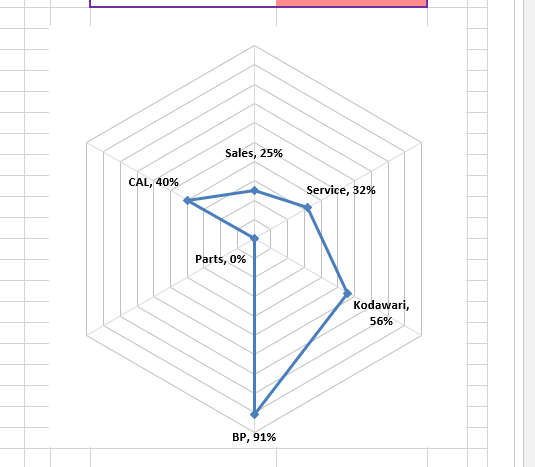
What is the current behavior?
The exported chart loses a lot of its styles. It looks like it resets to most of its default style no matter what style you set in the template.
For instance, the data labels disappear and legends appear instead. The color of the gridlines also reset to black:

What are the steps to reproduce?
The Radar chart in the examples works as it has mostly default styles. Use this file to view the issue:
sot.xlsx
<?php

require __DIR__ . '/vendor/autoload.php';

        $reader = new \PhpOffice\PhpSpreadsheet\Reader\Xlsx();
        $reader->setIncludeCharts(true);

        $spreadsheet = $reader->load("/home/fod/public_html/signoff_graph/Sign_Off_Template.xlsx");

        $sheet = $spreadsheet->getActiveSheet();

        // Redirect output to a client’s web browser (Xlsx)
        header('Content-Type: application/vnd.openxmlformats-officedocument.spreadsheetml.sheet');
        header('Content-Disposition: attachment;filename="SignOff Sheet.xlsx"');
        header('Cache-Control: max-age=0');
        // If you're serving to IE 9, then the following may be needed
        header('Cache-Control: max-age=1');
        // If you're serving to IE over SSL, then the following may be needed
        header('Expires: Mon, 26 Jul 1997 05:00:00 GMT'); // Date in the past
        header('Last-Modified: ' . gmdate('D, d M Y H:i:s') . ' GMT'); // always modified
        header('Cache-Control: cache, must-revalidate'); // HTTP/1.1
        header('Pragma: public'); // HTTP/1.0

        $writer = new \PhpOffice\PhpSpreadsheet\Writer\Xlsx($spreadsheet);
        $writer->setIncludeCharts(true);
        $writer->save('php://output');
Which versions of PhpSpreadsheet and PHP are affected?
Plugin version 1.4.0 and PHP version 5.6
This is:
What is the expected behavior?
I have a template file that has a Radar chart. The data for the chart is kept in the cells behind the chart. I read the template file. Change the values in the cells containing the chart data, and then export it. The chart should keep all its previous styling as in the template.
Here's how the chart in the template looks like :
What is the current behavior?
The exported chart loses a lot of its styles. It looks like it resets to most of its default style no matter what style you set in the template.
For instance, the data labels disappear and legends appear instead. The color of the gridlines also reset to black:
What are the steps to reproduce?
The Radar chart in the examples works as it has mostly default styles. Use this file to view the issue:
sot.xlsx
Which versions of PhpSpreadsheet and PHP are affected?
Plugin version 1.4.0 and PHP version 5.6