Spring Cloud Gateway 流量染色
网关常用于南北、东西向流量的边界。在某些场景下,期望流量经过网关之后,加入某些全链路透传标签。例如:
- 网关作为全链路追踪起始节点,需要生成第一跳 Tracer 上下文
- 在测试环境路由场景下,通过网关流量染色并配合网关的路由能力,实现把流量转发到对应的测试环境,如下图所示

Spring Cloud Tencent Gateway Plugin 实现了基于规则非常灵活的流量染色能力。
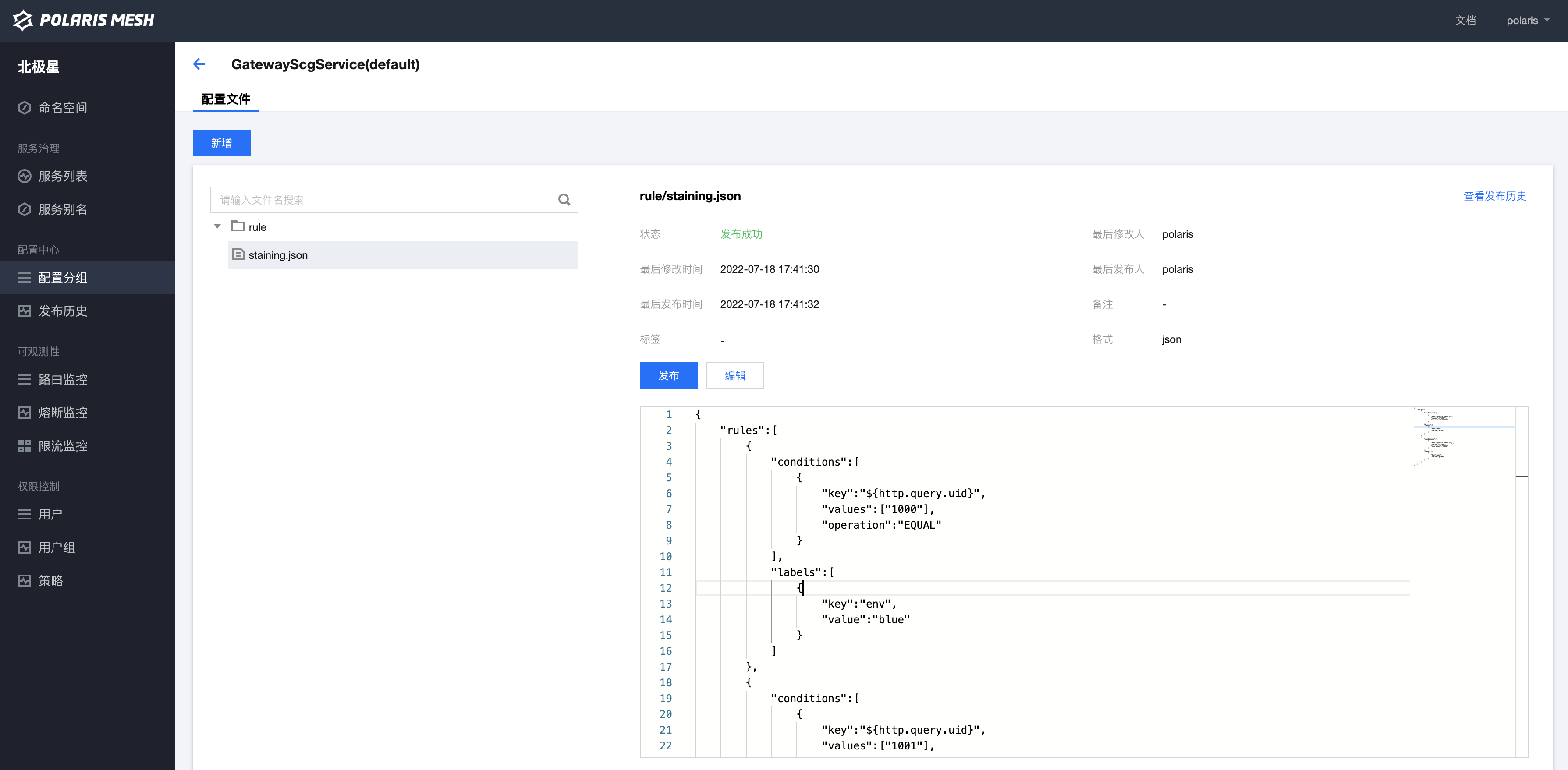
规则流量染色核心是基于染色规则实现动态流量染色。如下所示的规则实现:
- 请求查询参数 uid=1000 时,增加 env=blue 标签
- uid=1001 是,增加 env=green 标签。
{
    "rules":[
        {
            "conditions":[
                {
                    "key":"${http.query.uid}",
                    "values":["1000"],
                    "operation":"EQUAL"
                }
            ],
            "labels":[
                {
                    "key":"env",
                    "value":"blue"
                }
            ]
        },
        {
            "conditions":[
                {
                    "key":"${http.query.uid}",
                    "values":["1001"],
                    "operation":"EQUAL"
                }
            ],
            "labels":[
                {
                    "key":"env",
                    "value":"green"
                }
            ]
        }
    ]
}本章节将介绍普通的 Spring Cloud Gateway 如何快速集成流量染色能力。
需要通过北极星的配置中心下发流量染色规则,所以需要引入北极星。
搭建北极星服务请参考 Polaris Getting Started
- Console Address : http://14.116.241.63:8080/
- Username: polaris
- Password: polaris
- Server Address:
grpc://183.47.111.80:8091
腾讯云提供了免运维的北极星云服务,基于云服务可以快速开通生产级高可用北极星集群 了解更多
1.7.0 版本之后新增了 spring-cloud-tencent-gateway-plugin 插件,用于增强 Spring Cloud Gateway 的能力。
- 参考 Spring Cloud Tencent 版本管理 文档获取最新的版本号,引入 Spring Cloud Tencent Bom,例如:
<dependencyManagement>
    <dependencies>
        <dependency>
            <groupId>com.tencent.cloud</groupId>
            <artifactId>spring-cloud-tencent-dependencies</artifactId>
            <version>1.7.0-Hoxton.SR9</version>
            <type>pom</type>
            <scope>import</scope>
        </dependency>
    </dependencies>
</dependencyManagement>- 引入 Spring Cloud Tencent Gateway Plugin
<dependency>
    <groupId>com.tencent.cloud</groupId>
    <artifactId>spring-cloud-tencent-gateway-plugin</artifactId>
</dependency>

<!-- 如何需要全链路透传标签,需要引入 spring-cloud-starter-tencent-metadata-transfer 依赖 -->
<dependency>
    <groupId>com.tencent.cloud</groupId>
    <artifactId>spring-cloud-starter-tencent-metadata-transfer</artifactId>
</dependency>在 Spring Cloud Gateway 的 bootstrap.yml 配置文件中加入以下配置内容。由于依赖 Spring Cloud Tencent Polaris Config 下发染色规则,所以需要配置再 bootstrap.yml 文件里。
spring:
  application:
    name: ${application.name}
  cloud:
    polaris:
      address: grpc://${修改为第一步部署的 Polaris 服务地址}:8091
      namespace: default
    tencent:
      plugin:
        scg:
          staining:
            enabled: true # 打开染色插件开关,默认为 false
            rule-staining:
              enabled: true # 打开规则染色插件开关,默认为 true
              namespace: default # 染色规则配置文件所属的 Namespace,默认值为:default
              group: ${spring.application.name} # 染色规则配置文件所属的 Group,默认为:${spring.application.name}
fileName: rule/staining.json # 染色规则配置文件名,默认为:rule/staining.json应用启动成功后,即完成流量染色插件接入能力。
根据第三步配置的染色规则配置文件三元组[namespace, group, fileName]信息,到北极星控制台上配置染色规则。
当满足染色规则成功染色之后,将会打印以下 debug 日志,既说明接入成功。
[SCT] rule stained labels. {"env":"green"}