Meshroom in Google Colab (cloud)
You don´t have a CUDA GPU or not enough Ressources? Now you can run Meshroom on Google Colab (in CLI mode only, no GUI). The only thing you need is a Google Account. (+ internet connection with a decent upload rate!)
Note: This solution is a user contribution and not officially supported. For questions and suggestions refer to the original GIST
Google Colab is a free to use Jupyter notebook, that allows you to use free Tesla K80 GPU (24 GB of GDDR5 memory) it also gives you a total of 12 GB of ram, and you can use it up to 12 hours in row(keep the browser tab open as it will reset sooner otherwise). *
GPU: 1xTesla K80 , having 2496 CUDA cores, compute 3.7, 12GB(11.439GB Usable) GDDR5 VRAM (some sources state Google now uses Nvidia T4s)
CPU: 1xsingle core hyper threaded i.e(1 core, 2 threads) Xeon Processors @2.3Ghz (No Turbo Boost) , 45MB Cache
RAM: ~12.6 GB Available
Disk: ~320 GB Available
For every 12hrs or so Disk, RAM, VRAM, CPU cache etc data that is on our alloted virtual machine will get erased *
Go to https://colab.research.google.com, login and create a new empty python3 notebook. (First steps with Colab)
You NEED to change under Runtime->Change Runtime the selector to GPU. Otherwise it won't work!


Use the basic Colab Jupyter notebook by @donmahallem to run Meshroom.
If you have written a more sophisticated script, we kindly ask you to share it with the community.
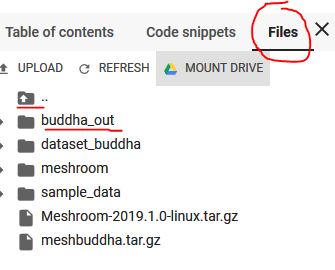
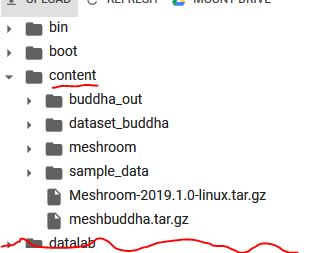
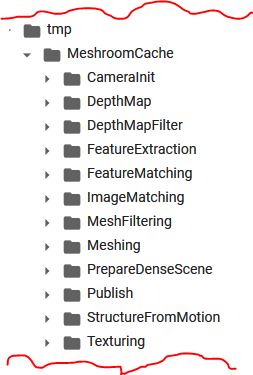
Colab File structure:
Download files:
https://stackoverflow.com/questions/48774285/how-to-download-file-created-in-colaboratory-workspace
https://towardsdatascience.com/downloading-datasets-into-google-drive-via-google-colab-bcb1b30b0166