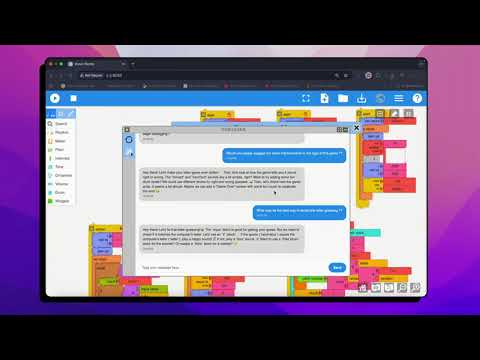
Welcome to the AI-Powered Music Blocks Debugger!
This intelligent assistant helps you create better music with Music Blocks by analyzing your projects and providing helpful suggestions. Whether your melody isn't playing correctly or your blocks aren't connecting properly, the AI debugger is here to guide you through solving problems and improving your musical creations.
The AI debugger is an intelligent assistant that provides comprehensive support for your Music Blocks projects. It can:
- Analyze your music blocks and identify potential issues
- Explain problems in clear, understandable language
- Provide creative suggestions to enhance your musical compositions
- Teach music concepts through interactive guidance
- Assist with block connections and proper arrangement

- Automatically examines all blocks in your project
- Identifies connection issues and logical inconsistencies
- Provides recommendations for improving musical flow
- Suggests optimizations for better performance
- Ask questions about your music projects in natural language
- Receive immediate, helpful responses
- Maintain conversation context throughout your session
- Get explanations tailored to your specific project
- Learn about music theory concepts like scales and rhythm
- Receive guidance on instrument combinations
- Discover new creative approaches to composition
- Understand the relationship between blocks and musical elements

-
Locate the Debugger Block:
- Navigate to the Widgets palette in Music Blocks
- Find the "debugger" block
- Drag it into your workspace
-
Activate the AI Assistant:
- Click on the AI Debugger block in your workspace
- The chat interface will open automatically
- The AI will analyze your project and provide an initial assessment
You can ask questions using natural language. Here are some effective examples:
Recommended Questions:
- "Why isn't my piano melody playing correctly?"
- "How can I fix the rhythm in my drum pattern?"
- "What's the best way to connect these blocks?"
- "Can you suggest improvements for this composition?"
The AI debugger will provide:
- Clear explanations of identified issues
- Step-by-step instructions for resolution
- Creative suggestions for enhancement
- Educational insights about music and block programming
- Enhanced Learning: Understand both music theory and programming concepts through practical problem-solving
- Confidence Building: Receive guidance when encountering challenges instead of abandoning projects
- Skill Development: Develop analytical thinking and creative problem-solving abilities
- Immediate Support: Get help whenever needed without waiting for instructor availability
- Creative Exploration: Discover new musical possibilities through AI-generated suggestions
- Student Insight: Monitor learning progress through conversation exports and analysis
- Efficient Support: Allow AI to handle basic questions while focusing on advanced instruction
- Personalized Learning: Each student receives tailored explanations based on their specific projects
- Assessment Tool: Track student understanding through debugging conversation patterns
- Learning Support: Better understand your child's educational activities and progress
- Encouragement: AI suggestions inspire continued exploration and creativity
- Safe Environment: All AI interactions are educational and age-appropriate
- Progress Tracking: Observe skill development through improved project outcomes
Create project → Add Debugger block → Click to activate → Chat interface opens
Ask specific questions → AI analyzes issue → Receive detailed explanation
Follow provided guidance → Apply suggested solutions → Understand underlying concepts
Request improvement suggestions → Explore new possibilities → Implement creative ideas
The AI-Powered Music Debugger was developed to provide comprehensive support for Music Blocks users of all skill levels. Whether you're beginning your musical journey or working on advanced compositions, this intelligent assistant offers personalized guidance to help you overcome challenges and enhance your creative projects.
The debugger combines artificial intelligence with music education principles to create an interactive learning experience. Through natural language conversations, you can receive immediate feedback, learn music theory concepts, and develop both programming and musical skills simultaneously.
To begin using the AI debugger, simply add the debugger block to your workspace, click to activate it, and start asking questions. The AI will analyze your project and provide tailored assistance to help you achieve your musical goals.
Continue creating and exploring! 🎵✨
Developed by: Om Santosh Suneri (GitHub)
Project: Google Summer of Code 2025 with Sugar Labs
For questions, feedback, or support, please reach out to the development team.
Last updated: August 2025 | Version 1.0