
Replies: 9 comments 1 reply

-
|
MacOS Catalina is only supported by the legacy build of the current Artisan v2.8.4 thus you should download and install artisan-mac-legacy-2.8.4.dmg. It is always advisable to save your current settings to an Note that builds of Artisan v2.0 are not available for download any more. Thus keep that app around on your computer until you are convinced that v2.8.4 works well for you. It should! |
Beta Was this translation helpful? Give feedback.

-
|
Thanks Marko! |
Beta Was this translation helpful? Give feedback.

-
|
Thanks Marko!
Since it has been a while (years) and I don't want to make any mistakes,
would you tell me how best to store/archive Artisan 2.0.0 and install 2.84
legacy so there are no conflicts on my Macbook running Catalina 10.15?
Will 2.8.4 be the default Arsitan sw when I launch Artisan to run or will
there be a conflict between the two versions on my macbook?
Also, once I have installed 2.8.4, will my US Roaster Corp 5kg roaster be
discovered by the new sw version and the 2.0.0 setting transfer
automatically to the 2.8.4 version during the first roaster or will I have
to identify my roaster for the new sw load and reinstall all my Roaster
Settings?
I'm not IT savvy so I hesitate with installations and settings out of
concern of messing something up and not being able to get myself out of the
problem.
Thanks in advance.
Mike
*** Please Note I am transitioning my Email to a new account as m**y Gmail
acct will be phased out in short order. Please update your records and
contacts accordingly with my New Email address --*
***@***.***** ***
*R/*
*Mike*
*"The love for all living creatures is the most noble attribute of man.”* –
Charles Darwin
…On Tue, Jul 25, 2023 at 1:59 PM Marko Luther ***@***.***> wrote:
MacOS Catalina is only supported by the legacy build of the current
Artisan v2.8.4 thus you should download and install
artisan-mac-legacy-2.8.4.dmg
<https://github.com/artisan-roaster-scope/artisan/releases/download/v2.8.4/artisan-mac-legacy-2.8.4.dmg>
.
It is always advisable to save your current settings to an
artisan-settings.aset file via menu Help >> Save Settings from time to
time to be able to go back to this setup.
Note that builds of Artisan v2.0 are not available for download any more.
Thus keep that app around on your computer until you are convinced that
v2.8.4 works well for you. It should!
—
Reply to this email directly, view it on GitHub
<#1242 (comment)>,
or unsubscribe
<https://github.com/notifications/unsubscribe-auth/BBQG3K6NF3PARIDKYCJFPKLXSACP7ANCNFSM6AAAAAA2XKOYIM>
.
You are receiving this because you authored the thread.Message ID:
<artisan-roaster-scope/artisan/repo-discussions/1242/comments/6543366@
github.com>
|
Beta Was this translation helpful? Give feedback.
-
There should be no conflict. There is no concept of a "default Artisan". However, macOS associates file types with apps. You can change that association via the Once you are setup with the current Artisan version you can zip the old Artisan.app v2.0.0 via a right-click on the app icon as with any other file and keep it around.
There is no |
Beta Was this translation helpful? Give feedback.
-
|
Hi Marko,
I am up and running with the 2.8.4 Legacy version. Thanks for the help and
getting me plugging in to this latest Legacy version of Artisan!
I did have some challenges with printing. I have always printed using the
"Preview" app on my Macbook. I'd use this from the File - Print menu and
make edits in Preview to have the Roast Graph fit the page by sizing and
cropping. However, with this 2.8.4 version it launches Adobe Acrobat each
time I try my print routing. Is there a reason Artisan will not launch the
Apple Preview App now in this legacy version and always goes to Adobe
Acrobat?
I tried every option I could find to get Preview to launch so I could print
but have been unable to get Preview to Launch from Artisan. I can't get
Preview to launch and then have it go find the Artisan Roast Log. So I am
stymied on how to do my print edits and cropping to get my standard printed
pages of my roast profiles. I keep a 3 ring binder of all my roast
profiles.
Other than this printing challenge, all else is working fine. I just need
to figure out some smoothing on the Delta Bean Temp curve as that is a bit
like an EKG in this legacy version. Any advice where to start tweaking on
smoothing the Delta Bean Temp curve?
Thanks again Marko. Greatly appreciate your help and advice.
Mike
*** Please Note I am transitioning my Email to a new account as m**y Gmail
acct will be phased out in short order. Please update your records and
contacts accordingly with my New Email address --*
***@***.***** ***
*R/*
*Mike*
*"The love for all living creatures is the most noble attribute of man.”* –
Charles Darwin
…On Thu, Jul 27, 2023 at 3:06 PM Marko Luther ***@***.***> wrote:
Thanks Marko! Since it has been a while (years) and I don't want to make
any mistakes, would you tell me how best to store/archive Artisan 2.0.0 and
install 2.84 legacy so there are no conflicts on my Macbook running
Catalina 10.15? Will 2.8.4 be the default Arsitan sw when I launch Artisan
to run or will there be a conflict between the two versions on my macbook?
There should be no conflict. There is no concept of a "default Artisan".
However, macOS associates file types with apps. You can change that
association via the Get Info dialog per file via the Open with (or apply
to all files of this type) as for any other macOS app. Please refer to the
user manual of your operating system.
Once you are setup with the current Artisan version you can zip the old
Artisan.app v2.0.0 via a right-click on the app icon as with any other file
and keep it around.
Also, once I have installed 2.8.4, will my US Roaster Corp 5kg roaster be
discovered by the new sw version and the 2.0.0 setting transfer
automatically to the 2.8.4 version during the first roaster or will I have
to identify my roaster for the new sw load and reinstall all my Roaster
Settings?
There is no discovery done by Artisan. It uses the device/machine
settings you configured to connect to hardware. Those configurations are
stored in the system and are shared by all Artisan versions. There should
be no action required, but it is advice able to save the Artisan setting to
a file before installing the new version just for a backup.
—
Reply to this email directly, view it on GitHub
<#1242 (comment)>,
or unsubscribe
<https://github.com/notifications/unsubscribe-auth/BBQG3KYQ7UF3IYNKBSH7RPLXSK33NANCNFSM6AAAAAA2XKOYIM>
.
You are receiving this because you authored the thread.Message ID:
<artisan-roaster-scope/artisan/repo-discussions/1242/comments/6568768@
github.com>
|
Beta Was this translation helpful? Give feedback.
-
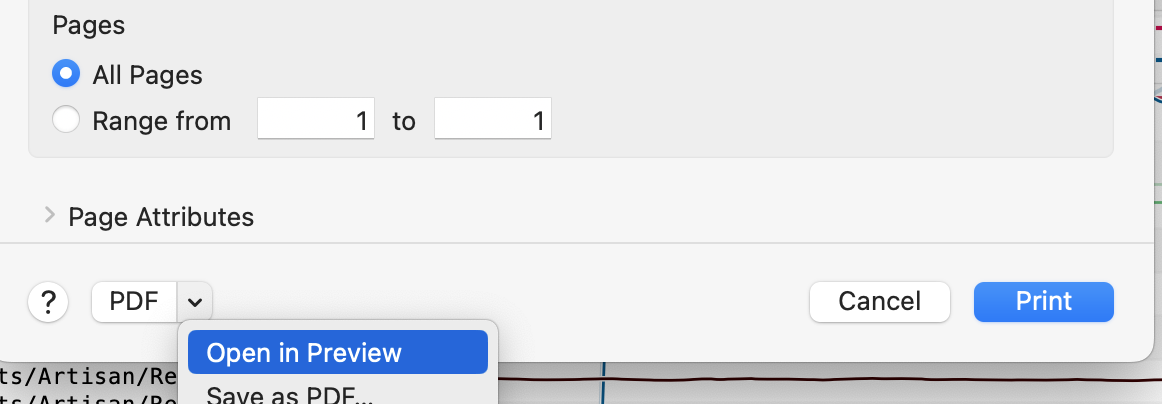
The newer Artisan versions are not doing anything different with printing than the older ones. No change there. Which app to open a PDF is a operating systems decision. You might just select a PDF file in Finder, chose Get Information from the menu and choose Preview as 
Measurement noise is setup specific, not Artisan specific. See On Idle Noise for some technical explanations. Smoothing in software should always be the last option to choose as it always produces a delay and you will loose information. Increase the |
Beta Was this translation helpful? Give feedback.
-
|
Hi MarkoThanks for the quick reply. With printing. I have always used this method — “ choose the Open with Preview directly from the print dialog.“. And Preview has always opened and allowed me to crop, etc the artisan profile and then print from this app. Can’t seem to get that to work now. Even trying to change adobe preferences. I loaded my settings that I save last week before installing 2.8.4. Any other ideas on Printing using Preview app?Mike"It's not whether you get knocked down, its whether you get back up"- LombardiSent from my iPhoneOn Jul 30, 2023, at 12:04 PM, Marko Luther ***@***.***> wrote:
Hi Marko, I am up and running with the 2.8.4 Legacy version. Thanks for the help and getting me plugging in to this latest Legacy version of Artisan! I did have some challenges with printing. I have always printed using the "Preview" app on my Macbook. I'd use this from the File - Print menu and make edits in Preview to have the Roast Graph fit the page by sizing and cropping. However, with this 2.8.4 version it launches Adobe Acrobat each time I try my print routing. Is there a reason Artisan will not launch the Apple Preview App now in this legacy version and always goes to Adobe Acrobat?
The newer Artisan versions are not doing anything different with printing than the older ones. No change there. Which app to open a PDF is a operating systems decision. You might just select a PDF file in Finder, chose Get Information from the menu and choose Preview as Open with app and click Change all. Alternatively, you can
I just need to figure out some smoothing on the Delta Bean Temp curve as that is a bit like an EKG in this legacy version. Any advice where to start tweaking on smoothing the Delta Bean Temp curve?
Measurement noise is setup specific, not Artisan specific. See On Idle Noise for some technical explanations. Smoothing in software should always be the last option to choose as it always produces a delay and you will loose information. Increase the Delta Span for the DeltaBT if you need to.
—Reply to this email directly, view it on GitHub, or unsubscribe.You are receiving this because you authored the thread.Message ID: ***@***.***>
|
Beta Was this translation helpful? Give feedback.
-
|
Got it Marko. Found how to change the default and deselected adobe pdf. Thanks again for taking time to help me out and answer my questions!Mike"It's not whether you get knocked down, its whether you get back up"- LombardiSent from my iPhoneOn Jul 30, 2023, at 12:40 PM, Mike Silver ***@***.***> wrote:Hi MarkoThanks for the quick reply. With printing. I have always used this method — “ choose the Open with Preview directly from the print dialog.“. And Preview has always opened and allowed me to crop, etc the artisan profile and then print from this app. Can’t seem to get that to work now. Even trying to change adobe preferences. I loaded my settings that I save last week before installing 2.8.4. Any other ideas on Printing using Preview app?Mike"It's not whether you get knocked down, its whether you get back up"- LombardiSent from my iPhoneOn Jul 30, 2023, at 12:04 PM, Marko Luther ***@***.***> wrote:
Hi Marko, I am up and running with the 2.8.4 Legacy version. Thanks for the help and getting me plugging in to this latest Legacy version of Artisan! I did have some challenges with printing. I have always printed using the "Preview" app on my Macbook. I'd use this from the File - Print menu and make edits in Preview to have the Roast Graph fit the page by sizing and cropping. However, with this 2.8.4 version it launches Adobe Acrobat each time I try my print routing. Is there a reason Artisan will not launch the Apple Preview App now in this legacy version and always goes to Adobe Acrobat?
The newer Artisan versions are not doing anything different with printing than the older ones. No change there. Which app to open a PDF is a operating systems decision. You might just select a PDF file in Finder, chose Get Information from the menu and choose Preview as Open with app and click Change all. Alternatively, you can
I just need to figure out some smoothing on the Delta Bean Temp curve as that is a bit like an EKG in this legacy version. Any advice where to start tweaking on smoothing the Delta Bean Temp curve?
Measurement noise is setup specific, not Artisan specific. See On Idle Noise for some technical explanations. Smoothing in software should always be the last option to choose as it always produces a delay and you will loose information. Increase the Delta Span for the DeltaBT if you need to.
—Reply to this email directly, view it on GitHub, or unsubscribe.You are receiving this because you authored the thread.Message ID: ***@***.***>
|
Beta Was this translation helpful? Give feedback.
-
|
Hi Marko,
Would you be able to tell me if it is possible to adjust / Calibrate the BT
& ET readings in Artisan so that they align with the Roaster digital temp
gauges for BT & ET? In using the 2.8.4 legacy sw I have a 20*F to as much
as 35*F delta in the BT & ET from the US Roaster Corp machine gauges. I
have not experienced this temp delta with the 2.0.0 version of Artisan I
have been using for years. So I am curious why now with the 2.8.4 version
the sw is off in Temp by such disparate degrees?
I connect my Macbook (Catalina 10.15) to the US Roaster Corp via 1048
Phidget. with J style Thermocouples.
Hoping to get the BT & ET Temps in 2.8.4 to align with corresponding temp
reading on the roaster
*R/*
*Mike*
*"The love for all living creatures is the most noble attribute of man.”* –
Charles Darwin
…On Sun, Jul 30, 2023 at 12:04 PM Marko Luther ***@***.***> wrote:
Hi Marko, I am up and running with the 2.8.4 Legacy version. Thanks for
the help and getting me plugging in to this latest Legacy version of
Artisan! I did have some challenges with printing. I have always printed
using the "Preview" app on my Macbook. I'd use this from the File - Print
menu and make edits in Preview to have the Roast Graph fit the page by
sizing and cropping. However, with this 2.8.4 version it launches Adobe
Acrobat each time I try my print routing. Is there a reason Artisan will
not launch the Apple Preview App now in this legacy version and always goes
to Adobe Acrobat?
The newer Artisan versions are not doing anything different with printing
than the older ones. No change there. Which app to open a PDF is a
operating systems decision. You might just select a PDF file in Finder,
chose Get Information from the menu and choose Preview as Open with app
and click Change all. Alternatively, you can choose the Open with Preview
directly from the print dialog.
[image: Screenshot 2023-07-30 at 17 57 39]
<https://user-images.githubusercontent.com/13909011/257062046-5d7e6fde-ee0c-407c-a563-ee8db525b88c.png>
I just need to figure out some smoothing on the Delta Bean Temp curve as
that is a bit like an EKG in this legacy version. Any advice where to start
tweaking on smoothing the Delta Bean Temp curve?
Measurement noise is setup specific, not Artisan specific. See On Idle
Noise
<https://artisan-roasterscope.blogspot.com/2019/03/on-idle-noise.html>
for some technical explanations. Smoothing in software should always be the
last option to choose as it always produces a delay and you will loose
information. Increase the Delta Span for the DeltaBT if you need to.
—
Reply to this email directly, view it on GitHub
<#1242 (comment)>,
or unsubscribe
<https://github.com/notifications/unsubscribe-auth/BBQG3K5NTNFR65LM3C4336LXS2AXHANCNFSM6AAAAAA2XKOYIM>
.
You are receiving this because you authored the thread.Message ID:
<artisan-roaster-scope/artisan/repo-discussions/1242/comments/6588012@
github.com>
|
Beta Was this translation helpful? Give feedback.

-
|
Covered on this page of the setup guide, but since these are likely different probes they won’t match. You can get them close, but you will find other problems with doing so. I use my roaster temps for guidelines and safety but follow Artisan temps from those probes for my roasting.
https://artisan-scope.org/docs/setup/
Setup
artisan-scope.org
…----------------------------------------
Michael Herbert, Head Roaster
Order at www.carefreebuzzbuzz.com <http://www.carefreebuzzbuzz.com/>
Support Artisan RoasterScope <https://artisan-scope.org/>by using
Artisan.Plus <https://artisan.plus/en/>
On Aug 27, 2023, at 8:31 AM, MONTSI94 ***@***.***> wrote:
Hi Marko,
Would you be able to tell me if it is possible to adjust / Calibrate the BT
& ET readings in Artisan so that they align with the Roaster digital temp
gauges for BT & ET? In using the 2.8.4 legacy sw I have a 20*F to as much
as 35*F delta in the BT & ET from the US Roaster Corp machine gauges. I
have not experienced this temp delta with the 2.0.0 version of Artisan I
have been using for years. So I am curious why now with the 2.8.4 version
the sw is off in Temp by such disparate degrees?
I connect my Macbook (Catalina 10.15) to the US Roaster Corp via 1048
Phidget. with J style Thermocouples.
Hoping to get the BT & ET Temps in 2.8.4 to align with corresponding temp
reading on the roaster
*R/*
*Mike*
*"The love for all living creatures is the most noble attribute of man.”* –
Charles Darwin
On Sun, Jul 30, 2023 at 12:04 PM Marko Luther ***@***.***>
wrote:
> Hi Marko, I am up and running with the 2.8.4 Legacy version. Thanks for
> the help and getting me plugging in to this latest Legacy version of
> Artisan! I did have some challenges with printing. I have always printed
> using the "Preview" app on my Macbook. I'd use this from the File - Print
> menu and make edits in Preview to have the Roast Graph fit the page by
> sizing and cropping. However, with this 2.8.4 version it launches Adobe
> Acrobat each time I try my print routing. Is there a reason Artisan will
> not launch the Apple Preview App now in this legacy version and always goes
> to Adobe Acrobat?
>
> The newer Artisan versions are not doing anything different with printing
> than the older ones. No change there. Which app to open a PDF is a
> operating systems decision. You might just select a PDF file in Finder,
> chose Get Information from the menu and choose Preview as Open with app
> and click Change all. Alternatively, you can choose the Open with Preview
> directly from the print dialog.
> [image: Screenshot 2023-07-30 at 17 57 39]
> <https://user-images.githubusercontent.com/13909011/257062046-5d7e6fde-ee0c-407c-a563-ee8db525b88c.png>
>
> I just need to figure out some smoothing on the Delta Bean Temp curve as
> that is a bit like an EKG in this legacy version. Any advice where to start
> tweaking on smoothing the Delta Bean Temp curve?
>
> Measurement noise is setup specific, not Artisan specific. See On Idle
> Noise
> <https://artisan-roasterscope.blogspot.com/2019/03/on-idle-noise.html>
> for some technical explanations. Smoothing in software should always be the
> last option to choose as it always produces a delay and you will loose
> information. Increase the Delta Span for the DeltaBT if you need to.
>
> —
> Reply to this email directly, view it on GitHub
> <#1242 (comment)>,
> or unsubscribe
> <https://github.com/notifications/unsubscribe-auth/BBQG3K5NTNFR65LM3C4336LXS2AXHANCNFSM6AAAAAA2XKOYIM>
> .
> You are receiving this because you authored the thread.Message ID:
> <artisan-roaster-scope/artisan/repo-discussions/1242/comments/6588012@
> github.com>
>
—
Reply to this email directly, view it on GitHub <#1242 (comment)>, or unsubscribe <https://github.com/notifications/unsubscribe-auth/AIW3J4HL5WVRZTZLZ7AHKULXXNR6PANCNFSM6AAAAAA2XKOYIM>.
You are receiving this because you are subscribed to this thread.
|
Beta Was this translation helpful? Give feedback.


Uh oh!
There was an error while loading. Please reload this page.
-
I have been using Artisan since v.9. I have had good success and a long run with v2.0.0. Now I would like to upgrade to v2.8.4 to catch up on the SW. Are there any installation nuances or key steps I need to ensure to adhere to in order to avoid any issues? I am assuming my old Macbook and macOS Catalina are still compatible with this latest version, as I read it on github. Is my assumption correct? Thanks in advance for any advice and guidance.
Beta Was this translation helpful? Give feedback.
All reactions