This repository was archived by the owner on Dec 15, 2022. It is now read-only.
This repository was archived by the owner on Dec 15, 2022. It is now read-only.
Mini GitHub browser #1019

Description

This continues from the discussion in #714 (comment).
To make interacting with GitHub easier, we have these options:
- Add an "Open in Atom" button on github.com, so that it's easy to open a PR or continue a code review in Atom.
- Have some sort of notifications and search inside Atom, so that you can easily find things you care about and also show if something has new activity since you last saw it. It also shouldn't take up too much space.
Below is an exploration of option 2, a search input with notifications built in.
1. Focus
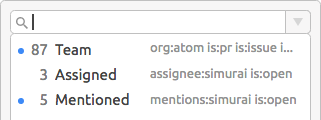
- When you focus the search input, a dropdown appears with some predefined search terms
- Use 🔽 key to select or trigger a search directly by entering a number
0-9. - The 🔵 blue dot is a hint that this search has new notifications
- You can also use 🔼 arrow up key to cycle through your previous searches
2. Filter autocomplete
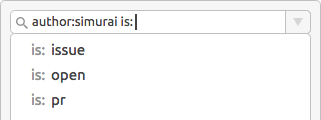
- I never really can remember those filters (or however they are called) with that
:in the center. So just typing:would list all of them to easily see what's available. - After choosing a filter or typing it (e.g.
is:) all options of that filter are listed. - Not shown in the ☝️ wireframe: There could also be a hint if a filter/option is available and didn't get misspelled. Like change the color or so.
3. Search results
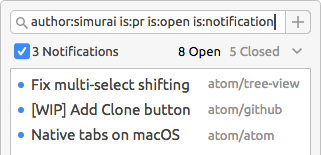
- Once your hit enter, the search results are shown.
- Right above the results are some more filters. Maybe the
is:notification(currently not part of the API) checkbox andis:open/closedtoggle. - The
Vdown chevron might open a dropdown with more commonly used filters.
4. Save a search
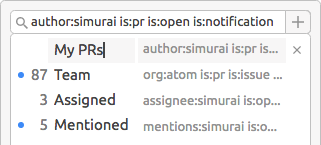
- Because there are so many filters/options and people have their own workflows, it might be handy to save searches. Click the ➕ icon to save your current search.
- To make it easy to spot a search, you can give it a name.
- You can also edit or delete the predefined/default searches.
- Rearrange the order of your saved searches based on importance or however you like.
Question: 🤔 Might be hard to say without trying it out, but could you imagine finding your way around GitHub with only a single search input?
Be able to save your searches and edit/delete the existing ones, would kinda let you create your personal navigation. And you can adapt it over time. Like when a project becomes too noisy, you might wanna switch to only see notifications if you get @ mentioned.