NCloud Obejct Storage 파일 업로드 구현
파일 업로드 설정 및 구현 과정을 공유하려고 글 남깁니다.
먼저, 설명서 에서 안내하는 내용을 따라 API 인증키를 생성하고 Object Storage 이용 신청 후 버킷을 생성합니다.
설명서를 읽어보면 Object Storage가 AWS의 S3를 이용하고 있어서 S3 관련 라이브러리를 연동해서 사용할 수 있습니다.
필요한 모듈
npm install multer multer-s3 aws-sdk
.env 설정
생성한 인증키, secret, 버킷 정보를 등록해줍니다.
리전하고 endpoint는 동일하게 작성하시면 됩니다.
#STORAGE
AWS_ACCESSKEY=
AWS_SECRETKEY=
AWS_REGION=kr-standard
S3_ENDPOINT=https://kr.object.ncloudstorage.com
S3_BUCKET=
upload 모듈 만들기
import multer from 'multer';
import multerS3 from 'multer-s3';
import AWS from 'aws-sdk';
import { v4 as uuidv4 } from 'uuid';
import moment from 'moment';
import { S3Config } from '../config'; //위에서 작성한 .env 파일을 읽어와 config로 만들어주었습니다.

const { endpoint, region, accessKey, secretKey, bucket } = S3Config;

//S3 연결에 필요한 정보를 설정합니다.
const s3 = new AWS.S3({
  endpoint: new AWS.Endpoint(endpoint),
  accessKeyId: accessKey,
  secretAccessKey: secretKey,
  region,
});

//S3 연결 정보를 multerS3에 등록
const storage = multerS3({
  s3,
  bucket,
  contentType: multerS3.AUTO_CONTENT_TYPE,
  acl: 'public-read',
  /**
  * 스토리지에 파일을 저장할 때 사용할 key를 생성하는 부분인데 해당 키가 경로가 되어 스토리지에 저장됩니다.
  * 파일을 구분하기 쉽게 업로드 날짜 별로 모이도록 날짜 정보를 이용해 중간 경로를 만들어주었고
  * 같은 이름의 파일이 업로드 될 수도 있는 상황을 처리하기 위해 파일명을 uuid로 변경하고
  * 원래 확장자를 붙여주었습니다.
  */
  key(req, file, cb) {
    const originFilename = file.originalname;
    const extension = originFilename.substring(originFilename.lastIndexOf('.'));
    cb(null, `uploads/${moment().format('YMD')}/${uuidv4()}${extension}`);
  },
});

export default multer({ storage });
Router 구현
//router
import express from 'express';
import upload from '../../libs/upload';
import FileController from './controller';

const router = express.Router();

/**
* 위에서 만든 upload 모듈(미들웨어)을 이용해 s3로 업로드를 요청하게 됩니다.
* 현재는 파일이 하나씩 업로드 된다고 생각해서 single을 사용했는데
* array, fields 등 여러개를 업로드 하는 방식도 제공하고 있습니다.
* 업로드에 성공하면 업로드 된 파일의 메타데이터(파일접근 URL 같은)들이 response됩니다.
*/
router.post('/', upload.single('file'), FileController.s3UploadCallback);

export default router;


//controller
/**
* 업로드 결과를 처리하는 컨트롤러 코드입니다.
* 업로드 성공시 파일의 메타데이터는 request에 file 객체로 등록되어 있습니다.
* 그중 파일에 접근하기 위한 URL을 꺼내 클라이언트로 응답하도록 구현했습니다.
*/
const s3UploadCallback = (req, res, next) => {
    try {
      const { location } = req.file;
      const payLoad = { url: location };
      res.json(payLoad);
    } catch (err) {
      next(err);
    }
  },
};
파일 메타데이터 예시
{
  fieldname: 'img',
  originalname: '스크린샷 2020-08-11 오후 4.05.51.png',
  encoding: '7bit',
  mimetype: 'image/png',
  size: 18472,
  bucket: 'project-portfolio-upload',
  key: 'uploads/1597667031103_스크린샷 2020-08-11 오후 4.05.51.png',
  acl: 'public-read',
  contentType: 'image/png',
  contentDisposition: null,
  storageClass: 'STANDARD',
  serverSideEncryption: null,
  metadata: { fieldName: 'img' },
  location: 'AWS-S3 URL',
  etag: '"22cdfa150f11b3d125853746e5a7a65c"',
  versionId: undefined
}

//출처: https://velog.io/@paerck25/multermulter-s3-%EC%82%AC%EC%9A%A9%EB%B2%95
업로드 결과 이미지
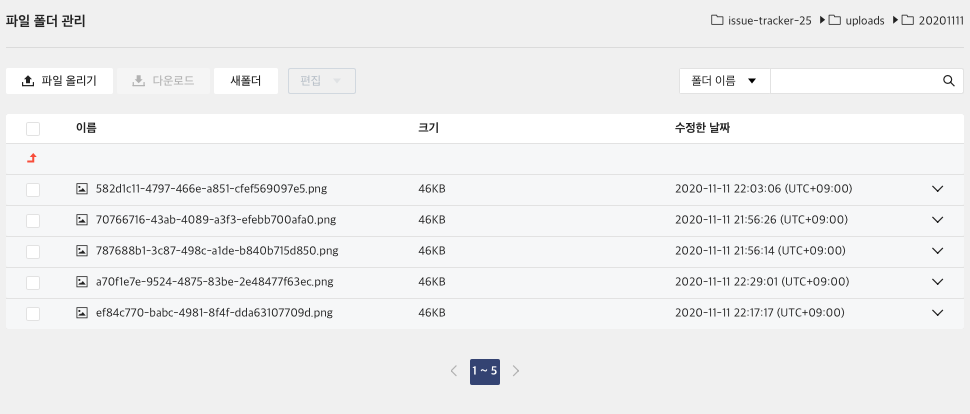
https://manual.ncloud.com/ko/storage/storage-8-4.html
https://morningbird.tistory.com/62
https://velog.io/@paerck25/multermulter-s3-%EC%82%AC%EC%9A%A9%EB%B2%95