Releases: brickbots/PiFinder
v1.11.2

v1.11.2 Release
The prebuilt image for this release is available at:
https://ddbeeedxfpnp0.cloudfront.net/software/PiFinder_1.11.2.img
For information about how to update software versions:
https://pifinder.readthedocs.io/en/release/user_guide.html#update-software
Notes
This is a minor release to address some data issues discovered in the ARP catalog and fix a couple of bugs. These release notes include version 1.11.1 and 1.11.2
Software Updates
- No feature or software changes
Bug Fixes
- Fixed position of some ARP catalog objects
- Regenerated images for all ARP objects to better frame objects
- Added more cross reference names in catalogs
- When pushing objects from SkySafari, PiFinder now properly displayed Locate screen
Documentation
- No Changes
Feedback on releases is always welcome and we very much appreciate the bug reports to help us continue to improve the PiFinder! I'll leave you with some of the great new objects in the ARP catalog!


v1.11.0
v1.11.0 Release
The prebuilt image for this release is available at:
https://ddbeeedxfpnp0.cloudfront.net/software/PiFinder_1.11.0.img
For information about how to update software versions:
https://pifinder.readthedocs.io/en/release/user_guide.html#update-software
Notes
If you like peculiar galaxies, this is the release for you! The main feature of this release is the addition of the Atlas of Peculiar Galaxies by Halton Arp and we've coupled this with a couple of requested changes and a few bug fixes to round everything out.
Software Updates
- Added ARP Catalog!
- Swapped direction of azimuth arrows in Locate screen per Cloudy Nights informal poll (see below)
- Change default exposure time to 0.4
- Exposure is now saved between sessions
- Made animation of GPS indicator more consistent among screens
- GPS Satellite count in status screen more reliable
- Accept 2d GPS fixes rather than wait for full 3d fix
- Allow wider range of FOV's to accommodate slightly different lens versions
Bug Fixes
- Bright Star Alignment no longer rejects very bright stars 🙌
Documentation
- Small typo fixes and clarifications
Thanks to everyone who took the time to weigh in on the Locate screen directional arrows for the Azimuth axis. We've swapped these for now as it seems to be the predominant intuition, but we are planning on making this customizable in the future.
v1.10.1
v1.10.1 Release
The prebuilt image for this release is available at:
https://ddbeeedxfpnp0.cloudfront.net/software/PiFinder_1.10.1.img
For information about how to update software versions:
https://pifinder.readthedocs.io/en/release/user_guide.html#update-software
Notes
This release is all about QOL - Quality of Life. It's a collection of minor changes to UI, little bits of functionality, and a bug fix which together make the PiFinder experience a bit nicer. Thanks for everyone who filed issues, made suggestions, and took the time to reach out to let us know how you use, and want to use, the PiFinder! 💯
Software Updates
- Nearby screen now holds list until scope is moved a few degrees to make selecting targets nice and easy
- RA / Dec now optionally shown on Chart screen in either HH:MM or Decimal degrees
- Locate screen no longer shows -.--- when missing key data but now shows Searching for GPS or Waiting for Solve
- GPS Status indicator in title bar now flashes while looking for GPS and is solid when GPS lock achieved
- Shape of arrows on Locate screen adjusted for enhanced legibility
- Camera orientation now completely configurable for custom builds
- Position of planets is now recalculated more often to improve accuracy of Push-To instructions
Bug Fixes
- Planets catalog can now be enabled/disabled along with others
Documentation
- Clarification on Software setup page


v1.10.0
v1.10.0 Release
The prebuilt image for this release is available at:
https://ddbeeedxfpnp0.cloudfront.net/software/PiFinder_1.10.0.img
For information about how to update software versions:
https://pifinder.readthedocs.io/en/release/user_guide.html#update-software
Notes
This is a major release featuring two great new catalogs along with a few bug fixes to make life better 🙌 You can see all the changes below, but here are the main highlights:
- Sharpless
The Sharpless catalog is a list of 313 H II regions (emission nebulae) intended to be comprehensive north of declination −27°.
(It does include some nebulae south of that declination as well.)
- Abell
The Abell Catalog of Planetary Nebulae (1966 by George O. Abell) contains 79 entries confirmed to be planetary nebulae.
Keep your suggestions for new catalogs coming as we'll be continuing to add new catalogs with every release 📈
Software Updates
- Sharpless Catalog
- Abell Catalog
Bug Fixes
- Fix IMU flip detection code to avoid 'stuck' IMU readings
- Restore catalog object additional name display
- Properly apply altitude filtering to catalog objects
- Filter catalog objects displayed in Nearby
- Make sure all catalogs are available for activation
Documentation
- Improved WiFi setup documentation
- Add catalog list to documentation
Thank you @mrosseel for helping to get to version 1.10.0 🎉
Contributors

Assets 2
v1.9.0
v1.9.0 Release
The prebuilt image for this release is available at:
https://ddbeeedxfpnp0.cloudfront.net/software/PiFinder_1.9.0.img
For information about how to update software versions:
https://pifinder.readthedocs.io/en/release/user_guide.html#update-software
Notes
This is a major feature release with a host of awesome new improvements. Once again @mrosseel was the champion here contributing pretty much all of this new functionality. A very special thank you goes out to @smroid for their work on Cedar Detect and improvements to Tetra3 🥇 You can see all the changes below, but here are the main highlights:
- Solving is both faster and more robust
We've switched to a new way of detecting stars which allows solving images with shorter exposures. 0.2 second exposures (5 solves per second!!) are now very usable under bottle 2/3 skies and similar improvements should apply across brighter skies as well. This star-detection update also helps with trees, buildings and other obstructions in the camera FOV!
- Nearby Screen
One of our favorite uses of the PiFinder is to explore a specific patch of sky, uncovering new objects that we may have never seen before. This was possible previously using an observing list populated with nearby objects, but @mrosseel took this idea and supercharged it! Now there is a specific screen, which updates in real time, showing a list of objects nearby that match your current catalog filters. Like globular clusters, maybe Planetary Nebula? Set your catalog filter to see the types objects you are in the mood for and as you move your scope around the sky you'll get an updated list of these objects nearby with magnitude and other info!


- New Catalogs
This update includes the Barnard catalog of dark nebula and the RASC catalog of double stars! Keep your suggestions coming as we'll be continuing to add new catalogs with every release 📈
Software Updates
- Switch to Cedar Detect and Cedar fork of Tetra3 for improved solving performance and robustness
- Add new Nearby screen
- Add RASC double star and Barnard catalogs
- Adjust catalog options page to allow support for more than 10 catalogs
- Catalog info display improvements with better formatting of descriptions
- Minor time to first GPS lock improvement
- Web Interface UI updates; Add default password to login page, clarify save/cancel when adding new networks
Bug Fixes
- Fix crashing bug when loading some observing lists
- Adjust FOV hint on solver to allow for variation in lens manufacturing
Documentation
- Developer guide overhaul by @apos 🙌
- Improvement in fist time focus instructions based on user feedback
Contributors


Assets 2
v1.8.3
v1.8.3 Release
The prebuilt image for this release is available at:
https://ddbeeedxfpnp0.cloudfront.net/software/PiFinder_1.8.3.img
For information about how to update software versions:
https://pifinder.readthedocs.io/en/release/user_guide.html#update-software
Notes
This is fix for an issue causing disconnection from SkySafari and other apps that rely on the LX200 PiFinder interface. Under many circumstances the PiFinder would return improperly formatted responses and would cause spurious disconnections.
Bug Fixes
- Fix improperly formatted response to LX200 GD request when current solution was in negative declination
v1.8.1
v1.8.1 Release
The prebuilt image for this release is available at:
https://ddbeeedxfpnp0.cloudfront.net/software/PiFinder_1.8.1.img
For information about how to update software versions:
https://pifinder.readthedocs.io/en/release/user_guide.html#update-software
Notes
This is minor change and bug fix related to the newly released planets catalog
Software Updates
- Planets Catalog now available at start up rather than being loaded after GPS lock
Bug Fixes
- Pressing 'B' to view object image for planets would cause a hard crash
v1.8.0
v1.8.0 Release
The prebuilt image for this release is available at:
https://ddbeeedxfpnp0.cloudfront.net/software/PiFinder_1.8.0.img
For information about how to update software versions:
https://pifinder.readthedocs.io/en/release/user_guide.html#update-software
Notes
This feature release adds Planets to the PiFinder catalog interface 🎉 . Also included is the ability to send targets from SkySafari or other apps to the PiFinder for Push-To locating and an interface for setting time/location via the web interface 🌐
Software Updates
- Planets Catalog! Once time/date is acquired a catalog of Planets will be available for your observing pleasure
- Allow Go-To command via LX200 interface. This enables sending targets not in the PiFinder catalog from SkySafari or other apps to the PiFinder. This is great for comets and other transients!
- Web Interface update to allow for setting time/date manually. Handy for debug or if you've forgotten your GPS dongle. Just click on the pencil link on the GPS status from the home page


v1.7.4
v1.7.4 Release
The prebuilt image for this release is available at:
https://ddbeeedxfpnp0.cloudfront.net/software/PiFinder_1.7.4.img
For information about how to update software versions:
https://pifinder.readthedocs.io/en/release/user_guide.html#update-software
Notes
This release fixes a bug in, and improves responsiveness of, the web interface. It also makes Wifi/IP information easier to find on the status page.
For more information:
https://pifinder.readthedocs.io/en/release/user_guide.html#web-interface
Software Updates
- Web interface is now multi-threaded to improve reliability and responsiveness
- Status screen re-ordered to bring wifi/ip information above the fold.
- Currently connected network name added to status screen
Bug Fixes
- Fix crashing bug in web interface when downloading compressed backup file
v1.7.3
v1.7.3 Release
The prebuilt image for this release is available at:
https://ddbeeedxfpnp0.cloudfront.net/software/PiFinder_1.7.3.img
For information about how to update software versions:
https://pifinder.readthedocs.io/en/release/user_guide.html#update-software
Notes
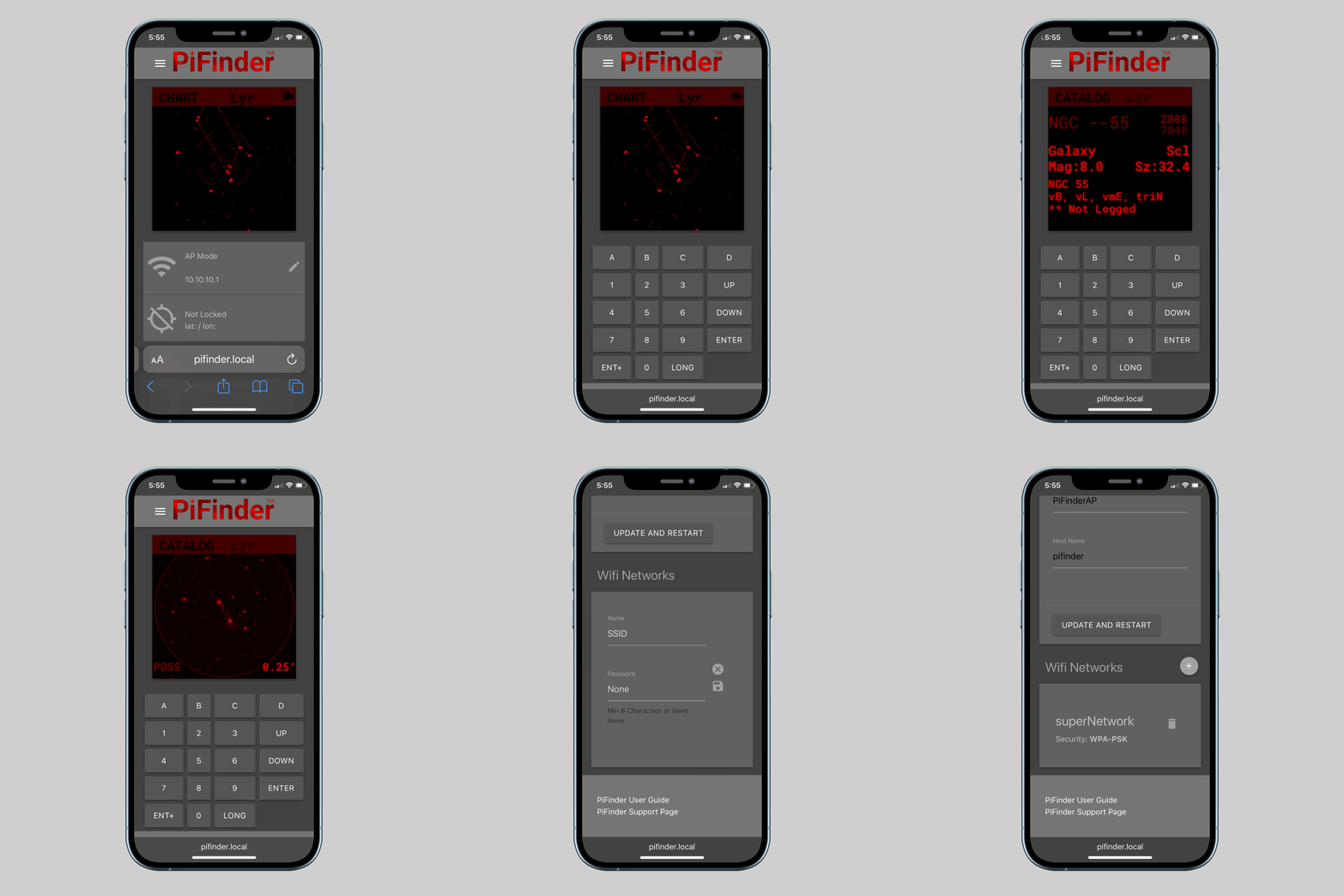
This release is features a long awaited overhaul and addition to the PiFinder web interface 🎉
- Fully responsive design for computer, phone or tablet use
- Quick access to current PiFinder status + live screen
- Full remote control with virtual screen/keypad
- Easy network adjustments:
- Add/Remove Wifi networks
- Change hostname
- Change Access Point network name
- Backup and restore observing logs, configuration and other user info
- Change PiFinder user password
- View and download observing sessions and logs
For more information:
https://pifinder.readthedocs.io/en/release/user_guide.html#web-interface
Software Updates
- Brand new web interface
- Run the web server automatically
- Access Point is the default mode for new software images
Bug Fixes
- Change the way IP addresses are probed to avoid freezing when accessing status screen
- Adjust coordinates to current epoch for LX200 server (fixes small position offset on SkySafari)