HWMonitor is a hardware monitoring program that aggregates several data points from from your PC hardware's sensors, and enables easy tracking of current and some historical (minimum and maximum) values, which can optionally be saved for future reference. These can be useful for performance tests, benchmarks, and troubleshooting.
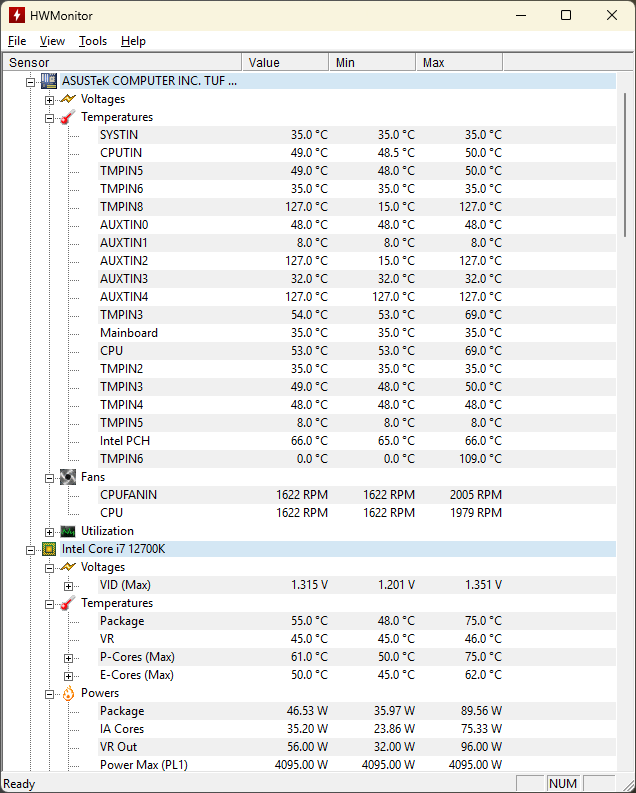
- Voltages
- Temperatures (configurable as either Celsius or Fahrenheit)
- Fan speeds
- Hardware utilization (available capacity, load, storage space, activity, etc.)
- Power utilization
- Power current
- Clock speeds
- Counters (SMART data, PCIe errors, etc.)
- Battery capacities (design capacity, capacity at full charge, current capacity, etc.)
- Battery levels (load, wear, charge, etc.)
- Performance limits
- Speeds (read/write for storage devices, upload/download for network adapters)
- Motherboards
- Central Processing Units (CPU)
- Random-access memory (RAM)
- Graphics Processing Units (GPU)
- Network adapters (physical or virtual)
- Laptop batteries
- Uninterruptible Power Supplies (UPS)
The installer executed by this package was built using Inno Setup. For advanced setup scenarios, refer to Inno Setup's command-line interface documentation. Any desired arguments can be appended to (or optionally overriding with the --override-arguments switch) the package's default install arguments with the --install-arguments option.
Installer-specific details (e.g. Setup configuration and supported Languages, Components, and Tasks) can be found in the Inno Setup Script file, which has been extracted using Inno Setup Unpacker and reuploaded for quick reference.
For future upgrade operations, consider opting into Chocolatey's useRememberedArgumentsForUpgrades feature to avoid having to pass the same arguments with each upgrade:
choco feature enable --name="'useRememberedArgumentsForUpgrades'"