Original texts by Manuel Parra: manuelparra@decsai.ugr.es and José Manuel Benítez: j.m.benitez@decsai.ugr.es
With contributions by Carlos Cano: carloscano@ugr.es
Content:
- Introduction to Hadoop
- Setting up Hadoop and connecting
- Working with HDFS
- Working with Hadoop Map-Reduce
Hadoop is an open-source framework developed by the Apache Software Foundation that enables the distributed processing of large datasets across clusters of computers using simple programming models. It is designed to scale up from a single server to thousands of machines, each offering local computation and storage. At its core, Hadoop is built to handle vast amounts of data in a fault-tolerant, reliable, and cost-effective way, making it particularly well-suited for big data applications.
The Hadoop ecosystem is composed of several key modules. The two primary ones are the Hadoop Distributed File System (HDFS), which provides high-throughput access to data, and MapReduce, a programming model for parallel data processing. HDFS stores data in large blocks spread across multiple nodes, ensuring redundancy and availability. MapReduce, on the other hand, processes data in parallel by dividing tasks into "map" and "reduce" functions.
Beyond its core components, Hadoop includes a rich ecosystem of tools and frameworks, such as Hive (for SQL-like querying), Pig (for data transformation), and YARN (for resource management). With its ability to process massive volumes of structured and unstructured data, Hadoop has become a foundational technology in many industries.
Hadoop.ugr.es is a computing infrastructure or cluster with 15 nodes and a header node containing the data processing platforms Hadoop and Spark and their libraries for Data Mining and Machine Learning (Mahout and MLLib). It also has HDFS installed for working with distributed data. To connect to it you can follow these steps:
From linux/MacOs machines:
ssh <your account>@hadoop.ugr.es
From Windows machine:
Use Putty/SSH
Download link: https://www.chiark.greenend.org.uk/~sgtatham/putty/latest.html
- Host:
hadoop.ugr.es - Port:
22 - Click "Open" -> Write your login credentials and password.
CURRENTLY THIS IS THE ONLY WAY TO RUN IT.
You can set up a test install of Hadoop locally or on the server we have been using so far, with the following docker-compose.yaml.
services:
  namenode:
    image: docker.io/bde2020/hadoop-namenode:2.0.0-hadoop3.2.1-java8
    container_name: namenode
    ports:
      - "9870:9870"  # HDFS Web UI
    environment:
      - CLUSTER_NAME=test
      - HDFS_CONF_dfs_namenode_datanode_registration_ip___hostname___check=false
    volumes:
      - namenode:/hadoop/dfs/name

  datanode:
    image: docker.io/bde2020/hadoop-datanode:2.0.0-hadoop3.2.1-java8
    container_name: datanode
    ports:
      - "9864:9864"  # DataNode Web UI
    environment:
      - CLUSTER_NAME=test
      - CORE_CONF_fs_defaultFS=hdfs://namenode:8020
    volumes:
      - datanode:/hadoop/dfs/data
    depends_on:
      - namenode

volumes:
  namenode:
  datanode:
If you are working on our server, you'll have to edit the ports sections to map the ports 9870 and 9864 to ports you have been assigned.
As a reminder, you can then start everything with
docker compose up -dYou can then check if things are running correctly by connecting with a web browser to the following URLs:
- HDFS NameNode UI: http://localhost:9870
- DataNode UI: http://localhost:9864
The Hadoop Distributed File System (HDFS) is a distributed file system designed to run on commodity hardware. It has many similarities with existing distributed file systems. However, the differences from other distributed file systems are significant. HDFS is highly fault-tolerant and is designed to be deployed on low-cost hardware. HDFS provides high throughput access to application data and is suitable for applications that have large data sets. HDFS relaxes a few POSIX requirements to enable streaming access to file system data. HDFS was originally built as infrastructure for the Apache Nutch web search engine project. HDFS is now an Apache Hadoop subproject. The project URL is http://hadoop.apache.org/. This material has been composed from the HDFS reference manual: https://hadoop.apache.org/docs/stable/hadoop-project-dist/hadoop-hdfs/ .
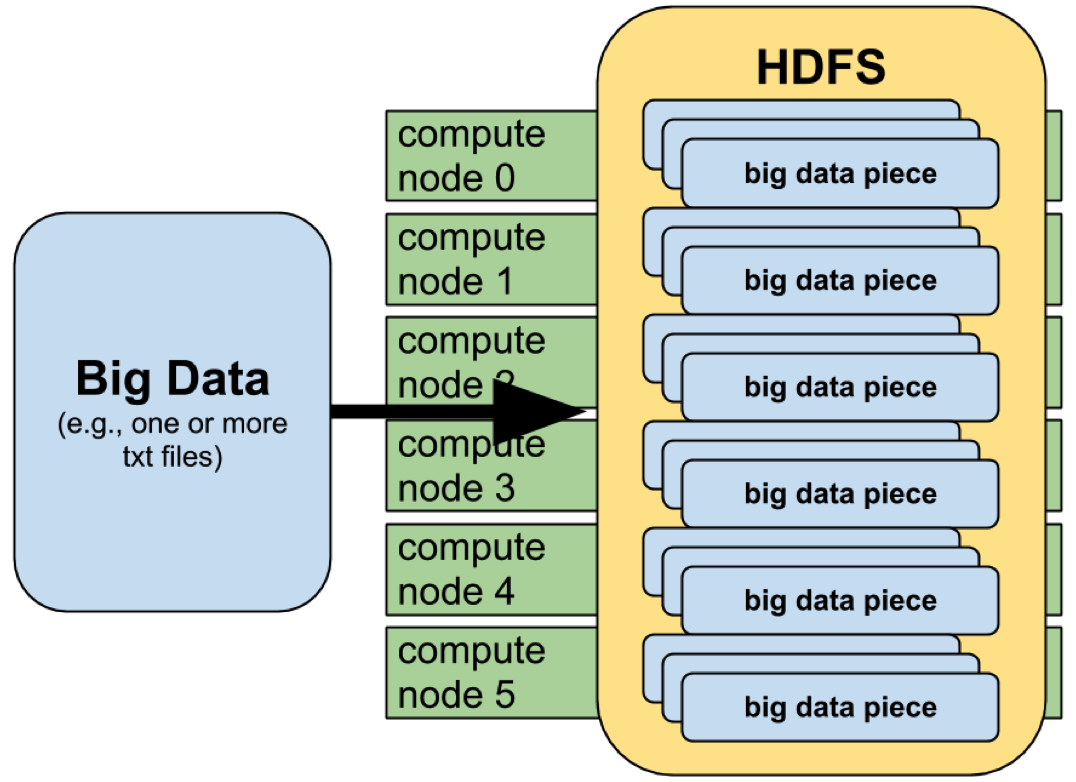
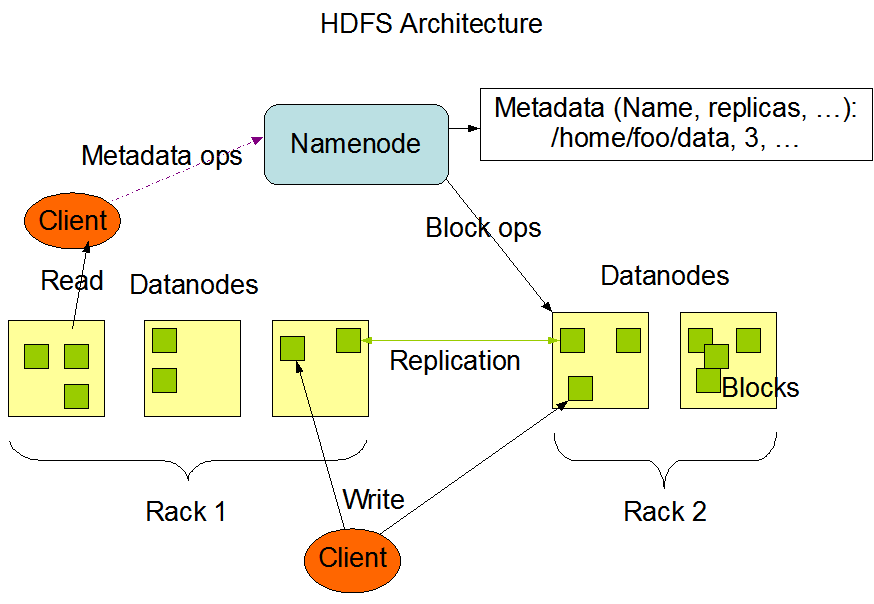
HDFS has a master/slave architecture. An HDFS cluster consists of a single NameNode, a master server that manages the file system namespace and regulates access to files by clients. In addition, there are a number of DataNodes, usually one per node in the cluster, which manage storage attached to the nodes that they run on. HDFS exposes a file system namespace and allows user data to be stored in files. Internally, a file is split into one or more blocks and these blocks are stored in a set of DataNodes. The NameNode executes file system namespace operations like opening, closing, and renaming files and directories. It also determines the mapping of blocks to DataNodes. The DataNodes are responsible for serving read and write requests from the file system’s clients. The DataNodes also perform block creation, deletion, and replication upon instruction from the NameNode.
Data Replication
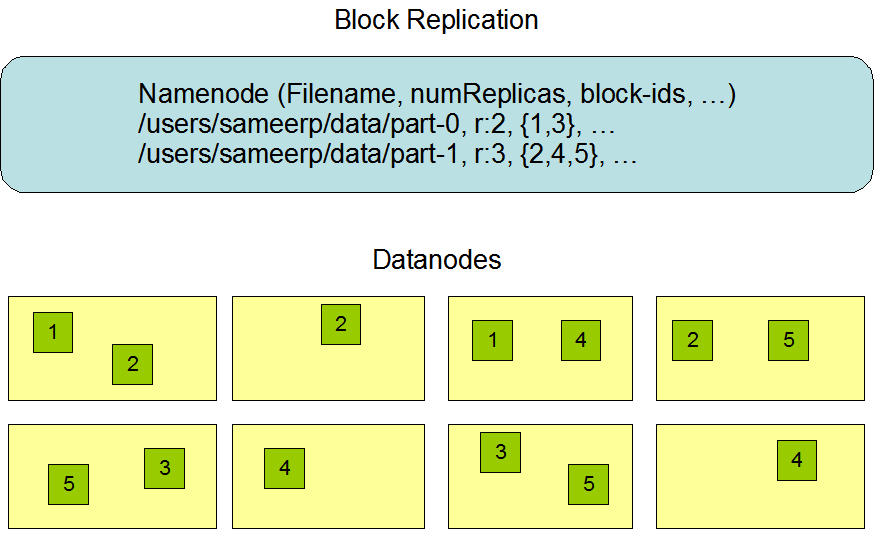
HDFS is designed to reliably store very large files across machines in a large cluster. It stores each file as a sequence of blocks; all blocks in a file except the last block are the same size. The blocks of a file are replicated for fault tolerance. The block size and replication factor are configurable per file. An application can specify the number of replicas of a file. The replication factor can be specified at file creation time and can be changed later. Files in HDFS are write-once and have strictly one writer at any time.
Log in hadoop ugr server with your credentials:
ssh ccsa<DNI>@hadoop...
or in ulises server with your credentials:
ssh xxusername@ulises...
you will also need a password from your teacher.
CURRENTLY THIS IS THE ONLY WAY TO RUN IT.
Connect to a shell in your docker container with the following command.
docker exec -it namenode bashNow we'll need to create a folder structure as follows:
hdfs dfs -mkdir /user
hdfs dfs -mkdir /user/CCSA2425/
hdfs dfs -mkdir /user/CCSA2425/spark
hdfs dfs -chown spark:spark /user/CCSA2425/spark
The management of the files in HDFS works in a different way of the files of the local system. The file system is stored in a special space for HDFS. The directory structure of HDFS is as follows:
/tmp     Temp storage
/user    User storage
/usr     Application storage
/var     Logs storage
Each user has in HDFS a folder in /user/ with the username, for example for the user with login mcc50600265 in HDFS have:
/user/CCSA2425/mcc50600265/
Attention! The HDFS storage space is different from the user's local storage space in hadoop.ugr.es
/user/CCSA2425/mcc50600265/ NOT EQUAL /home/mcc506000265/
For ulises, the HDFS folder is located in:
/user/xxyour-username
hdfs dfs <options>
Options are (simplified):
-ls         List of files
-cp         Copy files
-rm         Delete files
-rmdir      Remove folder
-mv         Move files or rename
-cat        Similar to Cat
-mkdir      Create a folder
-tail       Last lines of the file
-get        Get a file from HDFS to local
-put        Put a file from local to HDFS
List the content of a HDFS folder:
hdfs dfs -ls /user/CCSA2425/mcc50600265
Create a test file:
echo "HOLA HDFS" > fichero.txt
Move the local file fichero.txt to HDFS:
hdfs dfs -put fichero.txt /user/your-username/.
List again your folder:
hdfs dfs -ls /user/your-username
Create a folder test:
hdfs dfs -mkdir /user/your-username/test
Move fichero.txt to test folder:
hdfs dfs -mv /user/your-username/fichero.txt /user/your-username/test/.
Show the content:
hdfs dfs -cat /user/your-username/test/fichero.txt
Delete file and folder:
hdfs dfs -rm -skipTrash /user/your-username/test/fichero.txt
and
hdfs dfs -rmdir /user/your-username/test
Create two files:
echo "HOLA HDFS 1" > f1.txt
echo "HOLA HDFS 2" > f2.txt
Store in HDFS:
hdfs dfs -put f1.txt /user/your-username/.
hdfs dfs -put f2.txt /user/your-username/.
Concatenate both files:
hdfs dfs -getmerge /user/your-username/ merged.txt
- Create 5 files in your local account with the following names:
- part1.dat, part2.dat, part3.dat, part4.dat, part5.dat
- Copy files to HDFS
- Create the following HDFS folder structure:
- /test/p1/
- /train/p1/
- /train/p2/
- Copy part1 in /test/p1/ and part2 in /train/p2/
- Move part3 and part4 to /train/p1/
- Finally, merge folder /train/p2 and store as data_merged.txt
The provided examples are written in Java code for Hadoop version: 3.2.1. For examples in Python, go to these references
The main structure is that there is a mapper and reducer, which we will introduce in the following.
Maps input key/value pairs to a set of intermediate key/value pairs. Maps are the individual tasks which transform input records into intermediate records. The transformed intermediate records need not be of the same type as the input records. A given input pair may map to zero or many output pairs.
The Hadoop Map-Reduce framework spawns one map task for each InputSplit generated by the InputFormat for the job. Mapper implementations can access the configuration for the job via the JobContext.getConfiguration().
public class TokenCounterMapper
     extends Mapper<Object, Text, Text, IntWritable>{

   private final static IntWritable one = new IntWritable(1);
   private Text word = new Text();

   public void map(Object key, Text value, Context context) throws IOException, InterruptedException {
     StringTokenizer itr = new StringTokenizer(value.toString());
     while (itr.hasMoreTokens()) {
       word.set(itr.nextToken());
       context.write(word, one);
     }
   }
 }
Reduces a set of intermediate values which share a key to a smaller set of values.
Reducer has 3 primary phases:
- Shuffle: The Reducer copies the sorted output from each Mapper using HTTP across the network.
- Sort: The framework merge sorts Reducer inputs by keys (since different Mappers may have output the same key). The shuffle and sort phases occur simultaneously i.e. while outputs are being fetched they are merged. A SecondarySort to achieve a secondary sort on the values returned by the value iterator, the application should extend the key with the secondary key and define a grouping comparator. The keys will be sorted using the entire key, but will be grouped using the grouping comparator to decide which keys and values are sent in the same call to reduce. The grouping comparator is specified via Job.setGroupingComparatorClass(Class). The sort order is controlled by Job.setSortComparatorClass(Class).
- Reduce: In this phase the reduce(Object, Iterable, org.apache.hadoop.mapreduce.Reducer.Context) method is called for each <key, (collection of values)> in the sorted inputs.
The output of the reduce task is typically written to a RecordWriter via TaskInputOutputContext.write(Object, Object).
public class IntSumReducer<Key> extends Reducer<Key,IntWritable,
                                                 Key,IntWritable> {
   private IntWritable result = new IntWritable();

   public void reduce(Key key, Iterable<IntWritable> values,
                      Context context) throws IOException, InterruptedException {
     int sum = 0;
     for (IntWritable val : values) {
       sum += val.get();
     }
     result.set(sum);
     context.write(key, result);
   }
 }
Main function considering Map and Reduce objects and additional data for the job.
...
    Configuration conf = new Configuration();
    Job job = Job.getInstance(conf, "word count");
	job.setJarByClass(WordCount.class);
    job.setMapperClass(TokenizerMapper.class);
    job.setCombinerClass(IntSumReducer.class);
    job.setReducerClass(IntSumReducer.class);
    job.setOutputKeyClass(Text.class);
    job.setOutputValueClass(IntWritable.class);
    FileInputFormat.addInputPath(job, new Path(args[0]));
    FileOutputFormat.setOutputPath(job, new Path(args[1]));
    System.exit(job.waitForCompletion(true) ? 0 : 1);
...
Full example of Word Count for Hadoop 3.2.1. Copy the code and save it to your local path as WordCount.java.
import java.io.IOException;
import java.util.StringTokenizer;

import org.apache.hadoop.conf.Configuration;
import org.apache.hadoop.fs.Path;
import org.apache.hadoop.io.IntWritable;
import org.apache.hadoop.io.Text;
import org.apache.hadoop.mapreduce.Job;
import org.apache.hadoop.mapreduce.Mapper;
import org.apache.hadoop.mapreduce.Reducer;
import org.apache.hadoop.mapreduce.lib.input.FileInputFormat;
import org.apache.hadoop.mapreduce.lib.output.FileOutputFormat;

public class WordCount {

  // Mapper
  public static class TokenizerMapper
       extends Mapper<Object, Text, Text, IntWritable>{

    private final static IntWritable one = new IntWritable(1);
    private Text word = new Text();

    public void map(Object key, Text value, Context context
                    ) throws IOException, InterruptedException {
      StringTokenizer itr = new StringTokenizer(value.toString());
      while (itr.hasMoreTokens()) {
        word.set(itr.nextToken());
        context.write(word, one);
      }
    }
  }

  // Reducer
  public static class IntSumReducer
       extends Reducer<Text,IntWritable,Text,IntWritable> {
    private IntWritable result = new IntWritable();

      public void reduce(Text key, Iterable<IntWritable> values, Context context
                       ) throws IOException, InterruptedException {
      int sum = 0;
      for (IntWritable val : values) {
        sum += val.get();
      }
      result.set(sum);
      context.write(key, result);
    }
  }

  // Main
  public static void main(String[] args) throws Exception {
    Configuration conf = new Configuration();
    Job job = Job.getInstance(conf, "word count");
    job.setJarByClass(WordCount.class);
    job.setMapperClass(TokenizerMapper.class);
    job.setCombinerClass(IntSumReducer.class);
    job.setReducerClass(IntSumReducer.class);
    job.setOutputKeyClass(Text.class);
    job.setOutputValueClass(IntWritable.class);
    FileInputFormat.addInputPath(job, new Path(args[0]));
    FileOutputFormat.setOutputPath(job, new Path(args[1]));
    System.exit(job.waitForCompletion(true) ? 0 : 1);
  }
}
In your home folder, first, create the wordcount_classes folder:
mkdir wordcount_classes
Compile WordCount Application (from source code WordCount.java):
javac -classpath `yarn classpath` -d wordcount_classes WordCount.java
Then, (*pay attention as there is a space between / . *)
jar -cvf WordCount.jar -C wordcount_classes / .
Finally, the execution template is:
hadoop jar <Application> <MainClassName> <Input in HDFS> <Output in HDFS>
Examples of execution
*Pay attention: Each run requires a new, different, output folder. The output folder will be created on the fly, as the command is called. *
With a file Oddyssey.txt in /tmp (HDFS):
hadoop jar WordCount.jar WordCount /tmp/odyssey.txt /user/CCSA2223/<yourID>/<folder>/
With a text file in your HDFS folder:
hadoop jar WordCount.jar WordCount /user/CCSA2223/<yourID>/<yourFile> /user/CCSA2223/<yourID>/<folder>/
Check output folder with:
hdfs dfs -ls /user/your-username/<folder>
Return ...:
Found 2 items
-rw-r--r--   2 root mapred          0 2019-05-13 17:23 /user/.../_SUCCESS
-rw-r--r--   2 root mapred       6713 2019-05-13 17:23 /user/.../part-r-00000
Show the content of part-r-00000:
hdfs dfs -cat /user/your-username/<folder>/part-r-00000
Mapper:
public class MinMapper extends MapReduceBase implements Mapper<LongWritable, Text, Text, DoubleWritable> {


        private static final int MISSING = 9999;

        // Numero de la Columna del Dataset de donde vamos a buscar el valor mínimo
        public static int col=5;

		public void map(LongWritable key, Text value, OutputCollector<Text, DoubleWritable> output, Reporter reporter) throws IOException {

                // Como el fichero de datos cada columna está separada por el caracter , (coma)
				// Usamos el caracter , (coma) para dividir cada línea del fichero en el map en las columnas
                String line = value.toString();
                String[] parts = line.split(",");

                // Hacemos el collect de la key=1 y el valor de la columna (el valor corresponde con el número de columna
                // indicado anteriormente)
                output.collect(new Text("1"), new DoubleWritable(Double.parseDouble(parts[col])));
        }
}
Reducer:
public class MinReducer extends MapReduceBase implements Reducer<Text, DoubleWritable, Text, DoubleWritable> {

		// Funcion Reduce:
		public void reduce(Text key, Iterator<DoubleWritable> values, OutputCollector<Text, DoubleWritable> output, Reporter reporter) throws IOException {

		// Para extraer el Minimo usamos de valor incial el máximo de JAVA
		Double minValue = Double.MAX_VALUE;

		// Leemos cada tupla  y nos quedamos con el menor valor
		while (values.hasNext()) {
			minValue = Math.min(minValue, values.next().get());
		}

		// Hacemos el collect con la key el valor mínimo encontrado en esta fase de reducción
		output.collect(key, new DoubleWritable(minValue));
	}
}
Main (old version):
  public static void main(String[] args) throws Exception {
    Configuration conf = new Configuration();
    Job job = Job.getInstance(conf, "Min");
    job.setJarByClass(Min.class);
    job.setMapperClass(MinMapper.class);
    job.setCombinerClass(MinReducer.class);
    job.setReducerClass(MinReducer.class);
    job.setOutputKeyClass(Text.class);
    job.setOutputValueClass(IntWritable.class);
    FileInputFormat.addInputPath(job, new Path(args[0]));
    FileOutputFormat.setOutputPath(job, new Path(args[1]));
    System.exit(job.waitForCompletion(true) ? 0 : 1);
  }
First, create classes folder:
mkdir min_classes
Compile Min Application (from source code Min.java):
javac -classpath `yarn classpath` -d min_classes Min.java
Then, (pay attention in part / . is separated)
jar -cvf Min.jar -C min_classes / .
Finally, the execution template is:
hadoop jar <Application> <MainClassName> <Input in HDFS> <Output in HDFS>
Examples of execution
Pay attention: Each run require different output folder
With a file from one of these sample datasets already in HDFS:
hadoop jar Min.jar Min /user/CCSA2223/5000_ECBDL14_10tst.data /user/CCSA2223/<yourID>/<folder>/
Check results:
hdfs dfs -ls /user/CCSA2223/<yourID>/<folder>/
Show results:
hdfs dfs -cat /user/CCSA2223/<yourID>/<folder>/part-....
For Python Map-Reduce implementations of the word count example, please check the following references: