
A simple logo menu (in the style of the popular GNOME extension) to collect your launcher options in a nice menu.
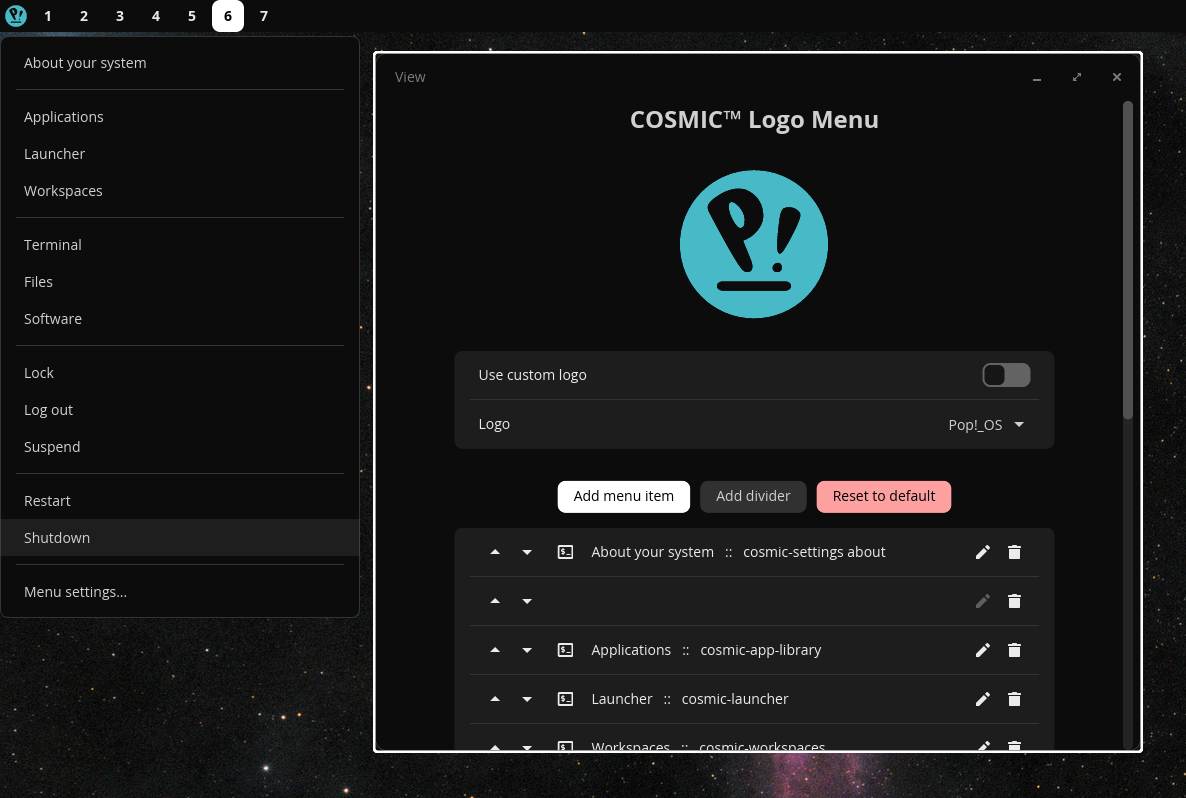
Important note: due to a ID change, anyone who's previously installed Logo Menu through the COSMIC store will need to run the following commands to migrate and continue recieving updates:
flatpak remove co.uk.cappsy.CosmicAppletLogoMenu
cp -r ~/.config/cosmic/co.uk.cappsy.CosmicAppletLogoMenu ~/.config/cosmic/dev.cappsy.CosmicExtAppletLogoMenu
flatpak install dev.cappsy.CosmicExtAppletLogoMenu
By far the best way to install the Logo Menu is through the official COSMIC™ Flatpak repository. Firstly, ensure you have Flatpak itself installed. You then should be able to search for and install Logo Menu from the COSMIC™ Store, under the Applets category. Alternatively, you can ensure you have the correct repo enabled and install Logo Menu through the command line.
flatpak remote-add --if-not-exists --user cosmic https://apt.pop-os.org/cosmic/cosmic.flatpakrepo
flatpak install dev.cappsy.CosmicExtAppletLogoMenuThe applet and settings app can be installed directly from one package in the AUR, and this will get you very latest code and not be tied to tagged releases. You will need base-devel and git if you don't have them already.
sudo pacman -S base-devel git
git clone https://aur.archlinux.org/cosmic-ext-applet-logomenu-git.git
cd cosmic-ext-applet-logomenu-git && makepkg -si- System76 and their COSMIC desktop environment
- COSMIC Utilities - Organization containing third party utilities for COSMIC™
- Logo Menu by Aryan20 - For the inspiration and being a fantastic resource for the logos used here
- Hand Pointer icon used in the logo by Liny Tiny Icons