



Paint a mural of the people who make your project happen.
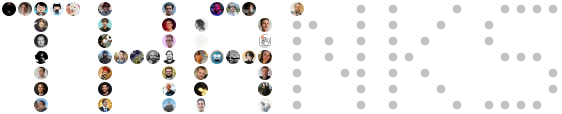
Want your face up there? Add your login to a config under examples/variants/ and open a PR —
casting is open, no audition required.
A GitHub Action that renders your users, your contributors, or both into embeddable SVG art and commits it to your repository.
- Ten styles — a classic grid, honeycomb hexagons, a weight-tiered mosaic, a golden-angle spiral, an orbit with your lead contributor at its centre, a stained-glass voronoi, a stencil that spells a word out of faces, a night-sky constellation, a city skyline, and a transit-map metro.
- Many sources, one mural — your curated
userslist, repository contributors, org members, stargazers, and GitHub Sponsors (tier amounts become weights). Write a source to enable it; everything merges, and your YAML entries always win. - Sections & roles — split the mural into titled groups and tag people with a role line, for honoring the folks the contributors API cannot see.
- Adapts to GitHub dark mode — the SVG carries both palettes and follows the viewer's theme, or pick one of four presets and tune every color yourself.
- SVG and PNG — self-contained SVGs (avatars embedded as base64, so they render inside READMEs) plus rasterized PNGs, including light/dark pairs.
- Quick start
- Styles — grid · honeycomb · mosaic · spiral · orbit · voronoi · stencil · constellation · skyline · metro
- Theme
- Sections and roles
- Emphasising a person
- Sources
- Multiple outputs and PNG
- Action inputs and outputs
- Full config reference
- Versions and pinning
- Notes
- CLI · Running it locally · Development · License
Create .github/contributor-mural.yml:
# List the sources you want — writing one is what turns it on.
contributors:             # this repository's contributors

users:                    # plus anyone the API cannot see
  - login: hahwul
    name: HAHWUL
    role: Creator

exclude:
  - dependabot[bot]
The smallest useful config is one line: contributors: on its own.
Add a workflow, e.g. .github/workflows/contributor-mural.yml:
name: Contributor Mural
on:
  workflow_dispatch:
  schedule:
    - cron: "0 3 * * 0"

permissions:
  contents: write

concurrency:
  group: contributor-mural

jobs:
  generate:
    runs-on: ubuntu-latest
    steps:
      - uses: actions/checkout@v5
      - uses: crystal-actions/contributor-mural@v1
Then embed the result in your README:
Pick one with style:, and tune it with the block of the same name. Every image below
is generated by this action from the config shown next to it — the full files live in
examples/ and examples/variants/.
A classic avatar wall: fixed-size avatars in rows, with optional names and role lines.
style: grid
grid:
  columns: 6
  avatar_size: 64
  shape: circle
  show_names: true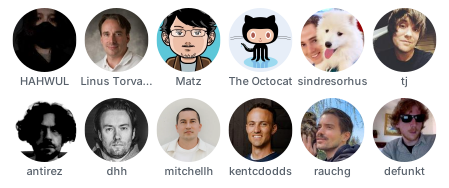
| Option | Default | Accepts |
|---|---|---|
columns |
8 |
1–100 |
avatar_size |
64 |
8–512 |
shape |
circle |
circle, rounded, square |
margin |
8 |
0–200 |
show_names |
true |
draws the name under each avatar |
truncate |
12 |
max name length; 0 disables truncation |
shape
circle |
rounded |
square |
|---|---|---|
 |
 |
 |
Pointy-top hexagons that tessellate; odd rows shift half a cell and hold one fewer avatar. No name labels — the tiling is the point.
style: honeycomb
honeycomb:
  columns: 6
  cell_size: 72
  gap: 4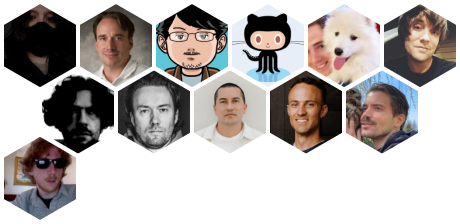
| Option | Default | Accepts |
|---|---|---|
columns |
9 |
1–100 (cells in an even row) |
cell_size |
72 |
8–512 (hex width; height is cell_size × 2/√3) |
gap |
4 |
0–200 |
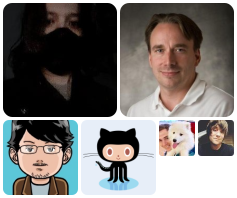
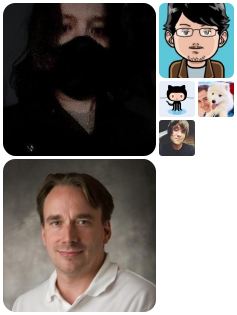
A weight-tiered collage: heavier people get bigger squares. Tier spans come from weight rank across the whole render, then each section is packed first-fit in list order.
style: mosaic
mosaic:
  width: 480
  base_cell: 56
  tiers: [3, 2, 1]
  gap: 3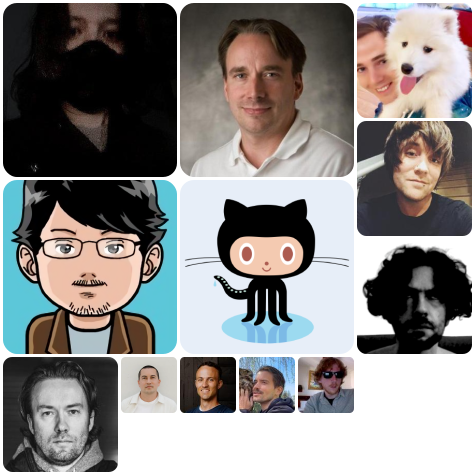
| Option | Default | Accepts |
|---|---|---|
width |
800 |
base_cell–8000 |
base_cell |
48 |
8–512 (one unit cell) |
tiers |
[3, 2, 1] |
cell spans per weight tier, heaviest first; each 1–12 |
gap |
2 |
0–200 |
tiers — more tiers means a finer ranking; a bigger first span means a louder lead.
[3, 2, 1] |
[4, 2, 1, 1] |
|---|---|
 |
 |
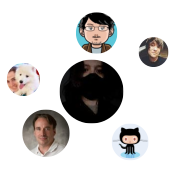
Sunflower (phyllotaxis) packing on the golden angle. Rank sets both size and distance from the centre, so the wall reads as a single organic bloom.
style: spiral
spiral:
  max_size: 76
  min_size: 34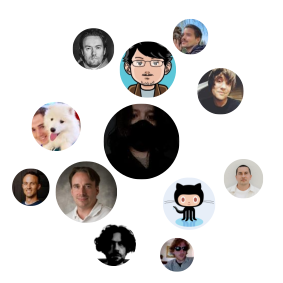
| Option | Default | Accepts |
|---|---|---|
max_size |
72 |
8–512 (the centre avatar) |
min_size |
32 |
8–512, must be ≤ max_size (the outermost) |
gap |
6 |
0–200 |
shape |
circle |
circle, rounded, square |
shape
circle |
square |
|---|---|
 |
 |
One avatar at the centre and the rest in rings around it, each ring a little smaller than the last.
style: orbit
orbit:
  center_size: 96
  avatar_size: 54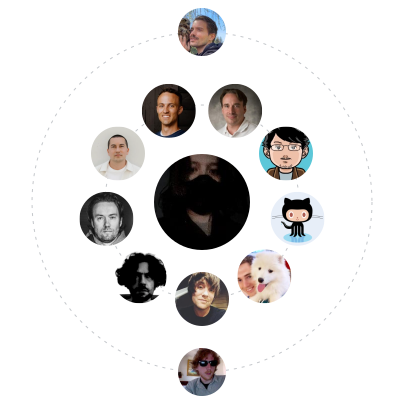
| Option | Default | Accepts |
|---|---|---|
center_size |
104 |
8–512 |
avatar_size |
56 |
8–512 (the first ring) |
min_size |
36 |
8–512, must be ≤ avatar_size |
ring_gap |
22 |
1–400 |
gap |
8 |
0–200 |
rings |
true |
the faint dashed orbit lines |
rings
true |
false |
|---|---|
 |
 |
Stained glass: cells tile the block edge to edge, separated by a hairline lead that lets the page show through. Weight widens a cell without moving it.
style: voronoi
voronoi:
  width: 480
  cell_size: 120
  gap: 4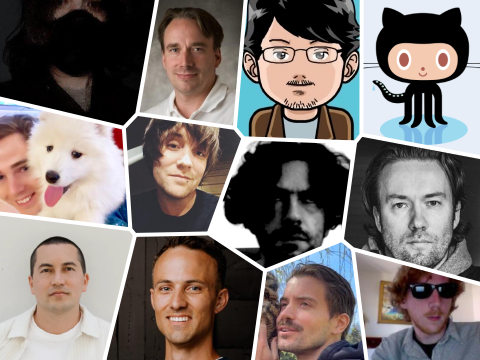
| Option | Default | Accepts |
|---|---|---|
width |
720 |
64–8000 |
cell_size |
96 |
16–512 — a target pitch, not a hard size |
rows |
unset | 1–64 — fix the row count instead of letting cell_size set it |
gap |
4 |
0–64, and at most 0.25 × (1 − jitter) × cell_size |
jitter |
0.5 |
0–0.8 |
weight_influence |
0.6 |
0–1, how much weight widens a cell |
outline |
false |
hairline cell borders, for busy backgrounds |
rows — how many rows to divide the wall into. Left unset, cell_size decides:
the cells stay near that pitch and the wall grows a row at a time as people arrive.
Setting rows fixes the rows instead, and the cells take up the slack — the wall keeps
its width, so fewer people to a row means bigger cells. Handy when a crowded wall packs
too many faces across:
style: voronoi
voronoi:
  width: 720
  rows: 8     # 40 people go five to a row in 144px cells, not eight in 90px
It never outruns the crowd — a row count above the headcount gives one person per row —
but it is a fixed number, so a wall that keeps growing on a small rows does get tight
across. Raise it as the crowd grows, or leave it unset and let cell_size track it.
jitter — how far seeds wander off the lattice. 0 is a plain grid; 0.8 is as
loose as it gets.
0.0 |
0.5 (default) |
0.8 |
|---|---|---|
 |
 |
 |
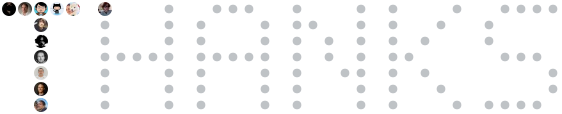
The wall as a word: avatars fill the lit pixels of text set in a built-in 5×7 face, and
every pixel still waiting for someone shows a faint dot. The mural is legible from the
first contributor and finishes itself as more arrive.
style: stencil
stencil:
  text: THANKS
  pixel_size: 14
  gap: 2
Same word, same geometry, 12 people and then 47:
| Option | Default | Accepts |
|---|---|---|
text |
THANKS |
A–Z, 0–9, space, - . ! ? + ' ♥; up to 4 lines of 16 chars, split on \n |
pixel_size |
24 |
8–512 — one glyph pixel, and the avatar that fills it |
gap |
4 |
0–200 |
letter_spacing |
1 |
0–8, blank columns between glyphs in glyph pixels |
line_gap |
1 |
0–8 |
shape |
circle |
circle, rounded, square |
ghosts |
true |
faint dots on the pixels nobody has filled yet |
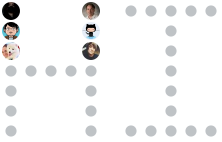
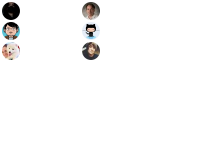
ghosts — with the dots the word is readable from person one; without them you get
only what your crowd covers.
true |
false |
|---|---|
 |
 |
Two lines and square pixels — text: "OPEN\nSOURCE", shape: square:
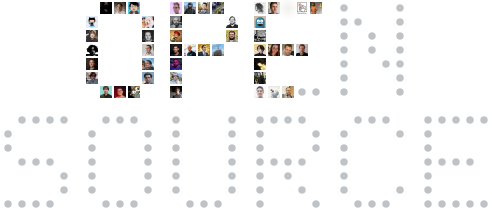
Size the word to your crowd: the block is the same size whether one person or six hundred show up, so a long word with few contributors is mostly ghosts.
A night sky: every contributor is a star whose size and glow follow their rank, near
neighbours join up into constellations, and tiny dust stars fill the dark between them.
Best over a dark background — try preset: midnight.
style: constellation
constellation:
  width: 480
  max_size: 72
  min_size: 28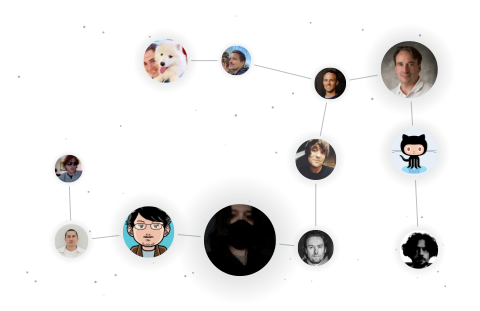
| Option | Default | Accepts |
|---|---|---|
width |
720 |
64–8000, and at least max_size + gap |
max_size |
64 |
8–512 (the brightest star) |
min_size |
20 |
8–512, must be ≤ max_size (the faintest) |
gap |
12 |
0–200 — the least clearance between any two stars |
jitter |
0.8 |
0–1, how far a star wanders inside its own cell |
lines |
true |
the thin lines joining near neighbours into constellations |
dust |
4 |
0–32 background dust stars per contributor; 0 clears the sky |
A city skyline: each contributor is a building whose height follows their weight — the people carrying the project are the towers — with the avatar up top like a rooftop billboard and a grid of lit windows below it. Daytime silhouette on light walls, dusk city on dark ones.
style: skyline
skyline:
  width: 520
  avatar_size: 48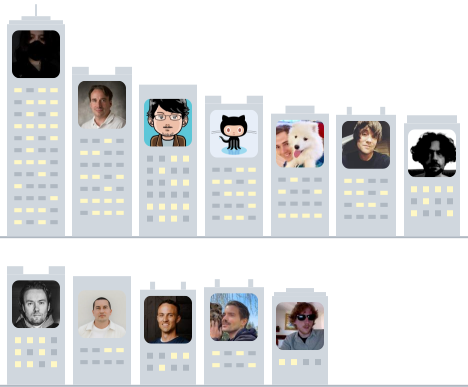
| Option | Default | Accepts |
|---|---|---|
width |
800 |
64–8000; buildings wrap into further rows past it |
avatar_size |
48 |
8–512 |
min_height |
96 |
28–1024, and at least avatar_size + 20 |
max_height |
220 |
28–1024, must be ≥ min_height (the top contributor's tower) |
gap |
6 |
0–200 |
shape |
rounded |
circle, rounded, square |
windows |
true |
the lit-and-dark window panes |
show_names |
false |
draws the name under each building |
truncate |
10 |
max name length; 0 disables truncation |
A transit map: contributors are stations on a coloured route that snakes across the
wall, with the heavier terminus rings at both ends of the line. Each section is its own
line in its own colour — the section title reads as the line's name — and role_lines
splits a section further into one line per role, named after it. Add weave and those
lines interleave and cross one another, the way a real network does.
style: metro
metro:
  columns: 4
  station_size: 52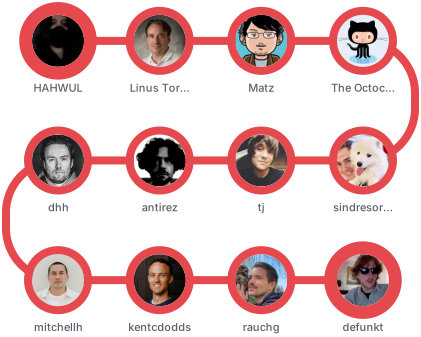
| Option | Default | Accepts |
|---|---|---|
columns |
6 |
1–100 (stations per row before the line turns) |
station_size |
56 |
8–512 |
line_width |
8 |
2–64, at most half of station_size |
gap |
24 |
0–200 (clearance between station rings) |
role_lines |
false |
one line per role, named after it; the unroled ride an unnamed line |
weave |
false |
interleave the role lines so their routes cross; needs role_lines, and gap ≥ 2.5 × line_width |
show_names |
true |
draws the name under each station |
truncate |
10 |
max name length; 0 disables truncation |
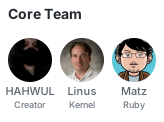
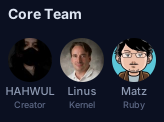
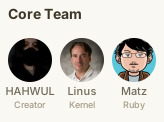
Four presets, each a light/dark palette pair:
theme:
  preset: github            # github | midnight | paper | mono
github |
midnight |
paper |
mono |
|---|---|---|---|
 |
 |
 |
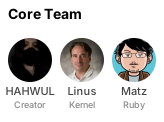 |
| Preset | Light background | Dark background | Notes |
|---|---|---|---|
github |
transparent |
transparent |
inherits the page; the default |
midnight |
#0b1021 |
#0b1021 |
one dark palette in both modes |
paper |
#faf8f2 |
#221f1a |
warm off-white / warm near-black |
mono |
#ffffff |
#000000 |
greyscale chrome |
With mode: auto (the default) the SVG carries both palettes and a
prefers-color-scheme media query, so the images on this page already follow your
GitHub theme — flip your appearance setting and the github swatch above changes with
it. Set mode: light or mode: dark to pin one.
Top-level keys override the light palette; dark: overrides the dark one. Anything you
leave out falls back to the preset.
theme:
  preset: github
  mode: auto
  background: transparent
  label_color: "#57606a"    # the name under an avatar
  role_color: "#6e7781"     # the role line under the name
  title_color: "#24292f"    # section titles
  dark:
    label_color: "#8b949e"
    title_color: "#e6edf3"
font_family: "-apple-system, 'Segoe UI', Helvetica, Arial, sans-serif"group files a person under a titled section; groups fixes the order of those
sections (and doubles as a typo guard — an unknown group is a config error). role
adds a small line under the name. Together they are how you honor people the
contributors API cannot see: unlinked commit emails, design work, documentation,
translations.
style: grid
groups: [Maintainers, Special Thanks]

users:
  - login: hahwul
    name: HAHWUL
    role: Creator
    group: Maintainers
  - login: torvalds
    name: Linus
    role: Reviewer
    group: Maintainers
  - login: matz
    name: Matz
    role: Docs
    group: Special Thanks
  - login: octocat
    name: Octocat
    role: Design
    group: Special Thanks

grid:
  columns: 2
  avatar_size: 48
  show_names: true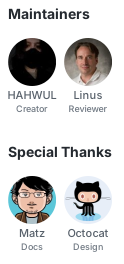
A user with no group renders in the untitled leading section — even if an API source
put that person in one. Placement is always yours.
weight says where someone stands in the list. scale says how large to draw them — a
multiplier between 1 and 2, applied to whatever size the style's own ranking arrived at:
style: spiral
contributors:

users:
  - login: hahwul
    role: Creator
    scale: 1.6
Ranking alone cannot do this. A weight is relative to everyone else, so the size it buys
moves whenever the list does: one new contributor re-cuts every mosaic tier boundary,
and a huge commit count still only means "first". scale names the person instead.
| Style | What scale does |
|---|---|
mosaic |
multiplies the tier span and rounds, ties up — 1.5 turns a 1-cell tier into a 2×2 cell, without moving a boundary everyone in that tier shares |
spiral |
multiplies the avatar size; the bloom re-packs so the larger avatar keeps a full gap from its neighbours |
orbit |
multiplies the avatar size; its ring holds fewer people and sits further out to make room |
constellation |
multiplies the star size; the sky keeps everyone a full gap apart around it |
skyline |
multiplies the building's height — the emphasised tower rises above the wall; the avatar keeps its size |
grid, honeycomb, stencil, metro |
ignored — in a fixed lattice a larger avatar either overlaps its neighbours or leaves a hole |
voronoi |
ignored — cells are cut out of the block rather than placed, so there is no per-user size to multiply |
A scale the chosen style cannot honour is reported as a workflow warning rather than
quietly dropped.
Write a block to enable it. Everything merges into one list, then exclude, sort, and
limit apply.
users:                      # your curated list — always wins on conflicts
  - login: hahwul
    name: HAHWUL            # optional display name (default: login)
    weight: 10              # optional, drives mosaic/voronoi sizing and weight sort
    scale: 1.6              # optional 1–2 size multiplier (mosaic, spiral, orbit,
                            # constellation, skyline)
    role: Creator           # optional label under the name
    group: Contributors     # optional section
    link: https://hahwul.com          # optional (default: the GitHub profile)
    avatar_url: assets/logo.png       # optional; a URL or a repo-relative file

contributors:               # this repository's contributors
  repo: owner/name          # default: the current repository
  include_bots: false       # keep accounts GitHub types as bots; legacy
                            # service accounts need an `exclude` entry
  include_anonymous: false  # include anonymous (email-only) contributors
  max: 100                  # contribution counts become weights
  weight: 1                 # optional: put everyone from here on one rung
  group: Contributors

members:                    # organization members (`org` is required)
  org: crystal-actions
  max: 100
  weight: 1
  group: Team

stargazers:                 # the repository's stargazers
  repo: owner/name
  max: 100
  weight: 1
  group: Stargazers

sponsors:                   # GitHub Sponsors (needs a token)
  login: hahwul             # default: the repository owner
  max: 100                  # tier $/month becomes each sponsor's weight
  weight: 1                 # optional: ignore tiers, treat sponsors alike
group: Sponsors| Source | Requires | Weight comes from |
|---|---|---|
users |
— | your weight:, else 1 |
contributors |
— (token lifts rate limits, reaches private repos) | commit count |
members |
org:; a read:org token for non-public members |
none (1) |
stargazers |
— | none (1), returned oldest-first |
sponsors |
a token |
monthly tier amount in dollars |
How they merge. When someone appears in both your users list and an API source,
your entry wins field by field — set a custom name or weight and let the contribution
count fill everyone else's. Someone returned by more than one API source (a contributor
who also sponsors) appears once, keeping the highest weight and the first source's group.
Source weight. Setting weight: on a source block replaces the weight every user
from it would otherwise carry, so the source sets the floor and users: carries only the
deviations. This is what makes "two maintainers above everyone else" survive a new
contributor landing a PR — without it the only way to flatten the field is to enumerate
every login, which freezes a list the API exists to keep fresh:
contributors:
  weight: 1                 # everyone from the API sits on one rung

users:
  - login: hahwul           # the exceptions, and only the exceptions
    weight: 3
  - login: ksg97031
    weight: 2
It is also how "sponsors above contributors" is expressed without touching tier amounts:
give sponsors a higher weight than contributors and let the merge keep the higher of
the two for anyone who is both.
exclude: ["*[bot]", ImgBotApp]  # drop logins from any source
sort: weight                # weight | login | none (none keeps list order)
limit: 60                   # cap rendered users after merge and sort
fail_on_missing: false      # true: fail the run when an avatar cannot be fetched
exclude patterns. Entries match logins case-insensitively. An entry containing *
(any run of characters) or ? (exactly one) is a wildcard; anything else is an exact
match. Those two are the whole vocabulary — there are no [...] character classes, so
*[bot] means what it looks like, "ends with the literal [bot]", rather than "ends with
b, o, or t".
What include_bots: false actually filters. It drops accounts GitHub types as bots:
type: "Bot", or a login ending in [bot]. Service accounts that predate the GitHub Apps
convention are typed User and come through like anybody else — ImgBotApp is a real
example, and its profile carries a bio, hundreds of repositories, and thousands of
followers, so there is nothing structural left to detect it by. Those need naming:
contributors:
  include_bots: false       # the ones GitHub labels

exclude:
  - ImgBotApp               # and the ones it does not
If a machine account shows up on your wall, this is why, and exclude is the fix.
One run can render several files. Each entry may override style and mode; everything
else (the style blocks, the theme, the sources) is shared.
style: grid
outputs:
  - path: docs/wall-grid.svg
  - path: docs/wall-hex.svg
    style: honeycomb
  - path: docs/wall-light.png     # .png is rasterized with rsvg-convert
  - path: docs/wall-dark.png
    mode: dark

png:
  scale: 2                        # rasterization zoom, 0 < scale ≤ 8
Use output: for a single file and outputs: for a list — setting both is an error.
PNGs cannot adapt to a theme, so a .png under mode: auto is pinned to the light
palette; add a second output with mode: dark for a pair.
| Input | Default | Description |
|---|---|---|
config |
.github/contributor-mural.yml |
Path to the config YAML, relative to the repository root |
token |
${{ github.token }} |
GitHub API token. Required for sponsors; also lifts rate limits and reaches private repos for the other API sources |
no_commit |
false |
Generate files but skip commit/push (must be true or false) |
commit_message |
chore: update contributor mural |
Commit message |
| Output | Description |
|---|---|
paths |
Comma-separated generated files, SVG and PNG |
user_count |
Number of users rendered in the last output |
width |
Pixel width of the first file in paths |
height |
Pixel height of the first file in paths |
changed |
Whether a commit was pushed; false when no_commit is set |
svg_path |
Deprecated alias for paths, kept for existing workflows |
Giving an <img> explicit dimensions is what stops the page from reflowing while the
image loads, but a mural resizes itself whenever the contributor set crosses a row
boundary — voronoi especially, since its height is width * rows² / count. Left alone,
every embed keeps a stale aspect ratio until somebody notices.
width and height describe the first entry of paths, so the embed side can be
corrected in the same run that changes the file:
- uses: crystal-actions/contributor-mural@v1
  id: mural
- name: Keep the embed in step with the wall
  run: |
    sed -i -E "s/(CONTRIBUTORS\.svg\" [^>]*width=\")[0-9]+(\" height=\")[0-9]+/\1${{ steps.mural.outputs.width }}\2${{ steps.mural.outputs.height }}/" \
      docs/content/_index.md
Both are whole numbers. A .png reports the size of the rasterized file, so png.scale
is already accounted for; an .svg reports its own size, rounded up when a style lands
on a fractional one.
Every key on one page
style: grid                 # grid | honeycomb | mosaic | spiral | orbit | voronoi |
                            # stencil | constellation | skyline | metro
output: CONTRIBUTOR_MURAL.svg    # path relative to the repository root

# --- Sources: write a block to enable it; results are merged ---

users:                      # your curated list
  - login: hahwul           # required — GitHub login
    name: HAHWUL            # optional display name (default: login)
    weight: 10              # optional, drives mosaic sizing + weight sort
    scale: 1.6              # optional 1–2 size multiplier for this person alone;
                            # honoured by mosaic, spiral, orbit, constellation,
                            # and skyline
    role: Creator           # optional label under the name (grid) / in tooltips
    group: Contributors     # optional section this user renders in
    link: https://hahwul.com          # optional (default: the GitHub profile)
    avatar_url: https://…/custom.png  # optional override; also accepts a
                                      # repo-relative file (assets/logo.png)

groups: [Contributors, Team, Stargazers, Sponsors]  # optional: section order, and a
                            # typo guard — every `group` below has to be listed here

contributors:               # this repository's contributors (all fields optional)
  repo: owner/name          # default: the current repository
  include_bots: false       # keep type=Bot / *[bot] accounts
  include_anonymous: false  # include anonymous (email-only) contributors
  max: 100                  # cap fetched contributors; contributions become weight
  weight: 1                 # optional: one weight for everyone from this source,
                            # replacing the derived one; `users:` still overrides
  group: Contributors       # optional section for API-fetched users

members:                    # organization members (`org` is required)
  org: crystal-actions
  max: 100
  weight: 1
  group: Team

stargazers:                 # the repository's stargazers
  repo: owner/name          # default: the current repository
  max: 100
  weight: 1
  group: Stargazers

sponsors:                   # GitHub Sponsors (needs a token)
  login: hahwul             # default: the repository owner
  max: 100                  # tier $/month becomes each sponsor's weight
  weight: 1                 # optional: ignore tiers and treat sponsors alike
  group: Sponsors

# --- Everything below is presentation ---

exclude:                    # drop logins from any source; `*` and `?` wildcards,
  - "*[bot]"                # otherwise an exact, case-insensitive match
  - ImgBotApp               # legacy service accounts are typed `User` by the
                            # API, so `include_bots: false` does not catch them

sort: weight                # weight | login | none (none keeps list order)
limit: 60                   # cap rendered users after merge/sort
fail_on_missing: false      # true: fail the run when an avatar can't be fetched

outputs:                    # optional: render several files in one run
  - path: docs/wall-grid.svg
  - path: docs/wall-hex.svg
    style: honeycomb
  - path: docs/wall.png     # .png outputs are rasterized (see `png` below)
    mode: dark              # optional per-output light/dark override

grid:
  columns: 8
  avatar_size: 64
  shape: circle             # circle | rounded | square
  margin: 8
  show_names: true
  truncate: 12              # max name length (0 = no truncation)

honeycomb:
  columns: 9
  cell_size: 72
  gap: 4

mosaic:
  width: 800
  base_cell: 48
  tiers: [3, 2, 1]          # cell spans per weight tier (top tier first)
  gap: 2

spiral:                     # sunflower packing; rank sets size and distance
  max_size: 72              # the centre avatar
  min_size: 32              # the outermost ones
  gap: 6
  shape: circle             # circle | rounded | square

orbit:                      # one avatar at the centre, the rest in rings
  center_size: 104
  avatar_size: 56           # first ring; each ring out is a little smaller
  min_size: 36
  ring_gap: 22
  gap: 8
  rings: true               # draw the faint orbit lines

voronoi:                    # stained glass; cells tile the block edge to edge
  width: 720
  cell_size: 96             # target cell pitch, not a hard size
  rows: 5                   # optional; fixes the rows and lets the cells widen
  gap: 4                    # the lead between cells — the page shows through
  jitter: 0.5               # 0 is a plain lattice, 0.8 is as loose as it gets
  weight_influence: 0.6     # 0..1, how much weight widens a cell
  outline: false            # hairline cell borders, for busy backgrounds

stencil:                    # avatars fill the pixels of a word
  text: THANKS              # A-Z, 0-9, space, and - . ! ? + ' ♥ (use "\n" for
                            # a second line; size the word to your crowd)
  pixel_size: 24            # one glyph pixel, and the avatar that fills it
  gap: 4
  letter_spacing: 1         # blank columns between glyphs, in glyph pixels
  line_gap: 1
  shape: circle             # circle | rounded | square
  ghosts: true              # faint dots on the pixels nobody has filled yet

constellation:              # a night sky; rank sets each star's size and glow
  width: 720
  max_size: 64              # the brightest star
  min_size: 20              # the faintest
  gap: 12                   # the least clearance between any two stars
  jitter: 0.8               # 0..1, how far a star wanders inside its cell
  lines: true               # join near neighbours into constellations
  dust: 4                   # background dust stars per contributor (0 = none)

skyline:                    # a city; weight sets each building's height
  width: 800                # buildings wrap into further rows past this
  avatar_size: 48
  min_height: 96            # at least avatar_size + 20
  max_height: 220           # the top contributor's tower
  gap: 6
  shape: rounded            # circle | rounded | square
  windows: true             # the lit-and-dark window panes
  show_names: false
  truncate: 10

metro:                      # a transit map; each section is its own line
  columns: 6                # stations per row before the line turns
  station_size: 56
  line_width: 8             # at most half of station_size
  gap: 24                   # clearance between station rings
  role_lines: false         # split each section into one line per role
  weave: false              # interleave the role lines so their routes cross
  show_names: true
  truncate: 10

theme:
  preset: github            # github | midnight | paper | mono
  mode: auto                # auto (follows the viewer's dark mode) | light | dark
  background: transparent   # light-palette overrides on top of the preset
  label_color: "#57606a"
  role_color: "#6e7781"     # the role line under names
  title_color: "#24292f"    # section titles
  dark:                     # dark-palette overrides
    label_color: "#8b949e"
  font_family: "-apple-system, 'Segoe UI', Helvetica, Arial, sans-serif"

png:
scale: 2 # rasterization zoom for .png outputsThe action runs a prebuilt image from GHCR, so the version that matters is the image, not just the ref you write in a workflow. Every released ref names an immutable image tag:
| Ref | Runs | Moves |
|---|---|---|
@v1.2.1 |
ghcr.io/…:v1.2.1 |
never |
@v1 |
the newest 1.x's own image tag | on each 1.x release, by the git tag moving |
@main |
ghcr.io/…:v1, a floating tag |
on every release |
So pinning @v1.2.1 pins the code, not only the ref. Only @main tracks a mutable image
tag, which is the trade-off for following development.
Every run prints its version as its first line:
contributor-mural v1.2.1
That is the fastest way to tell a stale image from a bad config. If a run rejects a value the docs say is supported — a style, a theme preset — read the banner first: an error listing what is accepted is only authoritative for the build that printed it, which is why those messages name their version too.
- A config file is required; the action fails if
.github/contributor-mural.yml(or the path you pass asconfig) does not exist. Unknown keys are errors, not warnings. - The workflow needs
permissions: contents: writeto push the generated file, and aconcurrencygroup avoids racing pushes on busy repositories. - Avatars link to profiles and carry name/role tooltips, but a README embed
(
) renders as an<img>, where neither is active. Open the SVG directly — or inline it — to get links. membersreturns public organization members only; a token withread:orgis needed for the rest. Stargazers arrive oldest-first with no weight, so under the defaultsort: weightthey trail contributors — usesort: noneto keep the API order.- On
pull_requestevents the checkout is a detached HEAD, so pushes fail — use push/schedule/dispatch triggers, or setno_commit: trueand handle the file yourself. - SVG size grows with user count (roughly 5–15 KB per avatar). Use
limitand moderate avatar sizes for large walls. - PNG output uses
rsvg-convert, bundled in the action image. For local runs install librsvg (brew install librsvg/apt install librsvg2-bin/apk add rsvg-convert). sponsorsalways needs atoken(GraphQL API); the defaultgithub.tokenworks for public sponsor lists.
The action binary is also a local CLI:
shards build --release
bin/contributor-mural --config examples/showcase.yml   # regenerates examples/*.svg
bin/contributor-mural -c my.yml --commit               # opt in to commit/push locally
--config is resolved against the current directory, while output paths and local
avatar_url files are resolved against --workspace (the current directory by default;
GITHUB_WORKSPACE inside the action). A local avatar_url has to stay inside the
workspace, and a remote one has to be a public address: whatever comes back is embedded
in a file the run commits, so an avatar_url pointing at the runner's own network —
loopback, a private range, or a metadata endpoint — is refused rather than published.
Committing happens automatically when
GITHUB_ACTIONS=true — including on runners that emulate it, such as act or Forgejo —
and otherwise only with --commit.
Comparing styles and weights by pushing a workflow is slow, and the answers are easier to see side by side. The action image runs anywhere Docker does, against the checkout you are standing in, with no Crystal toolchain:
docker run --rm \
  -v "$PWD:/github/workspace" -w /github/workspace \
  -e GITHUB_REPOSITORY=owner/repo \
  -e INPUT_CONFIG=.github/contributor-mural.yml \
  -e INPUT_NO_COMMIT=true \
  -e INPUT_TOKEN="$(gh auth token)" \
  ghcr.io/crystal-actions/contributor-mural:v1
The generated file lands in the working directory, so you can render a config, look at it, edit, and render again in seconds.
Why this cannot push. Two independent things stop it. INPUT_NO_COMMIT=true is the
explicit one. The implicit one is that committing is only automatic when
GITHUB_ACTIONS=true, which a plain docker run does not set — so even without
no_commit the command above writes files and stops. Dropping INPUT_NO_COMMIT is
therefore safe, but keeping it means you are not relying on an environment variable you
did not set.
GITHUB_REPOSITORY stands in for the repository the action would infer, and is what the
contributors, stargazers, and sponsors blocks default to. INPUT_TOKEN is optional
for public repositories, but without it the GitHub API allows 60 requests an hour, which a
few runs will exhaust.
Add -e INPUT_CONFIG=... variants to compare configs, and remember to docker pull — the
:v1 tag moves, and a cached image runs older code silently.
shards install
crystal spec                    # unit + golden-file specs (no network)
UPDATE_GOLDEN=1 crystal spec    # regenerate golden SVGs after renderer changes
crystal tool format
bin/ameba src spec
Every image in this README is generated from a committed config, so the snippets above cannot drift from what the renderer does. To regenerate them (needs network — avatars come from github.com):
bin/contributor-mural -c examples/showcase.yml            # the ten style heroes
for f in examples/variants/*.yml; do bin/contributor-mural -c "$f"; done
Release flow: pushing a vX.Y.Z tag builds a multi-arch image to
ghcr.io/crystal-actions/contributor-mural and force-moves the major tag (v1, v2, …).
The image is pushed before the git tag moves, so the moving tag always references an
existing image.
action.yml points at that published image, which is why consumers start in seconds
rather than building Crystal on their runner. The CI job that runs the action rewrites
action.yml back to image: Dockerfile first, so it tests the code under review instead
of the last release.
MIT — see LICENSE.