আপনি ইতিমধ্যে এই পাঠ্যক্রমের মাধ্যমে দেখেছেন যে প্রম্পটের মতো মূল ধারণা রয়েছে এবং এমনকি "প্রম্পট ইঞ্জিনিয়ারিং" নামে একটি সম্পূর্ণ শাখা রয়েছে। অনেক টুল যেমন ChatGPT, Office 365, Microsoft Power Platform এবং আরও অনেক কিছু আপনাকে প্রম্পট ব্যবহার করে কিছু অর্জন করতে সমর্থন করে।
আপনার জন্য একটি অ্যাপে এমন অভিজ্ঞতা যোগ করতে, আপনাকে প্রম্পট, কমপ্লিশন এবং কাজ করার জন্য একটি লাইব্রেরি নির্বাচন করার মতো ধারণাগুলি বুঝতে হবে। এই অধ্যায়ে আপনি ঠিক সেটাই শিখবেন।
এই অধ্যায়ে, আপনি:
- openai লাইব্রেরি এবং এর মূল ধারণাগুলি সম্পর্কে জানবেন।
- openai ব্যবহার করে একটি টেক্সট জেনারেশন অ্যাপ তৈরি করবেন।
- একটি টেক্সট জেনারেশন অ্যাপ তৈরি করতে প্রম্পট, টেম্পারেচার এবং টোকেনের মতো ধারণাগুলি কীভাবে ব্যবহার করবেন তা বুঝবেন।
এই পাঠ শেষে, আপনি সক্ষম হবেন:
- একটি টেক্সট জেনারেশন অ্যাপ কী তা ব্যাখ্যা করতে।
- openai ব্যবহার করে একটি টেক্সট জেনারেশন অ্যাপ তৈরি করতে।
- আপনার অ্যাপটি কম বা বেশি টোকেন ব্যবহার করতে কনফিগার করতে এবং বিভিন্ন আউটপুটের জন্য টেম্পারেচার পরিবর্তন করতে।
সাধারণত আপনি যখন একটি অ্যাপ তৈরি করেন তখন এতে কিছু ধরণের ইন্টারফেস থাকে যেমন:
- কমান্ড-ভিত্তিক। কনসোল অ্যাপগুলি সাধারণত এমন অ্যাপ যেখানে আপনি একটি কমান্ড টাইপ করেন এবং এটি একটি কাজ সম্পাদন করে। উদাহরণস্বরূপ,
gitএকটি কমান্ড-ভিত্তিক অ্যাপ। - ইউজার ইন্টারফেস (UI)। কিছু অ্যাপে গ্রাফিকাল ইউজার ইন্টারফেস (GUI) থাকে যেখানে আপনি বোতাম ক্লিক করেন, টেক্সট ইনপুট করেন, অপশন নির্বাচন করেন এবং আরও অনেক কিছু।
এটি একটি কমান্ড-ভিত্তিক অ্যাপের সাথে তুলনা করুন যেখানে আপনি একটি কমান্ড টাইপ করেন:
- এটি সীমাবদ্ধ। আপনি যে কোনও কমান্ড টাইপ করতে পারবেন না, শুধুমাত্র অ্যাপটি যে কমান্ডগুলি সমর্থন করে সেগুলি।
- ভাষা নির্দিষ্ট। কিছু অ্যাপ অনেক ভাষা সমর্থন করে, কিন্তু ডিফল্টভাবে অ্যাপটি একটি নির্দিষ্ট ভাষার জন্য তৈরি করা হয়, এমনকি আপনি আরও ভাষার সমর্থন যোগ করতে পারেন।
তাহলে একটি টেক্সট জেনারেশন অ্যাপ কীভাবে আলাদা?
একটি টেক্সট জেনারেশন অ্যাপে, আপনার আরও নমনীয়তা রয়েছে, আপনি একটি নির্দিষ্ট কমান্ড সেট বা একটি নির্দিষ্ট ইনপুট ভাষার মধ্যে সীমাবদ্ধ নন। পরিবর্তে, আপনি অ্যাপের সাথে ইন্টারঅ্যাক্ট করতে প্রাকৃতিক ভাষা ব্যবহার করতে পারেন। আরেকটি সুবিধা হল যে আপনি ইতিমধ্যেই একটি বিশাল তথ্যসূত্রের সাথে ইন্টারঅ্যাক্ট করছেন যা একটি বিশাল তথ্যভান্ডারের উপর প্রশিক্ষিত হয়েছে, যেখানে একটি ঐতিহ্যবাহী অ্যাপ একটি ডাটাবেসে যা আছে তাতে সীমাবদ্ধ হতে পারে।
অনেক কিছু আপনি তৈরি করতে পারেন। উদাহরণস্বরূপ:
- একটি চ্যাটবট। একটি চ্যাটবট আপনার কোম্পানি এবং এর পণ্য সম্পর্কে প্রশ্নের উত্তর দিতে পারে যা একটি ভাল মিল হতে পারে।
- সহকারী। LLMs টেক্সট সারাংশ তৈরি করা, টেক্সট থেকে অন্তর্দৃষ্টি পাওয়া, রিজিউমের মতো টেক্সট তৈরি করা ইত্যাদির জন্য দুর্দান্ত।
- কোড সহকারী। আপনি যে ভাষার মডেলটি ব্যবহার করেন তার উপর নির্ভর করে, আপনি একটি কোড সহকারী তৈরি করতে পারেন যা আপনাকে কোড লিখতে সহায়তা করে। উদাহরণস্বরূপ, আপনি GitHub Copilot এর মতো একটি পণ্য এবং ChatGPT ব্যবহার করতে পারেন আপনাকে কোড লিখতে সাহায্য করার জন্য।
আচ্ছা, আপনাকে একটি LLM এর সাথে ইন্টিগ্রেট করার একটি উপায় খুঁজে বের করতে হবে যা সাধারণত নিম্নলিখিত দুটি পদ্ধতির অন্তর্ভুক্ত করে:
- একটি API ব্যবহার করুন। এখানে আপনি আপনার প্রম্পট সহ ওয়েব অনুরোধ তৈরি করছেন এবং জেনারেট করা টেক্সট ফিরে পাচ্ছেন।
- একটি লাইব্রেরি ব্যবহার করুন। লাইব্রেরিগুলি API কলগুলিকে এনক্যাপসুলেট করতে সহায়তা করে এবং সেগুলি ব্যবহার করা সহজ করে তোলে।
LLM-এর সাথে কাজ করার জন্য কিছু সুপরিচিত লাইব্রেরি রয়েছে যেমন:
- openai, এই লাইব্রেরিটি আপনার মডেলের সাথে সংযোগ স্থাপন করা এবং প্রম্পট পাঠানো সহজ করে তোলে।
তারপর এমন কিছু লাইব্রেরি আছে যা উচ্চ স্তরে কাজ করে যেমন:
- Langchain। Langchain সুপরিচিত এবং পাইথন সমর্থন করে।
- Semantic Kernel। Semantic Kernel মাইক্রোসফটের একটি লাইব্রেরি যা C#, পাইথন, এবং জাভা ভাষাগুলিকে সমর্থন করে।
দেখি কিভাবে আমরা আমাদের প্রথম অ্যাপ তৈরি করতে পারি, কোন লাইব্রেরিগুলি প্রয়োজন, কতটুকু প্রয়োজন ইত্যাদি।
OpenAI বা Azure OpenAI এর সাথে ইন্টারঅ্যাক্ট করার জন্য অনেক লাইব্রেরি রয়েছে। C#, পাইথন, জাভাস্ক্রিপ্ট, জাভা এবং আরও অনেক প্রোগ্রামিং ভাষা ব্যবহার করা সম্ভব। আমরা openai পাইথন লাইব্রেরি ব্যবহার করার সিদ্ধান্ত নিয়েছি, তাই আমরা pip ব্যবহার করব এটি ইনস্টল করতে।
pip install openaiআপনাকে নিম্নলিখিত পদক্ষেপগুলি সম্পন্ন করতে হবে:
-
Azure এ একটি অ্যাকাউন্ট তৈরি করুন https://azure.microsoft.com/free/।
-
Azure OpenAI অ্যাক্সেস পান। https://learn.microsoft.com/azure/ai-services/openai/overview#how-do-i-get-access-to-azure-openai এ যান এবং অ্যাক্সেসের জন্য অনুরোধ করুন।
[!NOTE] লেখার সময়, আপনাকে Azure OpenAI অ্যাক্সেসের জন্য আবেদন করতে হবে।
-
পাইথন ইনস্টল করুন https://www.python.org/
-
একটি Azure OpenAI সার্ভিস রিসোর্স তৈরি করেছেন। রিসোর্স তৈরি করার জন্য এই গাইডটি দেখুন।
এ পর্যায়ে, আপনাকে আপনার openai লাইব্রেরিকে কোন API কী ব্যবহার করতে হবে তা বলতে হবে। আপনার API কী খুঁজতে, আপনার Azure OpenAI রিসোর্সের "Keys and Endpoint" বিভাগে যান এবং "Key 1" মানটি কপি করুন।
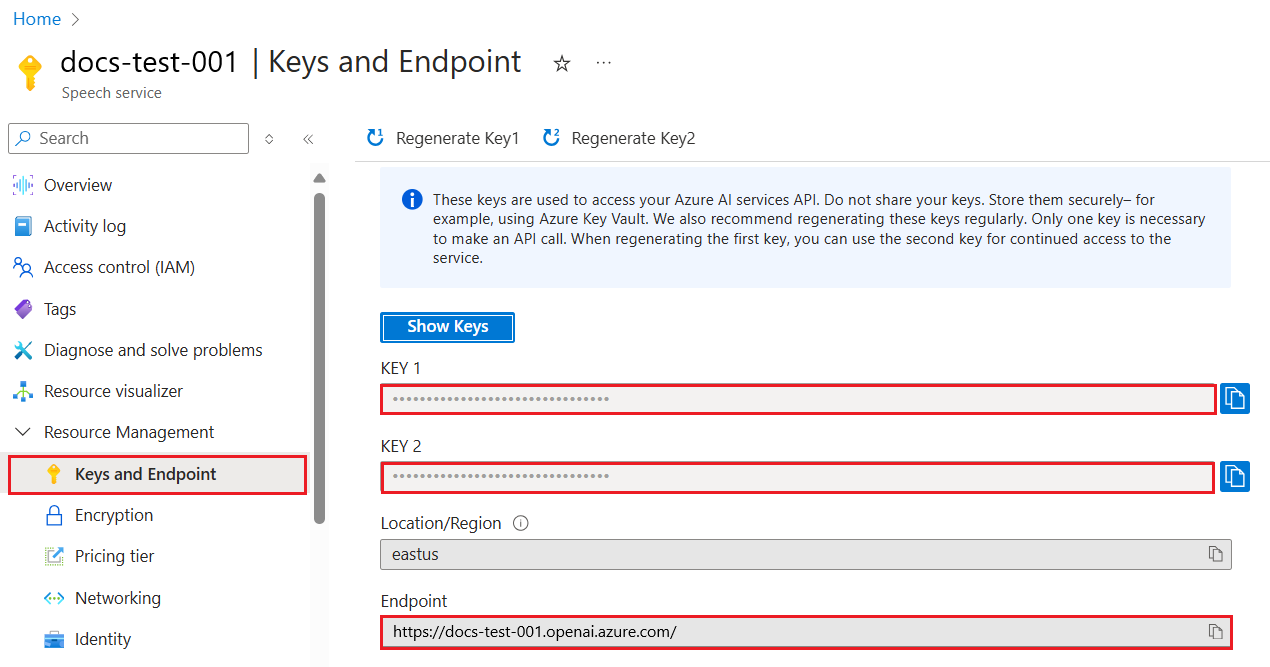
এখন যেহেতু আপনি এই তথ্যটি কপি করেছেন, আসুন লাইব্রেরিগুলিকে এটি ব্যবহার করার নির্দেশ দিই।
Note
আপনার API কী কোড থেকে আলাদা করা মূল্যবান। আপনি পরিবেশ ভেরিয়েবল ব্যবহার করে এটি করতে পারেন।
- পরিবেশ ভেরিয়েবল
OPENAI_API_KEYto your API key.export OPENAI_API_KEY='sk-...'সেট করুন
যদি আপনি Azure OpenAI ব্যবহার করছেন, এখানে কিভাবে আপনি কনফিগারেশন সেটআপ করবেন:
openai.api_type = 'azure'
openai.api_key = os.environ["OPENAI_API_KEY"]
openai.api_version = '2023-05-15'
openai.api_base = os.getenv("API_BASE")
উপরে আমরা নিম্নলিখিত সেট করছি:
api_typetoazure. This tells the library to use Azure OpenAI and not OpenAI.api_key, this is your API key found in the Azure Portal.api_version, this is the version of the API you want to use. At the time of writing, the latest version is2023-05-15.api_base, this is the endpoint of the API. You can find it in the Azure Portal next to your API key.
[!NOTE] >
os.getenvis a function that reads environment variables. You can use it to read environment variables likeOPENAI_API_KEYandAPI_BASE. Set these environment variables in your terminal or by using a library likedotenv.
The way to generate text is to use the Completion ক্লাস। এখানে একটি উদাহরণ:
prompt = "Complete the following: Once upon a time there was a"

completion = openai.Completion.create(model="davinci-002", prompt=prompt)
print(completion.choices[0].text)
উপরের কোডে, আমরা একটি কমপ্লিশন অবজেক্ট তৈরি করি এবং আমরা যে মডেলটি ব্যবহার করতে চাই এবং প্রম্পট পাস করি। তারপর আমরা জেনারেট করা টেক্সটটি প্রিন্ট করি।
এখন পর্যন্ত, আপনি দেখেছেন কিভাবে আমরা Completion to generate text. But there's another class called ChatCompletion ব্যবহার করেছি যা চ্যাটবটের জন্য বেশি উপযুক্ত। এটি ব্যবহার করার একটি উদাহরণ এখানে:
import openai

openai.api_key = "sk-..."

completion = openai.ChatCompletion.create(model="gpt-3.5-turbo", messages=[{"role": "user", "content": "Hello world"}])
print(completion.choices[0].message.content)
এই ফাংশনালিটির উপর আরও একটি আসন্ন অধ্যায়ে।
এখন আমরা কিভাবে openai সেট আপ এবং কনফিগার করতে হয় তা শিখেছি, এটি আপনার প্রথম টেক্সট জেনারেশন অ্যাপ তৈরি করার সময়। আপনার অ্যাপ তৈরি করতে, এই পদক্ষেপগুলি অনুসরণ করুন:
-
একটি ভার্চুয়াল পরিবেশ তৈরি করুন এবং openai ইনস্টল করুন:
python -m venv venv
source venv/bin/activate
pip install openai
[!NOTE] আপনি যদি উইন্ডোজ ব্যবহার করছেন তবে টাইপ করুন
venv\Scripts\activateinstead ofsource venv/bin/activate.[!NOTE] Locate your Azure OpenAI key by going to https://portal.azure.com/ and search for
Open AIand select theOpen AI resourceand then selectKeys and Endpointand copy theKey 1মান। -
একটি app.py ফাইল তৈরি করুন এবং এতে নিম্নলিখিত কোড দিন:
import openai

openai.api_key = "<replace this value with your open ai key or Azure OpenAI key>"

openai.api_type = 'azure'
openai.api_version = '2023-05-15'
openai.api_base = "<endpoint found in Azure Portal where your API key is>"
deployment_name = "<deployment name>"

# add your completion code
prompt = "Complete the following: Once upon a time there was a"
messages = [{"role": "user", "content": prompt}]

# make completion
completion = openai.chat.completions.create(model=deployment_name, messages=messages)

# print response
print(completion.choices[0].message.content)
[!NOTE] আপনি যদি Azure OpenAI ব্যবহার করছেন, তাহলে আপনাকে আপনার Azure OpenAI কী-তে
api_typetoazureand set theapi_keyসেট করতে হবে।আপনি নিম্নলিখিত মত একটি আউটপুট দেখতে পাবেন:
 very unhappy _____.

Once upon a time there was a very unhappy mermaid.
এখন আপনি দেখেছেন কিভাবে একটি প্রম্পট ব্যবহার করে টেক্সট তৈরি করতে হয়। আপনার এমনকি একটি প্রোগ্রাম চালু আছে যা আপনি পরিবর্তন করতে এবং বিভিন্ন ধরণের টেক্সট তৈরি করতে পরিবর্তন করতে পারেন।
প্রম্পট বিভিন্ন ধরণের কাজের জন্য ব্যবহার করা যেতে পারে। উদাহরণস্বরূপ:
- একটি ধরণের টেক্সট তৈরি করুন। উদাহরণস্বরূপ, আপনি একটি কবিতা, কুইজের জন্য প্রশ্ন ইত্যাদি তৈরি করতে পারেন।
- তথ্য অনুসন্ধান করুন। আপনি নিম্নলিখিত উদাহরণের মতো তথ্য অনুসন্ধান করতে প্রম্পট ব্যবহার করতে পারেন 'ওয়েব ডেভেলপমেন্টে CORS মানে কী?'।
- কোড তৈরি করুন। আপনি কোড তৈরি করতে প্রম্পট ব্যবহার করতে পারেন, উদাহরণস্বরূপ ইমেল যাচাই করতে ব্যবহৃত একটি নিয়মিত অভিব্যক্তি তৈরি করা বা কেন একটি সম্পূর্ণ প্রোগ্রাম তৈরি করবেন না, যেমন একটি ওয়েব অ্যাপ?
কল্পনা করুন আপনার বাড়িতে উপাদান রয়েছে এবং আপনি কিছু রান্না করতে চান। এর জন্য আপনার একটি রেসিপি দরকার। রেসিপি খুঁজে পাওয়ার একটি উপায় হল একটি সার্চ ইঞ্জিন ব্যবহার করা বা আপনি এটি করতে একটি LLM ব্যবহার করতে পারেন।
আপনি এমন একটি প্রম্পট লিখতে পারেন:
"নিম্নলিখিত উপাদান সহ একটি ডিশের জন্য ৫টি রেসিপি দেখান: মুরগি, আলু এবং গাজর। প্রতিটি রেসিপিতে, ব্যবহৃত সমস্ত উপাদান তালিকাভুক্ত করুন"
উপরের প্রম্পট দেওয়া, আপনি সম্ভবত একটি প্রতিক্রিয়া পাবেন যা এরকম:
1. Roasted Chicken and Vegetables:
Ingredients:
- 4 chicken thighs
- 2 potatoes, cut into cubes
- 2 carrots, cut into cubes
- 2 tablespoons olive oil
- 2 cloves garlic, minced
- 1 teaspoon dried thyme
- 1 teaspoon dried oregano
- Salt and pepper, to taste

2. Chicken and Potato Stew:
Ingredients:
- 2 tablespoons olive oil
- 1 onion, diced
- 2 cloves garlic, minced
- 2 chicken breasts, cut into cubes
- 2 potatoes, cut into cubes
- 2 carrots, cut into cubes
- 1 teaspoon dried oregano
- 1 teaspoon dried thyme
- 1 cup chicken broth
- Salt and pepper, to taste

3. Chicken and Potato Bake:
Ingredients:
- 2 tablespoons olive oil
- 2 chicken breasts, cut into cubes
- 2 potatoes, cut into cubes
- 2 carrots, cut into cubes
- 1 onion, diced
- 2 cloves garlic, minced
- 1 teaspoon dried oregano
- 1 teaspoon dried thyme
- 1 cup chicken broth
- Salt and pepper, to taste

4. Chicken and Potato Soup:
Ingredients:
- 2 tablespoons olive oil
- 1 onion, diced
- 2 cloves garlic, minced
- 2 chicken breasts, cut into cubes
- 2 potatoes, cut into cubes
- 2 carrots, cut into cubes
- 1 teaspoon dried oregano
- 1 teaspoon dried thyme
- 4 cups chicken broth
- Salt and pepper, to taste

5. Chicken and Potato Hash:
Ingredients:
- 2 tablespoons olive oil
- 2 chicken breasts, cut into cubes
- 2 potatoes, cut into cubes
- 2 carrots, cut into cubes
- 1 onion, diced
- 2 cloves garlic, minced
- 1 teaspoon dried oregano
এই ফলাফলটি দুর্দান্ত, আমি জানি কী রান্না করতে হবে। এই মুহুর্তে, দরকারী উন্নতি হতে পারে:
- আমি যা পছন্দ করি না বা অ্যালার্জি আছে এমন উপাদানগুলি ফিল্টার করা।
- একটি কেনাকাটার তালিকা তৈরি করুন, যদি আমার বাড়িতে সমস্ত উপাদান না থাকে।
উপরে উল্লিখিত ক্ষেত্রে, আসুন একটি অতিরিক্ত প্রম্পট যোগ করি:
"দয়া করে রসুন সহ রেসিপিগুলি সরিয়ে ফেলুন কারণ আমি অ্যালার্জিক এবং এটি অন্য কিছু দিয়ে প্রতিস্থাপন করুন। এছাড়াও, রেসিপিগুলির জন্য একটি কেনাকাটার তালিকা তৈরি করুন, বিবেচনা করে যে আমার বাড়িতে ইতিমধ্যে মুরগি, আলু এবং গাজর রয়েছে।"
এখন আপনার একটি নতুন ফলাফল আছে, যথা:
1. Roasted Chicken and Vegetables:
Ingredients:
- 4 chicken thighs
- 2 potatoes, cut into cubes
- 2 carrots, cut into cubes
- 2 tablespoons olive oil
- 1 teaspoon dried thyme
- 1 teaspoon dried oregano
- Salt and pepper, to taste

2. Chicken and Potato Stew:
Ingredients:
- 2 tablespoons olive oil
- 1 onion, diced
- 2 chicken breasts, cut into cubes
- 2 potatoes, cut into cubes
- 2 carrots, cut into cubes
- 1 teaspoon dried oregano
- 1 teaspoon dried thyme
- 1 cup chicken broth
- Salt and pepper, to taste

3. Chicken and Potato Bake:
Ingredients:
- 2 tablespoons olive oil
- 2 chicken breasts, cut into cubes
- 2 potatoes, cut into cubes
- 2 carrots, cut into cubes
- 1 onion, diced
- 1 teaspoon dried oregano
- 1 teaspoon dried thyme
- 1 cup chicken broth
- Salt and pepper, to taste

4. Chicken and Potato Soup:
Ingredients:
- 2 tablespoons olive oil
- 1 onion, diced
- 2 chicken breasts, cut into cubes
- 2 potatoes, cut into cubes
- 2 carrots, cut into cubes
- 1 teaspoon dried oregano
- 1 teaspoon dried thyme
- 4 cups chicken broth
- Salt and pepper, to taste

5. Chicken and Potato Hash:
Ingredients:
- 2 tablespoons olive oil
- 2 chicken breasts, cut into cubes
- 2 potatoes, cut into cubes
- 2 carrots, cut into cubes
- 1 onion, diced
- 1 teaspoon dried oregano

Shopping List:
- Olive oil
- Onion
- Thyme
- Oregano
- Salt
- Pepper
এটি আপনার পাঁচটি রেসিপি, যেখানে রসুনের উল্লেখ নেই এবং আপনার কাছে একটি কেনাকাটার তালিকাও রয়েছে যা বিবেচনা করে যে আপনার বাড়িতে ইতিমধ্যে কী রয়েছে।
এখন আমরা একটি দৃশ্যকল্প তৈরি করেছি, আসুন প্রদর্শিত দৃশ্যের সাথে মেলে কোড লিখি। এটি করতে, এই পদক্ষেপগুলি অনুসরণ করুন:
-
বিদ্যমান app.py ফাইলটি একটি সূচনা পয়েন্ট হিসাবে ব্যবহার করুন
-
promptভেরিয়েবলটি সনাক্ত করুন এবং এর কোডটি নিম্নলিখিতটিতে পরিবর্তন করুন:prompt = "Show me 5 recipes for a dish with the following ingredients: chicken, potatoes, and carrots. Per recipe, list all the ingredients used"
যদি আপনি এখন কোডটি চালান, তবে আপনি এরকম একটি আউটপুট দেখতে পাবেন:
-Chicken Stew with Potatoes and Carrots: 3 tablespoons oil, 1 onion, chopped, 2 cloves garlic, minced, 1 carrot, peeled and chopped, 1 potato, peeled and chopped, 1 bay leaf, 1 thyme sprig, 1/2 teaspoon salt, 1/4 teaspoon black pepper, 1 1/2 cups chicken broth, 1/2 cup dry white wine, 2 tablespoons chopped fresh parsley, 2 tablespoons unsalted butter, 1 1/2 pounds boneless, skinless chicken thighs, cut into 1-inch pieces
-Oven-Roasted Chicken with Potatoes and Carrots: 3 tablespoons extra-virgin olive oil, 1 tablespoon Dijon mustard, 1 tablespoon chopped fresh rosemary, 1 tablespoon chopped fresh thyme, 4 cloves garlic, minced, 1 1/2 pounds small red potatoes, quartered, 1 1/2 pounds carrots, quartered lengthwise, 1/2 teaspoon salt, 1/4 teaspoon black pepper, 1 (4-pound) whole chicken
-Chicken, Potato, and Carrot Casserole: cooking spray, 1 large onion, chopped, 2 cloves garlic, minced, 1 carrot, peeled and shredded, 1 potato, peeled and shredded, 1/2 teaspoon dried thyme leaves, 1/4 teaspoon salt, 1/4 teaspoon black pepper, 2 cups fat-free, low-sodium chicken broth, 1 cup frozen peas, 1/4 cup all-purpose flour, 1 cup 2% reduced-fat milk, 1/4 cup grated Parmesan cheese

-One Pot Chicken and Potato Dinner: 2 tablespoons olive oil, 1 pound boneless, skinless chicken thighs, cut into 1-inch pieces, 1 large onion, chopped, 3 cloves garlic, minced, 1 carrot, peeled and chopped, 1 potato, peeled and chopped, 1 bay leaf, 1 thyme sprig, 1/2 teaspoon salt, 1/4 teaspoon black pepper, 2 cups chicken broth, 1/2 cup dry white wine

-Chicken, Potato, and Carrot Curry: 1 tablespoon vegetable oil, 1 large onion, chopped, 2 cloves garlic, minced, 1 carrot, peeled and chopped, 1 potato, peeled and chopped, 1 teaspoon ground coriander, 1 teaspoon ground cumin, 1/2 teaspoon ground turmeric, 1/2 teaspoon ground ginger, 1/4 teaspoon cayenne pepper, 2 cups chicken broth, 1/2 cup dry white wine, 1 (15-ounce) can chickpeas, drained and rinsed, 1/2 cup raisins, 1/2 cup chopped fresh cilantro
নোট করুন, আপনার LLM অনির্ধারিত, তাই আপনি প্রোগ্রামটি চালানোর সময় প্রতিবার বিভিন্ন ফলাফল পেতে পারেন।
দুর্দান্ত, আসুন দেখি আমরা কীভাবে জিনিসগুলিকে উন্নত করতে পারি। জিনিসগুলিকে উন্নত করতে, আমরা চাই কোডটি নমনীয় তা নিশ্চিত করতে, যাতে উপাদানগুলি এবং রেসিপিগুলির সংখ্যা উন্নত এবং পরিবর্তন করা যায়।
-
আসুন নিম্নলিখিতভাবে কোডটি পরিবর্তন করি:
no_recipes = input("No of recipes (for example, 5): ")

ingredients = input("List of ingredients (for example, chicken, potatoes, and carrots): ")

# interpolate the number of recipes into the prompt an ingredients
prompt = f"Show me {no_recipes} recipes for a dish with the following ingredients: {ingredients}. Per recipe, list all the ingredients used"
একটি পরীক্ষামূলক রান নেওয়া, এটি দেখতে এরকম হতে পারে:
No of recipes (for example, 5): 3
List of ingredients (for example, chicken, potatoes, and carrots): milk,strawberries

-Strawberry milk shake: milk, strawberries, sugar, vanilla extract, ice cubes
-Strawberry shortcake: milk, flour, baking powder, sugar, salt, unsalted butter, strawberries, whipped cream
-Strawberry milk: milk, strawberries, sugar, vanilla extract
এখন আমাদের কাছে একটি কাজের অ্যাপ রয়েছে যা রেসিপি তৈরি করতে সক্ষম এবং এটি নমনীয় কারণ এটি ব্যবহারকারীর ইনপুটের উপর নির্ভর করে, রেসিপির সংখ্যার উপর এবং ব্যবহৃত উপাদানগুলির উপরও।
এটি আরও উন্নত করতে, আমরা নিম্নলিখিতগুলি যোগ করতে চাই:
-
উপাদান ফিল্টার করুন। আমরা এমন উপাদানগুলি ফিল্টার করতে সক্ষম হতে চাই যা আমরা পছন্দ করি না বা অ্যালার্জি আছে। এই পরিবর্তনটি সম্পন্ন করার জন্য, আমরা আমাদের বিদ্যমান প্রম্পট সম্পাদনা করতে পারি এবং এর শেষে একটি ফিল্টার শর্ত যোগ করতে পারি:
filter = input("Filter (for example, vegetarian, vegan, or gluten-free): ")

prompt = f"Show me {no_recipes} recipes for a dish with the following ingredients: {ingredients}. Per recipe, list all the ingredients used, no {filter}"
উপরে, আমরা প্রম্পটের শেষে
{filter}যোগ করি এবং আমরা ব্যবহারকারীর কাছ থেকে ফিল্টার মানটিও ক্যাপচার করি।প্রোগ্রাম চালানোর একটি উদাহরণ ইনপুট এখন এরকম হতে পারে:
No of recipes (for example, 5): 3
List of ingredients (for example, chicken, potatoes, and carrots): onion,milk
Filter (for example, vegetarian, vegan, or gluten-free): no milk

1. French Onion Soup

Ingredients:

-1 large onion, sliced
-3 cups beef broth
-1 cup milk
-6 slices french bread
-1/4 cup shredded Parmesan cheese
-1 tablespoon butter
-1 teaspoon dried thyme
-1/4 teaspoon salt
-1/4 teaspoon black pepper

Instructions:

1. In a large pot, sauté onions in butter until golden brown.
2. Add beef broth, milk, thyme, salt, and pepper. Bring to a boil.
3. Reduce heat and simmer for 10 minutes.
4. Place french bread slices on soup bowls.
5. Ladle soup over bread.
6. Sprinkle with Parmesan cheese.

2. Onion and Potato Soup

Ingredients:

-1 large onion, chopped
-2 cups potatoes, diced
-3 cups vegetable broth
-1 cup milk
-1/4 teaspoon black pepper

Instructions:

1. In a large pot, sauté onions in butter until golden brown.
2. Add potatoes, vegetable broth, milk, and pepper. Bring to a boil.
3. Reduce heat and simmer for 10 minutes.
4. Serve hot.

3. Creamy Onion Soup

Ingredients:

-1 large onion, chopped
-3 cups vegetable broth
-1 cup milk
-1/4 teaspoon black pepper
-1/4 cup all-purpose flour
-1/2 cup shredded Parmesan cheese

Instructions:

1. In a large pot, sauté onions in butter until golden brown.
2. Add vegetable broth, milk, and pepper. Bring to a boil.
3. Reduce heat and simmer for 10 minutes.
4. In a small bowl, whisk together flour and Parmesan cheese until smooth.
5. Add to soup and simmer for an additional 5 minutes, or until soup has thickened.
আপনি দেখতে পাচ্ছেন, এতে দুধ আছে এমন কোনো রেসিপি ফিল্টার করা হয়েছে। তবে, আপনি যদি ল্যাকটোজ অসহিষ্ণু হন, তাহলে আপনি এতে পনির আছে এমন রেসিপিও ফিল্টার করতে চাইতে পারেন, তাই পরিষ্কার হওয়ার প্রয়োজন আছে।
-
একটি কেনাকাটার তালিকা তৈরি করুন। আমরা একটি কেনাকাটার তালিকা তৈরি করতে চাই, বিবেচনা করে যে আমাদের বাড়িতে ইতিমধ্যে কী আছে।
এই কার্যকারিতার জন্য, আমরা হয় একটি প্রম্পটে সবকিছু সমাধান করার চেষ্টা করতে পারি অথবা আমরা এটি দুটি প্রম্পটে বিভক্ত করতে পারি। আসুন পরবর্তী পদ্ধতি চেষ্টা করি। এখানে আমরা একটি অতিরিক্ত প্রম্পট যোগ করার পরামর্শ দিচ্ছি, তবে এটি কাজ করার জন্য, আমাদের প্রথম প্রম্পটের ফলাফলটি পরবর্তী প্রম্পটের প্রসঙ্গ হিসাবে যোগ করতে হবে।
কোডের সেই অংশটি সনাক্ত করুন যা প্রথম প্রম্পটের ফলাফল প্রিন্ট করে এবং এর নীচে নিম্নলিখিত কোডটি যোগ করুন:
old_prompt_result = completion.choices[0].message.content
prompt = "Produce a shopping list for the generated recipes and please don't include ingredients that I already have."

new_prompt = f"{old_prompt_result} {prompt}"
messages = [{"role": "user", "content": new_prompt}]
completion = openai.Completion.create(engine=deployment_name, messages=messages, max_tokens=1200)

# print response
print("Shopping list:")
print(completion.choices[0].message.content)
নিম্নলিখিতটি লক্ষ্য করুন:
-
আমরা প্রথম প্রম্পট থেকে ফলাফলটি নতুন প্রম্পটে যোগ করে একটি নতুন প্রম্পট তৈরি করছি:
new_prompt = f"{old_prompt_result} {prompt}"
-
আমরা একটি নতুন অনুরোধ করছি, তবে প্রথম প্রম্পটে আমরা যতগুলি টোকেন চেয়েছি তা বিবেচনা করে, তাই এই সময় আমরা বলি
max_tokensহল 1200।completion = openai.Completion.create(engine=deployment_name, prompt=new_prompt, max_tokens=1200)
এই কোডটি চালানোর সময়, আমরা এখন নিম্নলিখিত আউটপুটে পৌঁছেছি:
No of recipes (for example, 5): 2
List of ingredients (for example, chicken, potatoes, and carrots): apple,flour
Filter (for example, vegetarian, vegan, or gluten-free): sugar


-Apple and flour pancakes: 1 cup flour, 1/2 tsp baking powder, 1/2 tsp baking soda, 1/4 tsp salt, 1 tbsp sugar, 1 egg, 1 cup buttermilk or sour milk, 1/4 cup melted butter, 1 Granny Smith apple, peeled and grated
-Apple fritters: 1-1/2 cups flour, 1 tsp baking powder, 1/4 tsp salt, 1/4 tsp baking soda, 1/4 tsp nutmeg, 1/4 tsp cinnamon, 1/4 tsp allspice, 1/4 cup sugar, 1/4 cup vegetable shortening, 1/4 cup milk, 1 egg, 2 cups shredded, peeled apples
Shopping list:
-Flour, baking powder, baking soda, salt, sugar, egg, buttermilk, butter, apple, nutmeg, cinnamon, allspice
-
এখন পর্যন্ত আমাদের কাছে কোড আছে যা কাজ করে, কিন্তু
অস্বীকৃতি:
এই নথিটি এআই অনুবাদ পরিষেবা Co-op Translator ব্যবহার করে অনুবাদ করা হয়েছে। আমরা যথাসম্ভব সঠিকতা নিশ্চিত করার চেষ্টা করি, তবে অনুগ্রহ করে মনে রাখবেন যে স্বয়ংক্রিয় অনুবাদে ভুল বা অসঙ্গতি থাকতে পারে। মূল ভাষায় থাকা নথিটি কর্তৃত্বপূর্ণ উৎস হিসাবে বিবেচিত হওয়া উচিত। গুরুত্বপূর্ণ তথ্যের জন্য, পেশাদার মানব অনুবাদ সুপারিশ করা হয়। এই অনুবাদের ব্যবহার থেকে উদ্ভূত কোনো ভুল বোঝাবুঝি বা ভুল ব্যাখ্যার জন্য আমরা দায়ী নই।