How To
Systems must be the only authoring point for any logic executed on entities. It's strictly forbidden to initiate any manipulation with entities outside of systems.
Though, they can call into their dependencies and pieces of logic isolated in their own files and classes.
Systems can't contain any collections of components or entities that persist through multiple frames: everything should be stored in ECS directly.
Systems can contain temporary collections used for data aggregation: take a look at DeferredLoadingSystem.cs.
Systems can't contain a state. All states should be written and stored in ECS Worlds.
Systems should have an internal constructor, it clearly indicates that we can't instantiate the system directly but are obliged to use ArchSystemsWorldBuilder.
Systems may accept shared dependencies in the .ctor such as:
- Settings that apriori exist in a single instance: Quality, Partitioning, etc.
- Pool Providers
- Utility functionality (that for some reason is not
static) - Configuration dedicated to the given system only, strategies and factories that are injected from the upper level: e.g.
IConcurrentBudgetProvider
Every system should be inherited from BaseUnityLoopSystem: it provides common functionality for profiling and error reporting.
Every system should execute a limited scope of responsibilities. It should be reflected in its name.
There is no strict rule of how many queries it should have but if it grows beyond 200 lines of code consider splitting it into static counterparts.
Normally, every feature is represented by multiple systems that are bound by a certain execution order.
Decide in which Game Loop moment (SystemGroup) it will be executed. It purely depends on the system's designation, e.g.:
- Physics manipulation should happen in
PhysicsSystemGroup - Actions based on
Transform.positionorTransform.rotation- inPresentationSystemGroupas it is executed after transformation is applied in Unity
Consider creating your own group for a given feature: it will simplify defining dependencies between other groups and systems
There are four ways of writing queries:
-
Automatic generation is the most preferred one. It can be used in the
systemsonly. But if you have a generic system it's impossible to use it asgenericattributes are not supported in the version of C# used in Unity. - Iterating over chunks manually:
GetChunkIterator(). The same code is generated by the source generator. You can consider this option in a generic class in some special cases. -
World.InlineQuerycan be used outside of the system itself and ingenericcases. Its performance is very close to generated queries. SeeReleasePoolableComponentSystem<T, TProvider>for a reference. -
World.Queryis the least preferred way of doing things as it usesdelegatesand can lead toclosuresunintentionally.
- Filter out by
DeleteEntityIntention: it's undesirable to execute logic over entities marked for destruction
System's Update should be allocation-free. In order to ensure this consider profiling before sending a feature for review.
When you define a system that operates in a scene context (not a global world) there will be as many instances of this system as worlds are loaded. Thus its Update may be executed many times in the same frame. You should keep the logic as simple as possible so every step of the system takes negligible time.
Every query produces an overhead. Try avoiding introducing multiple queries in the same system with the same filter. Invoke several different methods from one handler instead:
- e.g. take a look at
CalculateCharacterVelocitySystem: it uses a single entry pointResolveVelocityto calculate every kind of velocity in isolated pieces of logic:ApplyCharacterMovementVelocity,ApplyJump,ApplyGravity,ApplyAirDrag, etc. - another example is
FinalizeGltfContainerLoadingSystem: inFinalizeLoadingthe static methodConfigureGltfContainerColliders.SetupCollidersis called to execute logic encapsulated in its own class
In order to optimize it further there is a concept of throttling: Systems registered in a Scene World do not execute unless there is a CRDT change from the JavaScript scene. This behavior is implemented in SystemGroupsUpdateGate.cs.
Throttling must be enabled manually by annotating with ThrottlingEnabled attribute. Not every system is suitable for throttling: for example Promises resolution should happen as soon as data is ready.
Enabling Throttling will significantly relieve CPU pressure.
World.Get API and Queries provide a ref access to the component. It makes it possible to modify a value type directly without the necessity of setting it back.
⚠️ You must useref var, otherwise the value will be copied and changes won't be reflected, e.g.:ref var meshRendererComponent = ref world.Get<PrimitiveMeshRendererComponent>(entity);
⚠️ A severe ECS pitfall you may fall into: E.g. you have a query
        protected void TestQuery(in Entity entity, ref StreamableLoadingState state)
        {
            World.Add(entity, new StreamableLoadingResult<TAsset>());
            state.Value = StreamableLoadingState.Status.Finished;
        }
state.Value = StreamableLoadingState.Status.Finished; will not apply the change to the value you expect
because you make a structural change (World.Add) before that line and moving between archetypes invalidates ref StreamableLoadingState state
You should be very cautious and apply all structural changes last!
It's super hard to detect as ref StreamableLoadingState state will not throw any exception but will silently point to another cell (in fact the same cell but affected by memcpy) in the reserved array in the archetype's chunk.
So the change will apply eventually to an indefinite component: lucky you if it is just an empty reserved cell but it can be also another valid entity that will be modified accidentally!
UnitySystemTestBase<TSystem> provides basic functionality for world creation and disposal.
In Tests you can create systems directly by calling a constructor. Consider exposing them by [InternalsVisibleTo] to tests.
- In terms of
ECSthere is no difference betweenSDKcomponents (fromProto) and written by us - If you need to enrich an entity (created with an
SDKcomponent) with additional data create a separate component: by filtering you will be able to recognize whichcomponentsare not processed yet - Keep the balance between separate
componentsandstate:- structural changes are expensive operations, if the logic supposes frequent/uncontrolled
AddingorRemovingcomponents, it's preferred to have a single component and change its state instead. - otherwise, it's advised to maintain a reasonable segregation and responsibilities distribution between different
components
- structural changes are expensive operations, if the logic supposes frequent/uncontrolled
- If you need to wait for data that is retrieved asynchronously create an
AssetPromise<TAsset, TLoadingIntention>, e.g.:- Asset Bundles
- GLTF
- Textures
- Any other data from web requests
- You may have as many
AssetPromises as needed and store them in acomponentor add them to anentitydirectly. Keep in mind it's a value type as well so whatever you do, ensure you operate with it byref, otherwise the state won't be reflected.
- Some components can be natural singletons (e.g.
PhysicsTickComponent): in our case, it means they exist in a single instance perWorld - They are created by systems in
ctoror inInitialize - Then they can be used in
Updateby other systems - Instead of making a query every time such a component is needed consider caching it and save into a
SingleInstanceEntityfield
In order walk around all the existing SDK test scenes that Decentraland provides for testing purposes we already have the way to do it in our project simply choosing, while we're playing the DynamicSceneLoading scene, the option https://sdk-test-scenes.decentraland.zone in the realm dropdown, then these scenes will load.
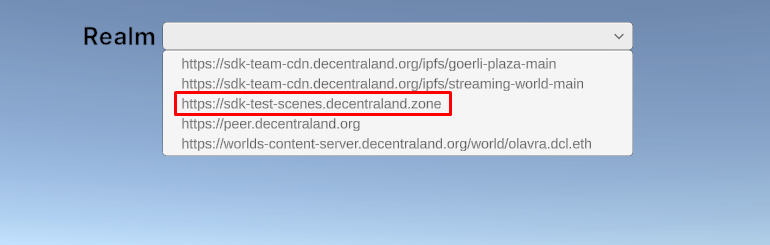
But there are sometimes, when we're modifying the implementation of an already existing SDK component or implementing a new one, it's very useful to have a custom scene where to experiment with that SDK component in a isolated way. For this purpose we can create a basic scene with the components that we're interested on test, run it in a local server and connect it to our project. To do this, let's follow the next steps:
1. Download the SDK7 Scene Template: Go to this repo and download it.
2. Run it in a local server: Open a console from the sdk7-scene-template folder and execute npm i. Once it finishes, execute npm run start. This will create the compiled bin file in sdk7-scene-template/bin/ and open the scene in your browser.

3. Modify the scene's code to your liking: Modify the code files inside sdk7-scene-template/src/ to have the scene that you need and observe how it automatically changes in your browser right after introduce the changes. Remember that you have the SDK Documentation available to learn how to implement each component from the SDK side.

4. Remove unnecessary code: Before attempting to test the scene from our Unity project, we will have to remove some unnecessary lines in the index.ts file. Specifically the related to initAssetPacks:

5. Link our project to our local scene: From this point on we can already close the scene in the browser (don't stop the local server in the console). We will go to the DynamicSceneLoading scene and add the new realm http://127.0.0.1:8000 in the EntryPoint game object.

6. Test our local scene from our project: Click on Play in Unity, select the new realm in the dropdown and that's it!
