[Question] Docker redirects automatically from port 8000 to 8080 #633

Description

Hi, I am trying to install and execute Wordpress, MySQL, PHPmyAdmin using docker-compose.
version: '3'

services:
  # Database
  db:
    image: mysql:5.7
    volumes:
      - db_data:/var/lib/mysql
    restart: always
    environment:
      MYSQL_ROOT_PASSWORD: password
      MYSQL_DATABASE: wordpress
      MYSQL_USER: wordpress
      MYSQL_PASSWORD: wordpress
    networks:
      - wpsite
  # phpmyadmin
  phpmyadmin:
    depends_on:
      - db
    image: phpmyadmin
    restart: always
    ports:
      - '8080:80'
    environment:
      PMA_HOST: db
      MYSQL_ROOT_PASSWORD: password
    networks:
      - wpsite
  # Wordpress
  wordpress:
    depends_on:
      - db
    image: wordpress:latest
    ports:
      - '8000:80'
    restart: always
    volumes: ['./:/var/www/html']
    environment:
      WORDPRESS_DB_HOST: db:3306
      WORDPRESS_DB_USER: wordpress
      WORDPRESS_DB_PASSWORD: wordpress
    networks:
      - wpsite
networks:
  wpsite:
volumes:
  db_data:
However, if I access http://localhost:8000 (Wordpress), it redirects me to http://localhost:8080 (PHP my admin).
I tried to change the port of PHP my Admin to 5000 then ran it. Afterwards, http://localhost:8000 (Wordpress) still redirected me to http://localhost:8080 (no services were running on this port).
I do not do port forwarding or installing web server such as Nginx. By the way, before adding the phpmyadmin service, http://localhost:8000 opens Wordpress and I had no issues.
This is the network tab when I open http://localhost:8000 (not 8080 although the picture shows http://localhost:8080) :
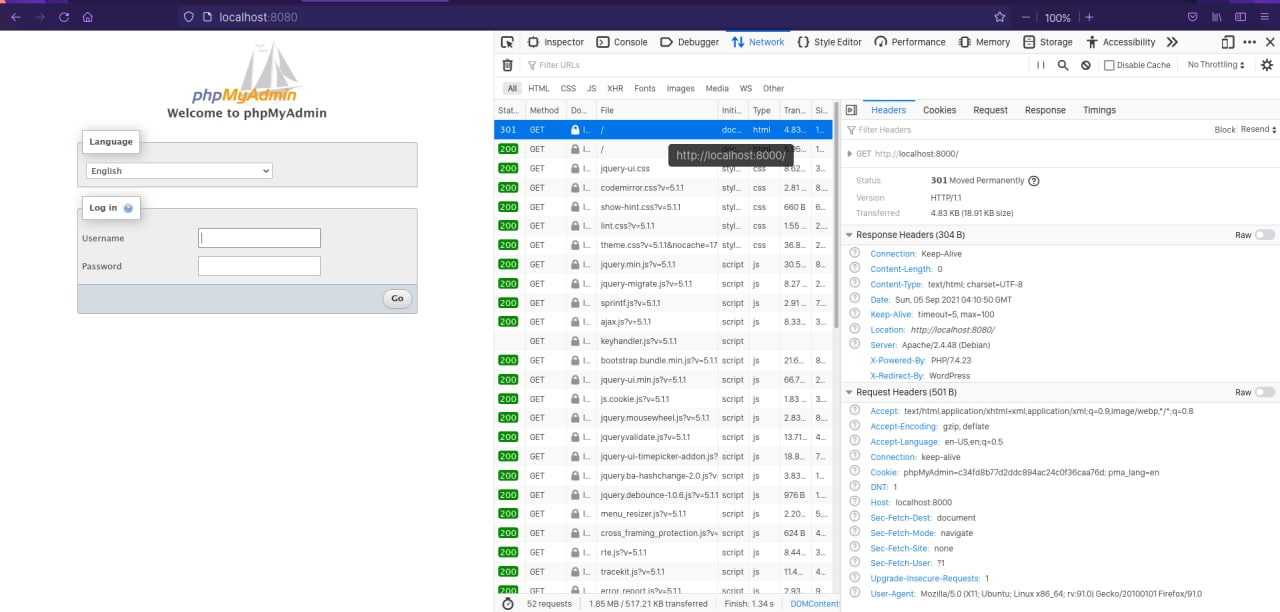
http://localhost:8000 got a status code 301 then it redirected me to http://localhost:8080 with the status code 200 (OK).
Could you please give me a clue what went wrong? Any help is appreciated!
System Information :
- Operating System : Ubuntu Focal Fossa 20.04 LTS
- Docker Compose : version 1.29.2, build 5becea4c
- Docker Engine : version 20.10.8, build 3967b7d
Another very similar issue in Windows 10 Pro : https://stackoverflow.com/questions/65921631/docker-redirect-automatically-from-port-8000-to-8080-docker-bug