chore: update dependencies, readme #167
Workflow file for this run
This file contains hidden or bidirectional Unicode text that may be interpreted or compiled differently than what appears below. To review, open the file in an editor that reveals hidden Unicode characters.
Learn more about bidirectional Unicode characters
| name: CI | |
| # Events that trigger workflow | |
| on: | |
| push: | |
| branches: | |
| - "*" | |
| pull_request: | |
| jobs: | |
| windows: | |
| name: Build (Windows) | |
| runs-on: windows-2022 | |
| steps: | |
| - name: Check out Git repository | |
| uses: actions/checkout@v4 | |
| with: | |
| fetch-depth: 0 | |
| submodules: true | |
| - name: Export Repo URL | |
| run: echo "REPO_URL=https://github.com/${{ github.repository }}" >> $GITHUB_ENV | |
| - name: Export Branch Name | |
| run: echo "BRANCH_NAME=${GITHUB_REF##*/}" >> $GITHUB_ENV | |
| - uses: actions/setup-node@v4 | |
| with: | |
| node-version: "22" | |
| - name: Build Distribution | |
| shell: pwsh | |
| run: | | |
| yarn | |
| yarn build | |
| cd .\dist | |
| Compress-Archive *.exe .\nudelta-x64.exe.zip | |
| cp .\nudelta-x64.exe.zip .. | |
| - name: Upload App | |
| uses: actions/upload-artifact@v4 | |
| with: | |
| name: win-app | |
| path: ./nudelta-x64.exe.zip | |
| linux: | |
| name: Build (Linux) | |
| runs-on: ubuntu-24.04 | |
| steps: | |
| - name: Check out Git repository | |
| uses: actions/checkout@v4 | |
| with: | |
| fetch-depth: 0 | |
| submodules: true | |
| - uses: actions/setup-node@v4 | |
| with: | |
| node-version: "22" | |
| - name: Export Repo URL | |
| run: echo "REPO_URL=https://github.com/${{ github.repository }}" >> $GITHUB_ENV | |
| - name: Export Branch Name | |
| run: echo "BRANCH_NAME=${GITHUB_REF##*/}" >> $GITHUB_ENV | |
| - name: Build Distribution | |
| run: | | |
| docker build -t appimage-build . | |
| id=$(docker create appimage-build) ; \ | |
| docker cp $id:/nudelta.AppImage nudelta-amd64.AppImage ; \ | |
| docker rm -v $id | |
| - name: Upload AppImage | |
| uses: actions/upload-artifact@v4 | |
| with: | |
| name: linux-appimage | |
| path: ./nudelta-amd64.AppImage | |
| macos: | |
| name: Build (${{ matrix.os.name }} | ${{ matrix.os.arch }}) | |
| runs-on: ${{ matrix.os.runner }} | |
| strategy: | |
| matrix: | |
| os: | |
| [ | |
| { | |
| name: "macOS 13", | |
| family: "macos", | |
| runner: "macos-13", | |
| arch: "x86_64", | |
| }, | |
| { | |
| name: "macOS 14", | |
| family: "macos", | |
| runner: "macos-14", | |
| arch: "arm64", | |
| }, | |
| ] | |
| steps: | |
| - name: Check out Git repository | |
| uses: actions/checkout@v4 | |
| with: | |
| fetch-depth: 0 | |
| submodules: true | |
| - name: Export Repo URL | |
| run: echo "REPO_URL=https://github.com/${{ github.repository }}" >> $GITHUB_ENV | |
| - name: Export Branch Name | |
| run: echo "BRANCH_NAME=${GITHUB_REF##*/}" >> $GITHUB_ENV | |
| - uses: actions/setup-node@v4 | |
| with: | |
| node-version: "22" | |
| - name: Get Cmake | |
| run: | | |
| brew install cmake | |
| - name: Build Distribution | |
| run: | | |
| yarn | |
| yarn build | |
| ls ./dist | |
| cp -r ./dist/*.dmg ./nudelta-${{ matrix.os.arch }}.app.dmg | |
| - name: Upload App | |
| uses: actions/upload-artifact@v4 | |
| with: | |
| name: mac-app-${{ matrix.os.arch }} | |
| path: ./nudelta-${{ matrix.os.arch }}.app.dmg | |
| publish: | |
| name: Publish | |
| runs-on: ubuntu-24.04 | |
| needs: [macos, linux, windows] | |
| steps: | |
| - name: Check out Git repository | |
| uses: actions/checkout@v4 | |
| with: | |
| fetch-depth: 0 | |
| - name: Export Repo URL | |
| run: echo "REPO_URL=https://github.com/${{ github.repository }}" >> $GITHUB_ENV | |
| - name: Export Branch Name | |
| run: echo "BRANCH_NAME=${GITHUB_REF##*/}" >> $GITHUB_ENV | |
| - name: Set default for env.NEW_TAG | |
| run: echo "NEW_TAG=NO_NEW_TAG" >> $GITHUB_ENV | |
| - name: Download Linux App | |
| uses: actions/download-artifact@v4 | |
| with: | |
| name: linux-appimage | |
| path: /tmp | |
| - name: Download Mac App | |
| uses: actions/download-artifact@v4 | |
| with: | |
| name: mac-app-x86_64 | |
| path: /tmp | |
| - name: Download Mac App | |
| uses: actions/download-artifact@v4 | |
| with: | |
| name: mac-app-arm64 | |
| path: /tmp | |
| - name: Download Windows App | |
| uses: actions/download-artifact@v4 | |
| with: | |
| name: win-app | |
| path: /tmp | |
| - name: Check for new version | |
| if: ${{ env.BRANCH_NAME == 'main' }} | |
| run: | | |
| cd ${GITHUB_WORKSPACE}/ && python3 .github/scripts/generate_tag.py | |
| - name: Tag Commit | |
| if: ${{ env.NEW_TAG != 'NO_NEW_TAG' }} | |
| uses: tvdias/github-tagger@v0.0.1 | |
| with: | |
| tag: "${{ env.NEW_TAG }}" | |
| repo-token: "${{ secrets.MY_TOKEN }}" | |
| - name: Upload Release Asset | |
| if: ${{ env.NEW_TAG != 'NO_NEW_TAG' }} | |
| uses: softprops/action-gh-release@v1 | |
| with: | |
| tag_name: ${{ env.NEW_TAG }} | |
| body: > | |
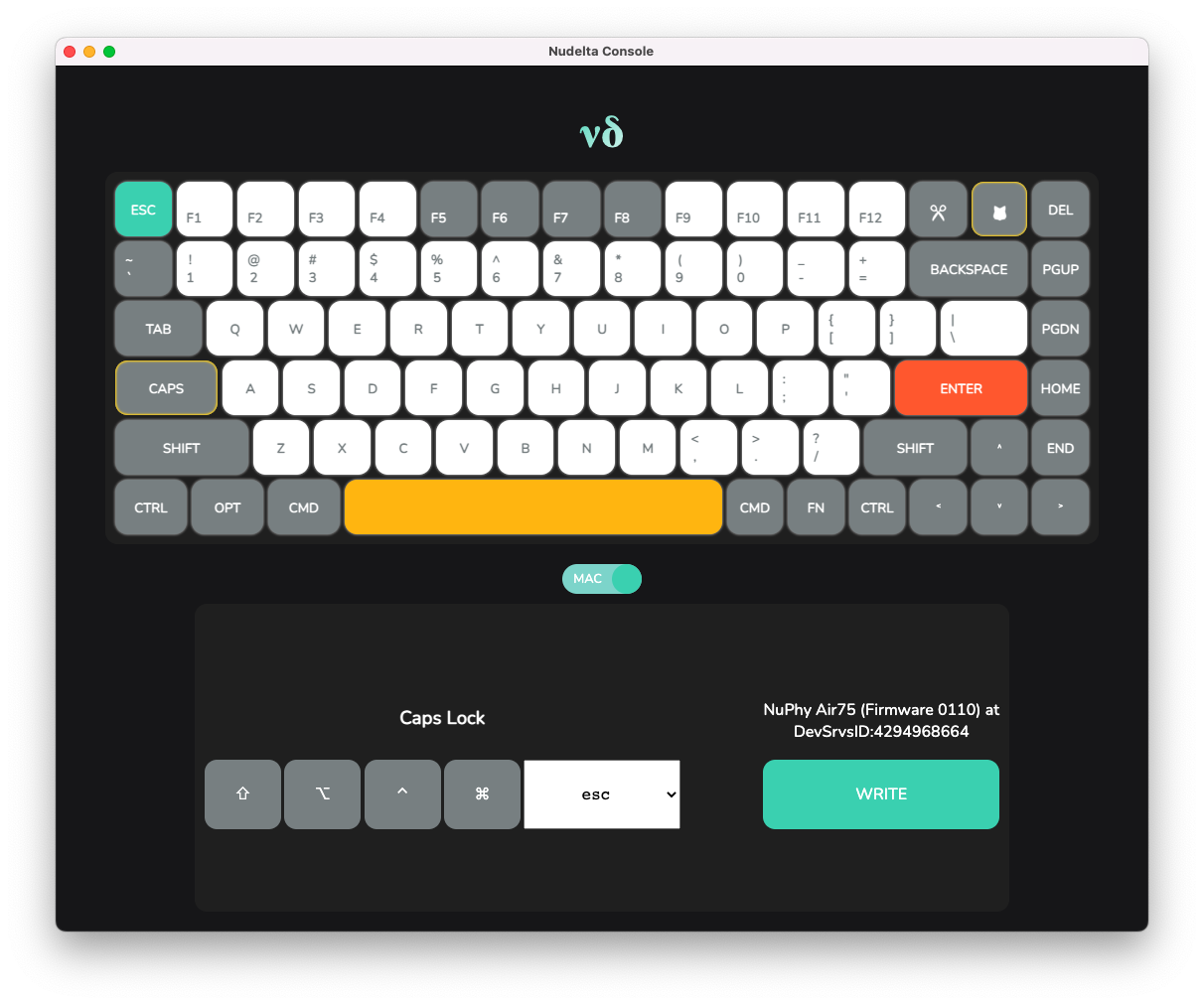
| Changelog: https://github.com/donn/nudelta/blob/main/Changelog.md | |
|  | |
| On Windows, you will need to download and unzip the `.exe` file. | |
| You may see a Windows SmartScreen warning- you may safely ignore it. | |
| On macOS, you will need to download the `.dmg` file, open it and | |
| drag Nudelta into your Applications folder. The app is not | |
| code-signed or notarized, so you will have to run this in your | |
| terminal before opening it: | |
| `sudo xattr -cr /Applications/nudelta.app` | |
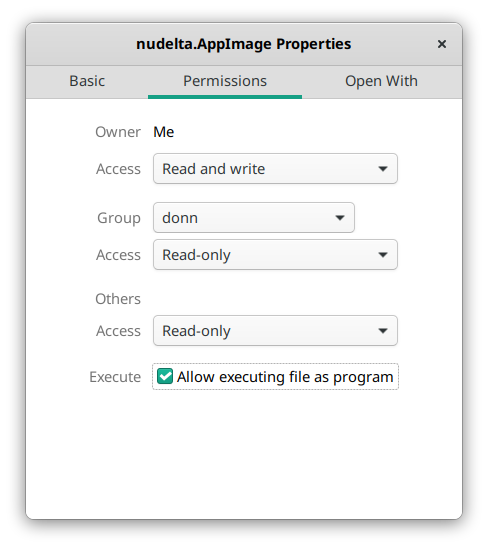
| On Linux, download the `.AppImage`, enable "allow executing file as | |
| program" in its properties (shown below), then double-click it. | |
| * You may need to install `libudev` separately- on Ubuntu, you can | |
| run `sudo apt-get install -y libudev`. | |
|  | |
| files: | | |
| /tmp/nudelta-x86_64.app.dmg | |
| /tmp/nudelta-arm64.app.dmg | |
| /tmp/nudelta-x64.exe.zip | |
| /tmp/nudelta-amd64.AppImage |