dotnet-trace does not resolve symbols on linux-arm #2003

Description

I want to use dotnet-trace on linux-arm (ARMv7-A 32Bit) to analyse my application, but the symbols/names of my application are not resolved for some reason.
If i use dotnet-trace for the same application on linux-x64 it will resolve the symbols/names just fine.
I am using dotnet-trace version 5.0.160202 together with .net core 5.0.102.
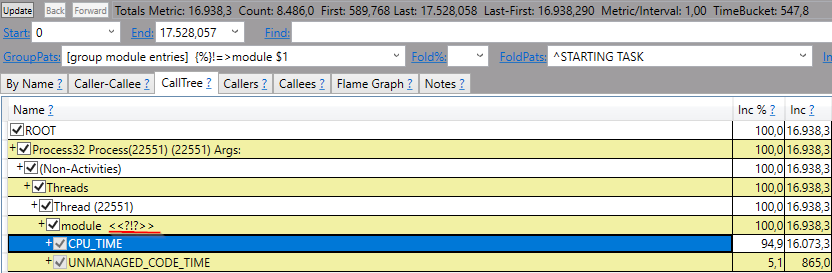
An example trace on linux-arm looks like this in PerfView:
Maybe i am missing something simple and this is a problem on my side, therefore i wrote done my steps. My application TestTrace consists of 2 files:
Program.cs:
using System;

namespace TraceTest
{
    class Program
    {
        static void Main(string[] args)
        {
            Console.WriteLine("DoSomething ...");
            DoSomething();
            Console.WriteLine("Finished!");
        }

        static void DoSomething()
        {
            for(var i = 0; i< 1_000_000_000; i++){}
        }
    }
}
TraceTest.csproj:
<Project Sdk="Microsoft.NET.Sdk">
  <PropertyGroup>
    <OutputType>Exe</OutputType>
    <TargetFramework>netcoreapp5.0</TargetFramework>
  </PropertyGroup>
</Project>
- How i build the binaries for
linux-armon Windows:
dotnet publish --configuration Debug -r linux-arm --self-contained
-
I copied the whole content inside the directory
..\TraceTest\bin\Debug\netcoreapp5.0\linux-arm\publishto$HOME/TraceTestonlinux-arm -
Install the
.net core 5.0 sdkonlinux-arm(all the following commands were executed asroot):
wget https://download.visualstudio.microsoft.com/download/pr/726e260e-ce94-46c3-a169-57b2ebf5433d/5fb2a00b04b3509a0a6db63e302523a8/dotnet-sdk-5.0.102-linux-arm.tar.gz -O dotnet-sdk-5.0.102-linux-arm.tar.gz
mkdir -p "$HOME/dotnet" && tar zxf dotnet-sdk-5.0.102-linux-arm.tar.gz -C "$HOME/dotnet"
export DOTNET_ROOT=$HOME/dotnet
export PATH=$PATH:$HOME/dotnet
- Install
dotnet-traceonlinux-arm(during my tests the following commands installeddotnet-traceversion '5.0.160202'):
dotnet tool install --global dotnet-trace
export PATH="$PATH:/home/root/.dotnet/tools"
- Collect a trace for my
TraceTestapplication:
cd $HOME/TraceTest
chmod +x TraceTest
dotnet-trace collect -- TraceTest
I got the following output (i stopped the trace manually here):
root@myLinuxArmMachine:$HOME/TraceTest# dotnet-trace collect -- TraceTest
No profile or providers specified, defaulting to trace profile 'cpu-sampling'

Provider Name                           Keywords            Level               Enabled By
Microsoft-DotNETCore-SampleProfiler     0x0000F00000000000  Informational(4)    --profile
Microsoft-Windows-DotNETRuntime         0x00000014C14FCCBD  Informational(4)    --profile

Process        : $HOME/TraceTest/TraceTest
Output File    : $HOME/TraceTest/trace.nettrace
[00:00:00:17]   Recording trace 599.055  (KB)
Press <Enter> or <Ctrl+C> to exit...969  (KB)
Stopping the trace. This may take up to minutes depending on the application being traced.

Trace completed.
- I opened the trace file
$HOME/TraceTest/trace.nettraceon my windows machine withPerfView. I double-clicked onThread Time (with StartStop Activities) Stacksand opened the tabCallTree, but there were no resolved symbols/names (see the screenshot from above).
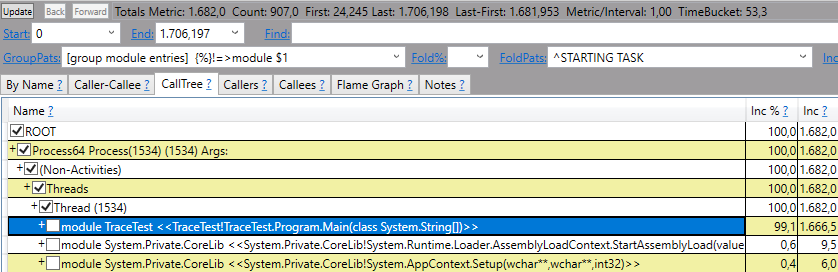
I did the same tracing process on linux-x64 and the symbols/names were resolved just fine:
Other things i tried without success:
- Use
.net core 3.1instead of.net core 5.0(so adapt the TraceTest.csproj, use the.net core 3.1 sdkand installdotnet-tracefor.net core 3.1). I know that it is not possible to do thedotnet-trace collect -- TraceTestcommand on.net core 3.1(so i added a Console.ReadKey() to my Program.cs and started the application manually). - Convert the trace to the speedscope format via
dotnet-trace convert trace.nettrace --format Speedscope --output trace.speedscope. There are no resovled names for any frame inside the created filetrace.speedscope.json.
In comparsion i can see some meaningful names for the fames in the converted trace oflinux-x64. Furthermore, there are more frames in thelinux-x64trace in general. It seems like all the different frames inside thelinux-x64are reduced to one frame "CPU_TIME" inside thelinux-armtrace. - Copy the project
TestTracedirectly tolinux-armand execute it viadotnet run. - Trace with the
PublishReadyToRunoption enableddotnet publish --configuration Debug -r linux-arm -p:PublishReadyToRun=true(compiled this on linux-x64 and not on Windows) - Do not stop the tracing manually. I always get the following error, but i do not think this should affect the tracing results:
[ERROR] Microsoft.Diagnostics.NETCore.Client.ServerNotAvailableException: Could not send Stop command. The target process may have exited.
   at Microsoft.Diagnostics.NETCore.Client.EventPipeSession.Stop() in /_/src/Microsoft.Diagnostics.NETCore.Client/DiagnosticsClient/EventPipeSession.cs:line 62
   at Microsoft.Diagnostics.Tools.Trace.CollectCommandHandler.Collect(CancellationToken ct, IConsole console, Int32 processId, FileInfo output, UInt32 buffersize, String providers, String profile, TraceFileFormat format, TimeSpan duration, String clrevents, String clreventlevel, String name, String diagnosticPort) in /_/src/Tools/dotnet-trace/CommandLine/Commands/CollectCommand.cs:line 221
I also searched for related problems, but i cannot find my exact problem (working fine on linux-x64, but not on linux-arm).
I hope i missing out something simple here and someone can help me.