Inconsistencies between Show() and ShowAsync() #14201


Description

.NET version
.NET 10.0.101
Did it work in .NET Framework?
Not available
Did it work in any of the earlier releases of .NET Core or .NET 5+?
Not available
Issue description
Highly appreciate the async extensions for WinForms #4631 & #11854. This helps a lot and I have really been looking forward to this.
However, we found out that the new async methods behave differently in three cases:
-
Showing async MDI children
MDI child forms cannot be shown asynchronously. For most business apps this is exactly the point where it should be supported given that all the forms the users are working with are usually MDI children. -
ShowAsync()without anIWin32Ownerdoes not set an owner but behaves like it would
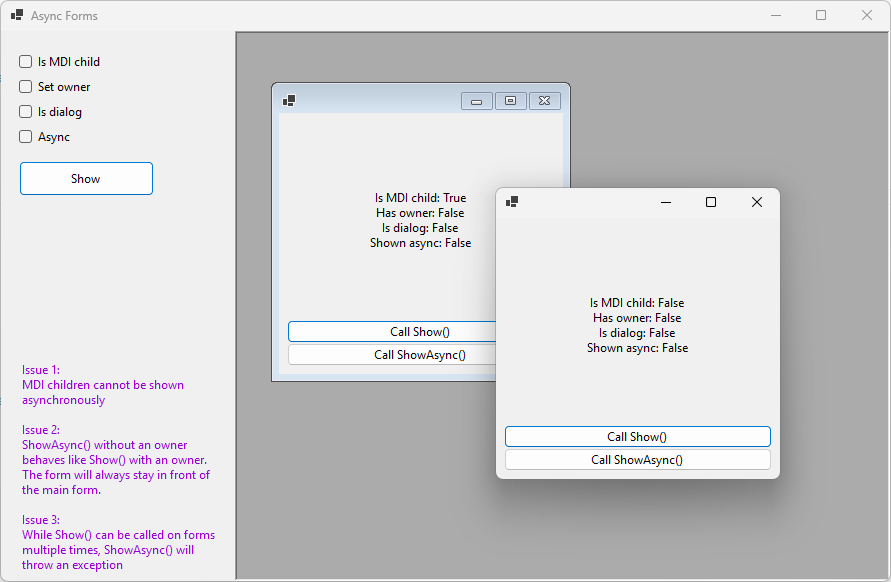
In the demo app, if you leave all checkboxes unset, you'll get a new form that can also get behind the main form.
If you check the Async checkbox only, the form will not get a parent and no owner. And still it behaves like it would have an owner.
What I mean by this is while the main form is not blocked and can be used while the created form stays open, the main form cannot cover the created form. The created form will always stay on top, just like it is the case withShow()with an owner. -
Calling
Show()/ShowAsync()twice
While it makes no sense to do this, we found out that the behavior differs when callingShow()multiple times (no error) vs. callingShowAsync()multiple times, which leads to exceptions.
Why is that and can this be changed to behave the same? I think the behavior ofShow()is better here as it might just be settingVisible=true, which can be done multiple times as well.
Steps to reproduce
I created a tiny repro app where all of this can be tested easily.
→ https://github.com/awaescher/AsyncFormsRepro
Just clone it and run dotnet run --project AsyncForms.