





🚀 AI-powered documentation that understands your code
AIGNE DocSmith is a powerful, AI-driven documentation tool built on the AIGNE Framework. It automatically analyzes your codebase to generate comprehensive, structured, and multi-language documentation that stays in sync with your code.
- 🧠 Intelligent Analysis: Understands your code's structure, patterns, and intent.
- 📚 Comprehensive Coverage: Generates everything from API references to user guides.
- 🌍 Global Ready: Supports 12 languages with professional-grade translation.
- 🔄 Always Current: Automatically detects changes and updates documentation accordingly.
- ⚡ Zero Config: Works out of the box with smart defaults and auto-detection.
DocSmith is part of the AIGNE ecosystem, a comprehensive AI application development platform.
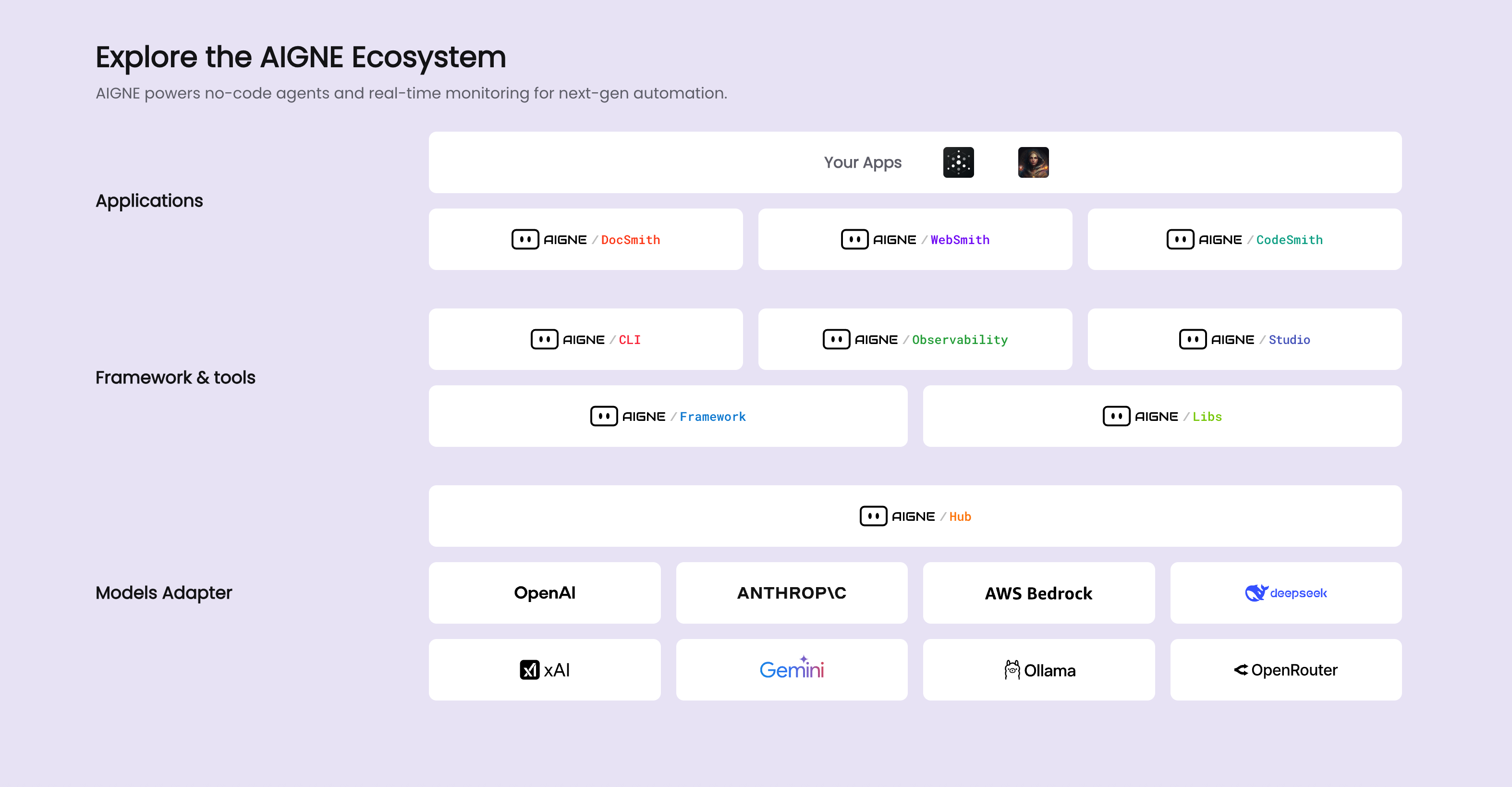
As shown in the diagram, DocSmith integrates seamlessly with other AIGNE components, leveraging the platform's AI capabilities and infrastructure.
- Smart Structure Planning: Analyzes your codebase to create a logical and comprehensive documentation structure.
- Intelligent Content Creation: Generates detailed, contextual content that explains both the "what" and the "why."
- Adaptive Writing Styles: Supports multiple documentation styles, including Technical, User-Friendly, and Developer-Focused.
- 12 Language Support: English, Chinese (Simplified & Traditional), Japanese, Korean, Spanish, French, German, Portuguese, Russian, Italian, and Arabic.
- Professional Translation: Provides context-aware translations that maintain technical accuracy.
- Glossary Integration: Ensures consistent terminology across all languages.
- AIGNE Hub Integration: Use the AIGNE Hub without API keys and switch between Google Gemini, OpenAI GPT, Claude, and more.
- Multiple LLM Support: Bring your own API keys for OpenAI, Anthropic, Google, and other providers.
- One-Click Publishing: Publish your docs and generate shareable links for your team. Publish to docsmith.aigne.io or your own Discuss Kit instance.
- Change Detection: Automatically identifies code changes and updates the relevant documentation.
- Targeted Regeneration: Updates specific sections with custom feedback and requirements.
- Version Awareness: Maintains a history of your documentation and tracks changes over time.
- Node.js 20+ and npm/pnpm
- No API keys required (uses the AIGNE Hub by default).
Install the AIGNE CLI globally:
npm install -g @aigne/cliVerify the installation:
aigne doc --helpNavigate to your project directory and run:
# One command to generate your documentation
aigne doc create
DocSmith will:
- 🔍 Auto-detect your project's structure and tech stack.
- 🎯 Guide you through an interactive setup (first time only).
- 📝 Generate comprehensive documentation.
- 🌍 Optionally translate it into multiple languages.
- 🚀 Publish it to your preferred platform.
DocSmith supports multiple AI providers:
🎯 AIGNE Hub (Recommended)
- ✅ No API keys required.
- ✅ Easy model switching.
- ✅ Built-in rate limiting and optimization.
# Switch models effortlessly
aigne doc create --model google:gemini-2.5-pro
aigne doc create --model anthropic:claude-sonnet-4-5
aigne doc create --model openai:gpt-4o
🔑 Custom API Keys Configure your own API keys for direct provider access:
- OpenAI GPT models
- Anthropic Claude models
- Google Gemini models
- and more...
# Smart generation with auto-configuration
aigne doc create

# Force a complete regeneration of the documentation
aigne doc create --forceRegenerate

# Generate with custom feedback
aigne doc create --feedback "Add more API examples and troubleshooting sections"# Interactively select and update a document
aigne doc update
# Update specific document with feedback
aigne doc update --docs overview.md --feedback "Add comprehensive FAQ section"# Interactive translation with smart language selection
aigne doc localize
# Translate specific documents into multiple languages
aigne doc localize --langs zh --langs ja --docs examples.md --docs overview.md
# Translate with a custom glossary for consistent terminology
aigne doc localize --glossary @path/to/glossary.md --feedback "Use technical terminology consistently"# Interactive publishing with platform selection
aigne doc publish
# Publish to a custom Discuss Kit instance
aigne doc publish --appUrl https://your-discuss-kit-instance.com# Interactive configuration setup
aigne doc init
# View the current configuration
aigne doc prefsDocSmith automatically detects your project's structure, but you can customize it to your needs:
- 📝 Documentation Styles: Technical, User-Friendly, Developer-Focused, Academic
- 🎯 Target Audiences: Developers, End Users, System Administrators, Business Users
- 🌍 Languages: Choose from 12 supported languages.
- 📁 Source Paths: Customize which files and directories to analyze.
- 📤 Output Settings: Configure the documentation structure and formatting.
DocSmith provides professional-grade translations for 12 languages:
| Language | Code | Support Level |
|---|---|---|
| English | en |
✅ Native |
| 简体中文 | zh-CN |
✅ Full |
| 繁體中文 | zh-TW |
✅ Full |
| 日本語 | ja |
✅ Full |
| 한국어 | ko |
✅ Full |
| Español | es |
✅ Full |
| Français | fr |
✅ Full |
| Deutsch | de |
✅ Full |
| Português | pt-BR |
✅ Full |
| Русский | ru |
✅ Full |
| Italiano | it |
✅ Full |
| العربية | ar |
✅ Full |
We welcome contributions from the community! Here's how you can help:
- 🔍 Search existing issues first.
- 📝 Use our issue templates for bug reports and feature requests.
- 🚨 Include clear reproduction steps and details about your environment.
- 🌟 Share your ideas in GitHub Discussions.
- 📋 Check our roadmap for planned features.
- 🗳️ Vote on existing feature requests.
# Clone the repository
git clone https://github.com/AIGNE-io/aigne-doc-smith.git
cd aigne-doc-smith

# Install dependencies
pnpm install

# Run tests
pnpm test

# Run the linter
pnpm run lint

# Automatically fix lint errors
pnpm run lint:fixPlease follow our community guidelines and maintain respectful, constructive communication.
- Team Collaboration: Multi-user workflows with role-based access.
- Custom Branding: White-label your documentation with your brand's identity.
- API Integration: Use REST APIs for automated documentation pipelines.
- Analytics: Track documentation usage and effectiveness.
- Private Cloud: Deploy on your own infrastructure.
- SSO Integration: Connect with your existing identity providers.
- Audit Logs: Complete activity tracking and compliance reporting.
- Data Privacy: Your code never leaves your environment in private deployments.
- Priority Support: Get direct access to our engineering team.
- Custom Training: We offer team onboarding and best practices workshops.
- Professional Services: We provide custom integrations and deployment assistance.
Contact us for enterprise licensing and deployment options.
See DocSmith in action with these real-world examples:
- Docs Repository - Generated with DocSmith.
This project is licensed under the Elastic License 2.0. See the LICENSE file for details.
- ✅ Free for most use cases: Including personal projects, internal use, and most commercial applications.
- ✅ Open source: The full source code is available for review and contributions.
- ✅ Commercial friendly: Use it in your business applications and services.
- ❌ Restrictions: You cannot offer DocSmith as a competing hosted service.