
Use the model for the unknown. Re-run the known path with checks and evidence.





Every Monday, you ask an agent to open the same dashboards, check the same numbers, and report the same failures.
The first run is useful: the model figures out the job. On the next run, most agents start over. They read the instructions again, choose tools again, spend tokens again, and may take a different path. You are paying for rediscovery, not new intelligence.
There is a second problem: a chat answer is not proof that the job ran correctly. A loose agent may treat “do not open GitHub” as an action, or trust a bad success score without checking whether its evidence makes sense.
Flyto2 AI separates those problems:
- A question stays a question. Conversation, current-data requests, and actions are routed before tools are exposed, then enforced again when a tool call reaches the dispatcher.
- “Do not” means do not. Multilingual negation, quoted commands, and hypothetical examples do not become accidental MCP actions.
- Evidence must add up. Learned Blueprint evidence with missing, contradictory, non-finite, or out-of-range values fails closed.
- Solved work becomes reusable. A successful typed procedure can become a Blueprint with arguments, permissions, retries, assertions, and real outcome history.
The model handles the new part. Checked execution handles the repeat:
new task
   ↓
model selects typed modules
   ↓  permission + schema + assertion gates
verified execution ───────────────→ reusable Blueprint
                                          ↓
matching request → fill new arguments → run checked steps → record evidence
On an exact deterministic reuse, Flyto2 AI records
planner_model_calls_used=0: the outer agent did not call a model to plan the
job again. A saved workflow may still contain an llm.* step, so this does not
pretend the entire workflow is token-free.
The 2026-07-28 Blueprint v3 evidence set contains five completed host runs: Qwen, Llama, and Gemma on Apple Silicon, plus an independent Qwen run on a GitHub-hosted Linux x86-64 runner. Each host ran 10 tasks 20 times in four modes—800 records per host, 4,000 records in total.
The suite used the production Blueprint engine, real Ollama model calls, real subprocess and filesystem work for coding, real HTTP requests for browser/API cases, and a real SQLite lifecycle. It did not replace planner or workflow model calls with mocks. Across the five hosts:
- workload success and warm-reuse success were 100%;
- manual corrections and false reuse were both zero;
- full measured tokens fell 71.25–72.90% versus re-planning without a Blueprint, and 84.80–85.78% versus agent-only execution;
- the paired 95% lower bound for the reduction versus no Blueprint stayed between 63.29% and 64.43%;
- the repeated Qwen run had zero success-rate drop and zero token increase.
“Full measured tokens” means the benchmark adds planner tokens and any model tokens used inside the workflow. The browser/API cases use a real loopback HTTP service, not a public website; local Ollama reported no provider charge, so these runs do not prove cloud-model cost savings.
Raw JSONL, scorecards, lifecycle evidence, rerun commands, and the independent GitHub run link live in flyto-blueprint benchmark results.
The broader local verification also covered:
- 700 multilingual and presentation-mutated routing cases;
- 5,000 seeded Unicode/noise inputs with zero routing crashes;
- 408 permission combinations;
- 4,500 Blueprint trust-boundary cases and 38 malformed-evidence cases;
- 1,173 passing project tests, with 15 optional/live-integration skips;
- 17/17 strict Flyto2 Indexer checks, with zero warnings.
These numbers describe the checked test set. They are not a claim that every slang phrase, mixed-language message, model provider, or live third-party MCP has been proven perfect.
pip install flyto-ai[full]   # base install is light; browser automation needs flyto-core[browser]
playwright install chromium
export OPENAI_API_KEY=<your-openai-key>   # or ANTHROPIC_API_KEY

flyto-ai "open https://example.com and extract the h1 text"
Only need an OpenAI-backed provider without browser automation (e.g.
embedding OpenAIProvider in another service)? pip install flyto-ai
stays free of Playwright, flyto-core, flyto-pro-core, flyto-blueprint,
and the anthropic SDK — see Optional extras.
Run flyto-ai with no prompt for an interactive session.
Good fit if you searched for:
- AI agent framework for browser automation
- natural language workflow automation
- open-source AI workflow generator
- MCP-compatible tool selection for AI agents
Official links: flyto2.com · Docs · PyPI · flyto-core · flyto-blueprint
The base install (pip install flyto-ai) is deliberately light: pyyaml,
pydantic, openai, langdetect, aiosqlite, rich, cryptography.
Everything that talks to browser automation, the Blueprint pattern engine,
flyto-pro's contract/cost layer, or the Anthropic SDK is an extra, so a
consumer that only needs e.g. OpenAIProvider never pays for Playwright + a
Chrome download.
| Extra | Adds | Use it for |
|---|---|---|
browser |
flyto-core[browser] (incl. Playwright) |
Browser automation tools (open, click, extract, …) |
pro |
flyto-pro-core |
Contract validation, multi-resource cost control |
blueprint |
flyto-blueprint |
Self-learning Blueprint pattern matching |
anthropic |
anthropic SDK |
AnthropicProvider / Claude models |
full |
all four above | Everything the CLI's browser-automation mode needs — pip install flyto-ai[full] |
agent / claude-sdk |
claude-agent-sdk |
The detachable Claude Code coding backend (see below) — independent of full |
For automation, Flyto2 AI asks the model to select typed modules instead of executing arbitrary model-generated shell or Python. The separate coding-agent mode can write code, but it is wrapped in budgets, Guardian hooks, Indexer context, and verification loops.
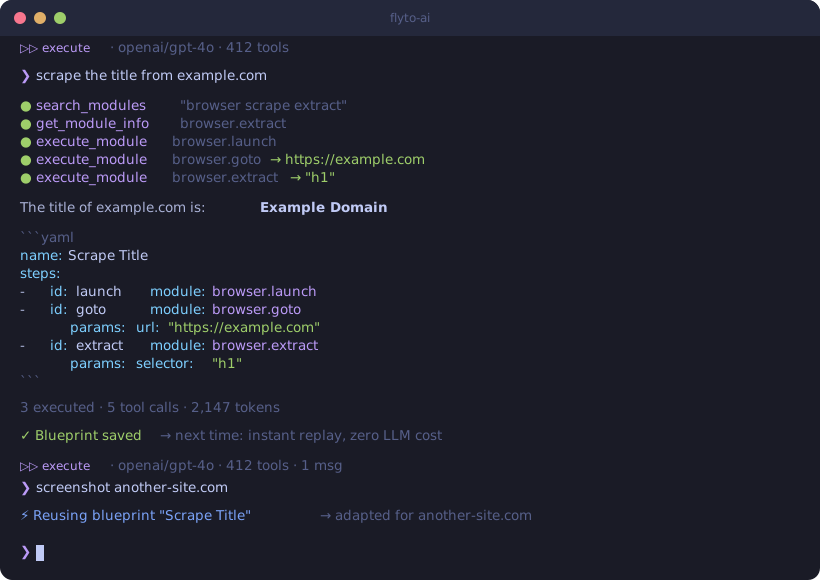
The bigger difference is reuse: a successful automation does not have to remain a chat transcript. It can become a parameterized Blueprint with an Evidence Card.
❯ scrape the title from example.com

Result: "Example Domain"
name: Scrape Title
params:
  url: "https://example.com"
steps:
  - id: launch
    module: browser.launch
  - id: goto
    module: browser.goto
    params:
      url: "${{params.url}}"
  - id: extract
    module: browser.extract
    params:
selector: "h1"Run flyto-ai for an interactive automation session, or pass a prompt directly
to generate and execute a workflow:
flyto-ai "open https://example.com and extract the h1 text"
flyto-ai --provider anthropic --model claude-sonnet-4-5 "summarize this page"
flyto-ai blueprints --export > blueprints.yaml
For local or CI configuration, copy .env.example and fill only the providers
you use. Never commit real API keys or bot tokens.
Flyto2 AI can turn a provider-neutral Robotics request into a bounded, attested plan without giving the model direct motor authority. The caller supplies a routed shortlist, atomic capability schemas, semantic location IDs, and optional complete route candidates. Flyto2 AI converts those facts into a provider-native JSON Schema, validates the proposal independently, and permits at most one repair attempt.
When route candidates are present, the schema encodes each complete candidate
as an exact step template. The model may choose yellow or orange at one fork
and blue, green, purple, or red at the next, but it cannot skip a required
waypoint, splice two branches, continue before matching human approval, or end
a motion plan without safe_stop.
Run the local Ollama-backed boundary:
python3 -m flyto_ai.robotics_planner_server \
  --host 127.0.0.1 \
  --port 8787 \
  --model flyto-qwen3:8b
POST /v1/robotics/plan returns the validated plan plus hashes of the exact
request, generated schema, and plan, provider counters, attempt results, and
the selected route ID. The server binds only to loopback; authentication and
remote deployment remain the responsibility of the embedding product.
- Feature map connects shipped behavior to source packages.
- Python API, CLI/MCP, and configuration cover integration contracts.
- Operations covers verification, releases, and incidents.
- Technical whitepaper explains the architecture and trust model.
- Generated reference inventories every Python function/class method, CLI declaration, static tool, environment read, and maintainer script from source. CI fails when that reference becomes stale.
The core difference is when the LLM is still needed:
| Traditional AI agents | flyto-ai | |
|---|---|---|
| New job | Model reasons and acts | Model can select modules and parameters |
| Repeated job | Model reasons again | Verified Blueprint can run directly |
| Ordinary conversation | Tool use may be left to model judgment | Intent gate is enforced again at dispatch |
| Negation and quoted actions | Can still look like tool instructions | Multilingual negative/meta requests stay answer-only |
| Execution | Often trusts generated commands | Permission + schema + PlanIR + assertion gates |
| “It worked” | Often inferred from the answer | Recorded from actual execution |
| Bad learned evidence | Trust behavior varies | Malformed or impossible evidence fails closed |
| Learning | Usually stays in chat history | Becomes reusable workflow + evidence |
| Token evidence | Provider bill/log | planner_model_calls_used=0 on deterministic exact reuse |
| Shared procedures | Trust is often implicit | Unknown imports stay quarantined |
Flyto2 AI publishes the raw runs behind its savings claim instead of presenting one unexplained percentage. The v3 scorecards report planner and workflow tokens separately, then add them for the full measured total. They also report success, manual corrections, retries, assertions, latency, false reuse, paired confidence bounds, model digest, hardware, commit, and runner provenance.
That distinction matters: deterministic Blueprint reuse can skip the outer
planning call, but a saved workflow may still contain an llm.* step. It is
only counted as a full-workflow reduction when those step-level model calls are
measured too.
❯ extract all product names and prices from example-shop.com/products
name: Scrape Products
params:
  url: "https://example-shop.com/products"
steps:
  - id: launch
    module: browser.launch
  - id: goto
    module: browser.goto
    params:
      url: "${{params.url}}"
  - id: extract
    module: browser.extract
    params:
      selector: ".product"
      fields:
        name: ".product-name"
price: ".product-price"❯ log in to staging.example.com, fill the contact form, and take a screenshot
name: Fill Contact Form
steps:
  - id: launch
    module: browser.launch
  - id: login
    module: browser.login
    params:
      url: "https://staging.example.com/login"
      username_selector: "#email"
      password_selector: "#password"
      submit_selector: "button[type=submit]"
  - id: fill
    module: browser.form
    params:
      url: "https://staging.example.com/contact"
      fields:
        name: "Test User"
        message: "Hello from flyto-ai"
  - id: proof
module: browser.screenshot❯ check if https://api.example.com/health returns 200, if not send a Slack message
name: Health Check Alert
params:
  endpoint: "https://api.example.com/health"
steps:
  - id: check
    module: http.get
    params:
      url: "${{params.endpoint}}"
  - id: notify
    module: notification.slack
    params:
      webhook_url: "${{params.slack_webhook}}"
      message: "Health check failed: ${{steps.check.status_code}}"
condition: "${{steps.check.status_code}} != 200"Large external capability catalogs can be routed with
flyto_ai.capability_router. It applies source/domain/runtime compatibility
filters, language-neutral flyto.goal-frame.v1 semantic ranking, trusted
Blueprint module_ids hints, and Core discovery through the existing
core_tools bridge. Raw-language aliases are a backwards-compatible recall
fallback, not the production routing authority. The LLM receives only a
bounded shortlist with a registry snapshot, semantic coverage, score reasons,
confidence, and ambiguity evidence. Robotics catalogs are source-scoped by
default, so an unrelated Core result such as a web robots.txt module cannot
enter a robot-motion shortlist merely because its words overlap.
Powered by flyto-core, the agent discovers the installed registry instead of assuming a frozen module count. Catalog areas include browser, flow, cloud, data, array, string, productivity, image, HTTP/API, notification, database, cryptography, containers, Kubernetes, and testing.
Browse available modules:
flyto-ai version # Shows installed module count“Learning” here means learning a procedure, not training model weights.
- A successful multi-step execution can be parameterized and saved.
- Repository/runtime compatibility prevents unsafe cross-project reuse.
- The Blueprint runs behind the same permission, validation, checkpoint, repair, and assertion gates as ordinary agent tools.
- A trusted outcome updates its Evidence Card; a failure lowers its score.
- Exact deterministic reuse records
planner_model_calls_used=0. - A score below 10 retires the pattern.
The Evidence Card exposes sample count, success rate, Wilson 95% lower bound,
retry rate, assertion pass rate, duration p50/p95, and zero-planner-call reuse.
Direct model reports remain community observations and cannot add trusted
detailed evidence.
flyto-ai blueprints                             # View learned blueprints
flyto-ai blueprints --export > blueprints.yaml # Export for sharingflyto-ai code defaults to the provider-neutral native control plane. It
confines writes to the selected workspace, keeps external MCP capabilities
detachable, and accepts success only after source-controlled host checks pass.
OpenAI, Anthropic, compatible endpoints, and local Ollama models use the same
versioned request and evidence contracts.
Run the no-mock ordinary-development benchmark with a real installed Ollama model, 101 distinct workspaces, three difficulty tiers, and an evidence-backed check/repair loop:
python scripts/benchmark_native_coding.py \
  --cases 101 --model qwen3:8b --minimum-rate 0.90 \
  --case-timeout 900 --max-tokens 4096 --max-agent-attempts 3
The harness rejects test edits and out-of-scope paths, writes resumable
checkpoints after every case, and emits a content-addressed JSON report under
out/benchmarks/native-coding/.
The 2026-08-01 native /api/chat run with think=false passed 99/101
(98.02%): standard 34/34, intermediate 32/34, and advanced 33/33. All three
tiers passed the 90% gate, all case IDs were distinct, every acceptance check
was a real python -m unittest -q subprocess, and hidden retries were zero.
The two failures remain in the evidence. See
out/benchmarks/native-coding/native-coding-benchmark-4495b61ad2d979b5a9a19a04dfdef2052ea7fb833285f4ae32d2f693fb9eecc1.json.
flyto-ai code-serve and flyto-ai code-mcp are two transports over one
audit-required coding service. For long-lived local Codex tasks,
flyto-ai code-mcp-supervisor keeps the client connection stable and replaces
only the inner code-mcp worker when its source build changes. The operator
selects the implementer once at startup —
--implementation-backend native|claude, default native, with an
optional bounded FLYTO_AI_CODING_BACKEND default. There is no per-job
selection and no fallback between implementers. The claude route needs the
optional flyto-ai[claude-sdk] extra and is pinned to claude-opus-5.
An implementer round never lands by itself. It stops at
awaiting_codex_audit, bound to an exact implementation_revision_sha256. An
authenticated host independently inspects and tests that workspace revision and
submits a verdict through the flyto_coding_audit MCP tool or
POST /v1/coding/jobs/{job_id}/audit: accept produces an accepted, landable
receipt; rework returns typed findings to the same job and implementation
session for another bounded round.
Many local Codex frontends coordinate through repository-set leases rather than one broad parent lock. The nearest Git repository is inferred by default; a cross-repository request can declare its complete atomic set. Inspect the shared main-axis/branch/queue/audit view without starting a worker or exposing another task's prompt:
flyto-ai code-task-window --state-dir ~/.flyto/coding-service
flyto-ai code-task-window --state-dir ~/.flyto/coding-service --json
The public MCP inventory remains submit/get/audit only.
A provider or check failure is terminal failed. Work interrupted while queued
or running becomes failed with failure_code=service_restarted. A rework
request past the ceiling is rejected rather than recorded: the job keeps its
current exact revision awaiting_codex_audit and non-landable, and no new
session starts. Only a valid accept on that exact revision can make it
landable. The service never stages, commits, pushes, publishes, or deploys —
landable is evidence, not an action.
Direct flyto-ai code and direct Python CodingService use remain supported
for legacy and library work, but they sit outside this audited route and cannot
produce its accepted, landable receipt. See
the coding control plane guide.
Use Claude Code only when the explicitly detachable compatibility backend is desired. This direct path is outside the host-managed audited route above: it cannot produce an accepted, landable receipt and is never the fallback for audited work.
pip install flyto-ai[claude-sdk]   # Installs claude-agent-sdk

# Basic — Claude Code writes code, no verification
flyto-ai code "fix the login form validation" --dir ./my-project --backend claude-sdk

# With verification — screenshot + visual comparison after each fix attempt
flyto-ai code "match the Figma design for the login page" \
  --dir ./my-project \
  --backend claude-sdk \
  --verify screenshot \
  --verify-args '{"url": "http://localhost:3000/login"}' \
  --reference ./figma-login.png \
  --max-attempts 3

# JSON output for CI/CD
flyto-ai code "add unit tests for auth module" \
  --dir ./project \
  --backend claude-sdk \
  --json
How it works:
Phase 1: Gather codebase context from flyto-indexer
Phase 2: Claude Code writes code (with Guardian safety hooks)
Phase 3: Run verification recipe (browser screenshot + text extraction)
Phase 4: LLM visual comparison (actual vs reference)
  → Failed → feed back to Claude Code (Phase 2)
  → Passed → return result
Features:
- Guardian hooks — blocks dangerous operations (rm -rf, .env writes, credential access)
- Evidence trail — every tool call logged to
~/.flyto/evidence/<session>/evidence.jsonl - Budget control —
--budget 5.0caps spending per task - Indexer integration — flyto-indexer provides codebase context + mounts as MCP server
- Session resume — feedback loop reuses the same Claude Code session for full context
# Python API
from flyto_ai import ClaudeCodeAgent, AgentConfig
from flyto_ai.agents import CodeTaskRequest

agent = ClaudeCodeAgent(config=AgentConfig.from_env())
result = await agent.run(CodeTaskRequest(
    message="fix the login page",
    working_dir="/path/to/project",
    verification_recipe="screenshot",
    verification_args={"url": "http://localhost:3000/login"},
    reference_image="./figma-login.png",
))
print(result.ok, result.attempts, result.files_changed)flyto-ai # Interactive chat — executes tasks directly
flyto-ai chat "scrape example.com" # One-shot execute mode
flyto-ai chat "scrape example.com" --plan # YAML-only mode (don't execute)
flyto-ai chat "take screenshot" -p ollama # Use Ollama (no API key needed)
flyto-ai chat "..." --webhook https://... # POST result to webhook
flyto-ai code "fix bug" --dir ./project # Claude Code Agent mode
flyto-ai serve --port 8080 # HTTP server for triggers
flyto-ai blueprints # List learned blueprints
flyto-ai version # Version + dependency statusJust run flyto-ai — multi-turn conversation with up/down arrow history:
$ flyto-ai

  _____ _       _        ____       _    ___
 |  ___| |_   _| |_ ___ |___ \     / \  |_ _|
 | |_  | | | | | __/ _ \  __) |   / _ \  | |
 |  _| | | |_| | || (_) |/ __/   / ___ \ | |
 |_|   |_|\__, |\__\___/|_____|  /_/   \_\___|
           |___/

  v0.6.0  Interactive Mode
  Provider: openai  Model: gpt-4o  Tools: 450

  ⏵⏵ execute · openai/gpt-4o · 450 tools
❯ scrape the title from example.com

  ○ browser.launch
  ○ browser.goto
  ○ browser.extract

  The title of example.com is: **Example Domain**

  3 executed · 5 tool calls

  ⏵⏵ execute · openai/gpt-4o · 450 tools · 1 msgs
❯ now also take a screenshot

❯ /mode
Switched to: plan-only (YAML output)
Commands: /clear, /mode, /history, /version, /help, /exit
Send results anywhere:
flyto-ai chat "scrape example.com" --webhook https://hook.site/xxxAccept triggers from anywhere:
flyto-ai serve --port 8080

# From Slack, n8n, Make, or any HTTP client:
curl -X POST http://localhost:8080/chat \
  -H "Content-Type: application/json" \
  -d '{"message": "take a screenshot of example.com"}'

# Execute mode (default) or plan-only:
curl -X POST http://localhost:8080/chat \
  -H "Content-Type: application/json" \
-d '{"message": "scrape example.com", "mode": "yaml"}'from flyto_ai import Agent, AgentConfig
async with Agent(config=AgentConfig.from_env()) as agent:
# Execute mode (default) — runs modules and returns results
result = await agent.chat("extract all links from https://example.com")
print(result.message) # Result + YAML workflow
print(result.execution_results) # Module execution results
# Plan-only mode — generates YAML without executing
result = await agent.chat("extract all links from example.com", mode="yaml")
print(result.message) # YAML workflow onlyWorks with any LLM provider:
export OPENAI_API_KEY=sk-...          # OpenAI models
export ANTHROPIC_API_KEY=sk-ant-...   # Anthropic models
flyto-ai chat "..." -p ollama         # Local models (Llama, Mistral, etc.)
flyto-ai chat "..." --model <name> # Any specific model- Workflows are auditable — YAML is human-readable, reviewable, and version-controllable
- Module policies — whitelist/denylist categories (e.g. block
file.*ordatabase.*) - Sensitive param redaction — API keys and passwords are masked in tool call logs
- Local-first — blueprints stored in local SQLite, nothing sent to third parties
- Webhook output — structured JSON only, no raw credentials in payload
The canonical Flytohub product topology — who owns what across flyto-admin,
flyto-app, flyto-cloud/flyto2, flyto-code/flyto-engine, flyto-ai,
flyto-blueprint, flyto-core, flyto-modules-*, and flyto-indexer — is in
ARCHITECTURE.md and docs/architecture-map.md.
The diagrams below are runtime call flows inside flyto-ai, not that ownership
map.
User message
  → LLM (OpenAI / Anthropic / Ollama)
    → Function calling: search_modules, get_module_info, execute_module, ...
      → 450 flyto-core modules (schema-validated, deterministic)
      → Self-learning blueprints (closed-loop, fewer repeated planning calls)
      → Browser page inspection
    → Execute mode: run modules, return results + YAML
    → Plan mode: YAML validation loop (auto-retry on errors)
  → Structured output (results + reusable workflow)

Claude Code Agent (flyto-ai code):
  → Phase 1: flyto-indexer gathers codebase context
  → Phase 2: Claude Agent SDK spawns Claude Code
      → PreToolUse hook: Guardian blocks dangerous ops
      → PostToolUse hook: Evidence trail logging
      → MCP: flyto-indexer available for code intelligence
  → Phase 3: YAML recipe verification (browser automation)
  → Phase 4: LLM visual comparison (screenshot vs Figma)
  → Loop: failed → feedback → Phase 2 | passed → done
Run Claude Code from your phone via Telegram — read/write files, run commands, multi-turn conversation with full context. Also supports flyto-ai agent automation via /agent.
# 1. Install
pip install flyto-ai[agent,serve]
npm install -g @anthropic-ai/claude-code   # Claude Code CLI (required by SDK)

# 2. Set tokens
export TELEGRAM_BOT_TOKEN=123456:ABC-DEF       # from @BotFather
export TELEGRAM_ALLOWED_CHATS=your_chat_id      # optional whitelist
export ANTHROPIC_API_KEY=sk-ant-...

# 3. Start server
flyto-ai serve --host 0.0.0.0 --port 7411 --dir /path/to/your/project

# 4. Register webhook (once)
curl "https://api.telegram.org/bot$TELEGRAM_BOT_TOKEN/setWebhook?url=https://your-domain/telegram"

# 5. Open Telegram → send any message → Claude Code replies with streaming
The --dir flag sets the default working directory for Claude Code. You can change it later with /cd in the chat.
| Command | Description |
|---|---|
| (plain text) | Claude Code — read/write files, run commands, multi-turn conversation |
/agent <msg> |
flyto-ai agent automation (browser, scraper, etc.) |
/cd <path> |
Change Claude Code working directory |
/model <name> |
Switch model (sonnet/opus/haiku) |
/cancel |
Interrupt Claude Code or cancel agent task |
/clear |
Clear session |
/status |
View active/recent tasks |
/cost |
View token spending |
/yaml |
List learned blueprints |
/help |
Show command list |
- Claude Code as default — plain text messages go to Claude Code CLI, with full file read/write, command execution, and persistent multi-turn context
- Real-time streaming — CLI output streams to Telegram by editing the status message in real time
- CLI-agnostic —
CLIProfileabstraction supports any AI CLI (Claude, Codex, Gemini, etc.) - MCP tools built-in — Claude Code inherits your MCP config (runtime-discovered flyto-core modules, flyto-indexer, etc.)
- Session resume — each chat maintains a CLI session; context is preserved across messages
- flyto-ai agent via
/agent— browser automation, scraping, and registry-backed workflows remain available as a slash command - Persistent job queue — agent tasks survive server restarts, with status tracking
- Mid-execution steering — send a message while an agent task is running to redirect it
| Variable | Purpose | Required |
|---|---|---|
TELEGRAM_BOT_TOKEN |
Bot token from @BotFather | Yes (for /telegram) |
TELEGRAM_ALLOWED_CHATS |
Comma-separated chat_id whitelist | No (empty = allow all) |
The Action Assistant is a 7-layer middleware system that makes browser automation reliable without hardcoding any site-specific logic into the system prompt.
Seven layers of system intelligence that run automatically on every tool call:
- Blueprint Guard — enforces blueprint-first routing; the agent must follow a matching blueprint before improvising
- Snapshot Guard — ensures the agent always has a fresh page snapshot before acting
- Param Auto-Correction — fixes common parameter mistakes (wrong field names, missing required fields) before they reach the module
- Circuit Breaker — detects infinite retry loops on failing or empty modules and stops execution early
- Anti-Bot Detection — recognizes bot-detection pages (Cloudflare, CAPTCHA) and switches strategy
- Selector Healing — when a selector fails, attempts alternative selectors before giving up
- Output Auto-Save — automatically persists structured output (screenshots, extracted data) to disk
- ask_user tool — pauses execution mid-flow to request user credentials, choices, or confirmation. The agent waits for the user's response before continuing.
- Vault auto-fill — encrypted local credential storage. Credentials entered once are securely saved and auto-filled on repeat visits to the same site.
- Preference learning — remembers non-sensitive choices (seat type, meal preference, sort order, etc.) so the agent does not ask again.
- Blueprint-first routing — 33 seed blueprints cover common workflows. The system enforces blueprint selection at the middleware level, not via prompt instructions.
- Zero hardcoded prompt — no module names, no site names, no selectors in the system prompt. All domain knowledge lives in blueprints and middleware.
- Circuit breaker — stops infinite retry when a module keeps failing or returns empty results. Prevents wasted tokens and stuck sessions.
- Credential masking — passwords and secrets are never exposed in LLM context. The vault injects credentials at execution time, after the LLM has selected the action.
The table below covers the most common values. See the complete generated
environment reference and annotated
.env.example for every runtime setting and fallback slot.
| Variable | Description |
|---|---|
FLYTO_AI_PROVIDER |
openai, anthropic, or ollama |
FLYTO_AI_API_KEY |
API key (or use provider-specific vars below) |
FLYTO_AI_MODEL |
Model name override |
OPENAI_API_KEY |
Fallback for OpenAI provider |
ANTHROPIC_API_KEY |
Fallback for Anthropic provider |
FLYTO_AI_BASE_URL |
Custom API endpoint (OpenAI-compatible) |
TELEGRAM_BOT_TOKEN |
Telegram Bot token for /telegram webhook |
TELEGRAM_ALLOWED_CHATS |
Comma-separated Telegram chat_id whitelist |
FLYTO_AI_CC_MAX_BUDGET |
Claude Code Agent max budget in USD (default: 5.0) |
FLYTO_AI_CC_MAX_TURNS |
Claude Code Agent max turns (default: 100, bounded ceiling: 100) |
FLYTO_AI_CC_MAX_FIX_ATTEMPTS |
Claude Code Agent max fix attempts (default: 3) |
Apache-2.0 — use it commercially, fork it, build on it.