If I have open lots of files (30), the foldings are saved only with certain files, not with others.
I found these messages in the console:

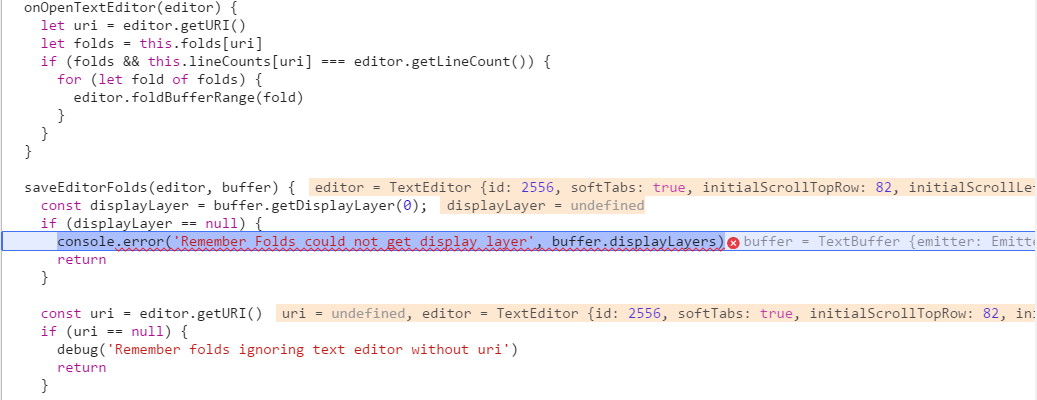
So I looked into the source of the messages:
  saveEditorFolds(editor, buffer) {
    const displayLayer = buffer.getDisplayLayer(0);
    if (displayLayer == null) {
      console.error('Remember Folds could not get display layer', buffer.displayLayers)
      return
    }

    const uri = editor.getURI()
    if (uri == null) {
      debug('Remember folds ignoring text editor without uri')
      return
    }

    const foldsByMarkerId = displayLayer.foldsMarkerLayer.markersById
    const folds = []
    for (const markerId in foldsByMarkerId) {
      const fold = foldsByMarkerId[markerId]
      folds.push(fold.getRange())
    }
    this.folds[uri] = folds
    this.lineCounts[uri] = editor.getLineCount()
  }
It seems that the code assumes that displayLayer[0] - whatever is it - always exists, but it's not the case:
The data structure shows that there is only displayLayer[1]:
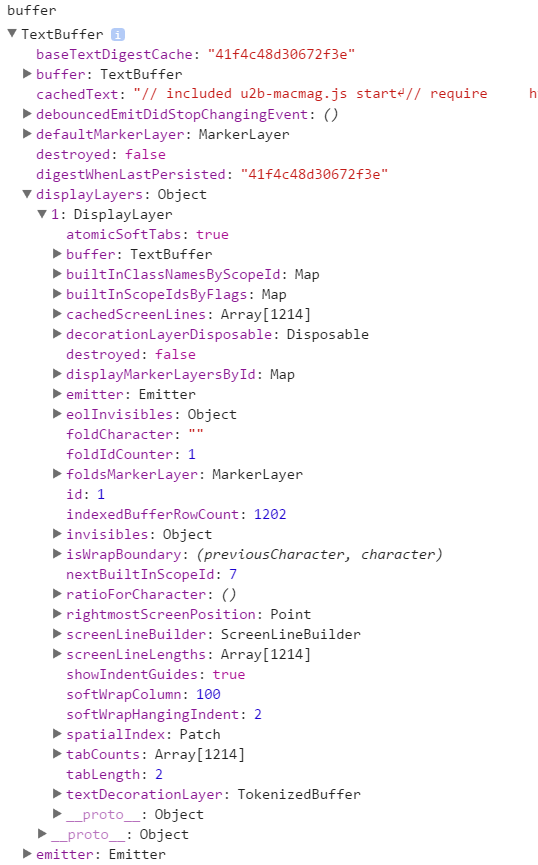
There ares file with displayLayers 6 and 7 too, as you can see from the error messages above. So I tried to fix it with a loop instead of the fix 0 index:
saveEditorFolds(editor, buffer) {
  for (const dlKey in buffer.displayLayers) {
	var displayLayer
    if(buffer.displayLayers.hasOwnProperty(dlKey) && (displayLayer = buffer.displayLayers[dlKey])) {
      const uri = editor.getURI()
      if (uri === null) {
        debug('Remember folds ignoring text editor without uri')
        return
      }
      const foldsByMarkerId = displayLayer.foldsMarkerLayer.markersById
      const folds = []
      for (const markerId in foldsByMarkerId) {
        const fold = foldsByMarkerId[markerId]
        folds.push(fold.getRange())
      }
      this.folds[uri] = folds
      this.lineCounts[uri] = editor.getLineCount()
      return
    }
  }
  console.error('Remember Folds could not get display layer', buffer.displayLayers)
}
And it works! It's a bit ugly that I access directly the property instead of calling the method, but in the original code there is a similar access in the error message. I could use the method, but I had no idea what range should I check - and that's slower too.
As I don't know what is a displayLayer, I have no idea, whether this bug comes from my setup or not. (Sorry, I have no idea how to include a package list, but I can lookup another Atom issue I reported with full info before if needed.)

If I have open lots of files (30), the foldings are saved only with certain files, not with others.
I found these messages in the console:
So I looked into the source of the messages:
It seems that the code assumes that displayLayer[0] - whatever is it - always exists, but it's not the case:
The data structure shows that there is only displayLayer[1]:
There ares file with displayLayers 6 and 7 too, as you can see from the error messages above. So I tried to fix it with a loop instead of the fix 0 index:
And it works! It's a bit ugly that I access directly the property instead of calling the method, but in the original code there is a similar access in the error message. I could use the method, but I had no idea what range should I check - and that's slower too.
As I don't know what is a displayLayer, I have no idea, whether this bug comes from my setup or not. (Sorry, I have no idea how to include a package list, but I can lookup another Atom issue I reported with full info before if needed.)