
(点击上方图片观看本课视频)
在本课程中,你已经了解了一些核心概念,比如提示词(prompts),甚至还有一个被称为“提示词工程”的完整学科。许多工具,如 ChatGPT、Office 365、Microsoft Power Platform 等,都支持你使用提示词来完成任务。
如果你想在应用程序中添加这样的体验,你需要理解提示词、完成(completions)等概念,并选择一个库来使用。这正是你将在本章中学习的内容。
在本章中,你将:
- 了解 openai 库及其核心概念。
- 使用 openai 构建一个文本生成应用程序。
- 理解如何使用提示词、温度(temperature)和令牌(tokens)等概念来构建文本生成应用程序。
在本课结束时,你将能够:
- 解释什么是文本生成应用程序。
- 使用 openai 构建一个文本生成应用程序。
- 配置你的应用程序以使用更多或更少的令牌,并调整温度以获得不同的输出。
通常,当你构建一个应用程序时,它会有某种界面,例如:
- 基于命令的界面。控制台应用程序是典型的应用程序,你输入一个命令,它就会执行一个任务。例如,
git是一个基于命令的应用程序。 - 用户界面(UI)。一些应用程序有图形用户界面(GUI),你可以点击按钮、输入文本、选择选项等。
与基于命令的应用程序相比,它们有以下局限性:
- 有限性。你不能随意输入任何命令,只能输入应用程序支持的命令。
- 语言特定性。有些应用程序支持多种语言,但默认情况下,应用程序是为特定语言构建的,即使你可以添加更多语言支持。
那么,文本生成应用程序有什么不同呢?
在文本生成应用程序中,你有更多的灵活性,不受限于一组命令或特定的输入语言。相反,你可以使用自然语言与应用程序交互。另一个好处是,你已经在与一个经过大量信息训练的数据源交互,而传统应用程序可能仅限于数据库中的内容。
你可以构建许多东西,例如:
- 聊天机器人。一个回答关于公司及其产品问题的聊天机器人可能是一个不错的选择。
- 助手。大型语言模型(LLM)在总结文本、从文本中获取见解、生成简历等方面表现出色。
- 代码助手。根据你使用的语言模型,你可以构建一个帮助你编写代码的代码助手。例如,你可以使用 GitHub Copilot 或 ChatGPT 来帮助你编写代码。
你需要找到一种与 LLM 集成的方法,通常包括以下两种方式:
- 使用 API。通过构建网络请求发送提示词并获取生成的文本。
- 使用库。库可以封装 API 调用,使其更易于使用。
以下是一些知名的用于处理 LLM 的库:
- openai,这个库使连接到模型并发送提示词变得容易。
还有一些操作层次更高的库,例如:
- Langchain。Langchain 是一个知名库,支持 Python。
- Semantic Kernel。Semantic Kernel 是微软开发的库,支持 C#、Python 和 Java。
让我们看看如何构建第一个应用程序,需要哪些库以及具体步骤。
有许多库可以与 OpenAI 或 Azure OpenAI 交互。可以使用多种编程语言,例如 C#、Python、JavaScript、Java 等。我们选择使用 openai Python 库,因此我们将使用 pip 来安装它。
pip install openai你需要完成以下步骤:
-
在 Azure 上创建一个账户 https://azure.microsoft.com/free/。
-
获取 Azure OpenAI 的访问权限。访问 https://learn.microsoft.com/azure/ai-services/openai/overview#how-do-i-get-access-to-azure-openai 并申请访问权限。
[!NOTE] 在撰写本文时,你需要申请访问 Azure OpenAI。
-
安装 Python https://www.python.org/
-
创建一个 Azure OpenAI 服务资源。请参阅此指南了解如何 创建资源。
此时,你需要告诉 openai 库使用哪个 API 密钥。要找到你的 API 密钥,请转到 Azure OpenAI 资源的“密钥和端点”部分,并复制“密钥 1”的值。
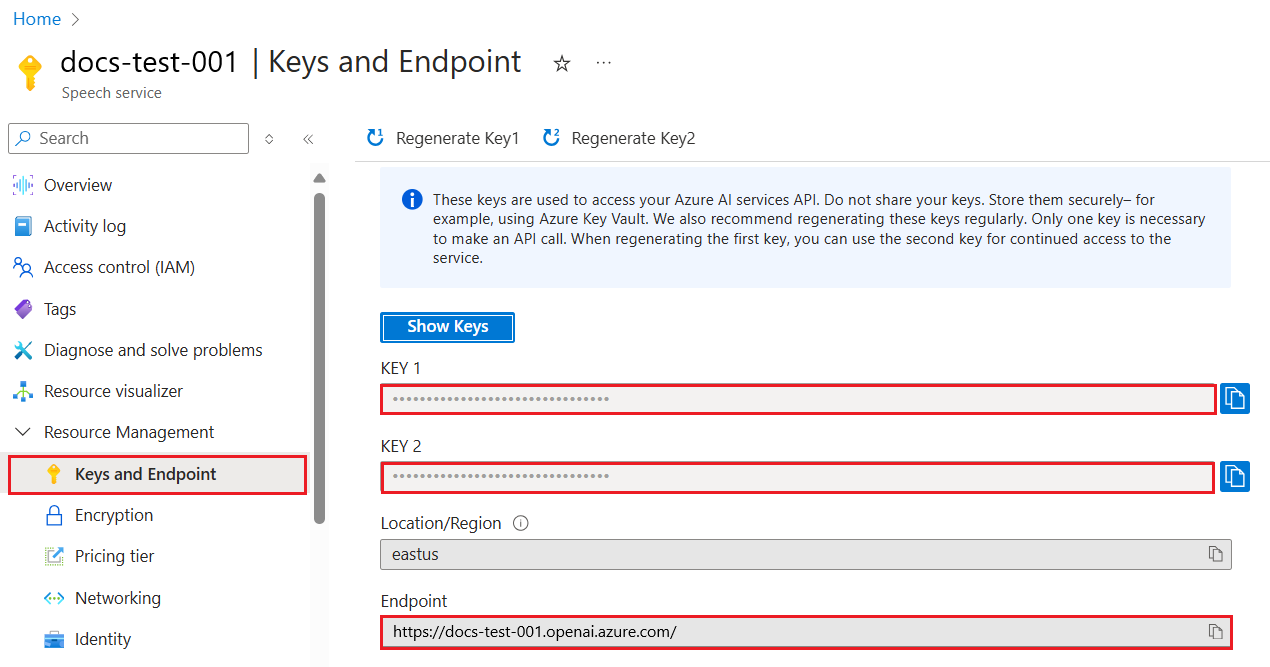
现在你已经复制了这些信息,让我们告诉库如何使用它。
Note
将 API 密钥与代码分离是值得的。你可以通过使用环境变量来实现。
- 设置环境变量
OPENAI_API_KEY为你的 API 密钥。export OPENAI_API_KEY='sk-...'
如果你使用的是 Azure OpenAI,以下是设置配置的方法:
openai.api_type = 'azure'
openai.api_key = os.environ["OPENAI_API_KEY"]
openai.api_version = '2023-05-15'
openai.api_base = os.getenv("API_BASE")
以上我们设置了以下内容:
api_type为azure。这告诉库使用 Azure OpenAI 而不是 OpenAI。api_key,这是你在 Azure 门户中找到的 API 密钥。api_version,这是你想使用的 API 版本。在撰写本文时,最新版本是2023-05-15。api_base,这是 API 的端点。你可以在 Azure 门户中找到它,就在你的 API 密钥旁边。
[!NOTE] >
os.getenv是一个读取环境变量的函数。你可以使用它读取像OPENAI_API_KEY和API_BASE这样的环境变量。在终端中设置这些环境变量,或者使用像dotenv这样的库。
生成文本的方法是使用 Completion 类。以下是一个示例:
prompt = "Complete the following: Once upon a time there was a"

completion = openai.Completion.create(model="davinci-002", prompt=prompt)
print(completion.choices[0].text)
在上述代码中,我们创建了一个完成对象,并传入我们想使用的模型和提示词。然后我们打印生成的文本。
到目前为止,你已经看到我们如何使用 Completion 来生成文本。但还有另一个类叫 ChatCompletion,它更适合聊天机器人。以下是一个使用它的示例:
import openai

openai.api_key = "sk-..."

completion = openai.ChatCompletion.create(model="gpt-3.5-turbo", messages=[{"role": "user", "content": "Hello world"}])
print(completion.choices[0].message.content)
更多关于此功能的内容将在后续章节中介绍。
现在我们已经学习了如何设置和配置 openai,是时候构建你的第一个文本生成应用程序了。按照以下步骤构建你的应用程序:
-
创建一个虚拟环境并安装 openai:
python -m venv venv
source venv/bin/activate
pip install openai
[!NOTE] 如果你使用的是 Windows,请输入
venv\Scripts\activate而不是source venv/bin/activate。[!NOTE] 通过访问 https://portal.azure.com/ 找到你的 Azure OpenAI 密钥,搜索
Open AI并选择Open AI 资源,然后选择密钥和端点并复制密钥 1的值。 -
创建一个 app.py 文件,并添加以下代码:
import openai

openai.api_key = "<replace this value with your open ai key or Azure OpenAI key>"

openai.api_type = 'azure'
openai.api_version = '2023-05-15'
openai.api_base = "<endpoint found in Azure Portal where your API key is>"
deployment_name = "<deployment name>"

# add your completion code
prompt = "Complete the following: Once upon a time there was a"
messages = [{"role": "user", "content": prompt}]

# make completion
completion = openai.chat.completions.create(model=deployment_name, messages=messages)

# print response
print(completion.choices[0].message.content)
[!NOTE] 如果你使用的是 Azure OpenAI,你需要将
api_type设置为azure,并将api_key设置为你的 Azure OpenAI 密钥。你应该会看到如下输出:
 very unhappy _____.

Once upon a time there was a very unhappy mermaid.
现在你已经了解了如何使用提示词生成文本。你甚至已经有一个可以修改和更改的程序来生成不同类型的文本。
提示词可以用于各种任务。例如:
- 生成某种类型的文本。例如,你可以生成一首诗、测验问题等。
- 查找信息。你可以使用提示词查找信息,例如“在 Web 开发中,CORS 是什么意思?”。
- 生成代码。你可以使用提示词生成代码,例如开发用于验证电子邮件的正则表达式,或者生成整个程序,比如一个 Web 应用程序。
想象一下,你家里有一些食材,你想做点什么。为此,你需要一个食谱。找到食谱的一种方法是使用搜索引擎,或者你可以使用 LLM 来完成。
你可以写一个这样的提示词:
"给我展示 5 个使用以下食材的菜肴的食谱:鸡肉、土豆和胡萝卜。每个食谱列出所有使用的食材。"
根据上述提示词,你可能会得到类似以下的回复:
1. Roasted Chicken and Vegetables:
Ingredients:
- 4 chicken thighs
- 2 potatoes, cut into cubes
- 2 carrots, cut into cubes
- 2 tablespoons olive oil
- 2 cloves garlic, minced
- 1 teaspoon dried thyme
- 1 teaspoon dried oregano
- Salt and pepper, to taste

2. Chicken and Potato Stew:
Ingredients:
- 2 tablespoons olive oil
- 1 onion, diced
- 2 cloves garlic, minced
- 2 chicken breasts, cut into cubes
- 2 potatoes, cut into cubes
- 2 carrots, cut into cubes
- 1 teaspoon dried oregano
- 1 teaspoon dried thyme
- 1 cup chicken broth
- Salt and pepper, to taste

3. Chicken and Potato Bake:
Ingredients:
- 2 tablespoons olive oil
- 2 chicken breasts, cut into cubes
- 2 potatoes, cut into cubes
- 2 carrots, cut into cubes
- 1 onion, diced
- 2 cloves garlic, minced
- 1 teaspoon dried oregano
- 1 teaspoon dried thyme
- 1 cup chicken broth
- Salt and pepper, to taste

4. Chicken and Potato Soup:
Ingredients:
- 2 tablespoons olive oil
- 1 onion, diced
- 2 cloves garlic, minced
- 2 chicken breasts, cut into cubes
- 2 potatoes, cut into cubes
- 2 carrots, cut into cubes
- 1 teaspoon dried oregano
- 1 teaspoon dried thyme
- 4 cups chicken broth
- Salt and pepper, to taste

5. Chicken and Potato Hash:
Ingredients:
- 2 tablespoons olive oil
- 2 chicken breasts, cut into cubes
- 2 potatoes, cut into cubes
- 2 carrots, cut into cubes
- 1 onion, diced
- 2 cloves garlic, minced
- 1 teaspoon dried oregano
这个结果很棒,我知道该做什么菜了。此时,可能有一些有用的改进:
- 过滤掉我不喜欢或过敏的食材。
- 生成一个购物清单,以防我家里没有所有的食材。
对于上述情况,让我们添加一个额外的提示词:
"请移除含有大蒜的食谱,因为我对大蒜过敏,并用其他东西替代。同时,请根据我家里已有的鸡肉、土豆和胡萝卜,为食谱生成一个购物清单。"
现在你会得到一个新的结果,即:
1. Roasted Chicken and Vegetables:
Ingredients:
- 4 chicken thighs
- 2 potatoes, cut into cubes
- 2 carrots, cut into cubes
- 2 tablespoons olive oil
- 1 teaspoon dried thyme
- 1 teaspoon dried oregano
- Salt and pepper, to taste

2. Chicken and Potato Stew:
Ingredients:
- 2 tablespoons olive oil
- 1 onion, diced
- 2 chicken breasts, cut into cubes
- 2 potatoes, cut into cubes
- 2 carrots, cut into cubes
- 1 teaspoon dried oregano
- 1 teaspoon dried thyme
- 1 cup chicken broth
- Salt and pepper, to taste

3. Chicken and Potato Bake:
Ingredients:
- 2 tablespoons olive oil
- 2 chicken breasts, cut into cubes
- 2 potatoes, cut into cubes
- 2 carrots, cut into cubes
- 1 onion, diced
- 1 teaspoon dried oregano
- 1 teaspoon dried thyme
- 1 cup chicken broth
- Salt and pepper, to taste

4. Chicken and Potato Soup:
Ingredients:
- 2 tablespoons olive oil
- 1 onion, diced
- 2 chicken breasts, cut into cubes
- 2 potatoes, cut into cubes
- 2 carrots, cut into cubes
- 1 teaspoon dried oregano
- 1 teaspoon dried thyme
- 4 cups chicken broth
- Salt and pepper, to taste

5. Chicken and Potato Hash:
Ingredients:
- 2 tablespoons olive oil
- 2 chicken breasts, cut into cubes
- 2 potatoes, cut into cubes
- 2 carrots, cut into cubes
- 1 onion, diced
- 1 teaspoon dried oregano

Shopping List:
- Olive oil
- Onion
- Thyme
- Oregano
- Salt
- Pepper
这是你的五个食谱,没有提到大蒜,同时你也有一个考虑到家里已有食材的购物清单。
现在我们已经演示了一个场景,让我们编写代码来匹配演示的场景。按照以下步骤操作:
-
使用现有的 app.py 文件作为起点。
-
找到
prompt变量,并将其代码更改为以下内容:prompt = "Show me 5 recipes for a dish with the following ingredients: chicken, potatoes, and carrots. Per recipe, list all the ingredients used"
如果你现在运行代码,你应该会看到类似以下的输出:
-Chicken Stew with Potatoes and Carrots: 3 tablespoons oil, 1 onion, chopped, 2 cloves garlic, minced, 1 carrot, peeled and chopped, 1 potato, peeled and chopped, 1 bay leaf, 1 thyme sprig, 1/2 teaspoon salt, 1/4 teaspoon black pepper, 1 1/2 cups chicken broth, 1/2 cup dry white wine, 2 tablespoons chopped fresh parsley, 2 tablespoons unsalted butter, 1 1/2 pounds boneless, skinless chicken thighs, cut into 1-inch pieces
-Oven-Roasted Chicken with Potatoes and Carrots: 3 tablespoons extra-virgin olive oil, 1 tablespoon Dijon mustard, 1 tablespoon chopped fresh rosemary, 1 tablespoon chopped fresh thyme, 4 cloves garlic, minced, 1 1/2 pounds small red potatoes, quartered, 1 1/2 pounds carrots, quartered lengthwise, 1/2 teaspoon salt, 1/4 teaspoon black pepper, 1 (4-pound) whole chicken
-Chicken, Potato, and Carrot Casserole: cooking spray, 1 large onion, chopped, 2 cloves garlic, minced, 1 carrot, peeled and shredded, 1 potato, peeled and shredded, 1/2 teaspoon dried thyme leaves, 1/4 teaspoon salt, 1/4 teaspoon black pepper, 2 cups fat-free, low-sodium chicken broth, 1 cup frozen peas, 1/4 cup all-purpose flour, 1 cup 2% reduced-fat milk, 1/4 cup grated Parmesan cheese

-One Pot Chicken and Potato Dinner: 2 tablespoons olive oil, 1 pound boneless, skinless chicken thighs, cut into 1-inch pieces, 1 large onion, chopped, 3 cloves garlic, minced, 1 carrot, peeled and chopped, 1 potato, peeled and chopped, 1 bay leaf, 1 thyme sprig, 1/2 teaspoon salt, 1/4 teaspoon black pepper, 2 cups chicken broth, 1/2 cup dry white wine

-Chicken, Potato, and Carrot Curry: 1 tablespoon vegetable oil, 1 large onion, chopped, 2 cloves garlic, minced, 1 carrot, peeled and chopped, 1 potato, peeled and chopped, 1 teaspoon ground coriander, 1 teaspoon ground cumin, 1/2 teaspoon ground turmeric, 1/2 teaspoon ground ginger, 1/4 teaspoon cayenne pepper, 2 cups chicken broth, 1/2 cup dry white wine, 1 (15-ounce) can chickpeas, drained and rinsed, 1/2 cup raisins, 1/2 cup chopped fresh cilantro
注意,LLM 是非确定性的,因此每次运行程序时,你可能会得到不同的结果。
很棒,让我们看看如何改进。为了改进,我们希望确保代码是灵活的,因此食材和食谱数量可以改进和更改。
-
让我们以以下方式更改代码:
no_recipes = input("No of recipes (for example, 5): ")

ingredients = input("List of ingredients (for example, chicken, potatoes, and carrots): ")

# interpolate the number of recipes into the prompt an ingredients
prompt = f"Show me {no_recipes} recipes for a dish with the following ingredients: {ingredients}. Per recipe, list all the ingredients used"
测试运行代码可能会如下所示:
No of recipes (for example, 5): 3
List of ingredients (for example, chicken, potatoes, and carrots): milk,strawberries

-Strawberry milk shake: milk, strawberries, sugar, vanilla extract, ice cubes
-Strawberry shortcake: milk, flour, baking powder, sugar, salt, unsalted butter, strawberries, whipped cream
-Strawberry milk: milk, strawberries, sugar, vanilla extract
我们现在有一个能够生成食谱的工作应用程序,并且它是灵活的,因为它依赖于用户的输入,包括食谱数量和使用的食材。
为了进一步改进,我们希望添加以下功能:
-
过滤掉食材。我们希望能够过滤掉我们不喜欢或过敏的食材。为实现此更改,我们可以编辑现有的提示词,并在其末尾添加一个过滤条件,如下所示:
filter = input("Filter (for example, vegetarian, vegan, or gluten-free): ")

prompt = f"Show me {no_recipes} recipes for a dish with the following ingredients: {ingredients}. Per recipe, list all the ingredients used, no {filter}"
上述代码中,我们在提示词末尾添加了
{filter},同时我们也从用户那里获取过滤值。现在运行程序的示例输入可能如下所示:
No of recipes (for example, 5): 3
List of ingredients (for example, chicken, potatoes, and carrots): onion,milk
Filter (for example, vegetarian, vegan, or gluten-free): no milk

1. French Onion Soup

Ingredients:

-1 large onion, sliced
-3 cups beef broth
-1 cup milk
-6 slices french bread
-1/4 cup shredded Parmesan cheese
-1 tablespoon butter
-1 teaspoon dried thyme
-1/4 teaspoon salt
-1/4 teaspoon black pepper

Instructions:

1. In a large pot, sauté onions in butter until golden brown.
2. Add beef broth, milk, thyme, salt, and pepper. Bring to a boil.
3. Reduce heat and simmer for 10 minutes.
4. Place french bread slices on soup bowls.
5. Ladle soup over bread.
6. Sprinkle with Parmesan cheese.

2. Onion and Potato Soup

Ingredients:

-1 large onion, chopped
-2 cups potatoes, diced
-3 cups vegetable broth
-1 cup milk
-1/4 teaspoon black pepper

Instructions:

1. In a large pot, sauté onions in butter until golden brown.
2. Add potatoes, vegetable broth, milk, and pepper. Bring to a boil.
3. Reduce heat and simmer for 10 minutes.
4. Serve hot.

3. Creamy Onion Soup

Ingredients:

-1 large onion, chopped
-3 cups vegetable broth
-1 cup milk
-1/4 teaspoon black pepper
-1/4 cup all-purpose flour
-1/2 cup shredded Parmesan cheese

Instructions:

1. In a large pot, sauté onions in butter until golden brown.
2. Add vegetable broth, milk, and pepper. Bring to a boil.
3. Reduce heat and simmer for 10 minutes.
4. In a small bowl, whisk together flour and Parmesan cheese until smooth.
5. Add to soup and simmer for an additional 5 minutes, or until soup has thickened.
如你所见,任何含有牛奶的食谱都被过滤掉了。但是,如果你对乳糖不耐受,你可能还希望过滤掉含有奶酪的食谱,因此需要明确说明。
-
生成购物清单。我们希望生成一个购物清单,考虑到我们家里已有的食材。
对于此功能,我们可以尝试在一个提示词中解决所有问题,也可以将其分成两个提示词。让我们尝试后者方法。这里建议添加一个额外的提示词,但为使其工作,我们需要将前一个提示词的结果作为上下文添加到后一个提示词中。
找到代码中打印第一个提示词结果的部分,并在其下方添加以下代码:
old_prompt_result = completion.choices[0].message.content
prompt = "Produce a shopping list for the generated recipes and please don't include ingredients that I already have."

new_prompt = f"{old_prompt_result} {prompt}"
messages = [{"role": "user", "content": new_prompt}]
completion = openai.Completion.create(engine=deployment_name, messages=messages, max_tokens=1200)

# print response
print("Shopping list:")
print(completion.choices[0].message.content)
请注意以下几点:
-
我们通过将第一个提示的结果添加到新的提示中来构建一个新的提示:
new_prompt = f"{old_prompt_result} {prompt}"
-
我们发出一个新的请求,同时考虑到我们在第一个提示中请求的令牌数量,因此这次我们将
max_tokens设置为 1200。completion = openai.Completion.create(engine=deployment_name, prompt=new_prompt, max_tokens=1200)
运行这段代码后,我们得到了以下输出:
No of recipes (for example, 5): 2
List of ingredients (for example, chicken, potatoes, and carrots): apple,flour
Filter (for example, vegetarian, vegan, or gluten-free): sugar


-Apple and flour pancakes: 1 cup flour, 1/2 tsp baking powder, 1/2 tsp baking soda, 1/4 tsp salt, 1 tbsp sugar, 1 egg, 1 cup buttermilk or sour milk, 1/4 cup melted butter, 1 Granny Smith apple, peeled and grated
-Apple fritters: 1-1/2 cups flour, 1 tsp baking powder, 1/4 tsp salt, 1/4 tsp baking soda, 1/4 tsp nutmeg, 1/4 tsp cinnamon, 1/4 tsp allspice, 1/4 cup sugar, 1/4 cup vegetable shortening, 1/4 cup milk, 1 egg, 2 cups shredded, peeled apples
Shopping list:
-Flour, baking powder, baking soda, salt, sugar, egg, buttermilk, butter, apple, nutmeg, cinnamon, allspice
-
目前我们有一个可以运行的代码,但还有一些调整可以进一步优化。我们应该做的一些事情包括:
-
将敏感信息与代码分离,例如 API 密钥。敏感信息不应该直接写在代码中,而应该存储在安全的位置。为了将敏感信息与代码分离,我们可以使用环境变量和像
python-dotenv这样的库从文件中加载它们。以下是代码的示例:-
创建一个
.env文件,内容如下:OPENAI_API_KEY=sk-...
注意,对于 Azure,你需要设置以下环境变量:
OPENAI_API_TYPE=azure
OPENAI_API_VERSION=2023-05-15
OPENAI_API_BASE=<replace>
在代码中,你可以像这样加载环境变量:
from dotenv import load_dotenv

load_dotenv()

openai.api_key = os.environ["OPENAI_API_KEY"]
-
-
关于令牌长度的建议。我们应该考虑生成所需文本需要多少令牌。令牌是有成本的,因此我们应该尽量减少使用的令牌数量。例如,我们是否可以通过调整提示的措辞来减少令牌的使用?
要更改使用的令牌数量,可以使用
max_tokens参数。例如,如果你想使用 100 个令牌,可以这样设置:completion = client.chat.completions.create(model=deployment, messages=messages, max_tokens=100)
-
尝试调整温度。温度是我们尚未提到但对程序表现非常重要的一个参数。温度值越高,输出越随机;温度值越低,输出越可预测。考虑你是否希望输出具有变化。
要调整温度,可以使用
temperature参数。例如,如果你想使用 0.5 的温度,可以这样设置:completion = client.chat.completions.create(model=deployment, messages=messages, temperature=0.5)
注意,温度越接近 1.0,输出越多样化。
对于这个任务,你可以选择自己想要构建的内容。
以下是一些建议:
- 调整食谱生成器应用以进一步优化。尝试不同的温度值和提示,看看能得到什么结果。
- 构建一个“学习助手”。这个应用应该能够回答关于某个主题的问题,例如 Python,你可以使用提示如“Python 中某个主题是什么?”或者“给我展示某个主题的代码”等。
- 历史机器人,让历史变得生动起来,指示机器人扮演某个历史人物,并向它询问关于其生活和时代的问题。
以下是一个初始提示,看看你如何使用它并根据自己的需求进行调整。
- "You're an expert on the Python language

    Suggest a beginner lesson for Python in the following format:

    Format:
    - concepts:
    - brief explanation of the lesson:
    - exercise in code with solutions"
以下是一些你可以使用的提示:
- "You are Abe Lincoln, tell me about yourself in 3 sentences, and respond using grammar and words like Abe would have used"
- "You are Abe Lincoln, respond using grammar and words like Abe would have used:

   Tell me about your greatest accomplishments, in 300 words"
温度这个概念的作用是什么?
- 它控制输出的随机性。
- 它控制响应的大小。
- 它控制使用的令牌数量。
在完成任务时,尝试改变温度值,尝试设置为 0、0.5 和 1。记住,0 是最不变化的,1 是变化最大的。哪个值最适合你的应用?
完成本课后,查看我们的 生成式 AI 学习合集,继续提升你的生成式 AI 知识!
前往第 7 课,我们将学习如何 构建聊天应用!
免责声明:
本文档使用AI翻译服务Co-op Translator进行翻译。尽管我们努力确保翻译的准确性,但请注意,自动翻译可能包含错误或不准确之处。原始语言的文档应被视为权威来源。对于重要信息,建议使用专业人工翻译。我们不对因使用此翻译而产生的任何误解或误读承担责任。