- JVM (Java Virtual Machine) is an abstract machine that enables your computer to run a Java program.
.png)
- JRE (Java Runtime Environment) is a software package that provides Java class libraries, Java Virtual Machine (JVM), and other components that are required to run Java applications.
- JDK (Java Development Kit) is a software development kit required to develop applications in Java. When you download JDK, JRE is also downloaded with it.
JDK (Java Development Kit) is a software development kit required to develop applications in Java. When you download JDK, JRE is also downloaded with it.
In addition to JRE, JDK also contains a number of development tools (compilers, JavaDoc, Java Debugger, etc).

Java Development Kit
If you want to develop Java applications, download JDK.
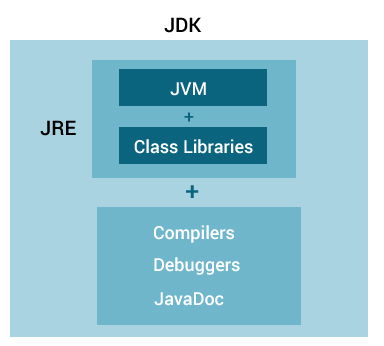
Relationship between JVM, JRE, and JDK
Operators in Java can be classified into 5 types:
- Arithmetic Operators
- Assignment Operators
- Relational Operators
- Logical Operators
- Unary Operators
- Bitwise Operators
| Operator | Operation |
|---|---|
+ |
Addition |
- |
Subtraction |
* |
Multiplication |
/ |
Division |
% |
Modulo Operation (Remainder after division) |
| Operator | Description |
|---|---|
~ |
Bitwise Complement |
<< |
Left Shift |
>> |
Right Shift |
>>> |
Unsigned Right Shift |
& |
Bitwise AND |
^ |
Bitwise exclusive OR |
| Operator | Meaning |
|---|---|
+ |
Unary plus: not necessary to use since numbers are positive without using it |
- |
Unary minus: inverts the sign of an expression |
++ |
Increment operator: increments value by 1 |
-- |
Decrement operator: decrements value by 1 |
! |
Logical complement operator: inverts the value of a boolean |
| Operator | Example | Equivalent to |
|---|---|---|
= |
a = b; |
a = b; |
+= |
a += b; |
a = a + b; |
-= |
a -= b; |
a = a - b; |
*= |
a *= b; |
a = a * b; |
/= |
a /= b; |
a = a / b; |
%= |
a %= b; |
a = a % b; |
| Operator | Example | Equivalent to |
|---|---|---|
= |
a = b; |
a = b; |
+= |
a += b; |
a = a + b; |
-= |
a -= b; |
a = a - b; |
*= |
a *= b; |
a = a * b; |
/= |
a /= b; |
a = a / b; |
%= |
a %= b; |
a = a % b; |
| Operator | Example | Meaning |
|---|---|---|
&& (Logical AND) |
expression1 && expression2 | true only if both expression1 and expression2 are true |
|| (Logical OR) |
expression1 || expression2 | true if either expression1 or expression2 is true |
! (Logical NOT) |
!expression | true if expression is false and vice versa |
| Operator | Description |
|---|---|
~ |
Bitwise Complement |
<< |
Left Shift |
>> |
Right Shift |
>>> |
Unsigned Right Shift |
& |
Bitwise AND |
^ |
Bitwise exclusive OR |
System.out.println(); or
System.out.print(); or
System.out.printf();import java.util.Scanner;
// create an object of Scanner
Scanner input = new Scanner(System.in);
// take input from the user
int number = input.nextInt();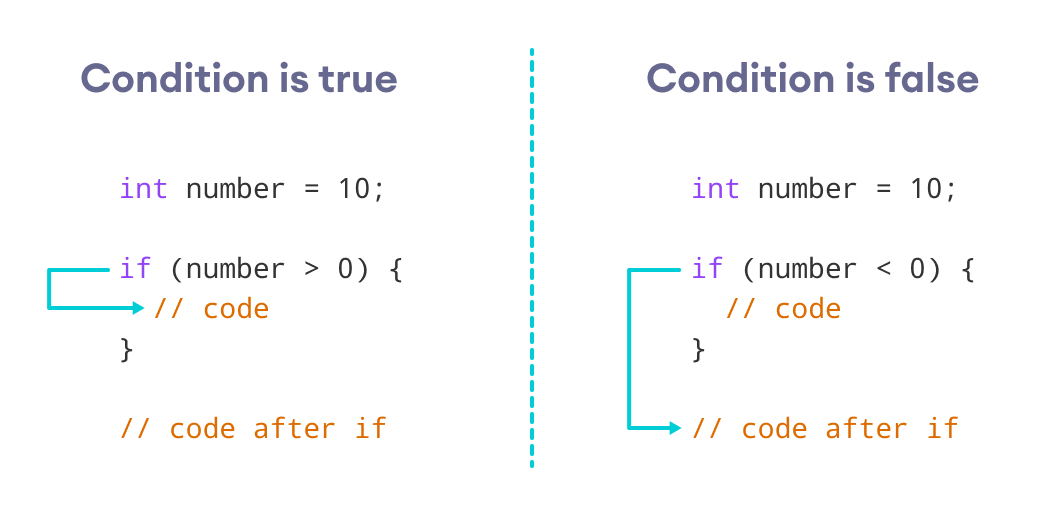
Working of Java if statement
How the if...else statement works?
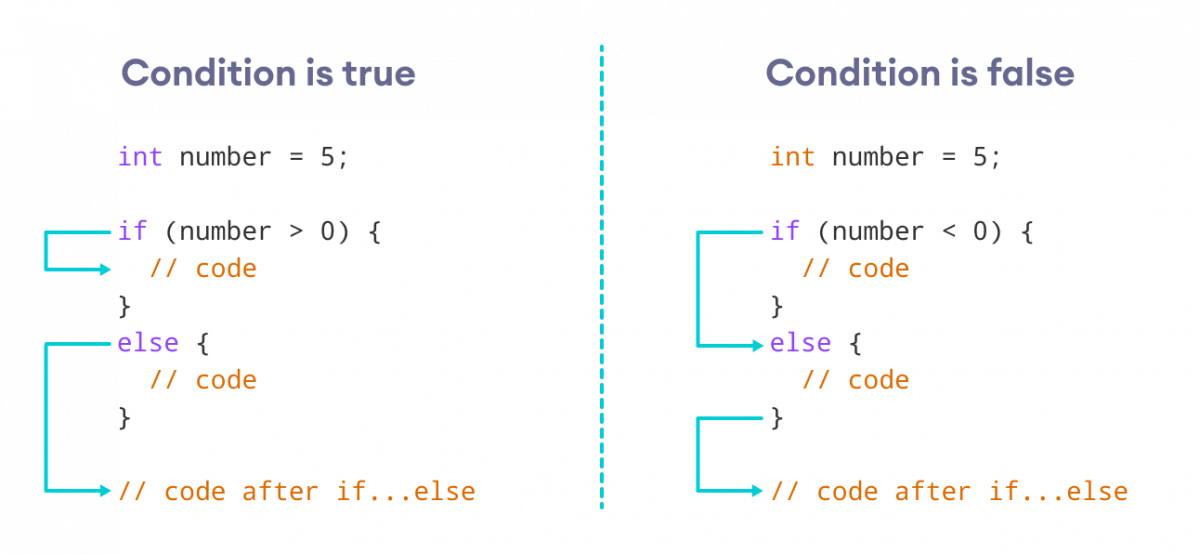
Working of Java if-else statements
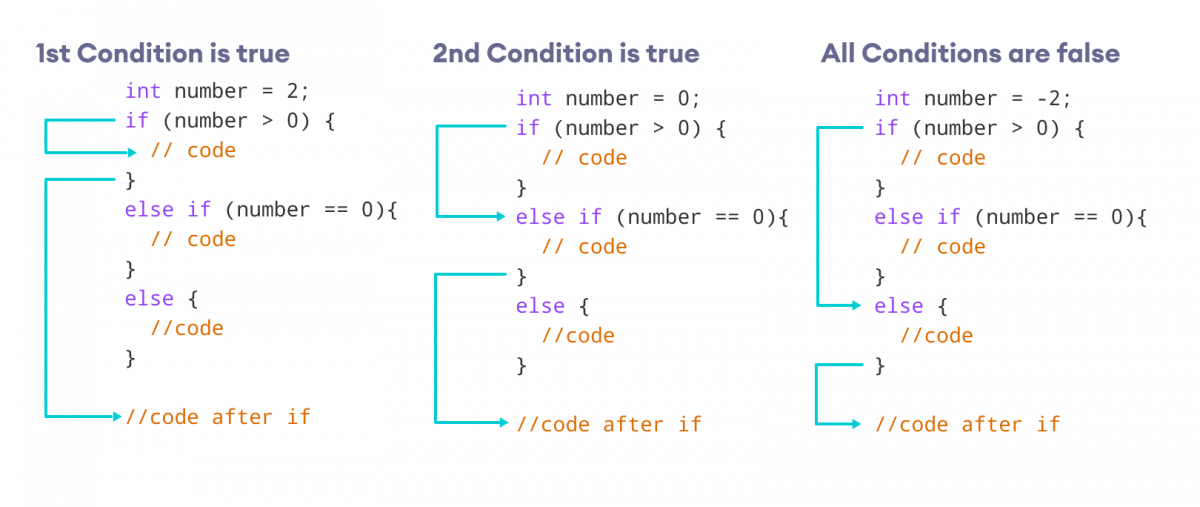
Working of if...else...if ladder
class Main {
  public static void main(String[] args) {

    int number = 0;

    // checks if number is greater than 0
    if (number > 0) {
      System.out.println("The number is positive.");
    }

    // checks if number is less than 0
    else if (number < 0) {
      System.out.println("The number is negative.");
    }

    // if both condition is false
    else {
      System.out.println("The number is 0.");
    }
  }
}
Output
The number is 0.
switch (expression) {

  case value1:
    // code
    break;

  case value2:
    // code
    break;

  ...
  ...

  default:
    // default statements
  }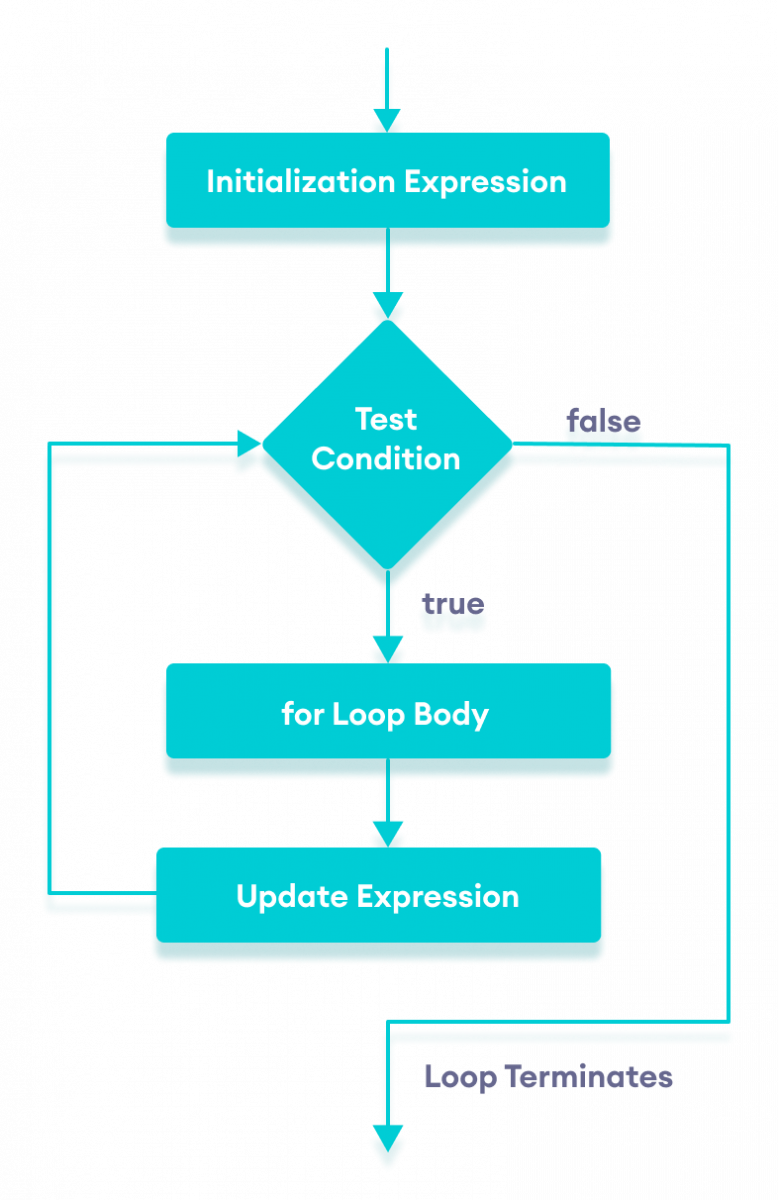
Flowchart of Java for loop
// print array elements
class Main {
  public static void main(String[] args) {
    // create an array
    int[] numbers = {3, 9, 5, -5};
    // for each loop
    for (int number: numbers) {
      System.out.println(number);
    }
  }
}

/* Output
3
9
5
-5
*/while (testExpression) {
// body of loop
}
Flowchart of Java while loop

Flowchart of Java do while loop
do {
    // body of loop
} while(textExpression);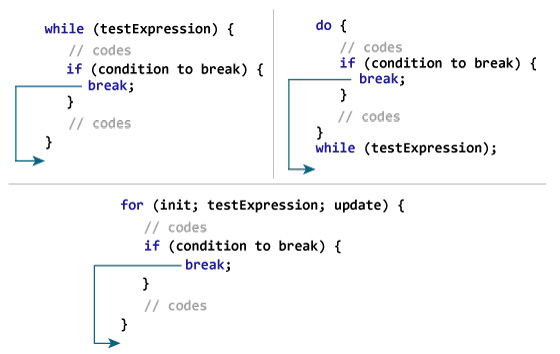
Working of Java break Statement
if (number < 0.0) {
    break;
}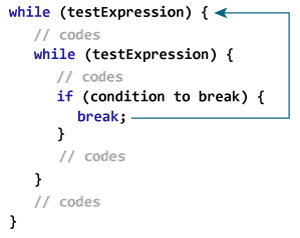
Working of break Statement with Nested Loops
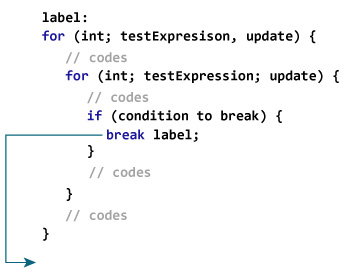
Working of the labeled break statement in Java
Working of Java continue statement
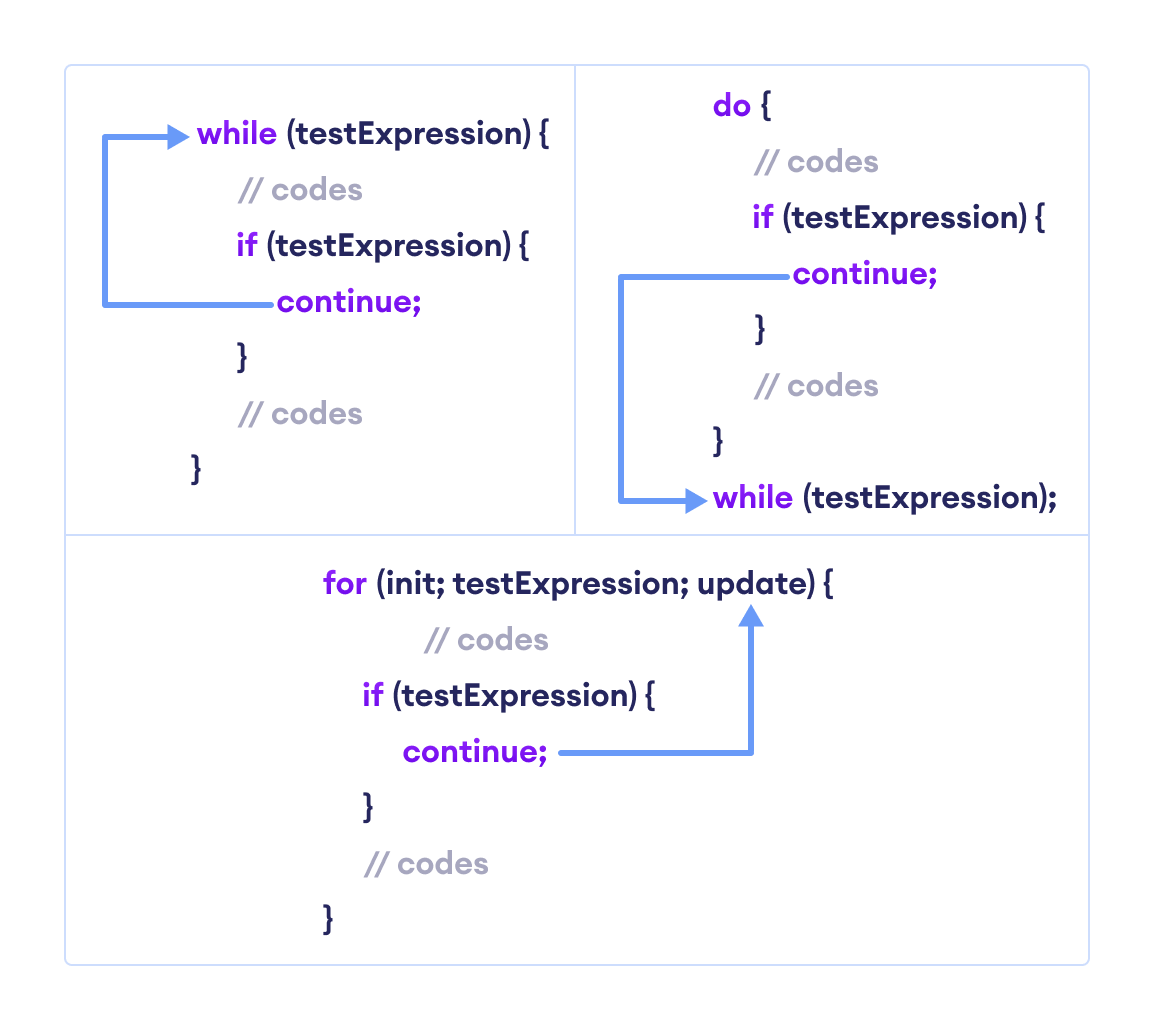
Working of Java continue Statement
Java continue with Nested Loop.
.png)
.png)
.png)
String[] array = new String[100];
// declare arrray
dataType[] arrayName;
// declare an array
int[] age = new int[5];
// initialize array
age[0] = 12;
age[1] = 4;
age[2] = 5;
..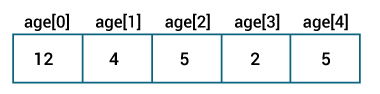
Java Arrays initialization
int[][] a = new int[3][4];
Here, we have created a multidimensional array named a. It is a 2-dimensional array, that can hold a maximum of 12 elements,
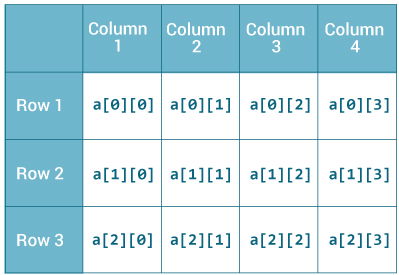
2-dimensional Array