Channel join fails when ordering service includes nodes from multiple orgs #887

Description

🧩 Issue Summary
Hi all,
I encountered a problem when joining orderer nodes to a channel using the Fabric Operations Console.
🏗️ Scenario Description
I have a single orderer service with five nodes:
- Org1 owns 3 of them.
- Org2 owns 2 of them.
This orderer service is configured without a system channel.
Additionally, I have three application organizations — Org3, Org4, and Org5.
I successfully created a channel that includes all five organizations (the two orderer orgs and the three application orgs).
⚙️ Problem Description
When the console begins joining the orderer nodes to the channel, it sends the config block to each node via their osnadmin REST endpoints:
https://test-network-hlf-console-console.localho.st:443/proxy/https://test-network-org1node1-admin.localho.st:443/participation/v1/channels
https://test-network-hlf-console-console.localho.st:443/proxy/https://test-network-org1node2-admin.localho.st:443/participation/v1/channels
https://test-network-hlf-console-console.localho.st:443/proxy/https://test-network-org1node3-admin.localho.st:443/participation/v1/channels
https://test-network-hlf-console-console.localho.st:443/proxy/https://test-network-org2node1-admin.localho.st:443/participation/v1/channels
https://test-network-hlf-console-console.localho.st:443/proxy/https://test-network-org2node2-admin.localho.st:443/participation/v1/channels
As you know, the orderer osnadmin REST API requires mutual TLS authentication.
The console uses the "Org Orderer TLS" identity of each organization to communicate with these endpoints.
However, the issue is that the console uses only one organization’s TLS identity to communicate with all endpoints.
In my case, it used the TLS identity of the last-added orderer org (Org2).
As a result:
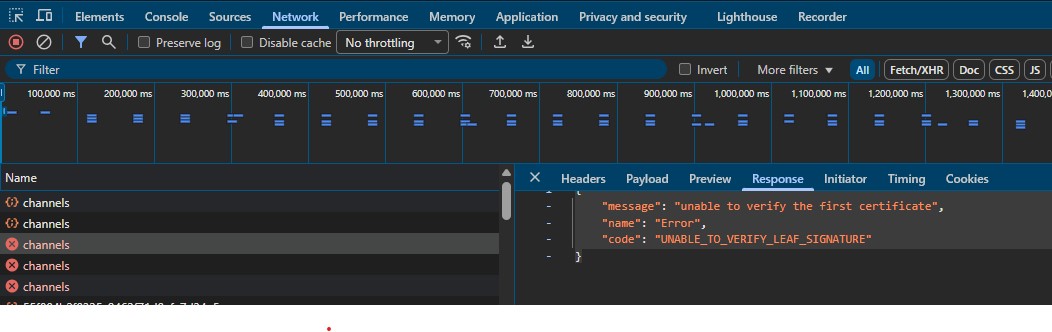
org2node1andorg2node2joined the channel successfully ✅- but
org1node1,org1node2, andorg1node3failed ❌ with the following error:
{
  "message": "unable to verify the first certificate",
  "name": "Error",
  "code": "UNABLE_TO_VERIFY_LEAF_SIGNATURE"
}
This happens because the client certificate used for mutual TLS was issued by Org2, which is not trusted by Org1's nodes.
🔍 Root Cause (suspected)
I believe this behavior originates from the following line of code in JoinOSNChannelModal.js:
// convert json to pb && then send joinOSNChannel call && reflect the status in the UI
async function perform_join(cluster, node, i, cb) {
    const j_opts = {
        host: node.osnadmin_url,
        certificate_b64pem: cluster.tls_identity ? cluster.tls_identity.cert : null,
        private_key_b64pem: cluster.tls_identity ? cluster.tls_identity.private_key : null,
        root_cert_b64pem: Array.isArray(cluster.tls_root_certs) ? cluster.tls_root_certs[0] : null,
        b_config_block: b_genesis_block,
    };

    try {
        await StitchApi.joinOSNChannel(j_opts);
    } catch (error) {
        const msg = (error && error.http_resp) ? error.http_resp : error;
        handle_join_outcome(cluster, i, constants.OSN_JOIN_ERROR, msg);
        return cb();
    }

    handle_join_outcome(cluster, i, constants.OSN_JOIN_SUCCESS);
    return cb();
}
It appears that the console uses a single cluster-wide TLS identity and root certs instead of selecting the correct TLS identity for each organization when joining orderer nodes.
🧭 Expected Behavior
Each orderer node should be contacted using the TLS identity corresponding to its own organization when performing the join via osnadmin.