
(ఈ పాఠం వీడియోను చూడడానికి పై చిత్రాన్ని క్లిక్ చేయండి)
ఈ పాఠ్యक्रमం ద్వారా మీరు ఇప్పటివరకు చూసినట్లుగా, ప్రాంప్ట్లు మరియు "ప్రాంప్ట్ ఇంజనీరింగ్" అనే ఒక పూర్తి శాస్త్రం వంటి ప్రాథమిక భావనలు ఉన్నాయి. మీరు ఇంటరాక్ట్ చేయగల అనేక టూల్స్, ఉదాహరణకు ChatGPT, Office 365, Microsoft Power Platform మరియు మరిన్ని, మీరు ఏదైనా సాధించడానికి ప్రాంప్ట్లను ఉపయోగించడాన్ని మద్దతు ఇస్తాయి.
మీరు అలాంటి అనుభవాన్ని ఒక యాప్లో చేర్చాలంటే, ప్రాంప్ట్లు, కంప్లీషన్స్ వంటి భావనలను అర్థం చేసుకోవాలి మరియు పని చేయడానికి ఒక లైబ్రరీని ఎంచుకోవాలి. ఇదే మీరు ఈ అధ్యాయంలో నేర్చుకోబోతున్నది.
ఈ అధ్యాయంలో, మీరు:
- openai లైబ్రరీ మరియు దాని ప్రాథమిక భావనలను నేర్చుకుంటారు.
- openai ఉపయోగించి టెక్స్ట్ జనరేషన్ యాప్ను నిర్మిస్తారు.
- ప్రాంప్ట్, టెంపరేచర్, టోకెన్స్ వంటి భావనలను ఉపయోగించి టెక్స్ట్ జనరేషన్ యాప్ను ఎలా నిర్మించాలో అర్థం చేసుకుంటారు.
ఈ పాఠం చివరికి, మీరు చేయగలుగుతారు:
- టెక్స్ట్ జనరేషన్ యాప్ అంటే ఏమిటో వివరించగలుగుతారు.
- openai ఉపయోగించి టెక్స్ట్ జనరేషన్ యాప్ను నిర్మించగలుగుతారు.
- మీ యాప్ను ఎక్కువ లేదా తక్కువ టోకెన్స్ ఉపయోగించడానికి మరియు టెంపరేచర్ను మార్చడానికి కాన్ఫిగర్ చేయగలుగుతారు, వేరే విధమైన అవుట్పుట్ కోసం.
సాధారణంగా మీరు ఒక యాప్ను నిర్మించినప్పుడు దానికి క్రింది విధమైన ఇంటర్ఫేస్ ఉంటుంది:
- కమాండ్ ఆధారిత. కన్సోల్ యాప్స్ సాధారణ యాప్స్, మీరు ఒక కమాండ్ టైప్ చేస్తారు మరియు అది ఒక పని చేస్తుంది. ఉదాహరణకు,
gitఒక కమాండ్ ఆధారిత యాప్. - యూజర్ ఇంటర్ఫేస్ (UI). కొన్ని యాప్స్లో గ్రాఫికల్ యూజర్ ఇంటర్ఫేస్ (GUIs) ఉంటాయి, మీరు బటన్లు క్లిక్ చేయడం, టెక్స్ట్ ఇన్పుట్ చేయడం, ఎంపికలు ఎంచుకోవడం మొదలైనవి చేస్తారు.
మీరు టైప్ చేసే కమాండ్ ఆధారిత యాప్తో పోల్చండి:
- ఇది పరిమితమైనది. మీరు ఏదైనా కమాండ్ టైప్ చేయలేరు, యాప్ మద్దతు ఇచ్చే కమాండ్లకే పరిమితం.
- భాషా నిర్దిష్టం. కొన్ని యాప్స్ అనేక భాషలను మద్దతు ఇస్తాయి, కానీ డిఫాల్ట్గా యాప్ ఒక నిర్దిష్ట భాష కోసం నిర్మించబడింది, మీరు మరిన్ని భాషా మద్దతు చేర్చగలిగినా.
అయితే టెక్స్ట్ జనరేషన్ యాప్ ఎలా వేరుగా ఉంటుంది?
టెక్స్ట్ జనరేషన్ యాప్లో, మీరు ఎక్కువ స్వేచ్ఛ కలిగి ఉంటారు, మీరు ఒక నిర్దిష్ట కమాండ్ల సెట్ లేదా ఒక నిర్దిష్ట ఇన్పుట్ భాషకు పరిమితం కాదు. బదులుగా, మీరు సహజ భాషను ఉపయోగించి యాప్తో ఇంటరాక్ట్ చేయవచ్చు. మరో లాభం ఏమిటంటే, మీరు ఇప్పటికే విస్తృత సమాచార సేకరణపై శిక్షణ పొందిన డేటా మూలంతో ఇంటరాక్ట్ చేస్తున్నారు, అయితే సాంప్రదాయ యాప్ డేటాబేస్లో ఉన్నదానితో పరిమితం కావచ్చు.
మీరు అనేక విషయాలు నిర్మించవచ్చు. ఉదాహరణకు:
- చాట్బాట్. మీ కంపెనీ మరియు దాని ఉత్పత్తుల గురించి ప్రశ్నలకు సమాధానం ఇచ్చే చాట్బాట్ మంచి సరిపోతుంది.
- సహాయకుడు. LLMలు టెక్స్ట్ను సారాంశం చేయడం, టెక్స్ట్ నుండి అవగాహన పొందడం, రిజ్యూమ్ల వంటి టెక్స్ట్ ఉత్పత్తి చేయడం వంటి పనుల్లో అద్భుతంగా ఉంటాయి.
- కోడ్ అసిస్టెంట్. మీరు ఉపయోగించే భాషా మోడల్పై ఆధారపడి, మీరు కోడ్ రాయడంలో సహాయం చేసే కోడ్ అసిస్టెంట్ను నిర్మించవచ్చు. ఉదాహరణకు, GitHub Copilot మరియు ChatGPT వంటి ఉత్పత్తులను ఉపయోగించి కోడ్ రాయడంలో సహాయం పొందవచ్చు.
మరి, మీరు సాధారణంగా LLMతో ఇంటిగ్రేట్ చేయడానికి రెండు విధానాలు ఉంటాయి:
- API ఉపయోగించండి. ఇక్కడ మీరు మీ ప్రాంప్ట్తో వెబ్ రిక్వెస్టులను నిర్మించి, జనరేట్ చేసిన టెక్స్ట్ను తిరిగి పొందుతారు.
- లైబ్రరీ ఉపయోగించండి. లైబ్రరీలు API కాల్స్ను కప్పి, వాటిని ఉపయోగించడాన్ని సులభతరం చేస్తాయి.
LLMలతో పని చేయడానికి కొన్ని ప్రసిద్ధ లైబ్రరీలు ఉన్నాయి:
- openai, ఈ లైబ్రరీ మీ మోడల్కు కనెక్ట్ అవ్వడం మరియు ప్రాంప్ట్లు పంపడం సులభం చేస్తుంది.
తర్వాత ఉన్నత స్థాయిలో పనిచేసే లైబ్రరీలు:
- Langchain. Langchain ప్రసిద్ధి పొందినది మరియు Python మద్దతు ఇస్తుంది.
- Semantic Kernel. Semantic Kernel మైక్రోసాఫ్ట్ యొక్క లైబ్రరీ, ఇది C#, Python, మరియు Java భాషలను మద్దతు ఇస్తుంది.
మనం మొదటి యాప్ను ఎలా నిర్మించాలో, ఏ లైబ్రరీలు అవసరమో, ఎంత అవసరమో చూద్దాం.
OpenAI లేదా Azure OpenAIతో ఇంటరాక్ట్ చేయడానికి అనేక లైబ్రరీలు ఉన్నాయి. మీరు C#, Python, JavaScript, Java మరియు మరిన్ని ప్రోగ్రామింగ్ భాషలను ఉపయోగించవచ్చు. మేము openai Python లైబ్రరీని ఎంచుకున్నాము, కాబట్టి pip ఉపయోగించి దాన్ని ఇన్స్టాల్ చేస్తాము.
pip install openaiక్రింది దశలను అనుసరించాలి:
-
Azureలో ఖాతా సృష్టించండి https://azure.microsoft.com/free/.
-
Azure OpenAIకి యాక్సెస్ పొందండి. https://learn.microsoft.com/azure/ai-services/openai/overview#how-do-i-get-access-to-azure-openai కి వెళ్లి యాక్సెస్ కోసం అభ్యర్థించండి.
[!NOTE] రాయేటప్పుడు, Azure OpenAIకి యాక్సెస్ కోసం దరఖాస్తు చేయాలి.
-
Python ఇన్స్టాల్ చేయండి https://www.python.org/
-
Azure OpenAI సర్వీస్ రిసోర్స్ సృష్టించండి. రిసోర్స్ సృష్టించడానికి ఈ గైడ్ చూడండి create a resource.
ఈ దశలో, మీరు openai లైబ్రరీకి ఏ API కీ ఉపయోగించాలో చెప్పాలి. మీ API కీ కనుగొనడానికి, Azure OpenAI రిసోర్స్లో "Keys and Endpoint" సెక్షన్కు వెళ్లి "Key 1" విలువను కాపీ చేసుకోండి.
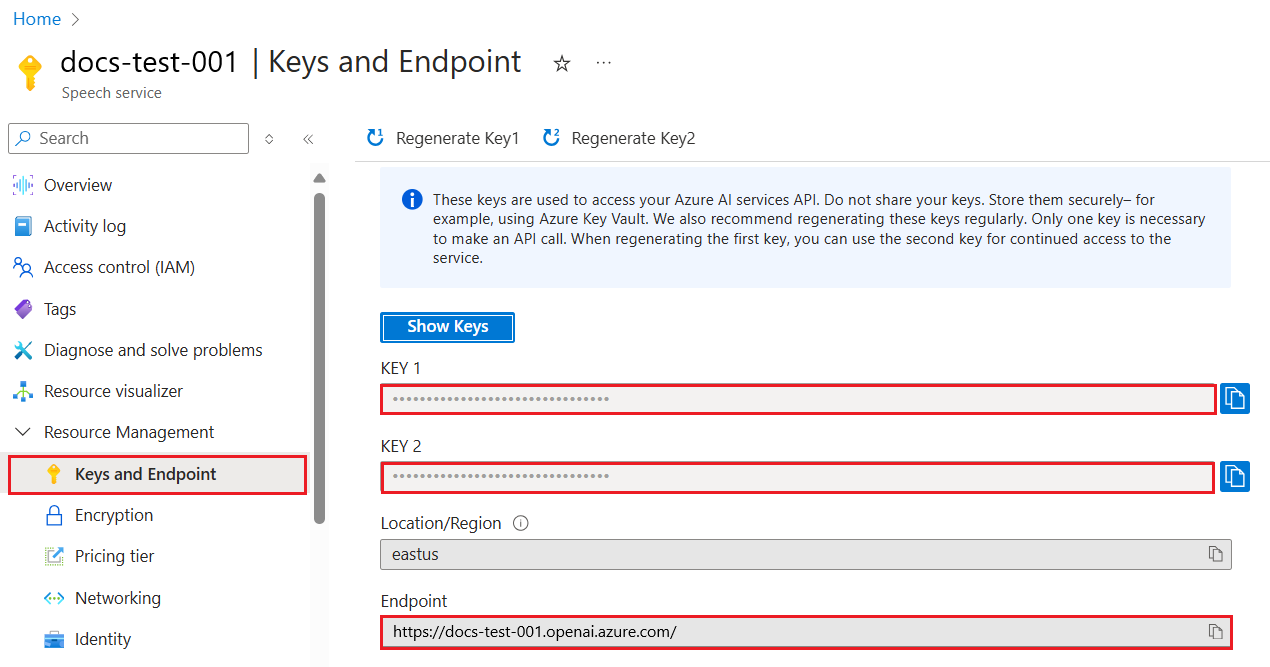
ఇప్పుడు ఈ సమాచారం కాపీ చేసుకున్న తర్వాత, లైబ్రరీలు దీన్ని ఉపయోగించమని సూచిద్దాం.
Note
మీ API కీని మీ కోడ్ నుండి వేరుగా ఉంచడం మంచిది. మీరు వాతావరణ వేరియబుల్స్ ఉపయోగించి దీన్ని చేయవచ్చు.
- వాతావరణ వేరియబుల్
OPENAI_API_KEYను మీ API కీకి సెట్ చేయండి.export OPENAI_API_KEY='sk-...'
మీరు Azure OpenAI ఉపయోగిస్తుంటే, ఇక్కడ మీరు కాన్ఫిగరేషన్ ఎలా సెటప్ చేయాలో ఉంది:
openai.api_type = 'azure'
openai.api_key = os.environ["OPENAI_API_KEY"]
openai.api_version = '2023-05-15'
openai.api_base = os.getenv("API_BASE")
పై కోడ్లో మేము క్రింది వాటిని సెటప్ చేస్తున్నాము:
api_typeనుazureగా సెట్ చేస్తున్నాము. ఇది లైబ్రరీకి Azure OpenAI ఉపయోగించమని చెబుతుంది, OpenAI కాదు.api_key, ఇది Azure పోర్టల్లో కనుగొన్న మీ API కీ.api_version, మీరు ఉపయోగించదలచిన API వెర్షన్. రాయేటప్పుడు, తాజా వెర్షన్2023-05-15.api_base, ఇది API యొక్క ఎండ్పాయింట్. మీరు Azure పోర్టల్లో మీ API కీ పక్కన దీన్ని కనుగొనవచ్చు.
[!NOTE] >
os.getenvఅనేది వాతావరణ వేరియబుల్స్ చదివే ఫంక్షన్. మీరు దీన్నిOPENAI_API_KEYమరియుAPI_BASEవంటి వాతావరణ వేరియబుల్స్ చదవడానికి ఉపయోగించవచ్చు. ఈ వేరియబుల్స్ను మీ టెర్మినల్లో లేదాdotenvలాంటి లైబ్రరీ ఉపయోగించి సెట్ చేయండి.
టెక్స్ట్ జనరేట్ చేయడానికి Completion క్లాస్ ఉపయోగిస్తారు. ఉదాహరణ ఇక్కడ ఉంది:
prompt = "Complete the following: Once upon a time there was a"

completion = openai.Completion.create(model="davinci-002", prompt=prompt)
print(completion.choices[0].text)
పై కోడ్లో, మేము ఒక completion ఆబ్జెక్ట్ సృష్టించి, ఉపయోగించదలచిన మోడల్ మరియు ప్రాంప్ట్ను అందిస్తున్నాము. తరువాత, జనరేట్ చేసిన టెక్స్ట్ను ప్రింట్ చేస్తాము.
ఇప్పటివరకు, మీరు Completion ఉపయోగించి టెక్స్ట్ ఎలా జనరేట్ చేస్తున్నామో చూశారు. కానీ ChatCompletion అనే మరో క్లాస్ ఉంది, ఇది చాట్బాట్స్కు మరింత అనుకూలంగా ఉంటుంది. దీన్ని ఉపయోగించే ఉదాహరణ ఇక్కడ ఉంది:
import openai

openai.api_key = "sk-..."

completion = openai.ChatCompletion.create(model="gpt-3.5-turbo", messages=[{"role": "user", "content": "Hello world"}])
print(completion.choices[0].message.content)
ఈ ఫంక్షనాలిటీపై మరింత సమాచారం రాబోయే అధ్యాయంలో ఉంటుంది.
ఇప్పుడు మేము openai సెటప్ మరియు కాన్ఫిగర్ చేయడం నేర్చుకున్నాము, మీ మొదటి టెక్స్ట్ జనరేషన్ యాప్ను నిర్మించడానికి సమయం వచ్చింది. మీ యాప్ను నిర్మించడానికి, ఈ దశలను అనుసరించండి:
-
వర్చువల్ ఎన్విరాన్మెంట్ సృష్టించి openai ఇన్స్టాల్ చేయండి:
python -m venv venv
source venv/bin/activate
pip install openai
[!NOTE] మీరు Windows ఉపయోగిస్తుంటే
source venv/bin/activateబదులుగాvenv\Scripts\activateటైప్ చేయండి.[!NOTE] మీ Azure OpenAI కీని కనుగొనడానికి https://portal.azure.com/ కి వెళ్లి
Open AIకోసం శోధించి,Open AI resourceఎంచుకుని, తరువాతKeys and EndpointలోKey 1విలువను కాపీ చేసుకోండి. -
app.py ఫైల్ సృష్టించి క్రింది కోడ్ ఇవ్వండి:
import openai openai.api_key = "<replace this value with your open ai key or Azure OpenAI key>" openai.api_type = 'azure' openai.api_version = '2023-05-15' openai.api_base = "<endpoint found in Azure Portal where your API key is>" deployment_name = "<deployment name>" # మీ పూర్తి కోడ్ను జోడించండి prompt = "Complete the following: Once upon a time there was a" messages = [{"role": "user", "content": prompt}] # పూర్తి చేయండి completion = openai.chat.completions.create(model=deployment_name, messages=messages) # ప్రతిస్పందనను ముద్రించండి print(completion.choices[0].message.content)
[!NOTE] మీరు Azure OpenAI ఉపయోగిస్తుంటే,
api_typeనుazureగా సెట్ చేయాలి మరియుapi_keyను మీ Azure OpenAI కీగా సెట్ చేయాలి.మీరు క్రింది విధమైన అవుట్పుట్ చూడగలుగుతారు:
 very unhappy _____.

Once upon a time there was a very unhappy mermaid.
ఇప్పుడు మీరు ప్రాంప్ట్ ఉపయోగించి టెక్స్ట్ ఎలా జనరేట్ చేయాలో చూశారు. మీరు ఒక ప్రోగ్రామ్ కూడా కలిగి ఉన్నారు, దాన్ని మార్చి వేర్వేరు రకాల టెక్స్ట్ను జనరేట్ చేయవచ్చు.
ప్రాంప్ట్లు అన్ని రకాల పనుల కోసం ఉపయోగించవచ్చు. ఉదాహరణకు:
- ఒక రకమైన టెక్స్ట్ను జనరేట్ చేయండి. ఉదాహరణకు, మీరు కవిత్వం, క్విజ్ కోసం ప్రశ్నలు మొదలైనవి జనరేట్ చేయవచ్చు.
- సమాచారం వెతకండి. మీరు ప్రాంప్ట్లను ఉపయోగించి "వెబ్ డెవలప్మెంట్లో CORS అంటే ఏమిటి?" వంటి సమాచారాన్ని వెతకవచ్చు.
- కోడ్ జనరేట్ చేయండి. మీరు ప్రాంప్ట్లను ఉపయోగించి కోడ్ జనరేట్ చేయవచ్చు, ఉదాహరణకు ఇమెయిల్స్ను ధృవీకరించడానికి రెగ్యులర్ ఎక్స్ప్రెషన్ తయారు చేయడం లేదా ఒక పూర్తి ప్రోగ్రామ్, ఉదాహరణకు వెబ్ యాప్ను జనరేట్ చేయడం.
మీ వద్ద ఇంట్లో పదార్థాలు ఉన్నాయని ఊహించుకోండి, మీరు ఏదైనా వండాలనుకుంటున్నారు. దానికి, మీరు ఒక రెసిపీ అవసరం. రెసిపీలను కనుగొనడానికి మీరు సెర్చ్ ఇంజిన్ ఉపయోగించవచ్చు లేదా LLM ఉపయోగించవచ్చు.
మీరు ఈ విధంగా ఒక ప్రాంప్ట్ రాయవచ్చు:
"క్రింది పదార్థాలతో వంటకం కోసం 5 రెసిపీలను చూపించండి: చికెన్, ఆలుగడ్డలు, క్యారెట్లు. ప్రతి రెసిపీకి ఉపయోగించిన అన్ని పదార్థాలను జాబితా చేయండి"
పై ప్రాంప్ట్ ఇచ్చినప్పుడు, మీరు ఈ విధమైన ప్రతిస్పందన పొందవచ్చు:
1. Roasted Chicken and Vegetables:
Ingredients:
- 4 chicken thighs
- 2 potatoes, cut into cubes
- 2 carrots, cut into cubes
- 2 tablespoons olive oil
- 2 cloves garlic, minced
- 1 teaspoon dried thyme
- 1 teaspoon dried oregano
- Salt and pepper, to taste

2. Chicken and Potato Stew:
Ingredients:
- 2 tablespoons olive oil
- 1 onion, diced
- 2 cloves garlic, minced
- 2 chicken breasts, cut into cubes
- 2 potatoes, cut into cubes
- 2 carrots, cut into cubes
- 1 teaspoon dried oregano
- 1 teaspoon dried thyme
- 1 cup chicken broth
- Salt and pepper, to taste

3. Chicken and Potato Bake:
Ingredients:
- 2 tablespoons olive oil
- 2 chicken breasts, cut into cubes
- 2 potatoes, cut into cubes
- 2 carrots, cut into cubes
- 1 onion, diced
- 2 cloves garlic, minced
- 1 teaspoon dried oregano
- 1 teaspoon dried thyme
- 1 cup chicken broth
- Salt and pepper, to taste

4. Chicken and Potato Soup:
Ingredients:
- 2 tablespoons olive oil
- 1 onion, diced
- 2 cloves garlic, minced
- 2 chicken breasts, cut into cubes
- 2 potatoes, cut into cubes
- 2 carrots, cut into cubes
- 1 teaspoon dried oregano
- 1 teaspoon dried thyme
- 4 cups chicken broth
- Salt and pepper, to taste

5. Chicken and Potato Hash:
Ingredients:
- 2 tablespoons olive oil
- 2 chicken breasts, cut into cubes
- 2 potatoes, cut into cubes
- 2 carrots, cut into cubes
- 1 onion, diced
- 2 cloves garlic, minced
- 1 teaspoon dried oregano
ఈ ఫలితం అద్భుతం, నాకు ఏమి వండాలో తెలుసు. ఈ దశలో, ఉపయోగకరమైన మెరుగుదలలు ఏమిటంటే:
- నాకు ఇష్టంలేని లేదా అలెర్జీ ఉన్న పదార్థాలను ఫిల్టర్ చేయడం.
- షాపింగ్ లిస్ట్ తయారు చేయడం, నేను ఇంట్లో అన్ని పదార్థాలు లేనప్పుడు.
పై సందర్భాల కోసం, అదనపు ప్రాంప్ట్ చేర్చుదాం:
"దయచేసి నేను అలెర్జీ ఉన్నందున వెల్లుల్లి ఉన్న రెసిపీలను తీసివేయండి మరియు దానిని మరొకదానితో మార్చండి. అలాగే, నేను ఇప్పటికే చికెన్, ఆలుగడ్డలు, క్యారెట్లు ఇంట్లో ఉన్నాయని పరిగణనలోకి తీసుకుని రెసిపీల కోసం షాపింగ్ లిస్ట్ తయారు చేయండి."
ఇప్పుడు మీకు కొత్త ఫలితం ఉంది, అంటే:
1. Roasted Chicken and Vegetables:
Ingredients:
- 4 chicken thighs
- 2 potatoes, cut into cubes
- 2 carrots, cut into cubes
- 2 tablespoons olive oil
- 1 teaspoon dried thyme
- 1 teaspoon dried oregano
- Salt and pepper, to taste

2. Chicken and Potato Stew:
Ingredients:
- 2 tablespoons olive oil
- 1 onion, diced
- 2 chicken breasts, cut into cubes
- 2 potatoes, cut into cubes
- 2 carrots, cut into cubes
- 1 teaspoon dried oregano
- 1 teaspoon dried thyme
- 1 cup chicken broth
- Salt and pepper, to taste

3. Chicken and Potato Bake:
Ingredients:
- 2 tablespoons olive oil
- 2 chicken breasts, cut into cubes
- 2 potatoes, cut into cubes
- 2 carrots, cut into cubes
- 1 onion, diced
- 1 teaspoon dried oregano
- 1 teaspoon dried thyme
- 1 cup chicken broth
- Salt and pepper, to taste

4. Chicken and Potato Soup:
Ingredients:
- 2 tablespoons olive oil
- 1 onion, diced
- 2 chicken breasts, cut into cubes
- 2 potatoes, cut into cubes
- 2 carrots, cut into cubes
- 1 teaspoon dried oregano
- 1 teaspoon dried thyme
- 4 cups chicken broth
- Salt and pepper, to taste

5. Chicken and Potato Hash:
Ingredients:
- 2 tablespoons olive oil
- 2 chicken breasts, cut into cubes
- 2 potatoes, cut into cubes
- 2 carrots, cut into cubes
- 1 onion, diced
- 1 teaspoon dried oregano

Shopping List:
- Olive oil
- Onion
- Thyme
- Oregano
- Salt
- Pepper
ఇవి మీ ఐదు రెసిపీలు, వెల్లుల్లి లేకుండా మరియు మీరు ఇప్పటికే ఇంట్లో ఉన్న పదార్థాలను పరిగణనలోకి తీసుకుని షాపింగ్ లిస్ట్ కూడా ఉంది.
ఇప్పుడు మనం ఒక సన్నివేశం ఆడుకున్నాము, ఆ సన్నివేశానికి సరిపోయే కోడ్ రాయండి. దీని కోసం, ఈ దశలను అనుసరించండి:
-
ఉన్న app.py ఫైల్ను ప్రారంభ బిందువుగా ఉపయోగించండి
-
promptవేరియబుల్ను కనుగొని దాని కోడ్ను క్రింది విధంగా మార్చండి:prompt = "Show me 5 recipes for a dish with the following ingredients: chicken, potatoes, and carrots. Per recipe, list all the ingredients used"
ఇప్పుడు మీరు కోడ్ నడిపితే, ఈ విధమైన అవుట్పుట్ చూడగలుగుతారు:
-Chicken Stew with Potatoes and Carrots: 3 tablespoons oil, 1 onion, chopped, 2 cloves garlic, minced, 1 carrot, peeled and chopped, 1 potato, peeled and chopped, 1 bay leaf, 1 thyme sprig, 1/2 teaspoon salt, 1/4 teaspoon black pepper, 1 1/2 cups chicken broth, 1/2 cup dry white wine, 2 tablespoons chopped fresh parsley, 2 tablespoons unsalted butter, 1 1/2 pounds boneless, skinless chicken thighs, cut into 1-inch pieces
-Oven-Roasted Chicken with Potatoes and Carrots: 3 tablespoons extra-virgin olive oil, 1 tablespoon Dijon mustard, 1 tablespoon chopped fresh rosemary, 1 tablespoon chopped fresh thyme, 4 cloves garlic, minced, 1 1/2 pounds small red potatoes, quartered, 1 1/2 pounds carrots, quartered lengthwise, 1/2 teaspoon salt, 1/4 teaspoon black pepper, 1 (4-pound) whole chicken
-Chicken, Potato, and Carrot Casserole: cooking spray, 1 large onion, chopped, 2 cloves garlic, minced, 1 carrot, peeled and shredded, 1 potato, peeled and shredded, 1/2 teaspoon dried thyme leaves, 1/4 teaspoon salt, 1/4 teaspoon black pepper, 2 cups fat-free, low-sodium chicken broth, 1 cup frozen peas, 1/4 cup all-purpose flour, 1 cup 2% reduced-fat milk, 1/4 cup grated Parmesan cheese

-One Pot Chicken and Potato Dinner: 2 tablespoons olive oil, 1 pound boneless, skinless chicken thighs, cut into 1-inch pieces, 1 large onion, chopped, 3 cloves garlic, minced, 1 carrot, peeled and chopped, 1 potato, peeled and chopped, 1 bay leaf, 1 thyme sprig, 1/2 teaspoon salt, 1/4 teaspoon black pepper, 2 cups chicken broth, 1/2 cup dry white wine

-Chicken, Potato, and Carrot Curry: 1 tablespoon vegetable oil, 1 large onion, chopped, 2 cloves garlic, minced, 1 carrot, peeled and chopped, 1 potato, peeled and chopped, 1 teaspoon ground coriander, 1 teaspoon ground cumin, 1/2 teaspoon ground turmeric, 1/2 teaspoon ground ginger, 1/4 teaspoon cayenne pepper, 2 cups chicken broth, 1/2 cup dry white wine, 1 (15-ounce) can chickpeas, drained and rinsed, 1/2 cup raisins, 1/2 cup chopped fresh cilantro
గమనిక, మీ LLM అనిశ్చితమైనది, కాబట్టి మీరు ప్రతి సారి ప్రోగ్రామ్ నడిపినప్పుడు వేర్వేరు ఫలితాలు పొందవచ్చు.
అద్భుతం, మనం ఎలా మెరుగుపరచాలో చూద్దాం. మెరుగుపరచడానికి, కోడ్ సౌలభ్యంగా ఉండాలి, కాబట్టి పదార్థాలు మరియు రెసిపీల సంఖ్య మార్చుకోవచ్చు.
-
కోడ్ను క్రింది విధంగా మార్చుదాం:
no_recipes = input("No of recipes (for example, 5): ") ingredients = input("List of ingredients (for example, chicken, potatoes, and carrots): ") # రెసిపీల సంఖ్యను ప్రాంప్ట్ మరియు పదార్థాలలో ఇంటర్పోలేట్ చేయండి prompt = f"Show me {no_recipes} recipes for a dish with the following ingredients: {ingredients}. Per recipe, list all the ingredients used"
పరీక్ష నడిపే కోడ్ ఇలా ఉండవచ్చు:
No of recipes (for example, 5): 3
List of ingredients (for example, chicken, potatoes, and carrots): milk,strawberries

-Strawberry milk shake: milk, strawberries, sugar, vanilla extract, ice cubes
-Strawberry shortcake: milk, flour, baking powder, sugar, salt, unsalted butter, strawberries, whipped cream
-Strawberry milk: milk, strawberries, sugar, vanilla extract
ఇప్పుడు మనకు రెసిపీలు ఉత్పత్తి చేయగల యాప్ ఉంది మరియు ఇది సౌలభ్యంగా ఉంది ఎందుకంటే ఇది యూజర్ ఇన్పుట్లపై ఆధారపడి ఉంటుంది, రెసిపీల సంఖ్య మరియు ఉపయోగించిన పదార్థాలు రెండింటినీ.
ఇంకా మెరుగుపరచడానికి, మనం క్రింది వాటిని చేర్చాలి:
-
పదార్థాలను ఫిల్టర్ చేయండి. మనం ఇష్టంలేని లేదా అలెర్జీ ఉన్న పదార్థాలను ఫిల్టర్ చేయగలగాలి. దీన్ని సాధించడానికి మన ప్రస్తుత ప్రాంప్ట్ను మార్చి చివర
{filter}అనే ఫిల్టర్ షరతును జోడించవచ్చు:filter = input("Filter (for example, vegetarian, vegan, or gluten-free): ") prompt = f"Show me {no_recipes} recipes for a dish with the following ingredients: {ingredients}. Per recipe, list all the ingredients used, no {filter}"
పై కోడ్లో, మేము ప్రాంప్ట్ చివర
{filter}జోడించాము మరియు యూజర్ నుండి ఫిల్టర్ విలువను కూడా పొందాము.ప్రోగ్రామ్ నడిపే ఉదాహరణ ఇన్పుట్ ఇలా ఉండవచ్చు:
No of recipes (for example, 5): 3
List of ingredients (for example, chicken, potatoes, and carrots): onion,milk
Filter (for example, vegetarian, vegan, or gluten-free): no milk

1. French Onion Soup

Ingredients:

-1 large onion, sliced
-3 cups beef broth
-1 cup milk
-6 slices french bread
-1/4 cup shredded Parmesan cheese
-1 tablespoon butter
-1 teaspoon dried thyme
-1/4 teaspoon salt
-1/4 teaspoon black pepper

Instructions:

1. In a large pot, sauté onions in butter until golden brown.
2. Add beef broth, milk, thyme, salt, and pepper. Bring to a boil.
3. Reduce heat and simmer for 10 minutes.
4. Place french bread slices on soup bowls.
5. Ladle soup over bread.
6. Sprinkle with Parmesan cheese.

2. Onion and Potato Soup

Ingredients:

-1 large onion, chopped
-2 cups potatoes, diced
-3 cups vegetable broth
-1 cup milk
-1/4 teaspoon black pepper

Instructions:

1. In a large pot, sauté onions in butter until golden brown.
2. Add potatoes, vegetable broth, milk, and pepper. Bring to a boil.
3. Reduce heat and simmer for 10 minutes.
4. Serve hot.

3. Creamy Onion Soup

Ingredients:

-1 large onion, chopped
-3 cups vegetable broth
-1 cup milk
-1/4 teaspoon black pepper
-1/4 cup all-purpose flour
-1/2 cup shredded Parmesan cheese

Instructions:

1. In a large pot, sauté onions in butter until golden brown.
2. Add vegetable broth, milk, and pepper. Bring to a boil.
3. Reduce heat and simmer for 10 minutes.
4. In a small bowl, whisk together flour and Parmesan cheese until smooth.
5. Add to soup and simmer for an additional 5 minutes, or until soup has thickened.
మీరు చూడగలిగినట్లుగా, పాలు ఉన్న ఏదైనా రెసిపీలు ఫిల్టర్ చేయబడ్డాయి. కానీ, మీరు లాక్టోస్ అసహ్యంతో ఉంటే, మీరు చీజ్ ఉన్న రెసిపీలను కూడా ఫిల్టర్ చేయాలనుకోవచ్చు, కాబట్టి స్పష్టంగా ఉండాలి.
-
షాపింగ్ లిస్ట్ తయారు చేయండి. మనం ఇంట్లో ఇప్పటికే ఉన్న పదార్థాలను పరిగణనలోకి తీసుకుని షాపింగ్ లిస్ట్ తయారు చేయాలి.
ఈ ఫంక్షనాలిటీ కోసం, మనం ఒకే ప్రాంప్ట్లో అన్నీ పరిష్కరించవచ్చు లేదా రెండు ప్రాంప్ట్లుగా విడగొట్టవచ్చు. రెండవ విధానాన్ని ప్రయత్నిద్దాం. ఇక్కడ మనం అదనపు ప్రాంప్ట్ చేర్చాలని సూచిస్తున్నాము, కానీ అది పనిచేయడానికి, మొదటి ప్రాంప్ట్ ఫలితాన్ని రెండవ ప్రాంప్ట్కు కాంటెక్స్ట్గా జోడించాలి.
మొదటి ప్రాంప్ట్ ఫలితాన్ని ప్రింట్ చేసే భాగాన్ని కనుగొని, క్రింద ఈ కోడ్ను జోడించండి:
old_prompt_result = completion.choices[0].message.content
prompt = "Produce a shopping list for the generated recipes and please don't include ingredients that I already have."

new_prompt = f"{old_prompt_result} {prompt}"
messages = [{"role": "user", "content": new_prompt}]
completion = openai.Completion.create(engine=deployment_name, messages=messages, max_tokens=1200)

# ప్రతిస్పందనను ముద్రించండి
print("Shopping list:")
print(completion.choices[0].message.content)
క్రింది విషయాలను గమనించండి:
-
మేము మొదటి ప్రాంప్ట్ నుండి ఫలితాన్ని కొత్త ప్రాంప్ట్కు జోడించడం ద్వారా కొత్త ప్రాంప్ట్ను నిర్మిస్తున్నాము:
new_prompt = f"{old_prompt_result} {prompt}"
-
మేము కొత్త అభ్యర్థన చేస్తాము, కానీ మొదటి ప్రాంప్ట్లో అడిగిన టోకెన్ల సంఖ్యను కూడా పరిగణలోకి తీసుకుంటాము, కాబట్టి ఈ సారి మేము
max_tokensను 1200 గా చెప్పాము.completion = openai.Completion.create(engine=deployment_name, prompt=new_prompt, max_tokens=1200)
ఈ కోడ్ను ప్రయోగించినప్పుడు, ఇప్పుడు మేము క్రింది అవుట్పుట్కు చేరుకున్నాము:
No of recipes (for example, 5): 2
List of ingredients (for example, chicken, potatoes, and carrots): apple,flour
Filter (for example, vegetarian, vegan, or gluten-free): sugar


-Apple and flour pancakes: 1 cup flour, 1/2 tsp baking powder, 1/2 tsp baking soda, 1/4 tsp salt, 1 tbsp sugar, 1 egg, 1 cup buttermilk or sour milk, 1/4 cup melted butter, 1 Granny Smith apple, peeled and grated
-Apple fritters: 1-1/2 cups flour, 1 tsp baking powder, 1/4 tsp salt, 1/4 tsp baking soda, 1/4 tsp nutmeg, 1/4 tsp cinnamon, 1/4 tsp allspice, 1/4 cup sugar, 1/4 cup vegetable shortening, 1/4 cup milk, 1 egg, 2 cups shredded, peeled apples
Shopping list:
-Flour, baking powder, baking soda, salt, sugar, egg, buttermilk, butter, apple, nutmeg, cinnamon, allspice
-
ఇప్పటివరకు మన దగ్గర ఉన్నది పనిచేసే కోడ్, కానీ మరింత మెరుగుపరచడానికి కొన్ని సవరణలు చేయాలి. మనం చేయవలసిన కొన్ని విషయాలు:
-
సీక్రెట్లను కోడ్ నుండి వేరుచేయండి, ఉదాహరణకు API కీ. సీక్రెట్లు కోడ్లో ఉండకూడదు మరియు భద్రతగల ప్రదేశంలో నిల్వ చేయాలి. సీక్రెట్లను కోడ్ నుండి వేరుచేయడానికి, మనం ఎన్విరాన్మెంట్ వేరియబుల్స్ మరియు
python-dotenvవంటి లైబ్రరీలను ఉపయోగించి వాటిని ఫైల్ నుండి లోడ్ చేయవచ్చు. కోడ్లో ఇది ఇలా కనిపిస్తుంది:-
క్రింది విషయాలతో
.envఫైల్ సృష్టించండి:OPENAI_API_KEY=sk-...
గమనిక, Azure కోసం, మీరు క్రింది ఎన్విరాన్మెంట్ వేరియబుల్స్ను సెట్ చేయాలి:
OPENAI_API_TYPE=azure
OPENAI_API_VERSION=2023-05-15
OPENAI_API_BASE=<replace>
కోడ్లో, మీరు ఎన్విరాన్మెంట్ వేరియబుల్స్ను ఇలా లోడ్ చేస్తారు:
from dotenv import load_dotenv

load_dotenv()

openai.api_key = os.environ["OPENAI_API_KEY"]
-
-
టోకెన్ పొడవు గురించి ఒక మాట. మనం కావలసిన టెక్స్ట్ను ఉత్పత్తి చేయడానికి ఎంత టోకెన్లు అవసరమో పరిగణించాలి. టోకెన్లు ఖర్చు అవుతాయి, కాబట్టి సాధ్యమైనంత వరకు మనం ఉపయోగించే టోకెన్ల సంఖ్యలో ఆర్థికంగా ఉండాలి. ఉదాహరణకు, మనం ప్రాంప్ట్ను ఇలా వ్రాయగలమా అంటే తక్కువ టోకెన్లు ఉపయోగించడానికి?
టోకెన్లను మార్చడానికి, మీరు
max_tokensపారామీటర్ను ఉపయోగించవచ్చు. ఉదాహరణకు, మీరు 100 టోకెన్లు ఉపయోగించాలనుకుంటే, మీరు ఇలా చేస్తారు:completion = client.chat.completions.create(model=deployment, messages=messages, max_tokens=100)
-
తాపనతో ప్రయోగాలు చేయడం. తాపనం అనేది ఇప్పటివరకు మనం ప్రస్తావించని విషయం కానీ మన ప్రోగ్రామ్ ఎలా పనిచేస్తుందో ఒక ముఖ్యమైన సందర్భం. తాపనం విలువ ఎక్కువైతే అవుట్పుట్ మరింత యాదృచ్ఛికంగా ఉంటుంది. తాపనం విలువ తక్కువైతే అవుట్పుట్ మరింత ఊహించదగినది అవుతుంది. మీరు మీ అవుట్పుట్లో మార్పు కావాలా లేదా అనేది పరిగణించండి.
తాపనను మార్చడానికి, మీరు
temperatureపారామీటర్ను ఉపయోగించవచ్చు. ఉదాహరణకు, మీరు 0.5 తాపన ఉపయోగించాలనుకుంటే, మీరు ఇలా చేస్తారు:completion = client.chat.completions.create(model=deployment, messages=messages, temperature=0.5)
గమనిక, 1.0 కి దగ్గరగా ఉంటే, అవుట్పుట్ మరింత వైవిధ్యంగా ఉంటుంది.
ఈ అసైన్మెంట్ కోసం, మీరు ఏది నిర్మించాలో ఎంచుకోవచ్చు.
ఇక్కడ కొన్ని సూచనలు ఉన్నాయి:
- రెసిపీ జనరేటర్ యాప్ను మరింత మెరుగుపరచండి. తాపన విలువలతో, ప్రాంప్ట్లతో ఆడుకోండి మరియు మీరు ఏం రాబట్టగలరో చూడండి.
- "స్టడీ బడీ"ని నిర్మించండి. ఈ యాప్ ఒక విషయం గురించి ప్రశ్నలకు జవాబివ్వగలగాలి, ఉదాహరణకు Python, మీరు "Python లో ఒక నిర్దిష్ట విషయం ఏమిటి?" వంటి ప్రాంప్ట్లు ఉండవచ్చు, లేదా మీరు "నిర్దిష్ట విషయం కోసం కోడ్ చూపించు" అనే ప్రాంప్ట్ ఉండవచ్చు.
- చరిత్ర బాట్, చరిత్రను జీవితం చేయండి, బాట్ను ఒక నిర్దిష్ట చారిత్రక పాత్రగా ఆదేశించి దాని జీవితం మరియు కాలం గురించి ప్రశ్నలు అడగండి.
క్రింద ఒక స్టార్టర్ ప్రాంప్ట్ ఉంది, మీరు దీన్ని ఎలా ఉపయోగించాలో మరియు మీ ఇష్టానికి అనుగుణంగా ఎలా సవరించాలో చూడండి.
- "You're an expert on the Python language

    Suggest a beginner lesson for Python in the following format:

    Format:
    - concepts:
    - brief explanation of the lesson:
    - exercise in code with solutions"
ఇక్కడ మీరు ఉపయోగించగల కొన్ని ప్రాంప్ట్లు ఉన్నాయి:
- "You are Abe Lincoln, tell me about yourself in 3 sentences, and respond using grammar and words like Abe would have used"
- "You are Abe Lincoln, respond using grammar and words like Abe would have used:

   Tell me about your greatest accomplishments, in 300 words"
తాపనం కాన్సెప్ట్ ఏమి చేస్తుంది?
- అవుట్పుట్ ఎంత యాదృచ్ఛికంగా ఉంటుందో నియంత్రిస్తుంది.
- ప్రతిస్పందన ఎంత పెద్దదో నియంత్రిస్తుంది.
- ఎంత టోకెన్లు ఉపయోగించబడతాయో నియంత్రిస్తుంది.
అసైన్మెంట్పై పని చేస్తున్నప్పుడు, తాపనను మార్చి చూడండి, దాన్ని 0, 0.5, మరియు 1 గా సెట్ చేయండి. 0 అంటే తక్కువ వైవిధ్యం మరియు 1 అంటే ఎక్కువ వైవిధ్యం. మీ యాప్కు ఏ విలువ ఉత్తమం అవుతుందో చూడండి.
ఈ పాఠం పూర్తి చేసిన తర్వాత, మా Generative AI Learning collection ను చూడండి మరియు మీ Generative AI జ్ఞానాన్ని మరింత పెంచుకోండి!
పాఠం 7 కి వెళ్లండి, అక్కడ మనం చాట్ అప్లికేషన్లు ఎలా నిర్మించాలో చూడబోతున్నాము!
అస్పష్టత:
ఈ పత్రాన్ని AI అనువాద సేవ Co-op Translator ఉపయోగించి అనువదించబడింది. మేము ఖచ్చితత్వానికి ప్రయత్నించినప్పటికీ, ఆటోమేటెడ్ అనువాదాల్లో పొరపాట్లు లేదా తప్పిదాలు ఉండవచ్చు. మూల పత్రం దాని స్వదేశీ భాషలో అధికారిక మూలంగా పరిగణించాలి. ముఖ్యమైన సమాచారానికి, ప్రొఫెషనల్ మానవ అనువాదం సిఫార్సు చేయబడుతుంది. ఈ అనువాదం వాడకంలో ఏర్పడిన ఏవైనా అపార్థాలు లేదా తప్పుదారుల కోసం మేము బాధ్యత వహించము.