- BOM (Browser Object Model) is formed by all the objects that are out of the loaded document and are part of the window object
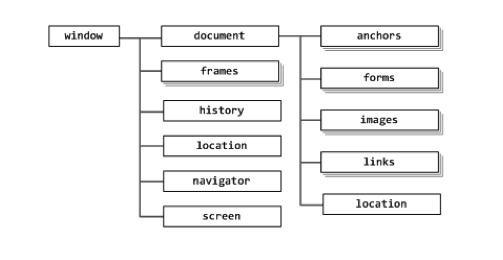
- The
windowobject also serve as container of the global variables and to offer native methods of JS (window.parseInt). Also contains information about the browser environment (frame, iframe, popup, ventana o pestaña)
Some of the objects objetos we have available in are:
window.navigatoris an object that contains information about the browser
>>> window.navigator.userAgent
"Mozilla/5.0 (Windows; U; Windows NT 5.1; es-ES; rv:1.9.2.12)
Gecko/20101026 Firefox/3.6.12 ( .NET CLR 3.5.30729)"window.locationis an objects that contains info (and methods) about the current URL
>>> window.location.href = 'http://www.packtpub.com'
>>> location.href = 'http://www.packtpub.com'
>>> location = 'http://www.packtpub.com'
>>> location.assign('http://www.packtpub.com')
>>> location.reload()
>>> window.location.href = window.location.href
>>> location = locationwindow.historyis an object that contains the history of visited pages and it has methods to move around themm (without thee possibility of seeing the URL’s)
>>> window.history.length
5
>>> history.forward()
>>> history.back()
>>> history.go(-2);window.framesis a colection of all the frames that are in the page. Every frame has its own window object. We can useparentto access the parent frame from the children frame. With the propertytopwe can access the page in top of all the frames.
We can access a concrete frame by its name.
<iframe name="myframe" src="about:blank" />
>>> window.frames[0]
>>> frames[0].window.location.reload()
>>> frames[0].parent === window
true
>>> window.frames[0].window.top === window
true
>>> self === window
true
>>> window.frames['myframe'] === window.frames[0]
truewindow.screenoffers info about the screen (general, out of the browser)
>>> window.screen.colorDepth
32
>>> screen.width
1440
>>> screen.availWidth
1440
>>> screen.height
900
>>> screen.availHeight
847Some of the method métodos available in window are:
window.open(),window.close()allow us to open and close new windows (popups)
window.open()returns a reference to the opened window (it it returns false that means the window couldn't be created - popups blocked)
Its use is not recommended ;-)
>>> var win = window.open('http://www.packtpub.com', 'packt',
'width=300,height=300,resizable=yes');
>>> win.close()window.moveTo(),window.moveBy(),window.resizeTo(),window.resizeBy()alow us to move and re-dimension the windows
Its use is not recommended ;-)
>>> window.moveTo(100, 100)
>>> window.moveBy(10, -10)
>>> window.resizeTo(300, 300)
>>> window.resizeBy(20, 10)window.alert(),window.prompt(),window.confirm()allow us to interact with the user through system messages
if (confirm('Are you sure you want to delete this item?')) {
// delete
} else {
// abort
}
>>> var answer = prompt('And your name was?');
console.log(answer);window.setTimeout(),window.setInterval()allow us to execute codigo after a time interval (and repeat it if we want)
>>> function boo(){alert('Boo!');}
>>> setTimeout(boo, 2000);
>>> var id = setTimeout(boo, 2000);
>>> clearTimeout(id);
>>> function boo() { console.log('boo') };
>>> var id = setInterval( boo, 2000 );
boo
boo
boo
>>> clearInterval(id)
var id = setInterval( "alert('boo, boo')", 2000 );
var id = setInterval( function(){ alert('boo, boo')}, 2000 );window.document is a BOM object with info about the current document
All the methods and properties inside window.document beong to the DOM objects category