This repository was archived by the owner on Feb 11, 2025. It is now read-only.
Setup Virtual Background - Issue #81
Unanswered
OrangeHedgehog
asked this question in
Q&A

Replies: 2 comments 1 reply

-
|
For this to work, you must add virtual background detector in the "Audio/video filter" section + Virtual background remover render in "Dilters of effects" |
Beta Was this translation helpful? Give feedback.
1 reply

-
I had them activated.
|
Beta Was this translation helpful? Give feedback.

-
|
to me it does nos show anything. its blank the page no settings nada. |
Beta Was this translation helpful? Give feedback.
0 replies
Sign up for free
to join this conversation on GitHub.
Already have an account?
Sign in to comment


Uh oh!
There was an error while loading. Please reload this page.
Uh oh!
There was an error while loading. Please reload this page.
-
Wanting to replace my Webcam background I installed OBS Studio 27.2.4 today, followed immediately by installing version 1.0.1 of this plugin (1.1.0 avoided due to seeing that some folks have had issues with it). After following the instructions, the Webcam (Video Capture Device) preview turned blank. I tried installing version 1.1.0 but then OBS Studio crashed on start.
Copied the 1.0.1
dataandobs-pluginsfolders back into the OBS Studio folder and OBS Studio starts again.Configuration steps:
Scene created
Added Webcam (Video Capture Device) to Sources.
Added static image to Sources.
With the Video Capture Device selected, opened Filters.
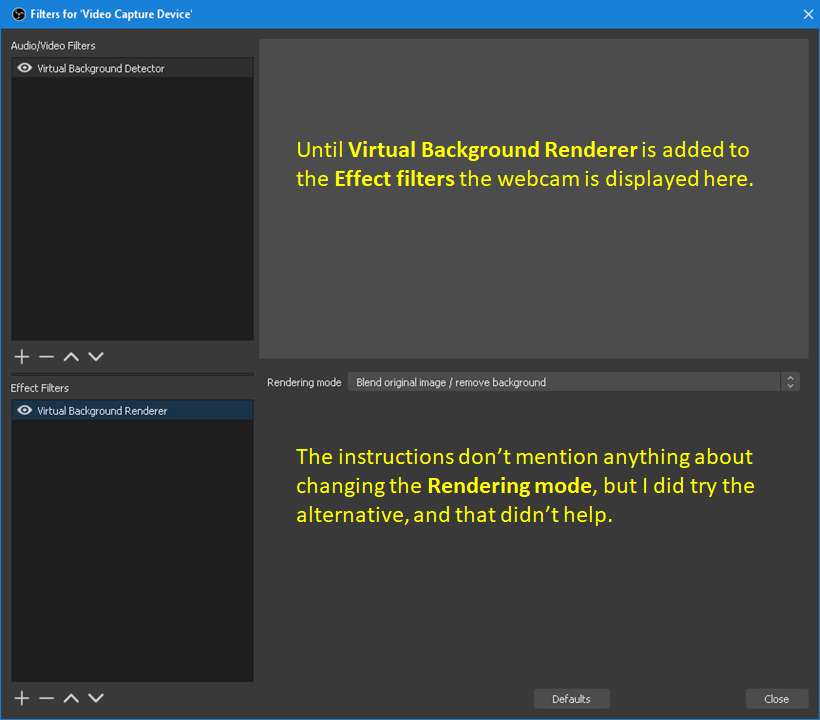
Applied Virtual Background Detector filter to the Audio/Video Filters. Seems to be okay.
Applied Virtual Background Renderer to the Effect Filters. Video Capture Device preview goes blank. This is even before clicking Close.
(These are the only filters applied.)
Virtual Background Detector settings are default, although I have tried changing the settings.
Virtual Background Renderer setting is also default (Blend). Tried Render only but that did not help.
In Sources, Video Capture Device is at the top, with the desired static image directly beneath it. There are no other Sources. I have tried reordering them, but that didn't help.
The Video Capture Device properties are all default.
I have just one Scene.
In the Scources, the 'eye's are not crossed out, and the padlock is open.
Regarding the known conflict with OBS Background removal plugin, I have not installed that, so it's not that.
What is the likely issue, and how do I get the virtual background to work, please?
Beta Was this translation helpful? Give feedback.
All reactions