
The modern, AI-powered, open-source web-based SQL IDE for cloud-native teams.



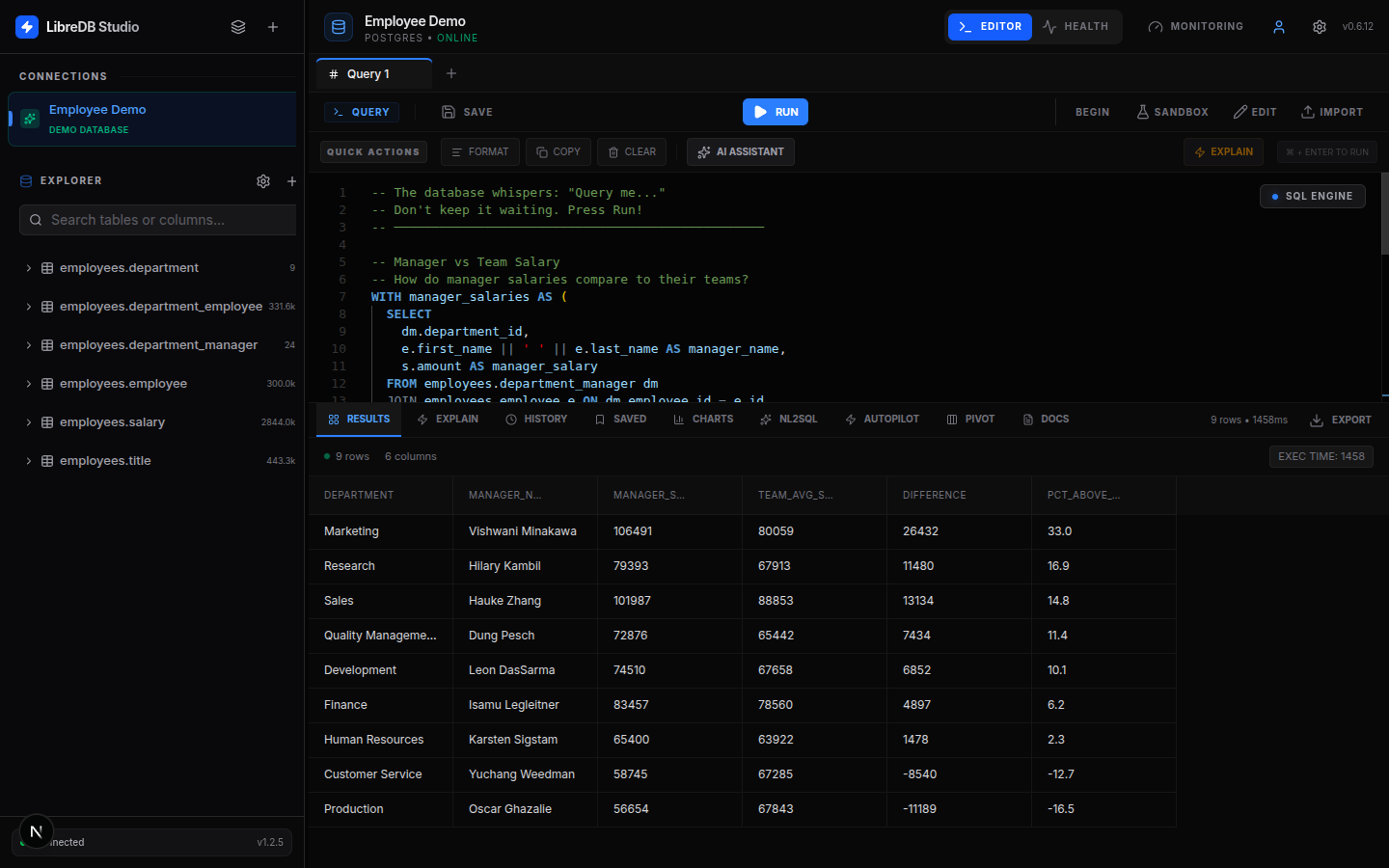
📖 Full documentation, source, and issues: https://github.com/libredb/libredb-studio
Query PostgreSQL, MySQL, SQLite, libSQL, DuckDB, Oracle, SQL Server, MongoDB, Redis, Couchbase, ClickHouse, Apache Druid, Elasticsearch, OpenSearch, Apache Trino and Apache Cassandra from your browser — with AI-powered query assistance, interactive ER diagrams, schema diff, a virtualized data grid, RBAC, OIDC SSO, and a live monitoring dashboard. A lightweight, secure bridge between heavy desktop tools (DataGrip/DBeaver) and minimal CLIs.
docker run \
  --name libredb-studio \
  -p 3000:3000 \
  -e ADMIN_EMAIL=admin@libredb.org \
  -e ADMIN_PASSWORD=change-me-admin \
  -e USER_EMAIL=user@libredb.org \
  -e USER_PASSWORD=change-me-user \
  -e JWT_SECRET=change-me-to-a-random-32-char-string \
  libredb/libredb-studio:latest
Open http://localhost:3000 and log in with the ADMIN_EMAIL / ADMIN_PASSWORD you set above. Use your own strong passwords and a random JWT_SECRET — the values here are placeholders.
None of these auth variables are mandatory. With the local provider,
ADMIN_PASSWORDandJWT_SECRETare required only when you opt into strict mode (AUTH_BOOTSTRAP=off); otherwise both are generated on first start and the admin password is printed once to the container log.USER_EMAIL/USER_PASSWORDare always optional — omit them to run admin-only, since no default user password is ever assumed. None of them are used whenNEXT_PUBLIC_AUTH_PROVIDER=oidc.
Enable AI: add
-e LLM_PROVIDER=gemini -e LLM_API_KEY=your_key -e LLM_MODEL=gemini-2.5-flash. That also brings the read-only agent, whose availability is derived from having a model configured; add-v libredb-data:/app/dataif its run history should survive a container recreate, or-e LIBREDB_AGENT_ENABLED=falseto keep the AI features and decline the agent.
services:
  libredb-studio:
    image: libredb/libredb-studio:latest
    ports:
      - "3000:3000"
    environment:
      ADMIN_EMAIL: admin@libredb.org
      ADMIN_PASSWORD: change-me
      USER_EMAIL: user@libredb.org
      USER_PASSWORD: change-me
      JWT_SECRET: change-me-to-a-random-32-char-string
      STORAGE_PROVIDER: sqlite                 # persist on the volume below
      STORAGE_SQLITE_PATH: /app/data/libredb-storage.db
    volumes:
      - libredb-data:/app/data
    restart: unless-stopped
volumes:
  libredb-data:
A ready-to-use, fully-commented compose file is in the repo: docker-compose.example.yml.
localhost in the connection dialog means this container, not your machine. A database on the host, or in another container, is not there — so a connection that works from a terminal fails here, and it fails as a timeout rather than as anything that mentions the host. This is the first thing to check when a container-run Studio cannot connect to a database you know is up.
Pick whichever fits how the database runs:
| Where the database runs | What to put in Host | How to start Studio |
|---|---|---|
| Another container, same Docker network | the service or container name (postgres, my-mysql) with the port inside the container |
docker run -p 3000:3000 --network <that-network> … |
| On the host, or a container publishing a host port | host.docker.internal |
docker run -p 3000:3000 --add-host=host.docker.internal:host-gateway … |
| Anywhere the host can reach (Linux only) | localhost works as written |
docker run --network host … (no -p; the app binds the host's port 3000) |
| A managed service (RDS, Atlas, Neon, …) | its real hostname | nothing special — it is reachable from anywhere |
Two things worth knowing before you pick:
- The port inside a network is the engine's own, not the one you published. A compose file that publishes
9201:9200to dodge a collision on the host is still9200between containers, and a Postgres published on5433is still5432there. host.docker.internalresolves by itself only on Docker Desktop. On Linux the--add-host=host.docker.internal:host-gatewayflag above is what creates it.
The network route is the one to prefer for a real deployment: put Studio and its databases on one network, address them by name, and nothing depends on a published port existing. docker-compose.yml in the repository is that shape.
| Tag | Pushed from | Use |
|---|---|---|
latest |
main |
Latest stable build |
X.Y.Z |
main / release |
Pin an exact version, e.g. docker pull libredb/libredb-studio:0.16.0 (recommended for production) |
dev |
feat/**, fix/** branches |
Bleeding-edge / preview (linux/amd64 only) |
sha-<commit> |
every build | Exact immutable commit |
- Architectures:
linux/amd64andlinux/arm64as a multi-arch manifest forlatest,X.Y.Z,mainand theirsha-tags. Preview builds fromfeat/**/fix/**branches (devand theirsha-tags) arelinux/amd64only: CI has no native arm64 runner for this job, so arm64 is emulated, and paying for that on every branch commit is not worth it for an image no arm64 consumer pins. - Primary registry:
ghcr.io/libredb/libredb-studio(GitHub Container Registry). It is canonical because that is where CI publishes and where the build provenance lives, not because of pull limits: thelibredbnamespace is in the Docker-Sponsored Open Source programme, which removes pull rate limits for everyone pulling this public image, sodocker pull libredb/libredb-studioneeds no account either. This Docker Hub repository is a convenience mirror for discoverability; both registries serve the identical multi-arch image.
Sixteen external engines share one interface, and three of them are read-only because their own SQL is. The table below has seventeen rows: the seventeenth is the embedded LibreDB store, which ships inside the image rather than being a server you connect out to.
| Database | Driver | Highlights |
|---|---|---|
| PostgreSQL | pg |
EXPLAIN plans, transactions, query cancellation, SSL/TLS, SSH tunnel |
| MySQL | mysql2 |
EXPLAIN plans, transactions, KILL QUERY, SSL/TLS, SSH tunnel |
| Oracle | oracledb (thin) |
FETCH FIRST pagination, V$ monitoring, ANALYZE, transactions |
| SQL Server | mssql |
OFFSET FETCH, sys.dm_* DMVs, DBCC CHECKDB, Azure SQL auto-detect |
| SQLite | bun:sqlite / node:sqlite |
File-based or in-memory databases; the driver follows the runtime, with a LIBREDB_SQLITE_DRIVER override |
| libSQL | none — HTTP | Full SQL IDE over the Hrana protocol against a libSQL server or Turso Cloud; SQLite's dialect across a network, with real per-table bytes from dbstat and an auth token instead of a password |
| DuckDB | @duckdb/node-api (a native N-API addon) |
Full SQL IDE against a local DuckDB file or :memory: on the server this image runs on; EXPLAIN (FORMAT JSON) plan trees, duckdb_* catalog introspection, real per-table bytes from pragma_storage_info block allocation, and cancellation through the driver's interrupt(). VACUUM, ANALYZE and CHECKPOINT only, and no slow-query or session panel, because DuckDB publishes neither. One operating-system process may hold the file, refused in read-only mode too |
| MongoDB | mongodb |
JSON query editor, find/aggregate/insert/update/delete |
| Redis | ioredis |
Command editor, non-blocking SCAN key browser, INFO monitoring, per-type command generation |
| Couchbase | none — HTTP | SQL++ query editor, bucket/scope/collection browser, cluster health |
| ClickHouse | none — HTTP | Full SQL IDE over the HTTP interface, part/compression sizes, system.* monitoring |
| Apache Druid | none — HTTP | Read-only SQL IDE over the SQL endpoint, datasource and segment browser |
| Elasticsearch | none — HTTP | Read-only SQL IDE over _sql, mapping-driven index/field explorer, cluster health with per-index document counts and store sizes |
| OpenSearch | none — HTTP | The same read-only IDE over _plugins/_sql, from the same provider module; LIMIT … OFFSET paging works here |
| Apache Trino | none — HTTP | Full SQL IDE over the client protocol, every configured catalog in one tree, EXPLAIN (FORMAT JSON) plans, system.runtime monitoring and query cancellation |
| Apache Cassandra | cassandra-driver (pure JS) |
CQL editor over the native protocol, keyspace browser with partition and clustering keys marked, system_views monitoring. No row counts and no sizes: the only figures Cassandra publishes are partition estimates and whole mebibytes, so neither is shown rather than shown wrong |
| LibreDB | @libredb/libredb |
The embedded key-value store, for a database with nothing to install |
Read-only where the engine is. Druid, Elasticsearch and OpenSearch have no UPDATE and no CREATE TABLE anywhere in their grammar, so inline editing and DDL are reported as unsupported instead of failing when used. Everything else — the query editor, the object browser, ER diagrams, schema diff and monitoring — works wherever the engine has something to answer with.
Twenty-six further engines speak the wire protocol of one of the sixteen drivers above, so they connect through it unchanged: pick that driver in the connection dialog. The table has twenty-two rows rather than twenty-six because engines that behave identically share a row; all twenty-six are named in it. Every one of them was measured against a real instance rather than assumed, and how much of the product worked is recorded per engine.
| Engine | Connect as | Support |
|---|---|---|
| MariaDB · Percona Server for MySQL | mysql |
Full — both are drop-in builds and both were measured rather than assumed: all fifteen surfaces answer and the numbers are correct. Nothing on screen says Percona, though: version() answers a bare 8.4.11-11 and the product name is only in @@version_comment |
| Percona Distribution for PostgreSQL | postgres |
Full — behaves as PostgreSQL throughout, with correct row counts and sizes, and unlike the MySQL build it names itself in version() |
| ParadeDB | postgres |
Full — correct numbers, but its nine extensions put 41 objects in the object browser for 2 user tables, and agent plan mode fails on a stock install because 539 non-system columns exceed the grounding capture's ceiling. version() names PostgreSQL only |
| OrioleDB | postgres |
Full — clean object browser and exact row counts, but its own storage is invisible to PostgreSQL's size functions, so every index reads 0 bytes and the cache hit ratio reads N/A. Nightly images only |
| TiDB | mysql |
Full — but a freshly loaded table reads 0 rows and 0 B until TiDB's background statistics catch up, the slow-query panel stays empty, and only a standalone --store=unistore server was probed |
| Vitess | mysql |
Full. Row counts and sizes are exact, but a running query cannot be cancelled: vtgate refuses KILL QUERY and the statement runs to completion. Per-index sizes read 0 bytes, and only an unsharded single-shard keyspace was probed |
| Citus | postgres |
Full — but statistics describe the coordinator, so a distributed table's row count and size are wrong rather than missing |
| TimescaleDB | postgres |
Full — but the statistics describe the empty parent table, so a hypertable's row count and size are wrong rather than missing, and every chunk shows up in the object browser |
| YugabyteDB | postgres |
Full — but row counts and sizes read 0 until you run ANALYZE, and index sizes always read 0 bytes |
| AlloyDB Omni | postgres |
Full. Row counts and sizes are exact, but the version panel cannot be told apart from a stock PostgreSQL 17 because version() names AlloyDB nowhere, eight of AlloyDB's own google_ml tables appear in the object browser, and the slow-query panel stays empty until pg_stat_statements is installed |
| Valkey · DragonflyDB · KeyDB | redis |
Full |
| Garnet | redis |
Full — every Redis surface answers, and the key browser grouped 71 keys into three patterns. Its own version - garnet_version:2.1.5 in INFO, beside redis_version:7.4.3 - is labeled ahead of the compat level, same as Valkey and DragonflyDB: the overview shows Garnet 2.1.5 (Redis 7.4.3). Two readings are absences wearing a value - every size shows 0 B because Garnet publishes no used_memory, and the cache hit ratio shows 100% because it publishes no keyspace counters. Max connections reads 0 |
| FerretDB | mongodb |
Full — sign in with the backend PostgreSQL credentials |
| StarRocks | mysql |
Partial — editor, table list, column metadata, table and storage stats, metrics, slow queries and Explain work, and the overview renders with uptime and connections read as not published; the health and session panels do not work because the engine has no information_schema.PROCESSLIST, the version reads MySQL 5.1, and row counts, sizes and indexes are empty |
| Apache Doris | mysql |
Full — the engine StarRocks was forked from, and the more trustworthy of the two: row counts and sizes are correct (2000 rows and 10187 bytes read as exactly that), cancellation genuinely cancels, every surface answers, the overview names the real Doris build and reads uptime and connections as not published, and Explain shows the engine's own plan. A freshly loaded table reads 0 for about a minute until its background statistics land, no index is ever reported, Optimize and Check do not exist in its grammar, and a foreign key is accepted but invisible and unenforced |
| CockroachDB | postgres |
Partial — editor, metrics, slow queries and sessions work; the object browser and size panels are blank |
| Apache Cloudberry (incubating) | postgres |
Partial. Row counts and sizes are correct after ANALYZE, but the monitoring dashboard and the table and index statistics all fail on one MPP planner restriction, and a foreign key is read back as though enforced when the engine does not enforce it |
| OceanBase | mysql |
Partial - fourteen of the fifteen surfaces return without throwing but only twelve do their job; health fails outright because the tenant has no performance_schema database at all, every size reads 0 B, and row counts are correct only once ANALYZE TABLE has run |
| SingleStore | mysql |
Partial - every surface answers, and the five that once failed were ours rather than SingleStore's: the provider's prepared-statement protocol took down Test Connection, health, the overview and the monitoring dashboard, and a MySQL-only EXPLAIN FORMAT=JSON took down Explain, which now shows the engine's own plan. Row counts and sizes are missing rather than wrong, a 2000-row table reading 0 rows and 0 B, and foreign keys do not exist at all |
| ScyllaDB | cassandra |
Partial - the editor and the object browser work in full, and all 18 CQL types read back byte-identically to the Apache Cassandra 5.0.9 probed in the same pass; Test Connection and the overview, health, performance-metrics, active-session and monitoring panels all read empty because ScyllaDB has no system_views keyspace at all - they degrade rather than throw, so Test Connection passes and the dialog saves the connection, which it could not do at all until that change. The object browser lists one extra table per secondary index, no version is displayed anywhere, and creating a keyspace on the 2026.2 line needs NetworkTopologyStrategy because SimpleStrategy is refused |
| Materialize · RisingWave | postgres |
Query editor only |
| Databend | mysql |
Query editor only — SQL and a plain EXPLAIN run, and its catalogs answer correctly when asked directly, but every parameterised read fails with Prepare is not support in Databend, so the object browser and all statistics panels are empty. It also has no SHOW STATUS and no information_schema.processlist |
Details, probed versions and each caveat: docs/providers/README.md.
- Professional SQL IDE — Monaco editor (VS Code engine), schema-aware autocomplete, multi-tab workspace, Visual EXPLAIN.
- Interactive ER diagrams — real FK edges, cardinality, auto-layout (ELK.js), PNG/SVG export.
- Schema diff & migration — compare snapshots/connections and auto-generate migration SQL.
- Read-only database agent — state an objective, and the run drafts SQL, reads the results and composes a report whose claims cite them. Three workflows (investigate / optimize / assess), a visible statement-and-time budget, and writes refused before the database is reached. Agent mode reads PostgreSQL, SQLite and DuckDB only — they are the only engines with a database-native read-only execution profile, and on any other engine an Agent-mode run ends
engine-unsupported; Plan mode is toolless, runs no statement of yours, and is grounded in your own schema on every engine — it reads the inventory before the model's first turn and asks for one statement in that engine's own language, or refuses withNO STATEMENT:and the question that would unblock it. Standalone image only. Guide · What leaves the machine. - Model-backed helpers — query safety analysis, EXPLAIN-in-plain-English, AI-generated schema docs, data-profile summaries. Gemini / OpenAI / Ollama / custom; with no model configured — no
LLM_*variables at all — no AI call is made. A key is required for Gemini and OpenAI only: Ollama and a custom endpoint count as a configured model without one, which enables the AI features — and the agent too, once its ledger path is writable. - Pro data grid — virtualized millions of rows, inline editing, per-column filters, pivot table, CSV/JSON export.
- Data visualization — 8 chart types with aggregation and saved-chart dashboards.
- Data privacy & masking — automatic sensitive-column detection, RBAC-enforced masking, export protection.
- Auth & SSO — local email/password or OIDC (Auth0, Keycloak, Okta, Azure AD, Zitadel) with PKCE and role mapping.
- DBA toolkit (admin) — live monitoring dashboard, threshold alerts, full audit trail, and one-click maintenance in each engine's own terms (VACUUM/ANALYZE/REINDEX on PostgreSQL,
OPTIMIZE TABLEon MySQL, and nothing offered where an engine has no maintenance statement to run).
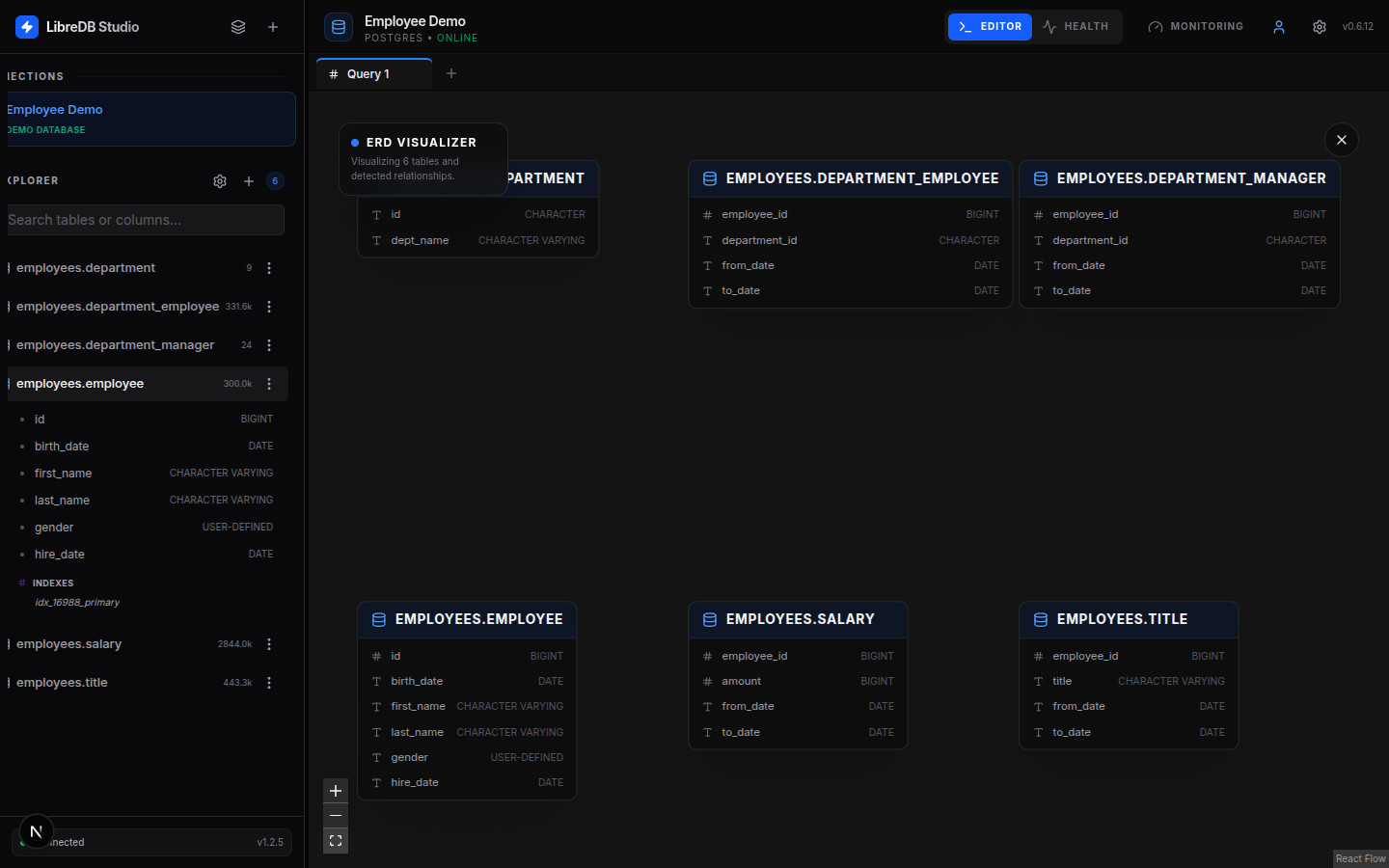
Interactive ER diagrams with real foreign-key edges and auto-layout.
| Variable | Required | Description |
|---|---|---|
ADMIN_EMAIL |
❌ | Admin email (default admin@libredb.org) |
ADMIN_PASSWORD |
❌ | Admin password. Required only in strict mode (AUTH_BOOTSTRAP=off) with the local provider; otherwise generated on first start |
USER_EMAIL |
❌ | Email of the optional non-admin account (default user@libredb.org; only read when USER_PASSWORD is set) |
USER_PASSWORD |
❌ | Password of the optional non-admin account. Never generated - the account exists only when you set it |
JWT_SECRET |
❌ | JWT signing secret (min 32 chars). Required only in strict mode; otherwise generated on first start |
AUTH_BOOTSTRAP |
❌ | on (default) generates missing auth secrets on first start and prints the admin password once to the container log; off requires them explicitly |
AUTH_COOKIE_SECURE |
❌ | false drops the Secure flag from auth cookies (browser reaches the app over plain HTTP, e.g. LAN/home server) |
NEXT_PUBLIC_AUTH_PROVIDER |
❌ | local (default) or oidc |
OIDC_ISSUER / OIDC_CLIENT_ID / OIDC_CLIENT_SECRET |
❌ | OIDC SSO (required when oidc) |
OIDC_ROLE_CLAIM / OIDC_ADMIN_ROLES / OIDC_SCOPE |
❌ | OIDC role mapping & scope |
LLM_PROVIDER / LLM_API_KEY / LLM_MODEL / LLM_API_URL |
❌ | AI: gemini, openai, ollama, custom |
STORAGE_PROVIDER |
❌ | local (default), sqlite, or postgres |
STORAGE_SQLITE_PATH |
❌ | SQLite file path (e.g. /app/data/libredb-storage.db) |
STORAGE_POSTGRES_URL |
❌ | PostgreSQL URL (when STORAGE_PROVIDER=postgres) |
Health check endpoint: GET /api/db/health · Container HTTP port: 3000.
- Docker / Compose — see Quick start above.
- Kubernetes (Helm) —
oci://ghcr.io/libredb/charts/libredb-studio· Artifact Hub - CapRover — built into the official One-Click Apps catalog: Apps → One-Click Apps/Databases → search LibreDB Studio. No third-party repo to add.
- PaaS — one-click buttons for Koyeb & Render in the GitHub README.
- Project website: https://libredb.org
- Source & docs: https://github.com/libredb/libredb-studio
- Contributing: CONTRIBUTING.md — how to open an issue, run the test suite and send a pull request, alongside the Code of Conduct
- Live demo: https://app.libredb.org
- DeepWiki docs: https://deepwiki.com/libredb/libredb-studio
- License: MIT
LibreDB Studio is open source under the MIT license and free to use, with no paid tier gating any feature on this page. If it is useful to you, a star on GitHub is the clearest signal that the work is worth continuing.

Repository: https://github.com/libredb/libredb-studio
This page mirrors DOCKERHUB.md in the GitHub repository.