注意 多轮训练逻辑已在 ms-swift 3.8 中进行重构,如果您的 ms-swift 版本低于该版本,请参考对应版本的文档。
在强化学习训练场景中,模型采样可能需要与环境进行多轮交互(如工具调用)。这种交互式训练要求模型能够根据环境反馈信息进行连续推理。本文档将详细介绍如何在 GRPO 训练中自定义多轮训练流程。
以下是多轮训练示例图,模型可能涉及多轮 rollout,包括环境交互、工具调用等步骤:

MultiTurnScheduler 是一个抽象基类,提供了默认的多轮对话管理逻辑,其工作流程如下图所示:
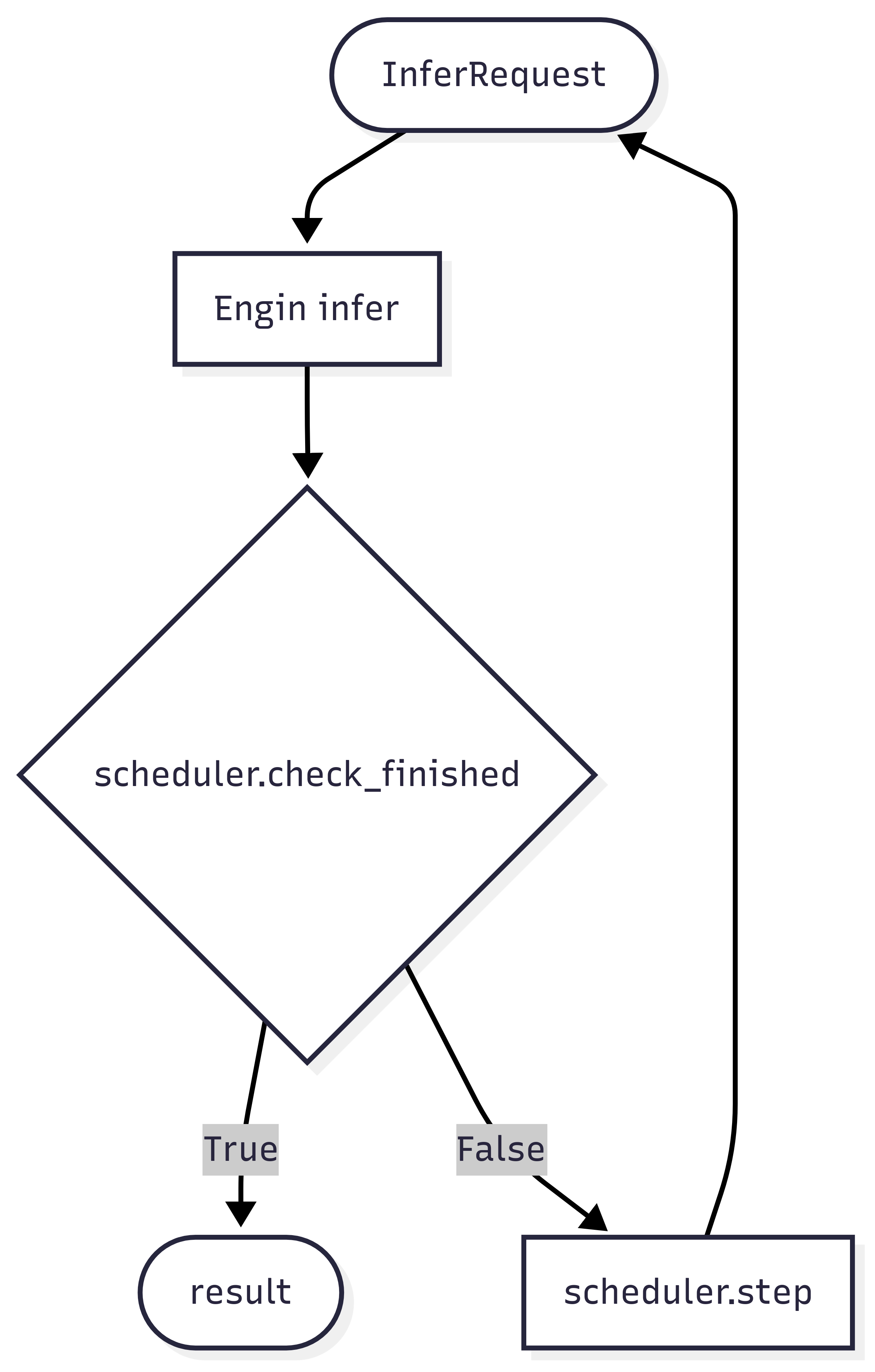
多轮规划器主要承担两大核心功能:
- 终止条件判断:通过
check_finished方法判断当前轮次推理是否应该结束 - 推理请求构造:通过
step方法构建下一轮推理的请求对象
抽象基类 MultiTurnScheduler 的核心方法如下:
class MultiTurnScheduler(ABC):

    def __init__(self, max_turns: Optional[int] = None, *args, **kwargs):
        self.max_turns = max_turns

    def step(self, infer_request: 'RolloutInferRequest', response_choice: 'ChatCompletionResponseChoice',
             current_turn: int) -> Dict:
        """
        处理对话轮次之间的转换。

        Args:
            infer_request: 当前推理请求
            response_choice: 当前轮次的响应
            current_turn: 当前轮次数

        Returns:
            Dict[str, Any]: 包含推理结果的字典,结构如下:
                - infer_request (必需): 下一轮的推理请求对象
                - response_token_ids (可选): 每个 rollout 轮次的响应 token IDs
                - response_loss_mask (可选): 每个 rollout 轮次响应的损失掩码
                - rollout_infos (可选): 额外信息数据
        """
        raise NotImplementedError

    def check_finished(self, infer_request: 'RolloutInferRequest', response_choice: 'ChatCompletionResponseChoice',
                       current_turn: int) -> bool:
        """
        检查多轮 rollout 是否应该结束的默认终止逻辑。

        默认终止条件:
        1. 当响应达到长度限制时 (finish_reason == 'length')
        2. 当对话达到最大轮数时 (如果设置了 max_turns)

        Args:
            infer_request: 推理请求对象
            response_choice: 包含生成结果的响应选择,包括 finish_reason
            current_turn: 当前对话轮数

        Returns:
            bool: True 表示终止对话,False 表示继续
        """
        if response_choice.finish_reason == 'length':
            return True
        if self.max_turns and current_turn >= self.max_turns:
            return True
        return False
step 和 check_finished 方法接收的参数说明:
- infer_request: 当前的推理请求
- response_choice: 当前轮次的推理结果
- current_turn: 当前推理轮次(从 1 开始)
入参示例(点击展开)
infer_request
"""
RolloutInferRequest(
    messages=[
        {'role': 'system', 'content': 'A conversation between User and Assistant. The user asks a question, and the Assistant solves it. The assistant first thinks about the reasoning process in the mind and then provides the user with the answer. The reasoning process and answer are enclosed within <think> </think> and <answer> </answer> tags, respectively, i.e., <think> reasoning process here </think><answer> answer here </answer>\n'}, {'role': 'user', 'content': 'What is the value of $\\sqrt{36 \\times \\sqrt{16}}$?'},
        {'role': 'assistant', 'content': 'To find the value of \\(\\sqrt{36 \\times \\sqrt{16}}\\), we will break down the problem step-by-step.\n\nFirst, we need to evaluate the inner square root:\n\\[\n\\sqrt{16}\n\\]\nWe know that:\n\\[\n4^2 = 16 \\implies \\sqrt{16} = 4\n\\]\n\nNext, we substitute this result back into the original expression:\n\\[\n\\sqrt{36 \\times \\sqrt{16}} = \\sqrt{36 \\times 4}\n\\]\n\nNow, we need to evaluate the product inside the square root:\n\\[\n36 \\times 4 = 144\n\\]\n\nSo, the expression simplifies to:\n\\[\n\\sqrt{144}\n\\]\n\nFinally, we determine the square root of 144:\n\\[\n\\sqrt{144} = 12\n\\]\n\nThus, the value of \\(\\sqrt{36 \\times \\sqrt{16}}\\) is:\n\\[\n\\boxed{12}\n\\]'}
    ],
    images=[],
    audios=[],
    videos=[],
    tools=None,
    objects={},
    data_dict={
        'problem': 'What is the value of $\\sqrt{36 \\times \\sqrt{16}}$?',
        'solution': "To solve the problem, we need to evaluate the expression \\(\\sqrt{36 \\times \\sqrt{16}}\\).\n\nWe can break down the steps as follows:\n\n1. Evaluate the inner square root: \\(\\sqrt{16}\\).\n2. Multiply the result by 36.\n3. Take the square root of the product obtained in step 2.\n\nLet's compute this step by step using Python code for accuracy.\n```python\nimport math\n\n# Step 1: Evaluate the inner square root\ninner_sqrt = math.sqrt(16)\n\n# Step 2: Multiply the result by 36\nproduct = 36 * inner_sqrt\n\n# Step 3: Take the square root of the product\nfinal_result = math.sqrt(product)\nprint(final_result)\n```\n```output\n12.0\n```\nThe value of \\(\\sqrt{36 \\times \\sqrt{16}}\\) is /\\(\\boxed{12}\\)."
        }
    )
"""
response_choice
"""
ChatCompletionResponseChoice(
    index=0,
    message=ChatMessage(
        role='assistant',
        content='To find the value of \\(\\sqrt{36 \\times \\sqrt{16}}\\), we will break down the problem step-by-step.\n\nFirst, we need to evaluate the inner square root:\n\\[\n\\sqrt{16}\n\\]\nWe know that:\n\\[\n4^2 = 16 \\implies \\sqrt{16} = 4\n\\]\n\nNext, we substitute this result back into the original expression:\n\\[\n\\sqrt{36 \\times \\sqrt{16}} = \\sqrt{36 \\times 4}\n\\]\n\nNow, we need to evaluate the product inside the square root:\n\\[\n36 \\times 4 = 144\n\\]\n\nSo, the expression simplifies to:\n\\[\n\\sqrt{144}\n\\]\n\nFinally, we determine the square root of 144:\n\\[\n\\sqrt{144} = 12\n\\]\n\nThus, the value of \\(\\sqrt{36 \\times \\sqrt{16}}\\) is:\n\\[\n\\boxed{12}\n\\]', tool_calls=None),
        finish_reason='stop',
        logprobs=None,
        messages=None)
"""
# response_choice.messages will be copied at the end of multi-turn inference.
默认的 check_finished 逻辑会在以下两种情况下停止推理:
- 模型回复被截断,即超出了
max_completion_length - 模型推理轮数超出了限制的最大轮数
完整的默认多轮 rollout 逻辑请参考该类的 run 方法,我们也可以通过重载run 方法来实现自定义多轮逻辑。
在 swift rollout 命令中,设置 multi_turn_scheduler 参数指定规划器
swift rollout \
    --model Qwen/Qwen3-1.7B \
    --use_async_engine true \
    --multi_turn_scheduler thinking_tips_scheduler \
    --vllm_max_model_len 32768 \
    --vllm_gpu_memory_utilization 0.8 \
    --max_turns 3
通过参数
external_plugins,我们可以将本地的多轮规划器注册到 ms-swift 中,具体实现请参考代码。
多轮训练脚本请参考脚本。
对于多轮 rollout,我们使用 AsyncEngine 来实现高效的批量数据异步多轮采样。AsyncEngine 在多轮推理时能够减少推理过程中的计算气泡:
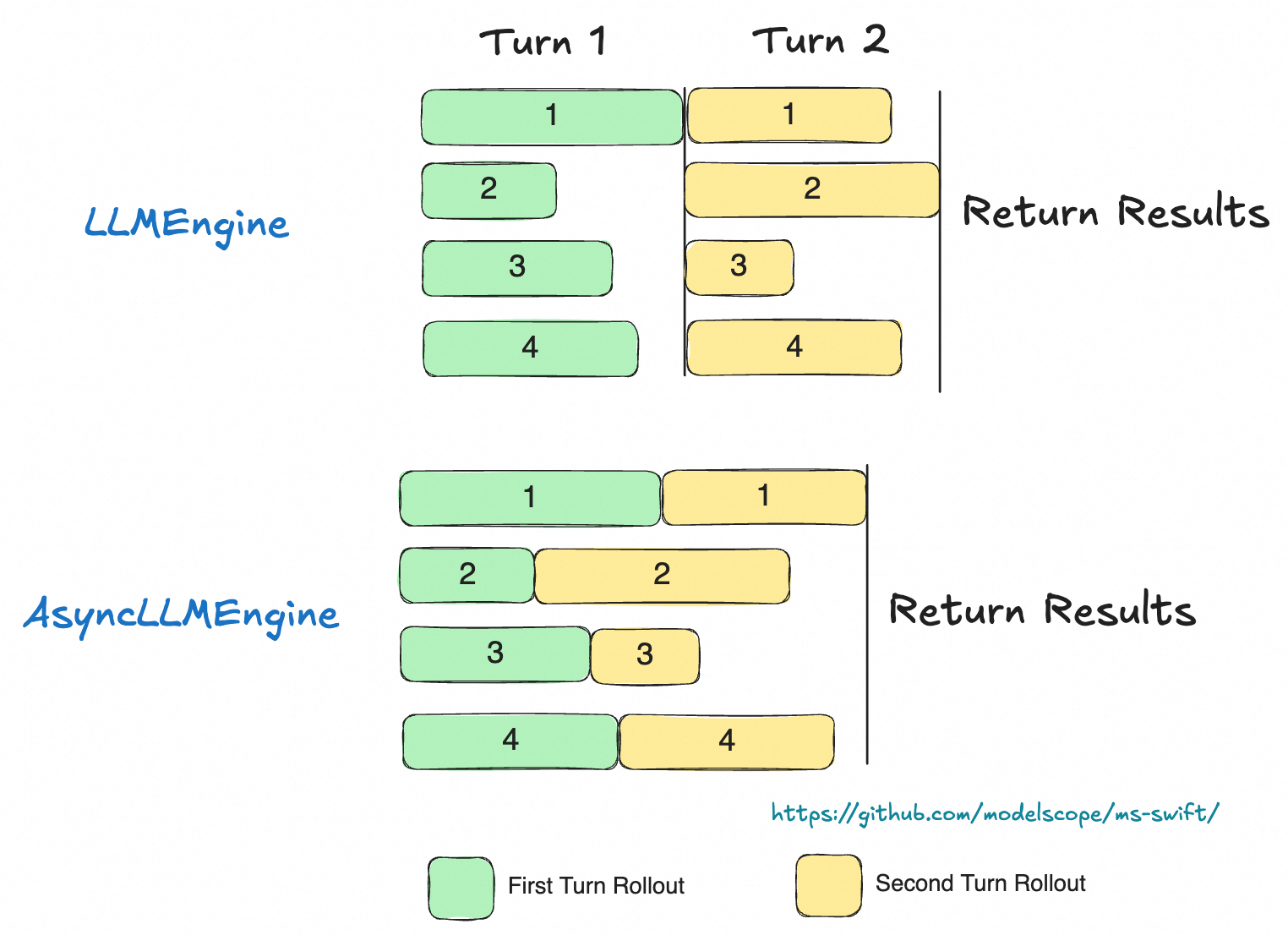
在 rollout 命令中使用参数 use_async_engine 来指定 engine 的种类(默认使用 async engine):
在以上默认逻辑中,我们用一条轨迹来计算多轮 rollout 的损失,这里需要假设多轮交互的过程中,模型的历史信息没有收到改变。
而在一些多轮场景中,我们可以需要在多轮 rollout 过程中动态地修改模型的历史信息(比如压缩历史信息),此时,我们需要将每轮的 rollout 单独作为一条轨迹进行训练。
比较常见的一种场景是对于思考类模型,在实际推理过程中,模型通常只会保留最后一轮的思考内容,而忽略历史模型回复中的思考内容。
对于这类场景,我们需要重写多轮规划器中的交互逻辑,即重载 run 方法,从而单独返回每一轮的 Rollout 的结果。
框架内置的 ThinkingModelTipsScheduler 类展示了如何通过重写 run() 方法来实现完全自定义的多轮推理逻辑。请参考内置多轮调度器实现
注意: 这种情况下,相同轨迹的数据会拆分为多条数据,在奖励相关的处理中,需要对相同轨迹的数据分配同样的reward。
可以在kwargs中获取 trajectory_inputs 获取完整轨迹的数据,具体实现参考MultiTurnThinkingTips类
在多模态多轮交互场景下,可能需要在对话过程中动态增删或修改多模态数据,并确保这些变更同步至 trainer。
实现方式:借助 rollout_infos,通过指定键值覆盖原始数据集的多模态内容。
现已支持覆盖的键:images、audios、videos。
具体请参考DeepEyes Schduler
在默认的多轮交互流程中,规划器先把模型生成的文本字符串返回给 trainer,trainer 再将其重新 encode 为 token id,用于后续训练。为了避免这一步重复编码的开销,你可以让规划器直接返回 response_token_ids,省去 trainer 侧的再次 encode。
具体做法如下:
- 在 response_choice 对象中读取 token_ids 属性,即可获得本次 rollout 生成的 token 序列。
- 在 step/run 方法的返回值里加入 response_token_ids,trainer 便能直接使用这些 token id 参与训练,无需重新编码。
具体实现可以参考ThinkingModelTipsScheduler类
在工具调用或环境交互返回结果时,若需将返回内容作为模型响应的一部分,建议对这些插入内容进行掩码处理,以确保模型在训练过程中不会对这些外部生成的内容计算损失。
我们可以通过两种方式设置损失掩码
第一种:设置 loss_scale
ms-swift 提供 loss_scale 参数来对模型回复部分的内容进行损失缩放设置。比如设置--loss_scale last_round,可以将非最后一轮的模型回复的损失置零。我们也可以实现自定义 loss_scale,具体请参考定制化 loss_scale 文档。
注:在GRPO中,loss_scale 只提供掩码功能,不提供缩放功能。
第二种:设置loss_mask
在step或者run方法中设置 response_loss_mask, 可以在规划器中自定义损失掩码。前提需要返回response token ids,返回的 response_loss_mask 需要与 response token ids等长。当返回 response_loss_mask 时,loss_scale 参数失效。
response_loss_mask 返回可以参考ToolCallScheduler类
在奖励函数中获取多轮 Rollout 中的信息
在step或者run方法中,返回 rollout_infos 对象,在奖励函数的 kwargs 中获取 rollout_infos:
class Scheduler():
    def step(self, infer_request: 'RolloutInferRequest', response_choice: 'ChatCompletionResponseChoice',
             current_turn: int) -> Dict:
        ...
        return {'infer_request': infer_request, 'rollout_infos': extra_dict}

class RewardFunction():
    def __call__(self, completions, **kwargs):
        infos = kwargs.get('rollout_infos', {})
...在训练侧设置参数--vllm_server_pass_dataset,可将数据集中的其他列传入多轮规划器。在infer_request.data_dict中获取。