v. 0.11.2
- Fixed colors for white themes on graphs and headers
- Changed colors in weather/postnl to match theme colors
- Changed grid on light/device buttons (state and label are now aligned horizontally)
- Added buienradar iframe
- Fixed security button not showing when alarm was armed
- Changed the way of showing brightness (it now only shows if a light is on), Special thanks to @jeroenklompen and @marswarrior (tweakers.net) for sharing this code.
- White themes now have a white dashboard/configuration/sidebar
v. 0.11.1
- Fixed some bugs with simple-weather-card.yaml (Cityname can only be hardcoded as this file is an !include, my bad)
- Added more options in mini-graph-template.yaml (it has now a ton of extra variables so you don't have to template yourself)
- Changed energy.yaml (now entities have a min/max state shown, you can do this with the new 'extrema' mode, feedback told me it might impact performance)
- Fixed typo in person-more-info.yaml (this would cause Lovelace to show an error and not load the page)
v. 0.11.0
- The simple weather card now has a tap_action available! Special thanks to @kalkih
- Deep Press (3d Touch) has been updated and now fixes the double click. (please update this component via HACS) Special thanks to @roflcoopter
- Added descriptive text on ALL decluttering-templates
- Changed Homekit Gray Light theme to be light in the dashboard/config as well
- Re-added a hold action to the third quick access menu button
- Removed weather popup (it will now navigate you to the weather page)
- Version names of these releases will now have the same notations as that HA did/does use. (e.g. 0.11.0)
- PostNL custom_component updated, but I still urge you to get it from @peternijssen's own repo!
v. 0.1b
- Added missing images to the images folder
- Changed back-button.yaml templating to be used everywhere instead of 4 different templates.
- Changed mini-graph-template.yaml to easily change between bar styles
- Added Clock for tablets on the 5 main views (climate, frontpage, lights, devices and security)
- Changed vacuum.yaml for tablets
- Changed graph type in energy.yaml
v. 0.1a
- Moved the Xiaomi Vacuum Cleaner zoned cleaning map out of the swipe-card into its own view. Swipe-card would not allow for this card to be used properly.
- Moved PostNL out of the swipe-card in the personal views so that photos of letters can now be used. Swipe-card would not allow for this card to be used properly.
- Small changes to the quickmenu on the personal views, the left button will now take you to the PostNL view.
- Small changes to the quickmenu on the vacuum view, the left button will now take you to the manual zoned cleaning view.
- Small changes to the quickmenu on the dog view, the left button will now take you to the right view.
- Added a brand new weather view (this is not the weather view on the frontpage, that one is still up for rework)
- Replaced automations.yaml file with a current one. There seemed to be duplicate automations in the old one. Use parts from this one instead.
Changes (05/08/2019) (*note: This setup will work perfectly fine with 0.97.x however themes only seem to work when I throw an automation at it (this means it will be set for all users), the dynamic standard themes (day/night) will work just fine, though for now setting a theme per user does not work. If setting globally use the lovelace button I created and the corresponding automations (or make your own)! It probably has to do with the way I have themed this and might require a rewrite.
A very very great summer to all of you, I hope you enjoy your summer. Today I have a great update for all of you. This update is massive! Why? Well remember that I wanted to experiment with conditional cards and more users? Well guess what I was not satisfied with the result. Yes I was satisfied with how it looked, but not the way it was coded. It was extremely slow to a point my old iPad Air wouldn't want to load this setup anymore. So this time around I have rewritten every single page in the setup and boy you are going to love this! (sorry for the ones that were adopting my previous setup, but this will make your life, and mine, a lot easier).
So lets talk about what has changed. For this release I have changed a lot of simple stuff. My setup was way too complicated and even I got lost in it. Now it is as simple as this: Every menu item (what used to be popup cards) are now just separate views. This is far easier to maintain. Extremely easy to edit and even easier to get it running as you can now work view by view. Performance has gone up massively. It loads about 2 to 3 times faster than the previous setup whilst having added a bit more features. The setup will work EXACTLY the same as before and you might not see the difference at first glance. I have worked out a lot of small details that were bugging me and I have redesigned the top part of the screen on every page so that the setup is now consistently the same on every view.
What does this mean for multi-user setup? Well nothing! It means you don't need input_booleans and a bunch of conditional cards anymore to reach te same result. What does it mean for my old setup? Well, I suggest starting over! (I am terribly sorry). But after a week of testing, this is actually a config I am comfortable with to say I will not change the way this works. Obviously I will be continuing working on the setup. But I am actually very very happy on how the current method turned out. You might wonder if you see all those tabs in the header then? Well no, the header is hidden on smartphones now. And on an ipad/tablet the header only shows the first 5 tabs (just like it used to be). All other tabs are hidden, you will not be able to swipe to them by accident and you will not be able to access them from the header at all. Everything will look and feel exactly like it was, just better! Ofcourse for convenience the first 5 tabs (which were already there) are still swipable.
All Changes:
- Completely rewritten lovelace setup for performance, ease of use and code reduction
- Removed almost 2000 lines of code (with the same end result yay)
- Added a quickmenu to every page for quickaccess to common views, the buttons change depending on the view you are on.
- Added a dog picture elements on the frontpage
- Groundwork for a decent landscape tablet mode, at the moment most of the elements are already great for use on a tablet in landscape mode. Unfortunately some elements will still look better on portret mode like the vacuum control panel. But nevertheless it is looking really great for the future. For screenshots please check the home assistant community website: https://community.home-assistant.io/t/homekit-inspired-lovelace-by-jimz011-august-2019-ha-0-96-x-compatible-now-with-dynamic-themes/117086
- Removed the header on all devices. My ipad still has a header which is added to the exceptions with CCH
- Removed all conditional-cards that functioned as a popup card to use the new views instead
- All input_booleans that had a name are replaced with a dummy one. Buttons will now just navigate you to the right view.
- Changed titles, headers etc to be more consistent with the rest of the setup.
- Now when the alarm is activated, the frontpage buttons will hide and the weather panel will be changed with a quickaccess menu, this is to prevent accidental presses in the interface whilst not being home and will prevent the alarm from going off for no reason but human error e.g. phone is unlocked, in your pants and you accidentally press a light button in your pocket, light turns on, sensor gets tripped, boom alarm goes off!. (this has never happened to me, but still this change is nice). The weather bar at the top will become a quickmenu with camera/menu/alarm buttons. So you can quickly access your camera's and alarm system. And if you really really have to whilst the alarm is activated, you can still go into the menu where you have access to everything.
- Decluttered A LOT, this includes the blank-card I used to create a gap between the borders of the screen. Each button is now 1 line! (I have had many suggestions to use a decluttering card for this, but I actually think this is much easier as it is just a single line, just make sure the path is correct)
- Minor changes to the vacuum control center to look better on the provided dark theme
- Added missing wallpapers and moved all unused images to another folder. This will make searching for the right image so much easier no?
- Many many little bugfixes and changes to detail.
Videos from this release:
Full Video: https://www.youtube.com/watch?v=Ng0EDltHujY
Tablet View: https://www.youtube.com/watch?v=105sd8tp4dg (srry my tablet is slow and old)
Quick Menu: https://www.youtube.com/watch?v=_4OUzDfBgIY (this is visible on all other views by default)
Alarm Interface Lock: https://www.youtube.com/watch?v=wsIgwRQdPFo
Minor changes only, rearranged themes, you will have to adjust your automations to use the correct name. Naming looks better in the HA menu's now.
- Rearranged themes, themes.yaml and themes folder have changed files, please update your automations as well.
- Added a new theme, just for testing purposes to see how fast I can create new colors. This took me less than 10 minutes.
- Uploaded a dummy secrets.yaml file. This should help starting this setup when copying the entire repo. It will make troubleshooting a lot easier and will help you to get you going a LOT faster!
Breaking Change: Yet another major release and for some the release you have been eager to see. Unfortunately this comes with some breaking changes to the setup. I have added a lot of detail to the main menu (watch the renewed video in the introduction section for the full review), but to do this I did not want to duplicate all the code, nor did I want to rewrite it as a decluttering template. So instead of using a decluttering card I used a lot of !includes. This is to have the same page load on different views without the need of adding extra code, with the added benefit: change it on one page = change it on all. Most items that were previously only accessible via the homescreen will now be available in the main menu as well (the homescreen remains unchanged). This change has only added a few lines of code which is great :P.
Themes: Finally I have gotten around at theming. Well not exactly the entire instance of HA, but just the parts we actually use every day (which is lovelace ofcourse). So to get me started much faster than I could have I have used a global theme named slate thanks to @SneakyPie. I have modified it slightly so that the header would be black (this is necessary for iphone users to have it look nice when switching themes). Unfortunately it comes with a readability downside of the HA interface (which is still easily readable but not the most pleasing). Unfortunately I do not know a way to make the header black without having some other colors change as well (which is the reason it is less readable). No worries, we only need that panel for configuration right? I have thought about this and some of the basic functions can be found in the new main menu (like restarting HA). So what have I themed then you might ask? Well simple, I have themed everything else in Lovelace what you can actually see (and what our spouses will use every day). And I think you might like it. The idea was to have a close relation with Apple's Homekit and having seen Homekit in iOS 13 with the new dark mode inspired me to do the same to my lovelace setup. So in this setup I have tried many different configurations but I thought to make it a lot simpler for me.
Dark Mode: Yes with this theming stuff it means I can now set themes globally (and I mean just the lovelace frontend) and it is super easy to edit them. All configuration that was required is now set in all the templates/files and the result will look something like the video below. And it can be even better! Dark mode will automatically enable when the sun sets, light mode will be re-enabled when the sun rises again. Just like iOS 13 would do it and just as Homekit would show it to you. Click on the link to see the supporting video!
Summary:
- Added a lot of new menu items and shortcuts
- Added dynamic themes
- Optimized a lot of code
- Minor bugfixes
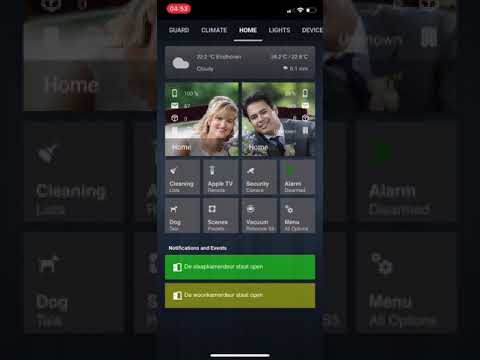
Breaking Change:
I am terribly sorry for everyone that just adapted my setup, but honestly (and I have mentioned it before) my last setup was experimental and so it was prone to change. In this update there is a major change that changes the way how the frontpage gets loaded for each person. I have decluttered all the double entries as a result of last updates state-switch/multi-user setup. Now every user will load the settings of a single template instead of having multiple configs per user. This makes managing the menu's a lot easier and the biggest benefit of this is that adding a user will only require you to setup additional input_booleans. (in this case I suffixed every input_boolean for a specific user with _username, just copy the input_booleans in your setup and change the name to add another user. Easy as it could be and it saves some 6000 lines of code (as this was the case after the experimental setup). If you have adopted the latest release you might have noticed that the performance of it went down and that it wasn't nearly as fast as of what you were used to in this setup. That was mostly due to the fact that code was duplicated for multiple users, as this is no longer the case you will find that performance is back on par with what you were used to in older configurations of this setup.
Changes:
- Massive overhaul to the way this setup handles multiple users. It is super easy to add another user to your setup!
- Added a card-loader mod on this setup, this will fix the problem where cards would not always be loaded until a refresh. This will make the config wait for those cards to be loaded before showing them in lovelace. You will probably not notice a difference in performance. You can find the link to card-loader below in the addons section of the docs.
Only minor changes in this update. Note: This update is mostly beneficial for iPhone users with 3d touch. If you do not have this there is no real need of updating, though you could if you want to be up-to-date ofcourse.
- Added 3d touch to the setup, this is done with this beautiful addon called deep-press, this with special thanks to @roflcoopter. You can install this via HACS or find the link below in the addons section of the docs. This will make iphone users with 3d touch really really happy. I am sure many of you iphone users struggle to get the hold_action going on any iphone and sometimes it works and sometimes it doesn't. Yes we might have learnt to work around this, but this is not the case for our spouses that don't think it works great. This will not replace the hold action, but add a 3d touch action to the button as well. Now when you firmly press on a button (just like you would with 3d touch). The 3d touch action will start the hold_action (so if you have a more-info window on your hold_action, it would show exactly that). So no longer will you need to struggle with the hold action on iPhones that have 3d touch.
- Minor fixes.
BREAKING CHANGE:
- This update has a major change and that is the removal of popup cards, there are some left, but most are gone now in favor of state-switches and conditional cards. This is still experimental so it is prone to change! The reason why I removed popup cards are simple. They are hard to use when copying an entire setup as they need to be setup correctly for them to work properly, this also means that you will need to adjust all the entities first before the card will show up properly. Conditional cards solves this problem as it will just display nothing if nothing is defined and will not break all other popup cards in the chain. Another major reason is because the size of the popup cards look really awkward on tablets when using conditional cards within those popups. The location of the popup will change randomly to a point you can't even see it on your screen anymore. This is most prominent on tablets/desktops. Another major reason is iOS. When you try to run popup cards on iOS it sometimes bugs and show you a duplicate of the card within the same popup. It looks really bad and only retrying to open the card fixes the problem, this is most prominent on older hardware like an iPad Air, iPhone 6s and less on newer devices like the iPhone 8 or iPhone X.
- So after reading the above you might think by yourself, 'Hey Jimz', 'if you use conditional cards, how will you deal with multiple users as they would clearly be visible to all users now wouldn't it?'. I'd say good question and the experimental solution is this: in this release I have added a state-switch to show views per user now.
- 'But Jimz, that would massively increase the code now wouldn't it?', Well not necessarily. I have removed many of the input_select options I had before and removed all the buttons that came with the popup cards (the 4 buttons on top of almost every popup card). It took up a lot of code and the removal of all these lines make up for the added code discussed above.
- 'And how would I get to those pages that were previously accessible with those buttons?' Easy, you simply swipe on the "popup" now and it will switch the page.
These changes will make per user views possible and changing anything in the menu or anything else in lovelace will not affect the other user when used at the same time. This means that when I open up the vacuum control panel (which is a conditional card) will only show for me and not for my wife and vice versa. She can open the same page at the same time and she will have no interference of me using the same conditional card!
Changes:
- Removed most input_select options with the exception of a few (like the menu)
- Removed popup-cards with the exception of weather and light page (to show a more-info window in a popup, this will be replaced by browser-mod in the next update)
- Added conditional cards in favor of popup cards, this has changed the config A LOT, do not overwrite your config with this if you do not know what you are doing
- Removed all buttons that used to navigate you through the popup-cards, this also affects all newly added cards like the vacuum control center card.
- Added swipe-card in favor of the old input_select buttons, this makes one handed use on phones a breeze.
- Added state-switch to accomodate for multi-users which was previously no problem with popup-cards. WARNING: This is a massive change and has made the setup a lot more complicated for new users. I use includes A LOT because not only will it save me a lot of time if I break a piece of the code (as most of the time only that part will not load) and is it easier to find, but also gives me the opportunity to organise the code in a way that I find suitable (and duplication of code doesn't look that bad this way, as they are in separate files).
- Split decluttering templates, this makes it easier to manage your templates and add very long templates if needed as this won't clutter the decluttering templates file :P
- Many minor changes to the UI to accomodate for all these changes above
You know what? Why don't you see for yourself what has changed? Video: CLICK ON THE IMAGE TO START VIDEO
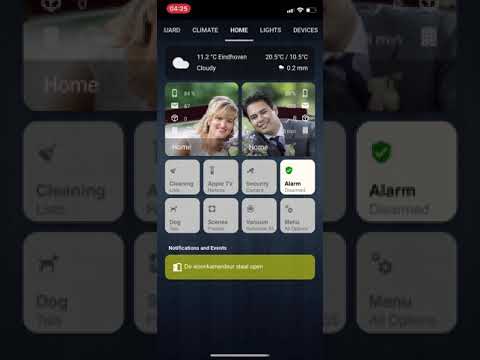
Sorry for the long delay, I have actually tried to rearrange the setup for use with swipe-card, but unfortunately this is way too buggy to be any good (it looked nice though), anyways a weeks work totally useless. But no fear, I still have the promised update for you guys.
- Added a pretty cool Vacuum Control Center, this will replace the previously used xiaomi-vacuum-cleaner-card and you can safely remove that addon if you use this setup, you will need a custom card for the zone map which can be found here: https://github.com/PiotrMachowski/Home-Assistant-Lovelace-Xiaomi-Vacuum-Map-card, the rest of the cards are just cards that you should already have if you follow this setup.
- The maintenance/cleaning popup card no longer has the dog card
- Moved around button placements of the frontpage to fit the menu button (previously this was the "other view", now you can simply press the menu button on the frontpage to show the entire menu, convenient eh?)
- Testing conditional cards as a replacement to popup cards, so far it seems to work very well. If you want to try it out yourself you can see my code, it uses conditional cards to show the menu now whereas before you would have to go to the actual view. This should save time and makes the interface a bit easier to use, in the future I might decide to swap all popup cards in favor of conditional cards, but like I said this is something I am currently testing
- The NOW ON and AUTOMATIONS popup buttons have been moved to the menu
- Added a dog popup button on the frontpage, this card was moved from the maintenance/cleaning popup card. It also has a state, device tracker and location added to it. For questions about this please send me a message on the HA community forums.
- Splitted the frontpage in multiple yaml files, this is in preparation for the conditional cards as this would clutter a single view immensely
- Minor fixes to the code
NOTE: Unfortunately all these changes (and the changes I still have in mind) keeps me from working on proper theming, themes are worked on but at a very slow pace, please have patience or use any other theme available on the community. If you do decide to use the theme I provide note that if you really need to get work done in the dev-states panel you will have to change the theme back to default as there are some black and white elements which are themed badly.
- Reworked Climate Control panel (also changed this in the other view, better know as the main menu)
- Added Energy Consumption to the setup
- Removed custom_updater in favor of HACS. BREAKING CHANGE, Warning! Do not copy/paste this if you have used parts of my setup before, you can not! Read the instructions on how to install and configure HACS https://custom-components.github.io/hacs/installation/manual/ . You will need to do this yourself and this could take a little time figuring out all the stuff. You can remove custom_updater and ALL the custom-cards previously installed if you switch to HACS. Note that custom-updater will be deprecated at some time so switching to HACS is just a matter of time. Read carefully on how to install this, you will need a github account to use this. But don't worry it is free and the instruction manual is pretty straight forward.
- Moved the config files to a separate folder. It is now easier to manage the configuration files, just like lovelace.
- Decluttered the notifications file, another 380 lines removed.
- Added birthday sensor, frontend notification and automation
- Minor fixes to the code
- Minor changes to the other view, the top menu button is now correctly aligned with the rest of the buttons, this was only noticable on larger screens like tablets and or desktops/laptops.
- Moved all the views to a view folder, this change will break your setup if you don't copy this!
- Added custom-card and custom-components to the repo, this will make understanding the setup easier.
BREAKING CHANGES THROUGHOUT THE ENTIRE SETUP!!!! If you have previously used my setup I have to warn you that the configuration for this setup is entirely different. Yes the result looks pretty much the same, but the current config is easier to manage and most important, it is almost 2000 lines of code less than before even with the added features! Unfortunately on the outside the setup looks a lot like the previous one, that is because I am pretty happy with the current design. This release is mostly based upon optimization, speed and attention to detail and future-proofing as everything is updated with current mods/cards/etc.
Summary:
- The entire interface is now dynamic, sizing happens based on the screen size, no longer are buttons a fixed dimension. This fixes spacing problems on larger screen phones like for example an iPhone Plus/Max, but also tablets benefit from this. And the beauty is that all buttons stay the same aspect ratio regardless of device. So say goodbye to weird rectangle looking buttons when viewed on larger screens and you can now enjoy square buttons at all times.
- Removed the following custom-cards: state-switch, useful-markdown-card, card-modder
- Added card-mod, markdown-mod and vacuum-cleaner-card
- Split lovelace setup into several files for easier management and a less cluttered setup, ui-lovelace.yaml will only reference to the new files, you will not need to edit this file afterwards in a long time. You will need to save this file (regardless if there were any changes) if you make changes in other files. That way it will reload lovelace, else it will keep the old config loaded until refreshed. It might be harder to catch errors because it will even load if you delete all the files within the lovelace folder until you refresh it! so be cautious when working with this. Yes it takes a step extra, but it is worth the effort as editing views, popup-cards or anything else is so easy now and best of all very easy to find. Find the new files in the lovelace folder!
- Removed anchors, this was necessary to split the lovelace file as anchors need to be at the root of every yaml file (at least that is what I understood of it)
- Added decluttering-card as a replacement to anchors and boy you are going to love this! Why? Well ALL the buttons in the entire setup are based of two templates. Check the code as to what I mean exactly because this one is huge!
- Added birthday sensor, it is a python_script which will create a sensor for you, notifications for the frontpage will arrive in the future. You can find the script in the python_scripts folder. You will need to create an automation, an example can be found at the bottom of my automations.yaml file
- Added vacuum-card as I have a Roborock S55 integrated in my setup now. This will get improved in the future as I am not happy with the current way it works. Nevertheless it is very much usable.
- Cleaned up a lot and I seriously mean a lot of code, no more weird stacks in stacks in stacks which served no purpose. All of the previous card-modder and useful-markdown-cards have been rewritten to be used with the core versions of this. Thomas Loven made a mod which does the same thing as the old ones but instead of it being a custom card it is a mod to the core card. In other words all of my current setup use this kind of code now.
- Unified all spacings between screens, whereas before on pages with 4 buttons the borders on the left and right. This is more in line with the Apple Homekit interface and this also means that the borders on each page are the same for every view, popup, card etc. And because the cards used are dynamic now you won't even notice a difference (though it is a tad bit smaller on iPhone X(s) devices.
- Removed state-switch card in favor of core conditional cards. Lightens up the setup and functions exactly the same way. Though if you use user based cards (e.g. you have a different homescreen than your spouse based on user logged in) I would not recommend you to remove this as this I do not know how to achieve the same thing with conditional cards. However I do not use user based cards so in my setup conditional cards will do exactly what the state-switch did in my previous configuration.
- Reworked other view with a revamped menu, color to the page will be added in the near future.
- Some small fixes, optimisations and a lot of attention to detail
!Important Note! Apple has released the first beta's of tvOS 13, the Apple component in Home Assistant will NO LONGER WORK with tvOS 13. This also means, no more state updates, no remote control, no dimming lights when started playing, no more automations possible whatsoever with the Apple TV. If you rely on this DON'T EVER UPDATE TO tvOS 13. Apple has removed a few services from the ATV which involves Home Sharing and was necessary for the pyatv component to work. They will most likely never create an alternative to this and thus you are warned. If you want to downgrade your Apple TV you can still do this until Apple stops signing that firmware so if you haven't downgraded before halfway september know that you will probably be stuck with a broken remote control in HA or broken automations that were based on the ATV's states.