I have:
Install method used:
Describe the bug
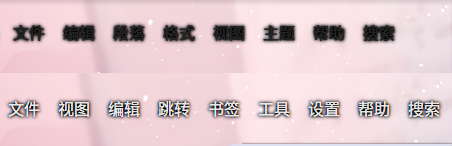
With a transparent panel and foreground color/shadow customization enabled, global menu labels can intermittently become thick black/fuzzy text instead of using the configured foreground color and shadow.
From investigation, foreground color application updates the Kirigami theme only on direct text/icon targets. Some dynamically-created/global-menu item trees keep their text styling on container items, so child labels can continue inheriting an old/dark text color.
Steps to reproduce
- Use Panel Colorizer v7.2.0 on Plasma 6 Wayland.
- Configure a transparent panel.
- Enable foreground text/icon color customization and foreground shadow for panel widgets.
- Add a global menu widget to the panel.
- Trigger panel item updates, for example by reloading Plasma or changing visible panel widgets.
- Observe the global menu text after the foreground update.
Observed Result
The global menu can render as heavy black/fuzzy text. The foreground state appears to be applied inconsistently when the menu item tree contains non-text container nodes.
Reference screenshot:
Expected Result
The global menu should keep the configured foreground color and shadow.
System information (please complete the following):
Run kinfo on a terminal and paste the output bellow
Operating System: Fedora Linux 44
KDE Plasma Version: 6.7.1
KDE Frameworks Version: 6.27.0
Qt Version: 6.11.1
Kernel Version: 7.0.13-200.fc44.x86_64 (64-bit)
Graphics Platform: Wayland
Processors: 16 x AMD Ryzen 9 7940H w/ Radeon 780M Graphics
Memory: 32 GiB of RAM (30.6 GiB usable)
Graphics Processor 1: AMD Radeon 780M Graphics
Graphics Processor 2: NVIDIA GeForce RTX 4060 Laptop GPU/PCIe/SSE2
- Things in your system that might be relevant: transparent panel, global menu widget, foreground text/icon color customization, foreground shadow.
Additional context
A foreground-only pull request with a proposed fix is linked below.
I have:
Install method used:
Describe the bug
With a transparent panel and foreground color/shadow customization enabled, global menu labels can intermittently become thick black/fuzzy text instead of using the configured foreground color and shadow.
From investigation, foreground color application updates the Kirigami theme only on direct text/icon targets. Some dynamically-created/global-menu item trees keep their text styling on container items, so child labels can continue inheriting an old/dark text color.
Steps to reproduce
Observed Result
The global menu can render as heavy black/fuzzy text. The foreground state appears to be applied inconsistently when the menu item tree contains non-text container nodes.
Reference screenshot:
Expected Result
The global menu should keep the configured foreground color and shadow.
System information (please complete the following):
Run
kinfoon a terminal and paste the output bellowAdditional context
A foreground-only pull request with a proposed fix is linked below.